| Maintenance Service Interval | Maintenance Procedure |
|---|---|
| Before each use or daily |
|
Introduction
This machine is a ride-on, rotary-blade lawn mower intended to be used by professional, hired operators in commercial applications. It is primarily designed for cutting grass on well-maintained lawns in parks, sports fields, and on commercial grounds. It is not designed for cutting brush, mowing grass and other growth alongside highways, or for agricultural uses.
Read this information carefully to learn how to operate and maintain your product properly and to avoid injury and product damage. You are responsible for operating the product properly and safely.
You may contact Toro directly at www.Toro.com for product safety and operation training materials, accessory information, help finding a dealer, or to register your product.
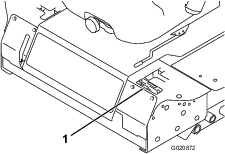
Whenever you need service, genuine Toro parts, or additional information, contact an Authorized Service Dealer or Toro Customer Service and have the model and serial numbers of your product ready. Figure 1 identifies the location of the model and serial numbers on the product. Write the numbers in the space provided.
This manual identifies potential hazards and has safety messages identified by the safety alert symbol (Figure 2), which signals a hazard that may cause serious injury or death if you do not follow the recommended precautions.

This manual uses 2 words to highlight information. Important calls attention to special mechanical information and Note emphasizes general information worthy of special attention.
Warning
CALIFORNIA
Proposition 65 Warning
Diesel engine exhaust and some of its constituents are known to the State of California to cause cancer, birth defects, and other reproductive harm.
Because in some areas there are local, state, or federal regulations requiring that a spark arrester be used on the engine of this machine, a spark arrester is available as an option. If you require a spark arrester, contact your Authorized Toro Service Dealer.
Genuine Toro spark arresters are approved by the USDA Forestry Service.
Important: It is a violation of California Public Resource Code Section 4442 to use or operate the engine on any forest-covered, brush-covered, or grass-covered land without a spark arrester muffler maintained in working order, or the engine constricted, equipped, and maintained for the prevention of fire. Other states or federal areas may have similar laws.
Safety
These machines meet or exceed ANSI B71.4–2004 specifications in effect at the time of production
Improper use or maintenance by the operator or owner can result in injury. To reduce the potential for injury, comply with these safety instructions and always pay attention to the safety alert symbol, which means Caution, Warning, or Danger—personal safety instruction. Failure to comply with the instruction may result in personal injury or death.
Safe Operating Practices
The following instructions are from the CEN standard EN 836:1997 and ANSI B71.4-2004.
This product is capable of amputating hands and feet and throwing objects. Always follow all safety instructions to avoid serious injury or death.
Training
-
Read the Operator's Manual and other training material carefully. Be familiar with the controls, safety signs, and the proper use of the equipment.
-
Never allow children or people unfamiliar with these instructions to use the lawn mower. Local regulations can restrict the age of the operator.
-
Never mow while people, especially children, or pets are nearby.
-
Keep in mind that the operator or user is responsible for accidents or hazards occurring to other people or their property.
-
Do not carry passengers.
-
All drivers should seek and obtain professional and practical instruction. Such instruction should emphasize:
-
the need for care and concentration when working with ride-on machines
-
control of a ride-on machine sliding on a slope will not be regained by the application of the control levers. The main reasons for loss of control are:
-
insufficient wheel grip, especially on wet grass;
-
being driven too fast;
-
inadequate braking;
-
the type of machine is unsuitable for its task;
-
lack of awareness of the effect of ground conditions, especially slopes;
-
incorrect load distribution.
-
-
Preparation
-
While mowing, always wear substantial, slip-resistant footwear and long trousers. Do not operate the equipment when barefoot or wearing open sandals.
-
Thoroughly inspect the area where the equipment is to be used and remove all objects which may be thrown by the machine.
-
Warning—fuel is highly flammable.
-
Store fuel in containers specifically designed for this purpose.
-
Refuel outdoors only and do not smoke while refueling.
-
Add fuel before starting the engine. Never remove the cap of the fuel tank or add fuel while the engine is running or when the engine is hot.
-
If fuel is spilled, do not attempt to start the engine but move the machine away from the area of spillage and avoid creating any source of ignition until fuel vapors have dissipated.
-
Replace all fuel tank and container caps securely.
-
-
Replace faulty silencers/mufflers.
-
Before using, always visually inspect to see that the blades, blade bolts and cutter assembly are not worn or damaged. Replace worn or damaged blades and bolts in sets to preserve balance.
Operation
-
Be alert, slow down and use caution when making turns. Look behind and to the side before changing directions.
-
Do not operate the engine in a confined space where dangerous carbon monoxide fumes can collect.
-
Mow only in daylight or in good artificial light.
-
Before attempting to start the engine, disengage all blade attachment clutches and shift into neutral.
-
Remember there is no such thing as a safe slope. Travel on grass slopes requires particular care. To guard against overturning:
-
do not stop or start suddenly when on a slope;
-
use slow speeds on slopes and during tight turns;
-
stay alert for humps and hollows and other hidden hazards.
-
-
Watch out for traffic when crossing or near roadways.
-
Stop the blades from rotating before crossing surfaces other than grass.
-
When using any attachments, never direct discharge of material toward bystanders nor allow anyone near the machine while in operation.
-
Never operate the machine with damaged guards, shields, or without safety protective devices in place.
-
Do not change the engine governor settings or overspeed the engine. Operating the engine at excessive speed may increase the hazard of personal injury.
-
Before leaving the operator's position:
-
disengage the power take-off and lower the attachments;
-
change into neutral and set the parking brake;
-
stop the engine and remove the key.
-
-
Disengage drive to attachments, stop the engine, and remove the ignition key:
-
before clearing blockages or unclogging chute;
-
before checking, cleaning or working on the lawn mower;
-
after striking a foreign object. Inspect the lawn mower for damage and make repairs before restarting and operating the equipment;
-
if the machine starts to vibrate abnormally (check immediately).
-
-
Do not operate the mower under the influence of alcohol or drugs.
-
Lightning can cause severe injury or death. If lightning is seen or thunder is heard in the area, do not operate the machine; seek shelter.
-
Disengage drive to attachments when transporting or not in use.
-
Stop the engine and disengage drive to attachment before refuelling.
Maintenance and Storage
-
Keep all nuts, bolts and screws tight to be sure the equipment is in safe working condition.
-
Never store the equipment with fuel in the tank inside a building where fumes may reach an open flame or spark.
-
Allow the engine to cool before storing in any enclosure.
-
To reduce the fire hazard, keep the engine, silencer/muffler, battery compartment and fuel storage area free of grass, leaves, or excessive grease.
-
Replace worn or damaged parts for safety.
-
If the fuel tank has to be drained, do this outdoors.
-
On multi-bladed mowers, take care as manually rotating one blade can cause other blades to rotate.
-
When machine is to be parked, stored or left unattended, lower the mower deck.
Toro Riding Mower Safety
The following list contains safety information specific to Toro products or other safety information that you must know that is not included in the CEN standard.
-
Engine exhaust contains carbon monoxide, which is an odorless, deadly poison that can kill you. Do not run engine indoors or in an enclosed area.
-
Keep hands, feet, hair and loose clothing away from attachment discharge area, underside of mower and any moving parts while engine is running.
-
Do not touch equipment or attachment parts which may be hot from operation. Allow to cool before attempting to maintain, adjust, or service.
-
Battery acid is poisonous and can cause burns. Avoid contact with skin, eyes and clothing. Protect your face, eyes, and clothing when working with a battery.
-
This machine is not designed or equipped for on-road use and is a “slow-moving vehicle.” If you must cross or travel on a public road, you should be aware of and comply with local regulations, such as required lights, slow moving vehicle signs, and reflectors.
-
Battery gases can explode. Keep cigarettes, sparks and flames away from battery.
-
Use only genuine Toro replacement parts to ensure that original standards are maintained.
-
Use only Toro approved attachments. Warranty may be voided if used with unapproved attachments.
Slope Operation
-
Do not mow near drop-offs, ditches, steep banks or water. Wheels dropping over edges can cause rollovers, which may result in serious injury, death, or drowning.
-
Do not mow slopes when grass is wet. Slippery conditions reduce traction and could cause sliding and loss of control.
-
Do not make sudden turns or rapid speed changes.
-
Use a walk behind mower and/or a hand trimmer near drop-offs, ditches, steep banks or water.
-
Reduce speed and use extreme caution on slopes.
-
Remove or mark obstacles such as rocks, tree limbs, etc. from the mowing area. Tall grass can hide obstacles.
-
Watch for ditches, holes, rocks, dips, and rises that change the operating angle, as rough terrain could overturn the machine.
-
Avoid sudden starts when mowing uphill because the mower may tip backwards.
-
Be aware that loss of traction may occur going downhill. Weight transfer to the front wheels may cause drive wheels to slip and cause loss of braking and steering.
-
Always avoid sudden starting or stopping on a slope. If tires lose traction, disengage the blades and proceed slowly off the slope.
-
Follow the manufacturer's recommendations for wheel weights or counterweights to improve stability.
-
Use extreme care with attachments. These can change the stability of the machine and cause loss of control.
Using the Rollover-Protection System (ROPS)
-
Keep the roll bar in the raised and locked position and use the seat belt when operating the machine.
-
Be certain that the seat belt can be released quickly in the event of an emergency.
-
Be aware there is no rollover protection when the roll bar is down.
-
Check the area to be mowed and never fold the ROPS in areas where there are slopes, drop offs or water.
-
Lower the rollbar only when absolutely necessary. Do not wear the seat belt with the roll bar folded down.
-
Check carefully for overhead clearances (i.e. branches, doorways, electrical wires) before driving under any objects and do not contact them.
Engine Emission Certification
The engine in this machine is EPA Tier 4 Final and stage 3b compliant.
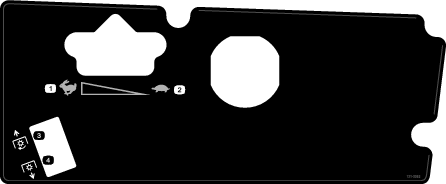
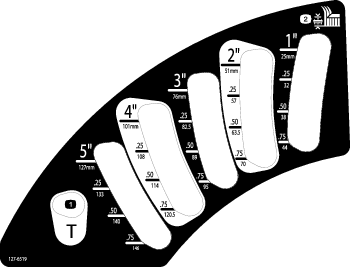
Slope Indicator
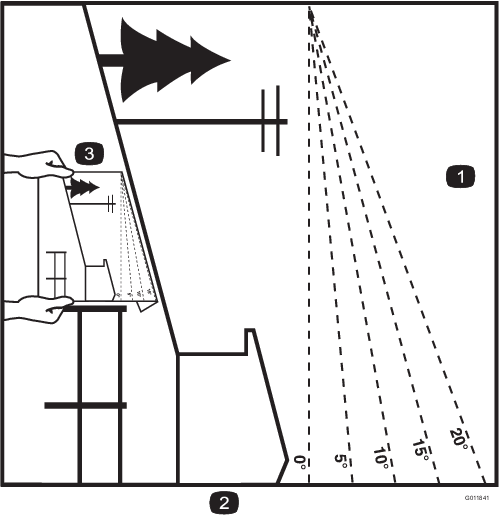
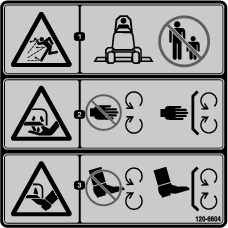
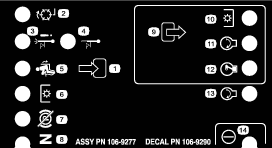
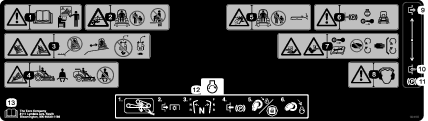
Safety and Instructional Decals
 |
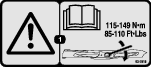
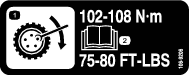
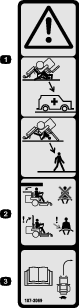
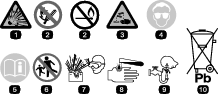
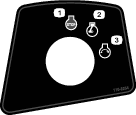
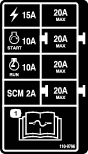
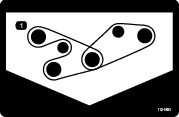
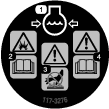
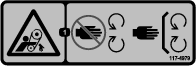
Safety decals and instructions are easily visible to the operator and are located near any area of potential danger. Replace any decal that is damaged or lost. |









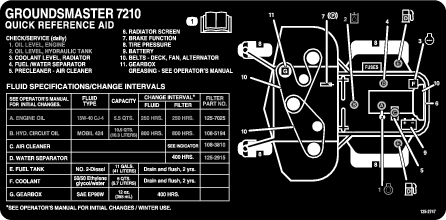
Setup
Raising the Roll Bar
Raise and secure the roll bar before using the product; refer to Using the Rollover-Protection System (ROPS) for detailed instructions and information on the rollover-protection system.
Checking the Tire Pressure
The tires are overinflated for shipping. Therefore, release some of the air to reduce the pressure. The correct air pressure is 124 kPa (18 psi) in the rear tires and 172 kPa (25 psi) in the caster wheels.
Checking Fluid Levels
-
Check the hydraulic fluid level before starting the engine, refer to Checking the Hydraulic System.
-
Check the engine-oil level before and after starting the engine, refer to Checking the Engine-Oil Level.
-
Check the cooling system before starting the engine; refer to Checking the Cooling System .
Product Overview
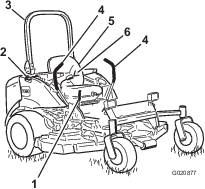
Become familiar with all the controls before you start the engine and operate the machine (Figure 4 and Figure 6).
Motion-Control Levers
The motion-control levers control the forward and rearward motions as well turn the machine. Refer to Driving the Machine.
Parking-Brake Lever
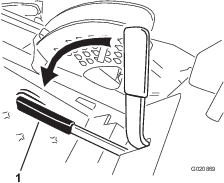
Whenever the engine is shut off, engage the parking brake to prevent accidental movement of the machine. To engage the parking brake, pull the parking-brake lever rearward and up (Figure 5). To release the parking brake, push the parking-brake lever forward and down.
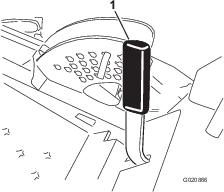
Caution
Do not park the traction unit on a slope.
Ignition Switch
The ignition switch has 3 positions: Off, On/Preheat, and Start.
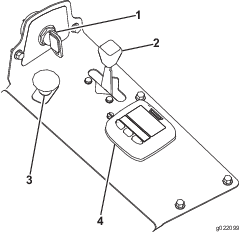
Throttle Lever
The throttle lever controls the speed of the engine. Move the throttle lever forward toward the FAST position to increase the engine speed. Move it rearward toward the SLOW position to decrease the engine speed. The throttle controls the speed of the blades and, in conjunction with motion-control levers, controls ground speed of the machine. Always run the machine with the throttle in the FAST position when cutting grass.
Power Take-off (PTO) Switch
The power take-off (PTO) switch starts and stops the mower blades.
Using the InfoCenter LCD Display
The InfoCenter LCD display shows information about your machine such as the operating status, various diagnostics and other information about the machine (Figure 7) There is a splash screen and main information screen of the InfoCenter. You can switch between the splash screen and main information screen, at any time, by pressing any of the InfoCenter buttons and then selecting the appropriate directional arrow.
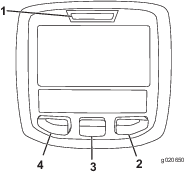
-
Left Button, Menu Access/Back Button—press this button to access the InfoCenter menus. You can use it to back out of any menu you are currently using.
-
Middle Button—use this button to scroll down menus.
-
Right Button—use this button to open a menu where a right arrow indicates additional content.
Note: The purpose of each button may change depending on what is required at the time. Each button will be labeled with an icon displaying its current function.
| SERVICE DUE | Indicates when scheduled service should be performed |
| RPM | Engine rpm/status—indicates the engine rpm |
 | Hour meter |
 | Info icon |
 | Stationary regeneration required |
 | Glow plugs are active |
 | Operator must sit in seat |
 | Parking Brake Indicator—indicates when the parking brake is On |
 | Coolant Temperature-indicates the engine coolant temperature in either °C or °F |
 | Temperature (hot) |
 | Denied or not allowed |
 | Engine Start |
 | Stop or shutdown |
 | Engine |
 | Key switch |
 | PIN code |
 | Hydraulic Oil Temperature-indicates the hydraulic oil temperature |
 | CAN bus |
 | InfoCenter |
 | Bad or failed |
 | Bulb |
 | Output of TEC controller or control wire in harness |
 | High: over allowed range |
 | Low: under allowed range |
| / | Out of range |
 | Switch |
 | Operator must release switch |
 | Operator should change to indicated state |
| Symbols are often combined to form sentences. Some examples are shown below | |
 | Engine start denied |
 | Engine shutdown |
 | Engine coolant too hot |
 | Sit down or set parking brake |
Using the Menus
To access the InfoCenter menu system, press the menu access button while at the main screen. This brings you to the main menu. Refer to the following tables for a synopsis of the options available from the menus:
| Main Menu | |
| Menu Item | Description |
| Faults | The Faults menu contains a list of the recent machine faults. Refer to the Service Manual or your Authorized Toro Distributor for more information on the Faults menu and the information contained there. |
| Service | The Service menu contains information on the machine such as hours of use and other similar numbers. |
| Settings | The Settings menu allows you to customize and modify configuration variables on the InfoCenter display. |
| About | The About menu lists the model number, serial number, and software version of your machine. |
| Service | |
| Menu Item | Description |
| Hours | Lists the total number of hours that the machine, engine and fan have been on, as well as the number of hours the machine has been transported and has overheated. |
| Settings | |
| Menu Item | Description |
| Units | Controls the units used on the InfoCenter. The menu choices are English or Metric |
| Language | Controls the language used on the InfoCenter*. |
| LCD Backlight | Controls the brightness of the LCD display. |
| LCD Contrast | Controls the contrast of the LCD display. |
| Protected Menus | Allows a person authorized by your company with the PIN code to access protected menus. |
* Only "operator-faced" text is translated. Faults, Service, and Diagnostics screens are "service-faced." Titles will be in the selected language, but menu items are in English.
| About | |
| Menu Item | Description |
| Model | Lists the model number of the machine. |
| SN | Lists the serial number of the machine. |
| Machine Controller Revision | Lists the software revision of the master controller. |
| InfoCenter Revision | Lists the software revision of the InfoCenter. |
| CAN Bus | Lists the machine communication bus status. |
Protected Menus
There is 1 operating configuration setting that is adjustable within the Service Menu of the InfoCenter: Regeneration request. This setting is in the Protected Menu.
Accessing Protected Menus
Note: The factory default PIN code for you machine is either 0000 or 1234.If you changed the PIN code and forgot the code, contact your Authorized Toro Distributor for assistance.
-
From the MAIN MENU, use the center button to scroll down to the SETTINGS MENU and press the right button (Figure 8).
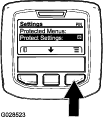
-
In the SETTINGS MENU, use the center button to scroll down to the PROTECTED MENU and press the right button (Figure 9A).
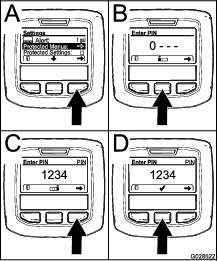
-
To enter the PIN code, press the center button until the correct first digit appears, then press the right button to move on to the next digit (Figure 9B and Figure 9C). Repeat this step until the last digit is entered and press the right button once more.
-
Press the middle button to enter the PIN code (Figure 9D).
Wait until the red indicator light of the InfoCenter illuminates.
Note: If the InfoCenter accepts the PIN code and the protected menu is unlocked, the word “PIN” displays in the upper right corner of the screen.
Note: Rotate the key switch to the OFF position and then to the ON position locks the protected menu.
You have the ability to view and change the settings in the Protected Menu. Once you access the Protected Menu, scroll down to Protect Settings option. Use the right button to change the setting. Setting the Protect Settings to OFF allows you to view and change the settings in the Protected Menu without entering the PIN code. Setting the Protect Settings to ON hides the protected options and requires you to enter the PIN code to change the setting in the Protected Menu. After you set the PIN code, rotate the key switch OFF and back to the ON position to enable and save this feature.
Note: Specifications and design are subject to change without notice.
| Length | 254 cm (100 inches) |
| Width (rear wheels) | 198 cm (78 inches) |
| Height (when the roll bar is up) | 183 cm (72 inches) |
| Height (when the roll bar is down) | 122 cm (48 inches) |
| Weight | 1012 kg (2231 lb) |
| Length | 254 cm (100 inches) |
| Width (rear wheels) | 191 cm (75 inches) |
| Height (when the roll bar is up) | 183 cm (72 inches) |
| Height (when the roll bar is down) | 122 cm (48 inches) |
| Weight, Model 30618 | 1052 kg (2320 lb) |
Attachments/Accessories
A selection of Toro approved attachments and accessories is available for use with the machine to enhance and expand its capabilities. Contact your Authorized Service Dealer or Distributor or go to www.Toro.com for a list of all approved attachments and accessories.
Operation
Note: Determine the left and right sides of the machine from the normal operating position.
Think Safety First
Carefully read all safety instructions and symbols in the safety section. Knowing this information could help you or bystanders avoid injury.
Danger
Operating on wet grass or steep slopes can cause sliding and loss of control.
Wheels dropping over edges can cause rollovers, which may result in serious injury, death, or drowning.
There is no rollover protection when the roll bar is down.
Always keep the roll bar in the fully raised and locked position and use the seat belt.
Read and follow the rollover protection instructions and warnings.
To avoid loss of control and possibility of rollover:
-
Do not operate near drop-offs or near water.
-
Do not operate on slopes greater than 20 degrees.
-
Reduce speed and use extreme caution on slopes.
-
Avoid sudden turns or rapid speed changes.
Caution
This machine produces sound levels that can cause hearing loss through extended periods of exposure.
Wear hearing protection when operating this machine.
The use of protective equipment for eyes, ears, hands, feet, and head is recommended.

Adding Fuel
Warning
Fuel is harmful or fatal if swallowed. Long-term exposure to vapors can cause serious injury and illness.
-
Avoid prolonged breathing of vapors.
-
Keep face away from nozzle and fuel tank or conditioner opening.
-
Keep fuel away from eyes and skin.
Danger
In certain conditions, fuel is extremely flammable and highly explosive. A fire or explosion from fuel can burn you and others and can damage property.
-
Fill the fuel tank outdoors, in an open area, when the engine is cold. Wipe up any fuel that spills.
-
Never fill the fuel tank inside an enclosed trailer.
-
Never smoke when handling fuel, and stay away from an open flame or where fuel fumes may be ignited by a spark.
-
Store fuel in an approved container and keep it out of the reach of children. Never buy more than a 180-day supply of fuel.
-
Do not operate machine without entire exhaust system in place and in proper working condition.
Danger
In certain conditions during fueling, static electricity can be released and cause a spark, which can ignite the fuel vapors. A fire or explosion from fuel can burn you and others and can damage property.
-
Always place fuel containers on the ground away from your vehicle before filling.
-
Do not fill fuel containers inside a vehicle or on a truck or trailer bed, because interior carpets or plastic truck bed liners may insulate the container and slow the loss of any static charge.
-
When practical, remove equipment from the truck or trailer and refuel the equipment with its wheels on the ground.
-
If this is not possible, then refuel such equipment on a truck or trailer from a portable container, rather than from a fuel-dispenser nozzle.
-
If you must use a fuel-dispenser nozzle, keep the nozzle in contact with the rim of the fuel tank or container opening at all times until fueling is complete.
Fuel Specification
Important: Use only ultra-low sulphur diesel fuel. Fuel with higher rates of sulfur degrades the diesel oxidation catalyst (DOC), which causes operational problems and shortens the service life of engine components.Failure to observe the following cautions may damage the engine.
-
Never use kerosene or gasoline instead of diesel fuel.
-
Never mix kerosene or used engine oil with the diesel fuel.
-
Never keep fuel in containers with zinc plating on the inside.
-
Do not use fuel additives.
Petroleum Diesel
Cetane rating: 45 or higher
Sulfur content: Ultra-low sulfur (<15 ppm)
| Diesel fuel specification | Location |
| ASTM D975 | USA |
| No. 1-D S15 | |
| No. 2-D S15 | |
| EN 590 | European Union |
| ISO 8217 DMX | International |
| JIS K2204 Grade No. 2 | Japan |
| KSM-2610 | Korea |
-
Use only clean, fresh diesel fuel or biodiesel fuels.
-
Purchase fuel in quantities that can be used within 180 days to ensure fuel freshness.
Use summer-grade diesel fuel (No. 2-D) at temperatures above -7°C (20°F) and winter-grade fuel (No. 1-D or No. 1-D/2-D blend) below that temperature.
Note: Use of winter-grade fuel at lower temperatures provides lower flash point and cold flow characteristics which eases starting and reduces fuel filter plugging.Using summer-grade fuel above -7°C (20°F) contributes toward longer fuel pump life and increased power compared to winter-grade fuel.
Biodiesel
This machine can also use a biodiesel blended fuel of up to B20 (20% biodiesel, 80% petroleum diesel).
Sulfur content: Ultra-low sulfur (<15 ppm)
Biodiesel fuel specification: ASTM D6751 or EN14214
Blended fuel specification: ASTM D975, EN590, or JIS K2204
Important: The petroleum diesel portion must be ultra-low sulfur.
Observe the following precautions:
-
Biodiesel blends may damage painted surfaces.
-
Use B5 (biodiesel content of 5%) or lesser blends in cold weather.
-
Monitor seals, hoses, gaskets in contact with fuel as they may be degraded over time.
-
Fuel filter plugging may be expected for a time after converting to biodiesel blends.
-
Contact your Authorized Toro Distributor if you wish for more information on biodiesel.
Fuel Tank Capacity
43.5 L (11.5 US gallons)
Filling the Fuel Tank
Important: The fuel tanks are connected, but the fuel does not transfer quickly from one tank to the other. It is important when filling that you park on a level surface. If you park on a hill, you may inadvertently overfill the tanks.
Important: Do not overfill the fuel tanks.
Important: Do not open the fuel tanks when parked on a hill. The fuel could spill out.
-
Park the machine on a level surface.
Important: The fuel tanks are connected, but the fuel does not transfer quickly from one tank to the other. It is important when filling that you park on a level surface. If you park on a hill, you may inadvertently overfill the tanks.
-
Shut the engine off and set the parking brake.
-
Clean around each fuel tank cap and remove the cap.
Important: Do not open the fuel tanks when parked on a hill. The fuel could spill out.
-
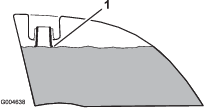
Add fuel to both fuel tanks, until the level is even with the bottom of the filler neck (Figure 11). Do not over fill the fuel tanks.
-
Install the fuel tank caps securely. Wipe up any fuel that may have spilled.
Note: If possible, fill the fuel tanks after each use. This will minimize possible buildup of condensation inside the fuel tank.
Checking the Engine-Oil Level
Before you start the engine and use the machine, check the oil level in the engine crankcase; refer to Servicing the Engine Oil.
Checking the Cooling System
Before you start the engine and use the machine, check the cooling system; refer to Checking the Cooling System .
Checking the Hydraulic System
Before you start the engine and use the machine, check the hydraulic system; refer to Checking the Hydraulic System.
Using the Rollover-Protection System (ROPS)
Warning
To avoid injury or death from rollover: keep the roll bar in the raised locked position and use the seat belt.
Ensure that the rear part of the seat is secured with the seat latch.
Warning
There is no rollover protection when the roll bar is in the down position.
-
Lower the roll bar only when absolutely necessary.
-
Do not wear the seat belt when the roll bar is in the down position.
-
Drive slowly and carefully.
-
Raise the roll bar as soon as clearance permits.
-
Check carefully for overhead clearances (i.e. branches, doorways, electrical wires) before driving under any objects and do not contact them.
Important: Lower the roll bar only when absolutely necessary.
-
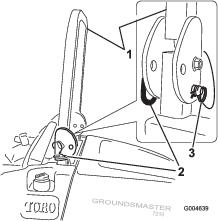
To lower the roll bar, remove the hairpin cotters, push the roll bar forward against the springs, and remove the 2 pins (Figure 12).
-
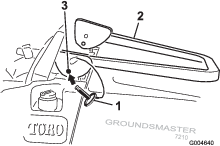
Lower the roll bar to the down position (Figure 13).
-
Install the 2 pins and secure them with the hairpin cotters (Figure 12).
Important: Ensure that the rear part of the seat is secured with the seat latch.
-
To raise the roll bar, remove the hairpin cotters and remove the 2 pins (Figure 12).
-
Raise the roll bar to the upright position and install the 2 pins and secure them with the hairpin cotters (Figure 12).
Important: Always use the seat belt when the roll bar is in the raised and locked position. Do not use the seat belt when the roll bar is in the lowered position.
Operating the Parking Brake
Always set the parking brake when you stop the machine or leave it unattended.
Setting the Parking Brake
-
Move the motion-control levers out to the NEUTRAL-LOCKED position (Figure 18).
-
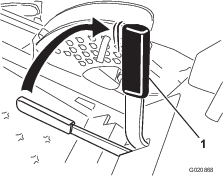
Pull up and back on the parking-brake lever to set the parking brake (Figure 14).
Note: The parking-brake lever should stay firmly in the engaged position.
Warning
The parking brake may not hold the machine parked on a slope and could cause personal injury or property damage.
Do not park the machine on slopes unless the wheels are chocked or blocked.
Releasing the Parking Brake
Push forward and down on the parking-brake lever to release the parking brake (Figure 15).
Starting and Stopping the Engine
Starting the Engine
-
Raise the roll bar up and lock it into place, sit on the seat, and fasten the seat belt.
-
Ensure that the motion controls are in the NEUTRAL-LOCKED position.
-
Set the parking brake; refer to Setting the Parking Brake.
-
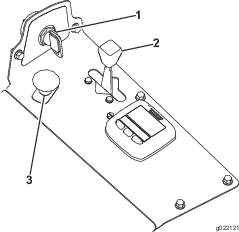
Move the PTO (power take-off) switch to the OFF position (Figure 16).
-
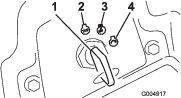
Turn the ignition key clockwise to the RUN position (Figure 17).
-
After the glow plug indicator light dims, turn the key to the START position. When the engine starts release the key.
Important: Use starting cycles of no more than 15 seconds per minute to avoid overheating the starter motor.
Note: Additional starting cycles may be required when starting the engine for the first time after the fuel system has been completely drained.
Important: When the engine is started for the first time, or after an engine oil change, or an overhaul of the engine, transmission, or wheel motor, operate the machine with the throttle lever in the SLOW position in both the forward and reverse directions for 1 to 2 minutes. Also operate the lift lever and PTO lever to ensure proper operation of all parts. Then shut the engine off and check fluid levels, check for oil leaks, loose parts, and any other noticeable malfunctions.
Caution
Shut the engine off and wait for all moving parts to stop before checking for oil leaks, loose parts, or other malfunctions.
Stopping the Engine
-
Disengage the PTO, move the motion-control levers to the NEUTRAL-LOCKED position, set the parking brake, and move the throttle lever to the SLOW position.
-
Turn the ignition key to the OFF position (Figure 17). Wait for all moving parts to stop before leaving the operating position.
-
Remove the key before transporting or storing the machine.
Important: Make sure to remove the key as the fuel pump or accessories may run and cause the battery to lose charge.
Caution
Children or bystanders may be injured if they move or attempt to operate the tractor while it is unattended.
Always remove the ignition key and set the parking brake when leaving the machine unattended, even if just for a few minutes.
Driving the Machine
The throttle control regulates the engine speed as measured in rpm (revolutions per minute). Place the throttle control in the FAST position for best performance. Always operate in the FAST throttle position when mowing.
Caution
The machine can turn very rapidly. You may lose control of it and cause personal injury or damage to machine.
-
Use caution when making turns.
-
Slow the machine down before making sharp turns.
-
Release the parking brake; refer to Releasing the Parking Brake.
Note: The engine stops if you move the traction-control levers with the parking brake engaged.
-
Move the levers to the center, unlocked position.
-
Drive the machine as follows:
-
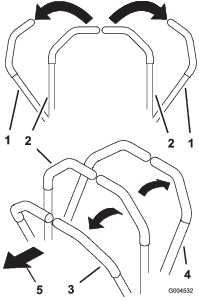
To drive straight forward, slowly push the motion-control levers forward (Figure 18).
-
To drive straight backward, slowly pull the motion-control levers rearward (Figure 18).
-
To turn, slow the machine by pulling back on both levers and then push forward on the lever on the opposite side from which you want to turn (Figure 18).
-
To stop, pull the motion-control levers to the NEUTRAL position.
Note: The farther you move the traction-control levers in either direction, the faster the machine moves in that direction.
-
Stopping the Machine
To stop the machine, move the motion-control levers to NEUTRAL-LOCKED position, disengage the power take-off (PTO), move the throttle to the SLOW position, and stop the engine.
Set the parking brake when you leave the machine; refer to Setting the Parking Brake. Remember to remove the key from the ignition switch.
Caution
Children or bystanders may be injured if they attempt to move or operate the tractor while it is unattended.
Always remove the ignition key and set the parking brake when leaving the machine unattended, even if just for a few minutes.
Operating the Mower
Raising and Lowering the Mower with the Deck-Lift Switch
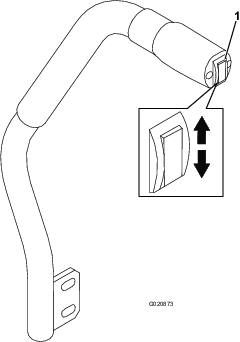
The deck-lift switch raises and lowers the mower deck (Figure 19).
Note: The engine must be running for you to use this lever.
-
To lower the mower deck, push the deck-lift switch down (Figure 19).
Note: When you lower the mower deck, it sets in a float/idle position.
-
To raise the mover deck, push the deck-lift switch up (Figure 19).
Important: Do not continue to hold the switch up or down after the mower has fully raised or lowered. Doing so damages the hydraulic system.
Note: To lock the mower deck in a raised position, raise the deck past the 15 cm (6 inch) position, remove the height-of-cut stop pin (refer to Adjusting the Height-of-Cut), and place the pin in the 15 cm (6 inch) height-of-cut position (Figure 43).
Engaging the Power Take-off (PTO)
The power take-off (PTO) switch starts and stops the mower blades and some powered attachments.
-
If the engine is cold, allow the engine to warm up 5 to 10 minutes before engaging the PTO.
-
Sit in the seat, release the pressure on the traction-control levers, and place them in neutral.
-
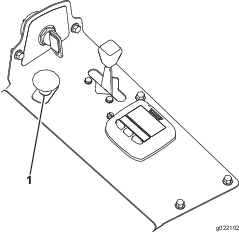
Pull up on the PTO switch to engage it (Figure 20).
Disengaging the PTO
To disengage, push the PTO switch to the OFF position.
Cutting Grass with the Machine
Note: Cutting grass at a rate that loads the engine promotes DPF regeneration.
-
Move the machine to the job site.
-
Whenever possible, set the engine-speed switch to high idle.
-
Engage the PTO switch.
-
Gradually move the traction pedal forward and slowly drive the machine over the mowing area.
-
Once the front of the cutting units are over the mowing area, lower the cutting units.
-
Cut grass so that the blades can cut and discharge clippings at a high rate while producing a good quality of cut.
Note: If the cutting rate is too high, the quality of cut may deteriorate. Reduce the ground speed of the machine or reduce the width of cut to regain high idle engine speed.
-
When the cutting units are over the far edge of the mowing area, lift the cutting units.
-
Perform a tear-shaped turn to quickly line up for your next pass.
Diesel Particulate Filter Regeneration
The diesel particulate filter (DPF) is part of the exhaust system. The diesel-oxidation catalyst of the DPF reduces harmful gasses and the soot filter removes soot from the engine exhaust.
The DPF regeneration process uses heat from the engine exhaust to incinerate the soot accumulated on the soot filter, converting the soot to ash, and clears the channels of the soot filter so that filtered engine exhaust flows out the DPF.
The engine computer monitors the accumulation of soot by measuring the back pressure in the DPF. If the back pressure is too high, soot is not incinerating in the soot filter through normal engine operation. To keep the DPF clear of soot, remember the following:
-
Passive regeneration occurs continuously while the engine is running—run the engine at full engine speed when possible to promote DPF regeneration.
-
If the back pressure is too high, the engine computer signals you through the InfoCenter when additional processes (assist and reset regeneration) are running.
-
Allow the assist and reset regeneration process to complete before shutting off the engine.
Operate and maintain your machine with the function of the DPF in mind. Engine load at high idle engine speed generally produce adequate exhaust temperature for DPF regeneration.
Important: Minimize the amount of time that you idle the engine or operate the engine at low-engine speed to help reduce the accumulation of soot in the soot filter.
Caution
The exhaust temperature is hot (approximately 600°C (1112°F) during DPF parked regeneration or recovery regeneration. Hot exhaust gas can harm you or other people.
-
Never operate the engine in an enclosed area.
-
Make sure that there are no flammable materials around the exhaust system.
-
Never touch a hot exhaust system component.
-
Never stand near or around the exhaust pipe of the machine.
DPF Soot Accumulation
-
Over time, the DPF accumulates soot in the soot filter. The computer for the engine monitors the soot level in the DPF.
-
When enough soot accumulates, the computer informs you that it is time to regenerate the diesel particulate filter.
-
DPF regeneration is a process that heats the DPF to convert the soot to ash.
-
In addition to the warning messages, the computer reduces the power produced by the engine at different soot-accumulation levels.
| Indication Level | Fault Code | Engine Power Rating | Recommended Action |
| Level 1: Engine Warning |
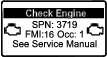 | The computer de-rates the engine power to 85% | Perform a parked regeneration as soon as possible; refer to Parked Regeneration. |
| Level 2: Engine Warning |
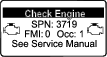 | The computer de-rates the engine power to 50% | Perform a recovery regeneration as soon as possible; refer to Recovery Regeneration. |
DPF Ash Accumulation
-
The lighter ash is discharged through the exhaust system; the heavier ash collects in the soot filter.
-
Ash is a residue of the regeneration process. Over time, the diesel particulate filter accumulates ash that does not discharge with the engine exhaust.
-
The computer for the engine calculates the amount of ash accumulated in the DPF.
-
When enough ash accumulates, the engine computer sends information to the InfoCenter in the form of a system advisory or an engine fault to indicate the accumulation of ash in the DPF.
-
The advisory and faults are indications that it is time to service the DPF.
-
In addition to the warnings, the computer reduces the power produced by the engine at different ash-accumulation levels.
| Indication Level | Advisory or Fault Code | Engine Speed Reduction | Engine Power Rating | Recommended Action |
|---|---|---|---|---|
| Level 1: System Advisory |
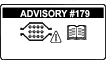 | None | 100% | Notify your service department that advisory #179 displays in the InfoCenter. |
| Level 2: Engine Warning |
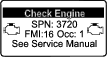 | None | The computer de-rates the engine power to 85% | Service the DPF; refer to Servicing the Diesel-Oxidation Catalyst (DOC) and the Soot Filter |
| Level 3: Engine Warning |
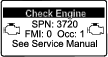 | None | The computer de-rates the engine power to 50% | Service the DPF; refer to Servicing the Diesel-Oxidation Catalyst (DOC) and the Soot Filter |
| Level 4: Engine Warning |
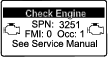 | Engine speed at max torque + 200 rpm | The computer de-rates the engine power to 50% | Service the DPF; refer to Servicing the Diesel-Oxidation Catalyst (DOC) and the Soot Filter |
Types of Diesel Particulate Filter Regeneration
| Type of Regeneration | Conditions for DPF regeneration | DPF description of operation |
|---|---|---|
| Passive | Occurs during normal operation of the machine at high-engine speed or high-engine load | The InfoCenter does not display an icon indicating passive regeneration. |
| During passive regeneration, the DPF processes high-heat exhaust gasses; oxidizing harmful emissions and burning soot to ash. | ||
| Refer to Passive DPF Regeneration. | ||
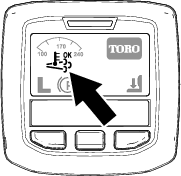
| Assist | Occurs as a result of low-engine speed, low-engine load, or after the computer detects back pressure in the DPF | When the assist/reset-regeneration icon  is displayed in the InfoCenter,
an assist regeneration is in progress. is displayed in the InfoCenter,
an assist regeneration is in progress. |
| During assist regeneration, the computer controls the intake throttle to increase the exhaust temperature, enabling assist regeneration to occur. | ||
| Refer to Assist DPF Regeneration. | ||
| Reset | Occurs after assist regeneration only if the computer detects that assist regeneration did not sufficiently reduce the soot level | When the assist/reset-regeneration icon  is displayed in the InfoCenter,
a regeneration is in progress. is displayed in the InfoCenter,
a regeneration is in progress. |
| Also occurs every 100 hours to reset baseline sensor readings | ||
| During reset regeneration, the computer controls the intake throttle and fuel injectors to increase the exhaust temperature during regeneration. | ||
| Refer to Reset Regeneration. |
| Type of Regeneration | Conditions for DPF regeneration | DPF description of operation |
|---|---|---|
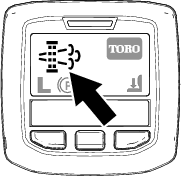
| Parked | Soot buildup occurs as a result of prolonged operation at low-engine speed or low-engine load. May also occur as a result of using incorrect fuel or oil | When the parked-regeneration icon  is displayed in the InfoCenter,
a regeneration is requested. is displayed in the InfoCenter,
a regeneration is requested. |
| The computer detects back pressure due to soot buildup and requests a parked regeneration | ||
| • Perform the parked regeneration as soon as possible to avoid needing a recovery regeneration. | ||
| • A parked regeneration requires 30 to 60 minutes to complete. | ||
| • You must have at least a 1/4 tank of fuel in the tank. | ||
| • You must park the machine to perform a recovery regeneration. | ||
| Refer to Parked Regeneration. | ||
| Recovery | Occurs as a result of ignoring parked regeneration requests and continuing operation, adding more soot when the DPF is already in need of a parked regeneration | When the recovery-regeneration icon  is displayed in the InfoCenter,
a recovery regeneration is requested. is displayed in the InfoCenter,
a recovery regeneration is requested. |
| Contact your Authorized Toro Distributor to have a service technician perform the recovery regeneration. | ||
| • A recovery regeneration requires up to 4 hours to complete. | ||
| • You must have at least a 1/2 tank of fuel in the machine. | ||
| • You must park the machine to perform a recovery regeneration. | ||
| Refer to Recovery Regeneration. |
Passive DPF Regeneration
-
Passive regeneration occurs as part of normal engine operation.
-
While operating the machine, run the engine at full-engine speed when possible to promote DPF regeneration.
Assist DPF Regeneration
-
The assist/reset-regeneration icon displays in the InfoCenter (Figure 27).
-
The computer takes control of the intake throttle to increase the temperature of the engine exhaust.
-
While operating the machine, run the engine at full engine speed when possible to promote DPF regeneration.
-
The
 icon displays in the InfoCenter while the assist
regeneration is processing.
icon displays in the InfoCenter while the assist
regeneration is processing. -
Whenever possible, do not shut off the engine or reduce engine speed while the assist regeneration is processing.
Important: Allow the machine to complete the assist regeneration process before shutting off the engine.
Note: The assist regeneration is finished processing when the
icon disappears from the
InfoCenter.
Reset Regeneration
-
The assist/reset-regeneration icon displays in the InfoCenter (Figure 28).
-
The computer takes control of the intake throttle and changes the fuel injection operation to increase the temperature of the engine exhaust.
Important: The assist/reset-regeneration icon indicates that the exhaust temperature discharged from of your machine may be hotter than during regular operation.
-
While operating the machine, run the engine at full engine speed when possible to promote DPF regeneration.
-
The
icon displays in the InfoCenter while the reset
regeneration is processing. -
Whenever possible, do not shut off the engine or reduce engine speed while the reset regeneration is processing.
Important: Allow the machine to complete the reset regeneration process before shutting off the engine.
Note: The reset regeneration is finished processing when the
icon disappears from the
InfoCenter.
Parked Regeneration
-
The parked-regeneration requested icon displays in the InfoCenter (Figure 29).
-
If a parked regeneration is needed, the InfoCenter displays engine warning SPN 3719, FMI 16 (Figure 30) and the engine computer derates engine power to 85%.
Important: If you do not complete a parked regeneration within 2 hours, the engine computer derates engine power to 50%.
-
A parked regeneration requires 30 to 60 minutes to complete.
-
If you are authorized by your company, you need the PIN code to perform the parked-regeneration process.
Preparing to Perform a Parked or Recovery Regeneration
-
Ensure that the machine has at least 1/4 tank of fuel.
-
Move the machine outside to an area away from combustible materials.
-
Park the machine on a level surface.
-
Ensure that the traction control or motion-control levers are in the NEUTRAL position.
-
If applicable, lower the cutting units and shut them off.
-
Engage the parking brake.
-
Set the throttle to the low IDLE position.
Performing a Parked Regeneration
Note: For instructions on unlocking protected menus, refer to Accessing Protected Menus.
-
Access the protected menu and unlock the protected settings submenu (Figure 31); refer to Accessing Protected Menus.
-
Navigate to the MAIN MENU, press the center button to scroll down to the SERVICE MENU, and press the right button to select the SERVICE option (Figure 32).
Note: The InfoCenter should display the PIN indicator in the upper right corner of the display.
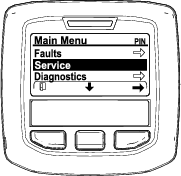
-
In the SERVICE MENU, press the middle button until the DPF REGENERATION options displays, and press the right button to select the DPF REGENERATION option (Figure 33).
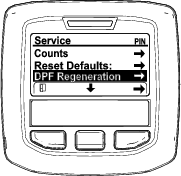
-
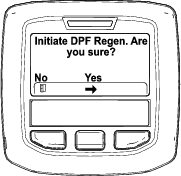
When the “Initiate DPF Regen. Are you sure?” message displays, press the center button (Figure 34).
-
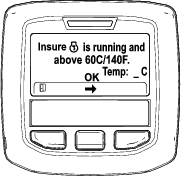
If the coolant temperature is below 60°C (140°F) the “Insure
 is running and above 60C/140F” message displays. (Figure 35).
Observe the temperature in the display, and run the machine at full throttle until the temperature reaches 60°C (140°F), then press the center button.
Note: If the coolant temperature is above 60°C (140°F) this screen is skipped.
-
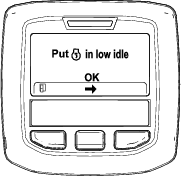
Move the throttle control to LOW IDLE and press the center button (Figure 36).
-
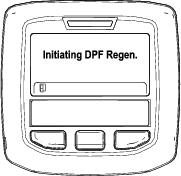
The following messages display as the parked regeneration process begins:
-
The “Initiating DPF Regen.” message displays (Figure 37).
-
The “Waiting on
” message displays
(Figure 38).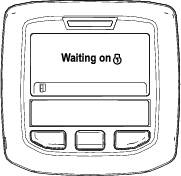
-
The computer determines whether the regeneration runs. One of the following messages displays in the InfoCenter:
-
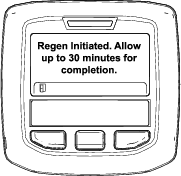
If the regeneration is allowed, the “Regen Initiated. Allow up to 30 minutes for completion” message displays in the InfoCenter, wait for the machine to complete the parked regeneration process (Figure 39).
-
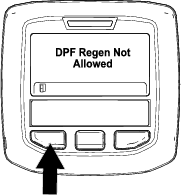
If the regeneration process is not allowed by the engine computer, the “DPF Regen Not Allowed” message displays in the InfoCenter (Figure 40). Press the left button to exit to the home screen
Important: If you did not meet all the requirements for regeneration or if less than 50 hours have passed since the last regeneration, the “DPF Regen Not Allowed” message appears.
-
-
-
While the regeneration is running, the InfoCenter returns to the home screen and shows the following icons:

The engine is cold—wait. 
The engine is warm—wait. 
The engine hot—regeneration in progress (percent complete). -
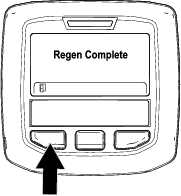
The parked regeneration is complete when the “Regen Complete” message displays in the InfoCenter. Press the left button to exit to the home screen (Figure 41).
Recovery Regeneration
-
If you ignore the request for a parked regeneration (displayed in the InfoCenter) and continue to operate the machine, a critical amount of soot builds up in the DPF.
-
If a recovery regeneration is needed, the InfoCenter displays engine warning SPN 3719, FMI 16 (Figure 42) and the engine computer derates engine power to 85%.
Important: If you do not complete a recovery regeneration within 15 minutes, the engine computer derates engine power to 50%.
-
Perform a recovery-regeneration whenever there is a loss of engine power and a parked regeneration cannot effectively clean the DPF of soot.
-
A recovery regeneration requires up to 4 hours to complete.
-
You need a distributor technician to perform the recovery regeneration process; contact your Authorized Toro Distributor.
Adjusting the Height-of-Cut
You can adjust the height-of-cut from 2.5 to 15.8 cm (1 to 6 inches) in 6 mm (1/4 inch) increments by relocating the stop pin into different hole locations.
-
With the engine running, push the deck-lift switch up until the mower deck is fully raised and release the switch immediately (Figure 19).
-
To adjust the height-of-cut, rotate the stop pin until the roll pin in it lines up with the slots in the holes in the height-of-cut bracket and remove it (Figure 43).
-
Select a hole in the height-of-cut bracket corresponding to your desired height-of-cut, insert the pin, and rotate it down to lock it in place (Figure 43).
Note: There are 4 rows of hole positions (Figure 43). The top row gives you the height-of-cut listed above the pin. The second row down gives you the height listed plus 6 mm (1/4 inch). The third row down gives you the height listed plus 12 mm (1/2 inch). The bottom row gives you the height listed plus 18 mm (3/4 inch). For the 15.8 cm (6 inch) position, there is only 1 hole, located in the second row. This does not add 6 mm (1/4 inch) to the 15.8 cm (6 inch) position.
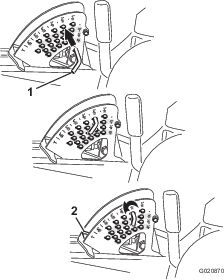
-
Adjust the anti-scalp rollers and skids as required.
Adjusting the Skid(s)
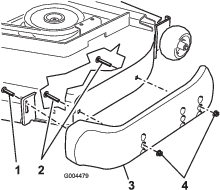
Mount the skids in the lower position when operating in height-of-cuts higher than 64 mm (2-1/2 inches) and in the higher position when operating in height-of-cuts lower than 64 mm (2-1/2 inches).
Note: On Guardian® mowers, when the skids become worn, you can switch the skid to the opposite sides of the mower, flipping them over. This allows you to use the skids longer before replacing them.
-
Disengage the PTO, move the motion-control levers to the NEUTRAL-LOCKED position, and set the parking brake.
-
Move the throttle lever to the SLOW position, stop the engine, remove the key, and wait for all moving parts to stop before leaving the operating position.
-
Loosen the screw at the front of each skid (2 skids on Guardian decks and 1 skid on side-discharge decks) as shown in Figure 44.
-
Remove the flange-head bolts and nuts from each skid.
-
Move each skid to the desired position and secure them with the flange-head bolts and nuts.
Note: Only use the top or center sets of holes to adjust the skids. The bottom holes are used when switching sides on a Guardian mower deck, at which time they become the top holes on the other side of the mower.
-
Torque the screw at the front of each skid to 9 to 11 N-m (80 to 100 in-lb).
Adjusting the Rear Anti-Scalp Rollers
Whenever you change the height-of-cut, adjust the height of the rear anti-scalp rollers.
-
Disengage the PTO, move the motion-control levers to the NEUTRAL-LOCKED position and set the parking brake.
-
Move the throttle lever to the SLOW position, stop the engine, remove the key, and wait for all moving parts to stop before leaving the operating position.
-
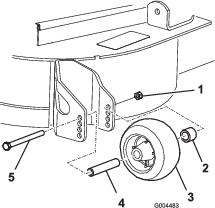
After adjusting the height-of-cut, adjust the rollers by removing the flange nut, bushing, spacer, and bolt (Figure 45).
-
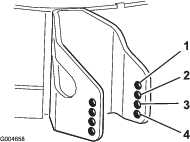
Select a hole so that the anti-scalp roller is positioned to the nearest corresponding height-of-cut desired (Figure 46).
-
Install the flange nut, bushing, spacer, and bolt (Figure 45).
Note: Torque to 54-61 N-m (40-45 ft-lb).
Adjusting the Rollers
Mount the rollers in the lower position when operating in height-of-cuts higher than 64 mm (2-1/2 inches) and in the higher position when operating in heights of cut lower than 64 mm (2-1/2 inches).
-
Disengage the PTO, move the motion-control levers to the NEUTRAL-LOCKED position, and set the parking brake.
-
Move the throttle lever to the SLOW position, stop the engine, remove the key, and wait for all moving parts to stop before leaving the operating position.
-
Raise the front of the machine and support it on jack stands.
-
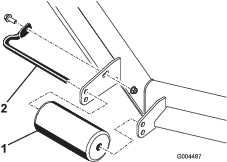
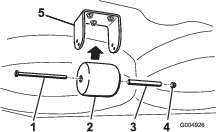
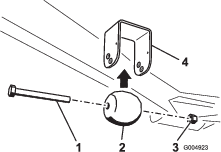
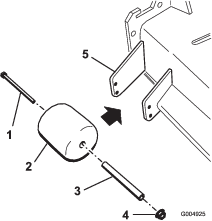
Remove the fasteners securing each roller on your mower deck, and move the rollers up or down as desired; refer to Figure 47 through Figure 51 as applicable for your mower.
-
Install the fasteners as illustrated in Figure 47 through Figure 51.
Using the Safety-Interlock System
Caution
If the safety-interlock switches are disconnected or damaged the machine could operate unexpectedly causing personal injury.
-
Do not tamper with the interlock switches.
-
Check the operation of the interlock switches daily and replace any damaged switches before operating the machine.
Understanding the Safety-Interlock System
The safety-interlock system is designed to prevent the engine from starting unless:
-
You are sitting on the seat or the parking brake is engaged.
-
The power take-off (PTO) is disengaged.
-
The motion-control levers are in the NEUTRAL-LOCKED position
-
The engine temperature is below the maximum operating temperature.
The safety-interlock system also is designed to stop the engine when the traction controls are moved from the NEUTRAL-LOCKED position with the parking brake engaged. If you rise from the seat when the PTO is engaged, there is a 1-second delay before the engine stops.
Testing the Safety-Interlock System
Test the safety-interlock system before you use the machine each time. If the safety system does not operate as described below, have an Authorized Service Dealer repair the safety system immediately.
-
Sit on the seat, engage the parking brake, move the PTO to On, and try starting the engine.
Note: The engine should not crank.
-
Sit on the seat, engage the parking brake, move the PTO to Off, move either motion-control lever out of the NEUTRAL-LOCKED position, and try starting the engine.
Note: The engine should not crank. Repeat for the other control lever.
-
Sit on the seat, engage the parking brake, move the PTO switch to Off, move the motion-control levers to the NEUTRAL-LOCKED position, and start the engine. While the engine is running, release the parking brake, engage the PTO and rise slightly from the seat.
Note: The engine should stop within 2 seconds.
-
Without an operator on the seat, engage the parking brake, move the PTO switch to Off, move the motion-control levers to the NEUTRAL-LOCKED position, and start the engine. While the engine is running, center either motion-control lever.
Note: The engine should stop within 2 seconds. Repeat for the other motion-control lever.
-
Without an operator on the seat, disengage the parking brake, move the PTO switch to Off, move the motion-control levers to the NEUTRAL-LOCKED position, and try starting the engine.
Note: The engine should not crank.
Using the SCM to Diagnose System Problems
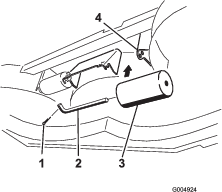
The machine is equipped with a standard control module (SCM) monitoring system that tracks the function of various key systems. The SCM is located under the right control panel. Access it through the side-panel cover (Figure 52). To open the side-panel cover, release the 2 latches and pull out.
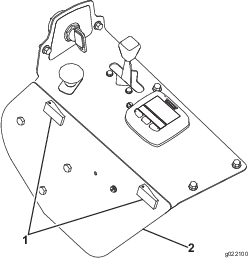
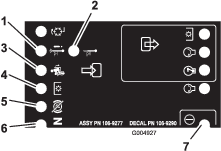
On the face of the SCM are 11 LEDs that illuminate to indicate various system conditions. You can use 7 of these lights for system diagnosis. Refer to Figure 53 for a description of what each light means. For details on using the rest of the SCM functions, refer to the Service Manual, available through your Authorized Toro Distributor.
Positioning the Seat
Changing the Seat Position
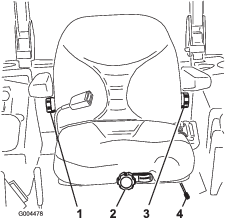
The seat can move forward and backward. Position the seat where you have the best control of the machine and are most comfortable.
-
To adjust, move the lever sideways to unlock the seat (Figure 54).
-
Slide the seat to the desired position and release lever to lock it in position.
-
Verify that the seat has locked into place by attempting to move it back and forth.
Changing the Seat Suspension
You can adjust the seat to provide a smooth and comfortable ride. Position the seat where you are most comfortable.
Without sitting on the seat, turn the knob in front either direction to provide the best comfort (Figure 54).
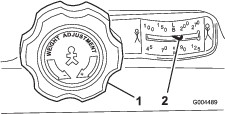
Changing the Back Position
You can adjust the back of the to provide a comfortable ride. Position the back of the seat where it is most comfortable.
To adjust it, turn the knob, under the right-side arm rest, in either direction to provide the best comfort (Figure 54).
Changing the Lumbar Support
You can adjust the back of the seat to provide a customized lumbar support for your lower back.
To adjust it, turn the knob, under the left-side arm rest, in either direction to provide the best comfort (Figure 54).
Unlatching the Seat
To access the hydraulic and other systems under the seat, unlatch the seat and swing it forward.
-
Use the seat-position-adjustment lever to slide the seat all the way forward.
-
Pull the seat latch forward and lift it up to unlatch the seat (Figure 56).
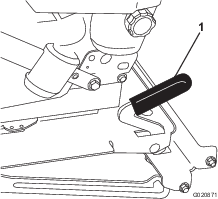
Pushing the Machine by Hand
Important: Never tow the machine because hydraulic damage may occur.
Pushing the Machine
-
Disengage the power take-off (PTO) and turn the ignition key to off. Move the levers to the NEUTRAL-LOCKED position and apply the parking brake. Remove the key.
-
Lift the seat.
-
Rotate each bypass valve counterclockwise 1 turn (Figure 57).
Note: This allows hydraulic fluid to bypass the pump, enabling the wheels to turn.
Important: Do not rotate the bypass valves more than 1 turn. This prevents valves from coming out of the body and causing fluid to run out.
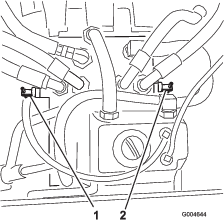
-
Disengage the parking brake before pushing.
Changing to Machine Operation
Rotate each bypass valve clockwise 1 turn and hand tighten them (torque of approximately 8 N-m (71 in-lb).
Note: Do not overtighten the bypass valves.
The machine does not drive unless the bypass valves are turned inward.
Loading the Machine
Use extreme caution when loading units on trailers or trucks. Use 1 full-width ramp that is wide enough to extend beyond the rear tires instead of individual ramps for each side of the unit (Figure 58). The lower rear section of the frame of the machine extends back between the rear wheels and serves as a stop for tipping backward. Using a full-width ramp provides a surface for the frame members to contact if the unit starts to tip backward. If it is not possible to use 1 full-width ramp, use enough individual ramps to simulate a full-width, continuous ramp.
The ramp should be long enough so that the angles do not exceed 15 degrees (Figure 58). A steeper angle may cause mower components to get caught as the unit moves from ramp to trailer or truck. Steeper angles may also cause the unit to tip backward. If loading on or near a slope, position the trailer or truck so it is on the down side of the slope and the ramp extends up the slope. This minimizes the ramp angle. The trailer or truck should be as level as possible.
Important: Do not attempt to turn the unit while on the ramp; you may lose control and drive off the side.
Avoid sudden acceleration when driving up a ramp and sudden deceleration when backing down a ramp. Both maneuvers can cause the unit to tip backward.
Warning
Loading a unit onto a trailer or truck increases the possibility of backward tip-over and could cause serious injury or death.
-
Use extreme caution when operating a unit on a ramp.
-
Use only a single, full-width ramp; do not use individual ramps for each side of the unit.
-
If individual ramps must be used, use enough ramps to create an unbroken ramp surface wider than the unit.
-
Do not exceed a 15 degree angle between ramp and ground or between ramp and trailer or truck.
-
Avoid sudden acceleration while driving unit up a ramp to avoid tipping backward.
-
Avoid sudden deceleration while backing unit down a ramp to avoid tipping backward.
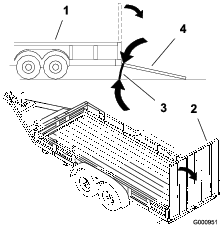
Transporting the Machine
Warning
Driving on the street or roadway without turn signals, lights, reflective markings, or a slow-moving-vehicle emblem is dangerous and can lead to accidents causing personal injury.
Do not drive machine on a public street or roadway without signs, lights, and/or markings required by local regulations.
Use a heavy-duty trailer or truck to transport the machine. Ensure that the trailer or truck has all necessary lighting and marking as required by law. Please carefully read all the safety instructions. Knowing this information could help you or bystanders avoid injury.
To transport the machine:
-
Ensure that your vehicle, hitch, safety chains, and trailer are adequate for the load you are pulling and that they meet all local traffic regulations for your area.
-
Lock the brake and block the wheels.
-
Securely fasten the machine to the trailer or truck with straps, chains, cable, or ropes as required by local traffic regulations in your area (Figure 59).
Operating Tips
Fast Throttle Setting/Ground Speed
To maintain enough power for the machine and deck while mowing, operate the engine at the FAST throttle position and adjust your ground speed for conditions. A good rule to follow is to decrease ground speed as the load on the cutting blades increases; and increase ground speed as the load on the blades decreases.
Mowing Direction
Alternate mowing direction to avoid making ruts in the turf over time. This also helps disperse clippings, which enhances decomposition and fertilization.
Cutting Speed
To improve cut quality, use a slower ground speed in certain conditions.
Avoid Cutting Too Low
If the cutting width of the mower is wider than the mower you previously used, raise the cutting height to ensure that uneven turf is not cut too short.
Select the Proper Height-of-Cut Setting
Remove approximately 25 mm (1 inch) or no more than 1/3 of the grass blade when cutting. In exceptionally lush and dense grass, you may have to slow down the forward speed and/or raise the height-of-cut to the next higher setting.
Important: If cutting more that 1/3 of the grass blade off, or in sparse long grass or dry conditions, the use of flat sail blades is recommended to reduce air-borne chaff, debris, and deck drive component strain.
Long Grass
If the grass is ever allowed to grow slightly longer than normal, or if it contains a high degree of moisture, raise the cutting height higher than usual and cut the grass at this setting. Then cut the grass again using the lower, normal setting.
Keep the Mower Clean
Clean clippings and dirt from the underside of the mower after each use. If grass and dirt build up inside the mower, cutting quality will eventually become unsatisfactory.
To reduce the risk of fire hazard, keep the engine, muffler, battery compartment, parking brake, cutting units, and fuel storage compartment free of grass, leaves, or excessive grease. Clean up any spilled oil or fuel.
Blade Maintenance
Maintain a sharp blade throughout the cutting season because a sharp blade cuts cleanly without tearing or shredding the grass blades. Tearing and shredding turns grass brown at the edges, which slows growth and increases the chance of disease. Check the blades daily for sharpness, and for any wear or damage. Sharpen the blades as necessary. If a blade is damaged or worn, replace it immediately with a genuine Toro replacement blade. Refer to Servicing the Cutting Blades.
Maintenance
Note: Determine the left and right sides of the machine from the normal operating position.
Recommended Maintenance Schedule(s)
| Maintenance Service Interval | Maintenance Procedure |
|---|---|
| After the first 10 hours |
|
| After the first 50 hours |
|
| After the first 200 hours |
|
| Before each use or daily |
|
| Every 50 hours |
|
| Every 100 hours |
|
| Every 150 hours |
|
| Every 200 hours |
|
| Every 250 hours |
|
| Every 400 hours |
|
| Every 800 hours |
|
| Every 1,500 hours |
|
| Every 6,000 hours |
|
| Every 2 years |
|
Important: Refer to your engine operator's manual for additional maintenance procedures. A detailed Service Manual is also available for purchase from your Authorized Toro Distributor.
Pre-Maintenance Procedures
Important: The fasteners on the covers of this machine are designed to remain on the cover after removal. Loosen all of the fasteners on each cover a few turns so that the cover is loose but still attached, then go back and loosen them until the cover comes free. This prevents you from accidentally stripping the bolts free of the retainers.
Lubrication
Greasing the Bearings and Bushings
| Maintenance Service Interval | Maintenance Procedure |
|---|---|
| Every 50 hours |
|
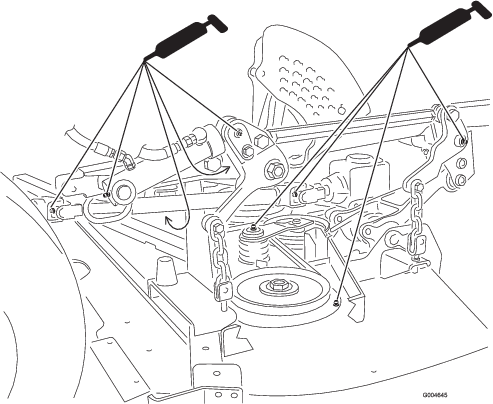
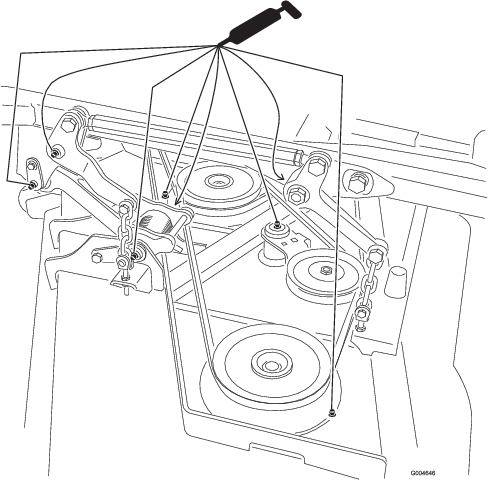
The machine has grease fittings that must be lubricated regularly with No. 2 general-purpose, lithium grease. If the machine is operated under normal conditions, lubricate all bearings and bushings after every 50 hours of operation. Lubricate the bearings and bushings daily when operating conditions are extremely dusty and dirty. Dusty and dirty operating conditions could cause dirt to get into the bearings and bushings, resulting in accelerated wear. Lubricate the grease fittings immediately after every washing, regardless of interval specified.
-
Wipe the grease fittings clean so that foreign matter cannot be forced into the bearing or bushing.
-
Pump grease into the fittings.
-
Wipe off excess grease.
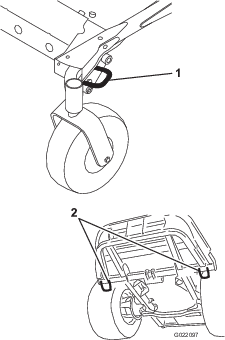
Figure 61 and Figure 62 illustrate the locations of the grease fittings.
Important: The fittings on the axles of the caster wheels are not illustrated. Ensure that you grease these fittings as well.
Note: Improper wash-down procedures can negatively affect bearing life. Do not wash down the unit when it is still hot and avoid directing high-pressure or high volume spray at the bearings or seals.
Servicing the Mower-Deck Gearbox Lubricant
The gearbox is designed to operate with SAE 80-90 gear lube. Although the gearbox comes from the factory with lubricant, check the level of the lubricant in the cutting unit before operating it and as recommended in the Daily Maintenance Checklist.
Checking the Mower-Deck Gear-Box Lubricant
| Maintenance Service Interval | Maintenance Procedure |
|---|---|
| Every 150 hours |
|
-
Position the machine and cutting unit on a level surface.
-
Lower the mower deck to the 2.5 cm (1 inch) height-of-cut.
-
Disengage the PTO, move the motion-control levers to the NEUTRAL-LOCKED position, and set the parking brake.
-
Move the throttle lever to the SLOW position, stop the engine, remove the key, and wait for all moving parts to stop before leaving the operating position.
-
Lift the footrest, exposing the top of the mower deck.
-
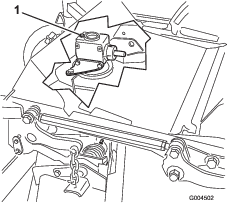
Remove the dipstick/fill plug from the top of the gearbox (Figure 63) and make sure that the lubricant is between the marks on the dipstick.
-
If the lubricant level is low, add enough lubricant until the level is between the marks on the dipstick.
Note: Do not overfill gearbox; overfilling the gearbox may damage it.
Changing the Mower-Deck Gearbox Lubricant
| Maintenance Service Interval | Maintenance Procedure |
|---|---|
| After the first 50 hours |
|
| Every 400 hours |
|
-
Position the machine and cutting unit on a level surface.
-
Lower the mower deck to the 2.5 cm (1 inch) height-of-cut.
-
Disengage the PTO, move the motion-control levers to the NEUTRAL-LOCKED position, and set the parking brake.
-
Move the throttle lever to the SLOW position, stop the engine, remove the key, and wait for all moving parts to stop before leaving the operating position.
-
Lift the footrest, exposing the top of the mower deck.
-
Remove the dipstick/fill plug from the top of the gearbox (Figure 63).
-
Place a funnel and drain pan under the drain plug located under the front of the gearbox and remove the plug, draining the lubricant into the pan.
-
Replace the drain plug.
-
Add enough lubricant, approximately 283 ml (12 oz), until the level is between the marks on the dipstick.
Note: Do not overfill gearbox; overfilling the gearbox may damage it.
Engine Maintenance
Checking the Air Cleaner
-
Check the air-cleaner body for damage, which could possibly cause an air leak. Replace a damaged air cleaner body.
-
Check the whole clean air intake system for leaks, damage, or loose hose clamps.
-
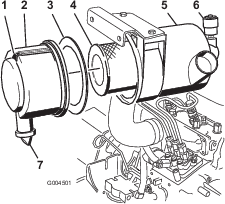
Service the air-cleaner filter when the air-cleaner indicator (Figure 64) shows red or every 400 hours (more frequently in extremely dusty or dirty conditions).
Important: Do not over service the air filter.
-
Be sure that the cover is seated correctly and seals with the air-cleaner body.
Servicing the Air Cleaner
| Maintenance Service Interval | Maintenance Procedure |
|---|---|
| Every 400 hours |
|
-
Pull the latch outward and rotate the air-cleaner cover counter-clockwise (Figure 64).
-
Remove the cover from the air-cleaner body (Figure 64).
-
Before removing the filter, use low pressure air (40 psi, clean and dry) to help remove large accumulations of debris packed between outside of primary filter and the canister.
Note: This cleaning process prevents debris from migrating into the intake when you remove the primary filter.
Important: Avoid using high-pressure air which could force dirt through the filter into the intake tract.
-
Remove and replace the primary filter (Figure 64).
Important: Do not clean the used element to avoid damage to the filter media.
-
Inspect the new filter for shipping damage, checking the sealing end of the filter and the body.
Important: Do not use a damaged element.
-
Ensure that the foam gasket is in place in the cover and that it is not torn or damaged (Figure 64).
Note: If it is damaged, replace it.
-
Insert the new filter by applying pressure to the outer rim of the element to seat it in the canister.
Important: Do not apply pressure to the flexible center of the filter.
-
Clean the dirt-ejection port (located in the removable cover) as follows:
-
Remove the rubber outlet valve from the cover (Figure 64).
-
Clean the cavity.
-
Replace the outlet valve.
-
-
Install the cover orienting the rubber outlet valve in a downward position—between approximately 5:00 to 7:00 when viewed from the end.
-
Reset the indicator (Figure 64) if it is showing red.
Servicing the Engine Oil
Oil Specification
Use high-quality, low-ash engine oil that meets or exceeds the following specifications:
-
API service category CJ-4 or higher
-
ACEA service category E6
-
JASO service category DH-2
Important: Using engine oil other than API CJ-4 or higher, ACEA E6, or JASO DH-2 may cause the diesel particulate filter to plug or cause engine damage.
Use the following engine oil viscosity grade:
-
Preferred oil: SAE 15W-40 (above 0°F)
-
Alternate oil: SAE 10W-30 or 5W-30 (all temperatures)
Toro Premium Engine Oil is available from your Authorized Toro Distributor in either 15W-40 or 10W-30 viscosity grades. See the parts catalog for part numbers.
Checking the Engine-Oil Level
| Maintenance Service Interval | Maintenance Procedure |
|---|---|
| Before each use or daily |
|
The engine is shipped with oil in the crankcase; however, the oil level must be checked before and after the engine is first started.
Important: Check the engine oil daily. If the engine-oil level is above the Full mark on the dipstick, the engine oil may be diluted with fuel;If the engine oil level is above the Full mark, change the engine oil.
The best time to check the engine oil is when the engine is cool before it has been started for the day. If it has already been run, allow the oil to drain back down to the sump for at least 10 minutes before checking. If the oil level is at or below the Add mark on the dipstick, add oil to bring the oil level to the Full mark. Do not overfill the engine with oil.
Important: Keep the engine oil level between the upper and lower limits on the dipstick; the engine may fail if you run it with too much or too little oil.
-
Park the machine on a level surface. Unlock the engine cover latches.
-
Open the engine cover.
-
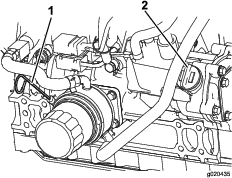
Remove the dipstick, wipe it clean, install the dipstick into the tube, and pull it out again. The oil level should be between the full and add marks (Figure 65).
-
If the oil level is low, remove the fill cap (Figure 65) and add oil until it is between the full and add marks. Do not overfill.
-
Install the oil fill cap and dipstick.
-
Close the engine cover and secure it with the latches.
Crankcase Oil Capacity
5.2 liters (5.5 qt) with the filter.
Changing the Engine Oil And Filter
| Maintenance Service Interval | Maintenance Procedure |
|---|---|
| Every 250 hours |
|
Change the oil and filter every 250 hours.
-
Remove the engine oil drain plug (Figure 66) and let the oil flow into a drain pan. When all the oil is drained, install the drain plug.
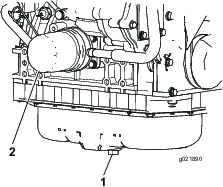
-
Remove the oil filter (Figure 66). Apply a light coat of clean oil to the new filter seal before screwing it on. Do not overtighten.
-
Add oil to the crankcase; refer to Servicing the Engine Oil.
Servicing the Diesel-Oxidation Catalyst (DOC) and the Soot Filter
| Maintenance Service Interval | Maintenance Procedure |
|---|---|
| Every 6,000 hours |
|
-
If advisory message displays in the InfoCenter, the DPF is nearing the recommended point for servicing the diesel-oxidation catalyst and the soot filter.
-
If engine faults , , or in the InfoCenter (Figure 68) display in the InfoCenter, clean the soot filter using the steps that follow:
-
Refer to the Engine section in the Service Manual for information on disassembling and assembling the diesel-oxidation catalyst and the soot filter of the DPF.
-
Refer to your Authorized Toro Distributor for diesel-oxidation catalyst and the soot filter replacement parts or service.
-
Contact your Authorized Toro Distributor to have them reset the engine ECU after you install a clean DPF.
-
Fuel System Maintenance
Note: Refer to Fuel Specification for proper fuel recommendations.
Danger
Under certain conditions, diesel fuel and fuel vapors are highly flammable and explosive. A fire or explosion from fuel can burn you and others and can cause property damage.
-
Use a funnel and fill the fuel tank outdoors, in an open area, when the engine is off and is cold. Wipe up any fuel that spills.
-
Do not fill the fuel tank completely full. Add fuel to the fuel tank until the level is to the bottom of the filler neck.
-
Never smoke when handling fuel, and stay away from an open flame or where fuel fumes may be ignited by a spark.
-
Store fuel in a clean, safety-approved container and keep the cap in place.
Servicing the Water Separator
| Maintenance Service Interval | Maintenance Procedure |
|---|---|
| Every 400 hours |
|
Drain water or other contaminants from water separator (Figure 69) daily.
-
Place a clean container under the fuel filter.
-
Loosen the drain plug on the bottom of the filter canister and open the vent on the top of the canister mount.
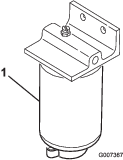
-
Clean the area where the filter canister mounts.
-
Remove the filter canister and clean the mounting surface.
-
Lubricate the gasket on the filter canister with clean oil.
-
Install the filter canister by hand until the gasket contacts mounting surface, then rotate it an additional 1/2 turn.
-
Tighten the drain plug on the bottom of the filter canister and close the vent on the top of the canister mount.
Servicing the Engine Fuel Filter
| Maintenance Service Interval | Maintenance Procedure |
|---|---|
| Every 400 hours |
|
-
Clean the area around the fuel-filter head (Figure 70).
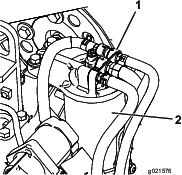
-
Remove the filter and clean the filter-head mounting surface (Figure 70).
-
Lubricate the filter gasket with clean lubricating engine oil. Refer to the engine operator's manual, included with the machine, for additional information.
-
Install the dry filter canister, by hand, until the gasket contacts the filter head, then rotate it an additional 1/2 turn.
-
Start the engine and check for fuel leaks around the filter head.
Cleaning the Fuel Tank
| Maintenance Service Interval | Maintenance Procedure |
|---|---|
| Every 2 years |
|
Drain and clean fuel tank every 2 years. Also, remove and clean the in-line strainers after draining the tank. Use clean diesel fuel to flush out the tank.
Important: Drain and clean the tank if the fuel system becomes contaminated or if the machine is to be stored for an extended period.
Checking the Fuel Lines and Connections
| Maintenance Service Interval | Maintenance Procedure |
|---|---|
| Every 400 hours |
|
Check the fuel lines and connections. Inspect them for deterioration, damage, chaffing, or loose connections.
Electrical System Maintenance
Important: Whenever working with the electrical system, always disconnect the battery cables, negative (-) cable first, to prevent possible wiring damage from short-outs.
Servicing the Battery
| Maintenance Service Interval | Maintenance Procedure |
|---|---|
| Every 50 hours |
|
Warning
Battery posts, terminals, and related accessories contain lead and lead compounds, chemicals known to the State of California to cause cancer and reproductive harm. Wash hands after handling.
Keep the top of the battery clean. If you store the machine in a location where temperatures are extremely high, the battery runs down more rapidly than if the machine is stored in a location where the temperature is cool.
Keep the top of the battery clean by washing it periodically with a brush dipped in ammonia or bicarbonate of soda solution. Flush the top surface with water after cleaning it. Do not remove the fill caps while cleaning the battery.
The battery cables must be tight on the terminals to provide good electrical contact.
If corrosion occurs at the terminals, disconnect the cables, negative (-) cable first, and scrape the clamps and terminals separately. Connect the cables, positive (+) cable first, and coat the terminals with petroleum jelly.
Warning
Battery terminals or metal tools could short against metal machine components, causing sparks. Sparks can cause the battery gasses to explode, resulting in personal injury.
-
When removing or installing the battery, do not allow the battery terminals to touch any metal parts of the machine.
-
Do not allow metal tools to short between the battery terminals and metal parts of the machine.
Warning
Incorrect battery cable routing could damage the machine and cables, causing sparks. Sparks can cause the battery gasses to explode, resulting in personal injury.
-
Always disconnect the negative (black) battery cable before disconnecting the positive (red) cable.
-
Always connect the positive (red) battery cable before connecting the negative (black) cable.
Storing the Battery
If you are storing the machine more than 30 days, remove the battery and charge it fully. Either store it on a shelf or on the machine. Leave the cables disconnected if you are storing the battery on the machine. Store the battery in a cool environment to prevent the battery from discharging rapidly. To prevent the battery from freezing, make sure that it is fully charged. The specific gravity of a fully charged battery is 1.265 to 1.299.
Checking the Fuses
The fuses are located under the control panel. Access them through the side panel cover (Figure 71). To open the side panel cover, release the 2 latches and pull out on it.
If the machine stops or has other electrical system issues, check the fuses. Grasp each fuse in turn and remove them 1 at a time, checking to see if any are blown.
Important: If you need to replace a fuse, always use the same type and amperage rated fuse as the one you are replacing, otherwise you could damage the electrical system. Refer to the decal next to the fuses for a diagram of each fuse and its amperage (Figure 72).
Note: If a fuse blows frequently, you probably have a short in the electrical system and should have it serviced by a qualified service technician.
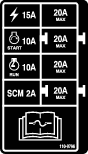
Drive System Maintenance
Checking the Tire Pressure
| Maintenance Service Interval | Maintenance Procedure |
|---|---|
| Every 50 hours |
|
Maintain the air pressure in the front and rear tires. The correct air pressure is 124 kPa (18 psi) in the rear tires and 172 kPa (25 psi) in the caster wheels. Uneven tire pressure can cause an uneven cut. Check the tires when they are cold to get the most accurate pressure reading.
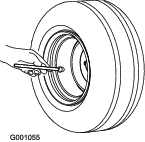
Replacing the Caster Wheels and Bearings
-
Obtain a new caster wheel assembly, cone bearings, and bearing seals from your Authorized Toro Distributor.
-
Remove the locknut from the bolt holding the caster-wheel assembly between the caster fork (Figure 74).
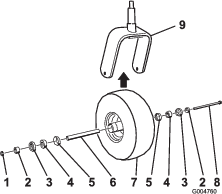
-
Grasp the caster wheel, and slide the bolt out of the fork or pivot arm.
-
Discard the old caster wheel and bearings.
-
Assemble the caster wheel by pushing the cone bearings and seals, packed with grease, into the wheel hub, positioned as shown in Figure 74.
-
Slide the spacer into the wheel hub through the bearings, captivating the spacer inside the wheel hub with 2 bearing spacers.
Important: Ensure that the seal lips are not folded inward.
-
Install the caster-wheel assembly between the castor fork and secure it in place with the bolt and locknut.
-
Tighten the nut until the wheel no longer spins freely, then back it off just until the wheel spins freely.
-
Attach a grease gun to the grease fitting on the caster wheel and fill it with No. 2 general-purpose, lithium grease.
Cooling System Maintenance
Danger
Discharging hot pressurized coolant or touching hot radiator and surrounding parts can cause severe burns.
-
Do not remove the radiator cap when the engine is hot. Always allow the engine to cool at least 15 minutes or until the radiator cap is cool enough to touch without burning your hand before removing the radiator cap.
-
Do not touch radiator and surrounding parts that are hot.
Danger
The rotating fan and drive belt can cause personal injury.
-
Do not operate the machine without the covers in place.
-
Keep fingers, hands and clothing clear of rotating fan and drive belt.
-
Shut off the engine and remove the ignition key before performing maintenance.
Caution
Swallowing engine coolant can cause poisoning.
-
Do not swallow engine coolant.
-
Keep out of reach from children and pets.
Checking the Cooling System
| Maintenance Service Interval | Maintenance Procedure |
|---|---|
| Before each use or daily |
|
The cooling system is filled with a 50/50 solution of water and permanent ethylene-glycol antifreeze. Check the level of the coolant in the expansion tank at the beginning of each day before starting the engine. The capacity of the cooling system is 7.5 liters (6 quarts).
-
Check the level of the coolant in the expansion tank (Figure 75).
Note: The coolant level should be between the marks on the side of the tank.
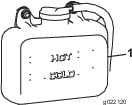
-
If coolant level is low, remove the expansion-tank cap and replenish the system.
Important: Do not overfill
-
Install the expansion-tank cap.
Cleaning the Radiator
| Maintenance Service Interval | Maintenance Procedure |
|---|---|
| Before each use or daily |
|
| Every 200 hours |
|
| Every 1,500 hours |
|
| Every 2 years |
|
To prevent the engine from overheating, the radiator must be kept clean. It may be necessary to check and clean the radiator more frequently in extremely dusty and dirty conditions.
Note: If the mower deck or engine shuts off due to overheating, first check the radiator for excessive buildup of debris.
Clean the radiator as follows:
-
Open the hood.
-
Working from the fan side of the radiator, blow out debris with low pressure (345 kpa; 50 psi) compressed air . Repeat the step from the front of the radiator and again from the fan side.
Important: Do not use water to clean the radiator.
-
After you thoroughly clean the radiator, clean out debris that may have collected in the channel at the radiator base.
-
Close the hood.
Brake Maintenance
Adjusting the Parking-Brake Interlock Switch
-
Stop the machine, move the deck-lift switch fully into the NEUTRAL-LOCKED position, set the parking brake, and remove the ignition key.
-
Remove the bolts securing the front panel and remove the panel (Figure 76).
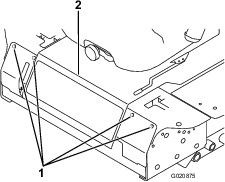
-
Loosen the 2 jam nuts securing the parking-brake interlock switch to the mounting bracket.
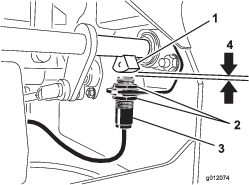
-
Move the switch up or down on the bracket until the distance between the brake-shaft sensor and the switch plunger is 3.9 mm (5/32 inch) as shown in Figure 77.
Note: Make sure that the brake-shaft sensor does not contact the switch plunger.
-
Secure the switch jam nuts.
-
Test the adjustment as follows:
-
Ensure that the parking brake is engaged and that you are not sitting on the seat, then start the engine.
-
Move the control levers out of the NEUTRAL-LOCKED position.
Note: The engine should stop. If it does not stop, recheck the adjustment you made to the switch.
-
-
Install the front panel.
Belt Maintenance
Checking the Alternator Belt
| Maintenance Service Interval | Maintenance Procedure |
|---|---|
| Every 100 hours |
|
Proper tension allows 10 mm (3/8 inch) deflection when a force of 44 N (10 lb) is applied on the belt midway between the pulleys.
If the deflection is not 10 mm (3/8 inch), complete the following procedure:
-
Loosen the alternator mounting bolts (Figure 78).
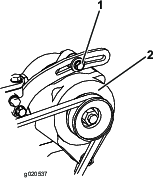
-
Increase or decrease the alternator-belt tension and tighten the bolts.
-
Check the deflection of the belt again to ensure that the tension is correct.
Replacing the Blade Drive Belts
| Maintenance Service Interval | Maintenance Procedure |
|---|---|
| Every 50 hours |
|
The blade drive belts, tensioned by the spring-loaded idler pulleys, are very durable. However, after many hours of use, the belts will show signs of wear. Signs of a worn belt are: squealing when belt is rotating, blades slipping when cutting grass, frayed edges, burn marks and cracks. Replace the belts if any of these conditions are evident.
-
Lower the cutting unit to the 2.54 cm (1 inch) height-of-cut setting, move the throttle lever to the SLOW position, stop the engine, set the parking brake, and remove the ignition key.
-
Remove the belt covers from the top of the cutting unit and set the covers aside.
-
Using a breaker bar or similar tool, move the idler pulley for the top belt away from the top drive belt to release the belt tension and slip the belt off the pulleys (Figure 79).
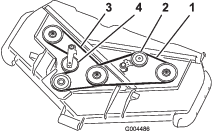
-
Using a breaker bar or similar tool, move the idler pulley for the bottom belt away from the bottom drive belt to release the belt tension and allow the belt to be slipped off the pulleys (Figure 79).
-
Route a new belt around the gearbox pulley, bottom spindle pulleys, and idler-pulley assembly as shown in Figure 79.
-
Route a new belt around the top spindle pulleys and idler-pulley assembly as shown in Figure 79.
-
Install the belt covers.
Controls System Maintenance
Adjusting the Control-Lever Neutral-Interlock Switch
-
Stop the machine, move the deck-lift switch fully into the NEUTRAL-LOCKED position, set the parking brake, and remove the ignition key.
-
Remove the bolts securing the front panel and remove the panel (Figure 80).
-
Loosen the 2 screws securing the interlock switch (Figure 81).
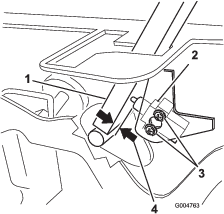
-
Holding the control lever against the frame, move the switch toward the lever until the distance between lever and switch body is 0.4 to 1 mm (0.015 to 0.045 inch ) as shown in Figure 81.
-
Secure the switch.
-
Repeat steps 3 to 5 for the other lever.
-
Install the front panel.
Adjusting the Control-Lever Neutral Return
If the motion-control levers do not align with the neutral slots when you release them from the reverse-drive position, adjustment is required. Adjust each lever, spring, and rod separately.
-
Disengage the PTO, move the control lever to the NEUTRAL-LOCKED position, and set the parking brake.
-
Move the throttle lever to the SLOW position, stop the engine, remove the key, and wait for all moving parts to stop before leaving the operating position.
-
Remove the bolts securing the front panel and remove the panel (Figure 82).
-
Move the control lever to the NEUTRAL position but not locked (Figure 84).
-
Pull the lever back until the clevis pin (on an arm above the pivot shaft) contacts the end of the slot (just beginning to put pressure on the spring) as shown in Figure 83.
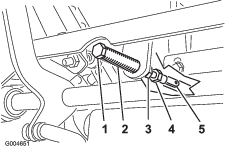
-
Check where the control lever is relative to notch in console (Figure 84).
Note: The control lever should be centered, allowing it to pivot outward to the NEUTRAL-LOCKED position.
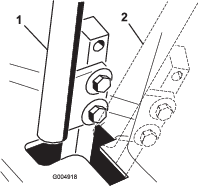
-
If adjustment is needed, loosen the nut and jam nut against the yoke (Figure 83).
-
Applying slight rearward pressure on the motion-control lever, turn the head of the adjustment bolt in the appropriate direction until the control lever is centered in the NEUTRAL-LOCKED position (Figure 83).
Note: Keeping rearward pressure on the lever keeps the pin at the end of the slot and allows the adjustment bolt to move the lever to the appropriate position.
-
Tighten the nut and jam nut (Figure 83).
-
Repeat steps 4 through 9 for the other control lever.
-
Install the front panel.
Adjusting the Traction Drive for Neutral
This adjustment must be made with drive wheels turning.
Danger
Mechanical or hydraulic jacks may fail to support the machine and cause a serious injury.
-
Use jack stands when supporting the machine.
-
Do not use hydraulic jacks.
Warning
The engine must be running to perform this adjustment. Contact with moving parts or hot surfaces may cause personal injury.
Keep hands, feet, face, clothing, and other body parts away from rotating parts, muffler, and other hot surfaces.
-
Raise the frame onto stable jack stands so that the drive wheels can rotate freely.
-
Slide the seat forward, unlatch it, and swing it up and forward.
-
Disconnect the electrical connector from the seat safety switch.
-
Temporarily install a jumper wire across the terminals in the wiring harness connector.
-
Start the engine, ensure that the throttle lever is midway between the FAST and SLOW positions, and release the parking brake.
Note: The motion-control levers must be in the NEUTRAL-LOCKED position while making any adjustments.
-
Adjust the pump-rod length on 1 side by rotating the hex shaft, in the appropriate direction, until the corresponding wheel is still or is slightly creeping in reverse (Figure 85).
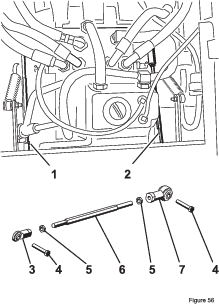
-
Move the motion-control lever forward and reverse, then back to neutral.
Note: The wheel must stop turning or slightly creep in reverse.
-
Move the throttle lever to the FAST position.
Note: Make sure that the wheel remains stopped or slightly creeps in reverse; adjust it if necessary.
-
Repeat steps 6 through 8 for the other side of the machine.
-
Tighten the jam nuts at the ball joints (Figure 83).
-
Move the throttle lever to the SLOW position and stop the engine.
-
Remove the jumper wire from the wire-harness connector and plug the connector into the seat switch.
Warning
The electrical system does not perform proper safety shutoff with jumper wire installed.
-
Remove jumper wire from wire-harness connector and plug the connector into the seat switch after adjustment.
-
Never operate this unit with jumper installed and seat switch bypassed.
-
-
Lower the seat into position.
-
Remove the jack stands.
Adjusting the Maximum Ground Speed
-
Disengage the PTO, move the motion-control levers to the NEUTRAL-LOCKED position, and set the parking brake.
-
Move the throttle lever to the SLOW position, stop the engine, remove the key, and wait for all moving parts to stop before leaving the operating position.
-
Remove the bolts securing the front panel and remove the panel (Figure 86).
-
Loosen the jam nut on the stop bolt for one of the control levers (Figure 87).
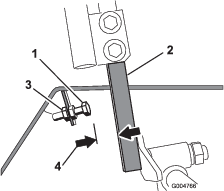
-
Thread the stop bolt all the way in (away from the control lever).
-
Push the control lever all the way forward until it stops and hold it there.
-
Thread the stop bolt out (toward the control lever) until there is a gap of 1.5 mm (0.060 inch) between the head of the stop bolt and the control lever.
-
Tighten the jam nut to secure the stop bolt in place.
-
Repeat steps 4 through 8 for the other control lever.
-
Install the front panel.
Note: If you wish to reduce the maximum machine speed, set the speed for both control levers as directed above, then back each stop bolt out an equal amount toward the control lever until you reach the maximum speed you desire (you likely need to test your adjustment several times). Ensure that the machine drives straight and does not turn when both control levers are pushed all the way forward. If the machine turns, the stop bolts are not evenly set and need to be adjusted further.
Adjusting the Tracking
-
Disengage the PTO, move the motion-control levers to the NEUTRAL-LOCKED position and set the parking brake.
-
Move the throttle lever to the SLOW position, stop the engine, remove the key, and wait for all moving parts to stop before leaving the operating position.
-
Loosen the bolts securing the control levers (Figure 88)
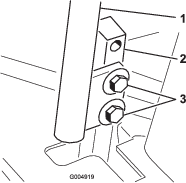
-
Have someone push the control-lever posts (not the control levers) all the way forward into the maximum speed position and hold them there.
-
Adjust the control levers so that they line up and tighten the bolts, securing the levers to the posts (Figure 89).

Hydraulic System Maintenance
The reservoir is filled at the factory with approximately 4.7 liters (5 quarts) of high quality tractor transmission/hydraulic fluid. The recommended replacement fluid is as follows:
| Toro Premium Transmission/Hydraulic Tractor Fluid (Available in 5 gallon pails or 55 gallon drums. See parts catalog or Toro distributor for part numbers.) |
Alternate fluids: If the Toro fluid is not available, Mobil® 424 hydraulic fluid may be used.
Note: Toro will not assume responsibility for damage caused by improper substitutions.
Note: Many hydraulic fluids are almost colorless, making it difficult to spot leaks. A red dye additive for the hydraulic system oil is available in 20 ml (2/3 oz) bottles. One bottle is sufficient for 15-22 liters (4-6 gallons) of hydraulic oil. Order part number 44-2500 from your Authorized Toro Distributor.
Checking the Hydraulic System
| Maintenance Service Interval | Maintenance Procedure |
|---|---|
| Before each use or daily |
|
Check the level of the hydraulic fluid before the engine is first started and daily thereafter.
-
Position the machine on a level surface.
-
Place the controls in the NEUTRAL-LOCKED position and start the engine.
Note: Run engine at lowest possible RPM to purge the system of air. .
Important: Do not engage the PTO.
-
Raise the deck to extend lift cylinders, stop the engine, and remove the key.
-
Raise the seat to access the hydraulic fluid tank.
-
Remove the hydraulic fill cap from the filler neck (Figure 90).
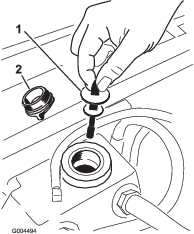
-
Remove the dipstick and wipe it with a clean rag (Figure 90).
-
Place the dipstick into the filler neck; then remove it and check the fluid level (Figure 90).
Note: If the fluid level is not within the notched area of the dipstick, add enough high-quality hydraulic fluid to raise level to within the notched area. Do not overfill.
-
Replace the dipstick and thread the fill cap finger-tight onto the filler neck.
-
Check all hoses and fittings for leaks.
Changing the Hydraulic Oil And Filter
| Maintenance Service Interval | Maintenance Procedure |
|---|---|
| After the first 200 hours |
|
| Every 800 hours |
|
-
Disengage the PTO, move the motion-control levers to the NEUTRAL-LOCKED position, and set the parking brake.
-
Move the throttle lever to the SLOW position, stop the engine, remove the key, and wait for all moving parts to stop before leaving the operating position.
-
Place a large pan under the hydraulic reservoir and transmission case and remove the plugs, draining all of the hydraulic fluid (Figure 91).
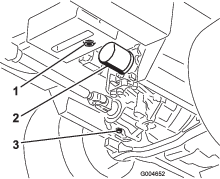
-
Clean the area around the hydraulic oil filter and remove it (Figure 91).
-
Immediately install a new hydraulic oil filter.
-
Install the hydraulic reservoir and transmission-case drain plugs.
-
Fill the reservoir to the proper level; refer to Checking the Hydraulic System.
-
Start the engine and check for oil leaks.
-
Allow the engine to run for about 5 minutes, then shut it off.
-
After 2 minutes, check the level of the hydraulic fluid; refer to Checking the Hydraulic System.
Mower Deck Maintenance
Warning
If you raise the machine using only a jack to support it while you work under the mower deck, the jack could tip, causing the mower deck to fall, crushing you or bystanders.
Always secure the machine with at least 2 jack stands when you raise the mower deck.
Caution
On the top of the mower deck are 2 links that connect them to the frame. Connected to these links are torsion spring that are under tension (Figure 92). If you disconnect the link, the stored energy in the torsion spring releases and could cause the links to move, damaging your hands or fingers.
Carefully remove the mower deck from the frame and secure the links before disconnecting them from the frame.
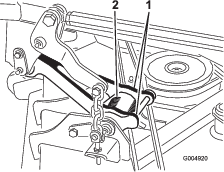
Servicing the Cutting Blades
Maintain sharp blades throughout the cutting season because sharp blades cut cleanly without tearing or shredding the grass blades. Tearing and shredding turns grass brown at the edges, which slows growth and increases the chance of disease.
Check the blades daily for sharpness, and for any wear or damage. Sharpen the blades as necessary. If a blade is damaged or worn, replace it immediately with a genuine Toro replacement blade.
Danger
A worn or damaged blade can break, and a piece of the blade could be thrown at you or bystanders, resulting in serious personal injury or death.
-
Inspect the blade periodically for wear or damage.
-
Replace a worn or damaged blade.
Inspect the blades every 8 hours.
Preparing to Service the Blades
-
Disengage the PTO, move the motion-control levers to the NEUTRAL-LOCKED position, and set the parking brake.
-
Move the throttle lever to the SLOW position, stop the engine, remove the key, and wait for all moving parts to stop before leaving the operating position.
Inspecting the Blades
| Maintenance Service Interval | Maintenance Procedure |
|---|---|
| Before each use or daily |
|
-
Inspect the cutting edges (Figure 93).
Note: If the edges are not sharp or have nicks, remove and sharpen the blades. Refer to Removing the Blades and Sharpening the Blades.
-
Inspect the blades, especially the curved area (Figure 93).
Note: If you notice any damage, wear, or a slot forming in this area, immediately install a new blade (Figure 93).
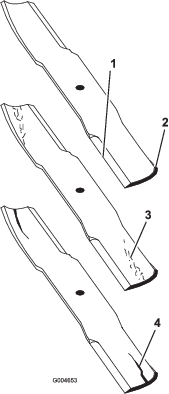
Danger
If you allow the blade to wear, a slot will form between the sail and flat part of the blade. Eventually a piece of the blade may break off and be thrown from under the housing, possibly resulting in serious injury to you or bystanders.
-
Inspect the blade periodically for wear or damage.
-
Never try to straighten a blade that is bent or weld a broken or cracked blade.
-
Replace a worn or damaged blade.
-
Checking for Bent Blades
-
Disengage the PTO, move the motion-control levers to the NEUTRAL-LOCKED position, and set the parking brake.
-
Move the throttle lever to the SLOW position, stop the engine, remove the key, and wait for all moving parts to stop before leaving the operating position.
-
Rotate the blades until the ends face forward and backward (Figure 94).
Note: Measure from a level surface to the cutting edge, position A, of the blades (Figure 94). Note this dimension.
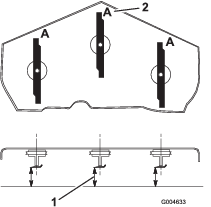
-
Rotate the opposite ends of the blades forward.
-
Measure from a level surface to the cutting edge of the blades at the same position as in step 3 above.
Note: The difference between the dimensions obtained in steps 3 and 4 must not exceed 3 mm (1/8 inch). If this dimension exceeds 3 mm (1/8 inch), the blade is bent and must be replaced; refer to Removing the Blades and Installing the Blades.
Warning
A blade that is bent or damaged could break apart and could seriously injure or kill you or bystanders.
-
Always replace bent or damaged blade with a new blade.
-
Never file or create sharp notches in the edges or surfaces of blade.
-
Removing the Blades
Blades must be replaced if a solid object is hit, if the blade is out of balance or is bent. To ensure optimum performance and continued safety conformance of the machine, use genuine Toro replacement blades. Replacement blades made by other manufacturers may result in non-conformance with safety standards.
Warning
Contact with a sharp blade can cause serious injury.
Wear gloves or wrap sharp edges of the blade with a rag.
-
Hold the blade end using a rag or thickly-padded glove.
-
Remove the blade bolt, anti-scalp plate, and blade from the spindle shaft (Figure 97).
Sharpening the Blades
Warning
When sharpening a blade, pieces of the blade could be thrown and cause serious injury.
Wear proper eye protection when sharpening blades.
-
Sharpen the cutting edge at both ends of the blade (Figure 95).
Note: Maintain the original angle. The blade retains its balance if the same amount of material is removed from both cutting edges.
-
Check the balance of the blade by putting it on a blade balancer (Figure 96).
Note: If the blade stays in a horizontal position, the blade is balanced and can be used. If the blade is not balanced, file some metal off the end of the sail area only (Figure 97). Repeat this procedure until the blade is balanced.

Installing the Blades
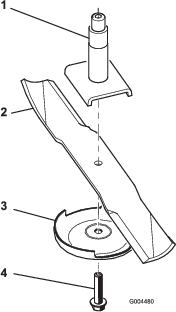
Correcting the Mower Deck Mismatch
If the cut is uneven across the mower swath, correct it as follows:
-
Position the machine on a level surface.
-
Set the cutting unit to the desired height-of-cut, move the throttle lever to the SLOW position, stop the engine, set the parking brake, and remove the ignition key.
-
Check and adjust the front and rear tire pressure; refer to Checking the Tire Pressure.
-
Check for bent blades.
-
Remove the covers from the top of the cutting units.
-
Rotate the blade on each spindle until the ends face forward and backward.
-
Measure from the floor to the front tip of the cutting edge.
-
Adjust the jam nuts securing the deck yokes/chains to the mower deck until the mower deck is level.
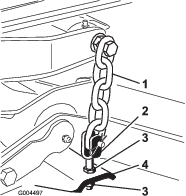
Adjusting the Blade Pitch
Blade pitch is the difference in height-of-cut from the front of the blade plane to the back of the blade plane. Use a blade pitch of approximately 8 mm (5/16 inch). The back of the blade plane should be 8 mm (5/16 inch) higher than the front.
-
Position the machine on a level surface.
-
Set the cutting unit to the desired height-of-cut, move the throttle lever to the SLOW position, stop the engine, set the parking brake, and remove the ignition key.
-
Rotate the center blade so that it points straight forward.
-
Using a short ruler, measure from the floor to the front tip of the blade.
-
Rotate the same blade tip to the rear and measure from the floor to the tip of the blade at the rear of the deck.
-
Subtract the front dimension from the rear dimension to calculate the blade pitch.
-
Adjust the jam nuts securing the rear deck yokes/chains to raise the rear of the deck so that the blade pitch is set to 8 mm (5/16 inch) (Figure 99).
Replacing the Grass Deflector
Warning
An uncovered discharge opening could allow the lawn mower to throw objects at you or bystanders and result in serious injury. Also, contact with the blade could occur.
-
Never operate the machine without a mulch kit or grass deflector installed.
-
Make sure that the grass deflector is in the down position.
-
Lower the cutting unit to the shop floor, move the throttle lever to the SLOW position, stop the engine, set the parking brake, and remove the ignition key.
-
Remove the locknut, bolt, spring, and spacer holding the deflector to the pivot brackets (Figure 100).
Note: Remove damaged or worn grass deflector.
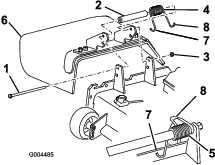
-
Place the spacer and spring between the replacement grass-deflector brackets (Figure 100).
Note: Place the left J-hook end of the spring behind the deck edge.
Note: Make sure that the left J-hook end of the spring is installed behind the deck edge before installing the bolt as shown in Figure 100.
-
Install the bolt and nut.
Note: Place the right J-hook end of the spring around the grass deflector (Figure 100).
Important: The grass deflector must be able to lower down into position. Lift the deflector up to test that it lowers into the full down position.
Cleaning
Cleaning Under the Mower
| Maintenance Service Interval | Maintenance Procedure |
|---|---|
| Before each use or daily |
|
Remove the grass buildup under the mower daily.
-
Disengage the PTO, move the motion-control levers to the NEUTRAL-LOCKED position, and set the parking brake.
-
Move the throttle lever to the SLOW position, stop the engine, remove the key, and wait for all moving parts to stop before leaving the operating position.
-
Raise the mower to the TRANSPORT position.
-
Raise the front of the machine by using jack stands.
-
Thoroughly clean the underside of the mower with water.
Disposing of Waste
Engine oil, batteries, hydraulic oil, and engine coolant are pollutants. Dispose of these according to your state and local regulations.
Storage
Machine
-
Thoroughly clean the machine, deck, and engine, paying special attention to these areas:
-
Radiator and radiator screen
-
Underneath the deck
-
Under the deck belt covers
-
Counterbalance springs
-
PTO-shaft assembly
-
All grease fittings and pivot points
-
Remove the control panel and clean out inside of the control box
-
Beneath the seat plate and top of the transmission
-
-
Check and adjust front and rear tractor tire pressure; refer to Checking the Tire Pressure.
-
Remove, sharpen, and balance the mower blades. Install the blades and torque the blade fasteners to 115-149 N-m (85-110 ft-lb).
-
Check all fasteners for looseness and tighten them as necessary. Especially torque the 6 bolts securing the mower deck frame to the traction unit (Figure 101) to 359 N-m (265 ft-lb).
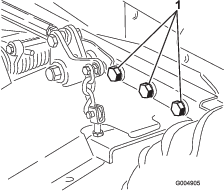
-
Grease or oil all grease fittings, pivot points, and transmission bypass-valve pins. Wipe off any excess lubricant.
-
Lightly sand and use touch-up paint on painted areas that are scratched, chipped or rusted. Repair any dents in the metal body.
-
Service the battery and cables as follows:
-
Remove the battery terminals from the battery posts.
-
Clean the battery, terminals, and posts with a wire brush and baking soda solution.
-
Coat the cable terminals and battery posts with Grafo 112X skin-over grease (Toro Part No. 505-47) or petroleum jelly to prevent corrosion.
-
Slowly recharge the battery for 24 hours every 60 days to prevent lead sulfation of the battery.
-
Engine
-
Drain the engine oil from the oil pan and replace the drain plug.
-
Replace the oil filter.
-
Fill the engine with the recommended motor oil.
-
Start the engine and run it at idle speed for 2 minutes.
-
Drain the fuel from the fuel tank, fuel lines, pump, filter, and separator. Flush the fuel tank with clean diesel fuel and connect all fuel lines.
-
Thoroughly clean and service the air cleaner assembly.
-
Seal the air cleaner inlet and the exhaust outlet with weather-proof masking tape.
-
Check the oil filler cap and fuel-tank cap to ensure that they are securely in place.
Schematics
Hydraulic Schematic