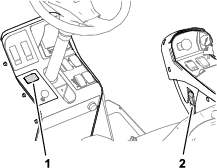
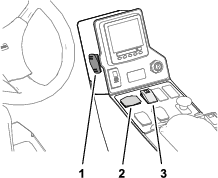
Introduction

If you are installing the North American Cab Light Kit on a 2017 and later Groundsmaster 4010 or 4110 Series rotary mowers with a cab, you will need to install the optional Light Adapter Kit.

Installation

Preparing the Machine

Caution

If you leave the key in the ignition switch, someone could accidently start the engine and seriously injure you or bystanders.

Remove the key from the ignition switch before you do any maintenance.

  1. Park the machine on a level surface.

  2. Engage the parking brake.

  3. Shut off the engine and remove the key.

Disconnecting the Battery

Disconnecting the Battery

Groundsmaster 4010 Series or Groundsmaster 4110 Series Machines
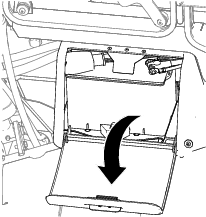
  1. Open the battery compartment door (Figure 1).

    g205862
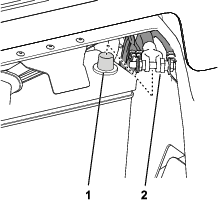
  2. Disconnect the negative (-) battery cable from the battery (Figure 2).

    Warning

    Electrical sparks can cause the battery gasses to explode, resulting in personal injury.

    Incorrect battery cable routing could damage the machine and cables, causing sparks.

    • Always disconnect the negative (black) battery cable before disconnecting the positive (red) cable.

    • Always connect the positive (red) battery cable before connecting the negative (black) cable.

    Warning

    Battery terminals or metal tools could short against metal components, causing sparks.

    • When removing or installing the battery, do not allow the battery terminals to touch any metal parts of the machine.

    • Do not allow metal tools to short between the battery terminals and metal parts of the machine.

    • Always keep the battery strap in place to protect and secure the battery.

    g205863

Disconnecting the Battery

Groundsmaster 5900 Series Machines
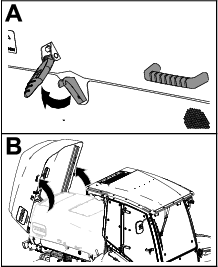
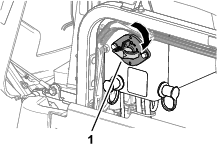
  1. Unlatch the hood latches at both sides of the hood (Figure 3).

    g210583
  2. Open the hood (Figure 3).

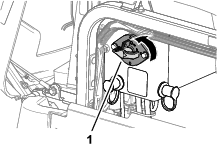
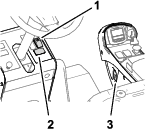
  3. Rotate the battery disconnect switch to the OFF position (Figure 4).

    g210582

Installing the Switches for the Turn Signal and Hazard

Parts needed for this procedure:

Rocker switch (3-position—turn-signal switch)1
Rocker switch (2-position—hazard switch with a hazard-warning symbol)1

Installing the Turn Signal and Hazard Switches

Groundsmaster 4010 Series or Groundsmaster 4110 Series Machines
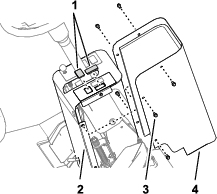
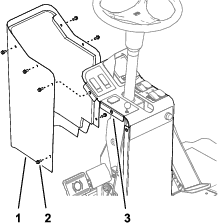
  1. Remove the 6 flange-head screws (1/4 x 5/8 inch) that secure the cover to the steering tower, and remove the cover (Figure 5).

    g210721
  2. From below the panel of the steering tower, remove the 2 dash plugs from the panel of the steering tower as shown in Figure 5.

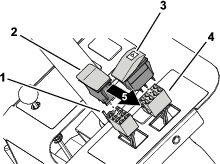
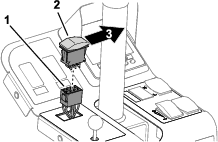
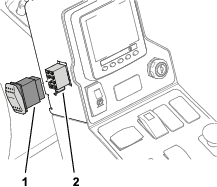
  3. Plug the rocker switch (2-position—hazard switch with a hazard-warning symbol) into the 8-socket connector of the platform harness labeled (Figure 6).

    g210723
  4. Align the hazard symbol forward, and insert the switch into the opening in the panel of the steering tower until the switch snaps securely into the panel (Figure 6).

  5. Plug the rocker switch (3 position—turn-signal switch) into the other 8-socket connector of the platform harness (Figure 6).

  6. Align the tail of the turn-signal switch to the right side of the machine, and insert the switch into the opening in the panel of the steering tower until the switch snaps securely into the panel (Figure 6).

  7. Secure the wire harness as needed with a cable tie.

    Note: When routing the wires, ensure that the operation of the tilt steering does not damage the harness or pull on the wires.

  8. Assemble the cover to the steering tower with the 6 flange-head screws (1/4 x 5/8 inch) that you removed in step 1.

    g210722
  9. Torque the screws to 1017 to 1243 N∙cm (90 to 110 in-lb).

Installing the Turn Signal

Groundsmaster 5910 Models 31599 or 31599N

Note: The Groundsmaster 5910 Models 31599 or 31599N do not have a hazard switch.

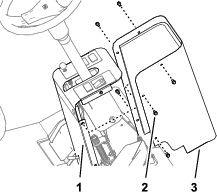
  1. Remove the 6 flange-head screws (1/4 x 5/8 inch) that secure the cover to the steering tower, and remove the cover (Figure 8).

    g210795
  2. From below the panel of the steering tower, remove the dash plug for the steering switch from the steering tower as shown in Figure 8.

  3. Plug the rocker switch (3 position—turn-signal switch) into the 8-socket connector of the platform harness (Figure 9).

    g210797
  4. Align the tail of the turn-signal switch to the right side of the machine, and insert the switch into the opening in the panel of the steering tower until the switch snaps securely into the panel (Figure 9).

  5. Secure the wire harness as needed with a cable tie.

    Note: When routing the wires, ensure that the operation of the tilt steering does not damage the harness or pull on the wires.

  6. Assemble the cover to the steering tower with the 6 flange-head screws (1/4 x 5/8 inch) that you removed in step 1.

    g210796

Installing the Turn Signal and Hazard Switches

Groundsmaster 5910 Model 31599 or 31599N
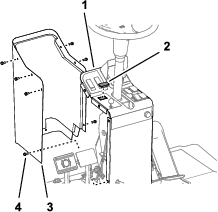
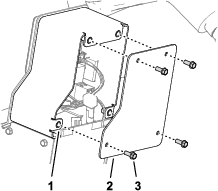
  1. Remove the 4 washer-head screws (1/4 x 5/8 inch) that secure the front cover to the console arm, and remove the cover (Figure 11).

    g210849
  2. From inside the console arm, remove the dash plugs for the hazard switch and the turn-signal switch from the console arm as shown in Figure 12.

    g210850
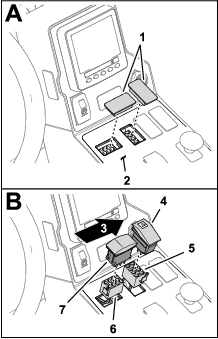
  3. Plug the rocker switch (2-position—hazard switch with a hazard-warning symbol) into the 8-socket connector of the platform harness labeled (Figure 12).

  4. Align the hazard symbol forward, and insert the switch into the opening in the dash panel until the switch snaps securely into the panel (Figure 12).

  5. Plug the rocker switch (3 position—turn-signal switch) into the 8-socket connector of the platform harness labeled (Figure 12).

  6. Align the tail of the turn-signal switch to the right side of the machine, and insert the switch into the opening in the dash panel until the switch snaps securely into the panel (Figure 12).

  7. Secure the wire harness as needed with a cable tie.

    Note: When routing the wires, ensure that the operation of the tilt steering does not damage the harness or pull on the wires.

    Note: You will install the front cover of the control arm in Installing the Light Switch.

Installing the Switch for the Headlight

Parts needed for this procedure:

Rocker switch (2 position—light switch)1

Installing the Light Switch

Groundsmaster 4010 Series Machines, Groundsmaster 4110 Series Machines, or Groundsmaster 5910 Models 31599 or 31599N
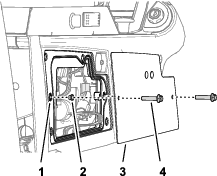
  1. Remove the 2 flange-head screw (1/4 x 1-1/4 inches) and 2 spacers that secure the cover plate to the panel frame of the control arm (Figure 13).

    g210749
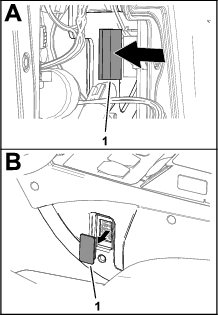
  2. From inside the control arm, press the dash plug out of the hole in the side of the control panel (Figure 14).

    g210750
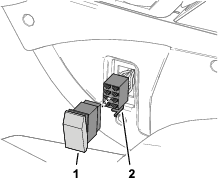
  3. Plug the rocker switch (2 position—light switch) into the 8-socket connector (Figure 15) of the platform harness labeled .

    g210748
  4. Install the cover and plate to the right side of the control arm with the 2 flange-head screw (1/4 x 1-1/4 inches) and 2 spacers that you removed in step 1, and tighten the screws by hand.

Installing the Light Switch

Groundsmaster 5910 Models 31699 or 31699N
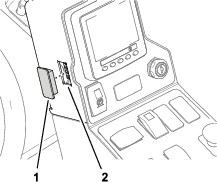
  1. From inside the control arm, press the dash plug out of the hole in the side of the arm (Figure 16).

    g210848
  2. Plug the rocker switch (2 position—light switch) into the 8-socket connector (Figure 17) of the platform harness labeled .

    g210847
  3. Assemble the front cover with the 4 washer-head screws (1/4 x 5/8 inch) that you removed in step 1 of Installing the Turn Signal and Hazard Switches for Models 31699 and 31699N, and tighten the screws by hand (Figure 18).

    g210849

Installing the Headlights

Parts needed for this procedure:

Light bracket (left)1
Flange-head bolt (3/8 x 1 inch)4
Flange locknut (3/8 inch)4
Washer (3/8 inch)6
Flange nut (1/4 inch)2
Flange-head bolt (1/4 x 5/8 inch)2
Flange locknut (1/4 inch)2
Light bracket (right)1
Mounting bracket2
Headlight assembly 2

Installing the Head Light Bracket

Groundsmaster 4110 Series Machines
  1. Align the holes of the left light bracket with the holes of the left headlight mount as shown in Figure 19.

    g210931
  2. Assemble the light bracket to the headlight mount (Figure 19) with a flange-head bolt (3/8 x 1 inch), 2 washers (3/8 inch), a flange locknut (3/8 inch), a flange-head bolt (1/4 x 5/8 inch), and a flange locknut (1/4 inch).

  3. Repeat steps 1 and 2 for the light bracket at the other side of the machine.

  4. Torque the flange-head bolt (3/8 x 1 inch) and flange locknut (3/8 inch) to 37 to 45 N∙m (27 to 33 ft-lb).

  5. Torque the flange-head bolt (1/4 x 5/8 inch) and a flange locknut (1/4 inch) to 1017 to 1243 N∙cm (90 to 110 in-lb).

Installing the Headlights

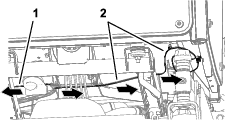
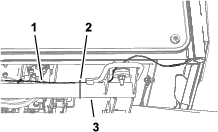
  1. Route the branches of the platform harness across the front of the machine (Figure 20).

    g210947
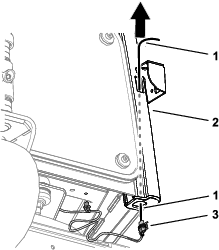
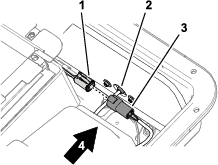
  2. Align a piece of wire through the forward opening in the front pillar and out the bottom (Figure 21).

    g210929
  3. Attach the wire to the 2–socket connector for the headlight branch of the platform harness (Figure 21).

  4. Pull the headlight branch of the platform harness up through the pillar (Figure 21).

  5. Connect the short harness to the 2-socket connector of the headlight connector of the platform harness.

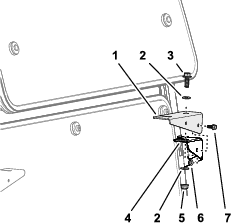
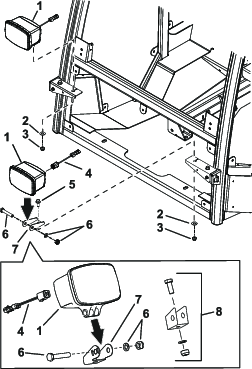
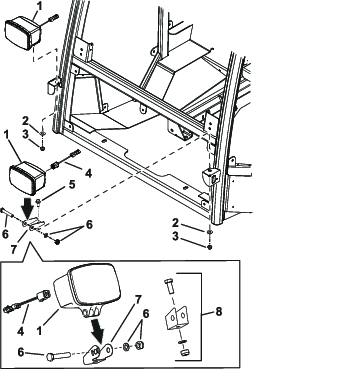
  6. Remove the hardware from the light (Figure 22 or Figure 23).

  7. Discared the existing bracket and hardware shown in Figure 22 and Figure 23.

  8. Install the new bracket with the hardware from the light (Figure 22 and Figure 23).

  9. Install the lights to the machine as shown in Figure 22 and Figure 23.

    g309873
    g309872
  10. Install the short harness into the back of the light (Figure 22 or Figure 23).

  11. Secure the headlight branch of the platform harness as follows:

    • For Groundsmaster 4010 and 4110 Series machines, secure the headlight branch of the platform harness to the cross tune with a cable tie as shown in Figure 24.

      g210930
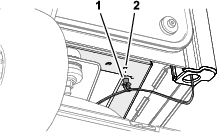
    • For Groundsmaster 5910 Series machines, insert the push-in connector for the headlight branch of the platform harness into the hole in the front support (Figure 25).

      g210933

Installing the Turn Signal and Warning Lights

Parts needed for this procedure:

Gasket (front light—oval)2
Front turn-signal and warning light2
Hex-head screw (#10 x 1-3/8 inches)4
Washer (#10)4
Gasket (rear light—rectangular)2
Taillight2
Nut (5 mm)4
Washer (5 mm)4

Removing the Cab Roof

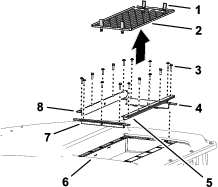
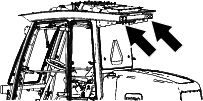
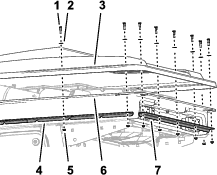
  1. Open the 4 latches that secure the screen to the roof of the cab, and remove the screen (Figure 26).

    g211212
  2. Remove the 16 flange-head screws (1/4 x 1 inch) that secure the front, left, right, and back seals to the roof and liner of the cab (Figure 26).

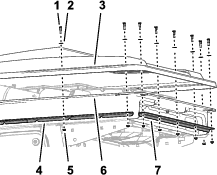
  3. Remove the 22 shoulder bolts, 22 washers (5/16 x 5/8 inch), 22 flange locknut (1/4 inch) that secure the flange of the roof, flange of the headliner, side cab straps, and end cab straps (Figure 27).

g211209

Installing the Front Turn Signal and Warning Lights

g211202
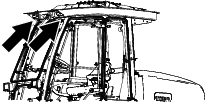
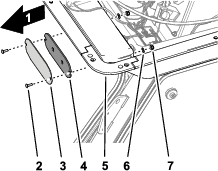
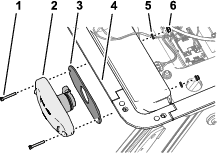
  1. At the front of the headliner, remove the 2 carriage bolts (#10 x 5/8 inch), 2 washers (#10), and 2 flange locknuts (#10) that secure the front light cover and seal to the headliner, and remove the cover and seal (Figure 33).

    Note: Ensure that the surface of the headliner under the seal is clean.

    g211210
  2. Align the oval gasket over the connector for the front turn-signal and warning light with the backing of the adhesive side of the oval gasket away from the body of the light (Figure 34).

    g211204
  3. Remove the backing gasket.

  4. Align the holes in the front turn-signal and warning light and gasket with the holes in the headliner (Figure 35).

  5. Secure the front turn-signal and warning light to the headliner with 2 hex-head screws (#10 x 1-3/8 inches), 2 washers (#10), and 2 flange locknuts (#10), and tighten the screws and nuts by hand (Figure 35).

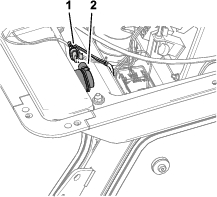
  6. Plug the 3-socket connector of the cab wire harness labeled (if you are installing the left turn-signal and warning light) or (if you are installing the right turn-signal and warning light) into the 3-pin connector of the turn-signal and warning light (Figure 31).

    g211206
  7. Repeat steps 1 through 6 for the front turn-signal and warning light at the other side of the machine.

Installing the Taillights

g211208
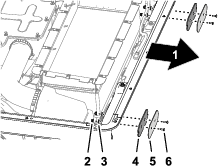
  1. At the back of the headliner, remove the 2 carriage bolts (#10 x 5/8 inch), 2 washers (#10), and 2 flange locknut (#10) that secure the rear light cover and seal to the headliner, and remove the cover and seal (Figure 33).

    Note: Ensure that the surface of the headliner under the seal is clean.

    g211211
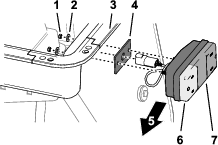
  2. Remove the backing from the adhesive side of the rectangular gasket for the rear taillight.

  3. Align the adhesive side of the gasket to the headliner, align the holes of the gasket to the holes in the headliner, and apply the gasket to the headliner. (Figure 34).

    g211205
  4. Align the taillight to the headliner with the amber lens of the light outward (Figure 47).

  5. Route the harness connector of the taillight harness through the large hole in the gasket and the studs of the taillight through the small holes (Figure 34).

  6. Secure the taillight to the headliner with 2 nuts (5 mm) and 2 washers (5 mm), and tighten the nuts by hand (Figure 34).

  7. Plug the 4-pin connector of the taillight harness into the 4-socket connector of the cab wire harness (Figure 35) labeled (if you are installing the left taillight) or (if you are installing the right taillight) .

  8. Repeat steps 1 through 7 for the taillight at the other side of the machine.

g211207

Mounting the Reflective Tape

Parts needed for this procedure:

Red reflective tape 4
Yellow reflective tape2
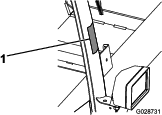
  1. Apply the yellow reflective tape as shown in Figure 36.

    Note: Apply the yellow reflective tape on the corner of the frame so that it wraps from the front to the side.

    g028731
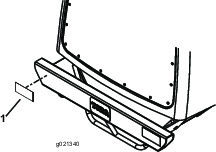
  2. Apply 2 strips of red reflective tape to each end of the bumper as shown in Figure 37.

    g022340
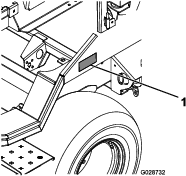
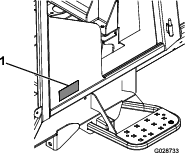
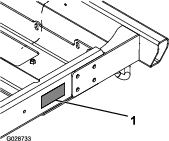
  3. Apply the remaining 2 strips of red reflective tape according to your model, as shown in Figure 38, Figure 39, or Figure 40.

    g028732
    g028733
    g028734

Installing the Fuse

Groundsmaster 4010 and 4110 Series Machines
  1. Remove the 2 socket-head bolts (1/4 x 3/4 inch) and 2 washers (1/4 inch) that secure the controller cover for the power center to the relay mount, and remove the cover (Figure 41).

    g211643
  2. Insert the fuse (15 A) into the slot at column in row of the fuse block as shown in Figure 42.

  3. Remove the 7.5 A fuse from the slot at column in row and install the fuse (10 A) in that slot as shown in Figure 42.

    g246740
  4. Align the holes in the controller cover with the holes in the relay mount (Figure 41).

  5. Assemble the controller cover to the relay mount with the 2 socket-head bolts (1/4 x 3/4 inch) and 2 washers (1/4 inch) that you removed in step 1 (Figure 41).

Connecting the Battery

Connecting the Battery

Groundsmaster 4100 Series Machines
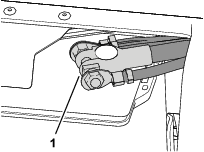
  1. Assemble the terminal of the negative battery cable to the negative post of the battery, and tighten the nut of the terminal by hand (Figure 43).

    g205861
  2. Test the lights of the kit.

  3. Close the battery compartment door securely.

Connecting the Battery

Groundsmaster 5900 Series Machines
  1. Rotate the battery disconnect switch to the ON position (Figure 44).

    g210584
  2. Test the lights of the kit.

  3. Close the hood and latch it.

Finishing Installing the Kit

Checking the Lights

  1. Insert the key into the ignition switch and rotate it to the RUN position.

  2. Perform the following operational checks of the installed lights:

    ModelsHeadlightsHazard SignalLeft-Turn SignalRight-Turn Signal
    *GM 4010 and 4110 SeriesXXXX
    (with hazard switch ON)(with hazard switch ON)
    GM 5910 Models 31599 or 31599NXXXX
    (with hazard switch ON)(with hazard switch ON)
    GM 5910 Models 31699 or 31699NXOperates with the headlights(with headlight switch ON)(with headlight switch ON)
    *GM = Groundsmaster
  3. Set the headlight switch to the ON position.

Installing the Cab Roof

  1. Align the holes in the flange of the roof with the holes in the flange of the headliner (Figure 45).

    g211203
  2. Assemble the flange of the roof to the flange of the headliner (Figure 45) with the 22 shoulder bolts, 22 washers (5/16 x 5/8 inch), 22 flange locknut (1/4 inch) that you removed in step 3 of Removing the Cab Roof.

  3. Torque the shoulder bolts and nuts to 1017 to 1243 N∙cm (90 to 110 in-lb).

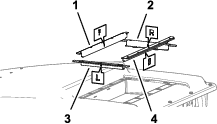
  4. Align the front seal, right seal, left seal, and back seal to the roof and head liner as shown in Figure 36.

    g211201
  5. Assemble the seals to the roof and head liner with the 16 flange-head screws (1/4 x 1 inch) that you removed in step 2 of Removing the Cab Roof.

    g211212
  6. Torque the flange-head screws to 1017 to 1243 N∙cm (90 to 110 in-lb).

  7. Assemble the screen to the roof and head liner and secure the latches of the screen to the flanges of the right and left seals (Figure 36).

Operation

Controls

g211429
g211430

Light Switch

Press the light switch (Figure 48 or Figure 49 or Figure 50) to the ON position to illuminate the headlights.

Note: The headlights illuminates only if the ignition switch is in the RUN position.

g211431

Hazard Lights

Note: The hazard lights for Groundsmaster 5910 Models 31599 or 31599N operate when set the headlight switch to the ON position.

Operating the Hazard Switch

Groundsmaster 4010 Series Machines, Groundsmaster 4110 Series Machines, or Groundsmaster 5910 Model 31699 or 31699N

Press the hazard switch (Figure 48 or Figure 50) to the ON position to activate the flashing hazard lights.

Turn-Signal Switch

Note: For Groundsmaster 4010 Series machines, 30636; Groundsmaster 4110 Series machines, or Groundsmaster 5910 Model 31699 or 31699N, you must set the hazard switch to the ON position to use the turn signals.

Use the turn-signal switch (Figure 48, Figure 49, or Figure 50) to indicate your turn as follows:

  • Press down on the left side of the turn-signal switch to indicate a left turn.

  • Center the turn-signal switch position to shutoff the turn signal.

  • Press down on the right side of the turn-signal switch to indicate a right turn.

Maintenance

Replacing Fuses

Replacing the Fuse

Groundsmaster 4010 Series or Groundsmaster 4110 Series Machines
  1. Remove the 2 socket-head bolts (1/4 x 3/4 inch) and 2 washers (1/4 inch) that secure the controller cover for the power center to the relay mount, and remove the cover (Figure 51).
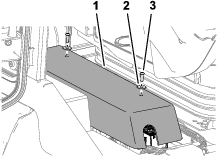
    g211643
  2. Replace the open (blown) fuse for the road light circuit, at the fuse-block slot at column in row or column in row (Figure 52).
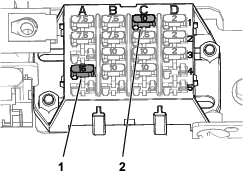
    g246740
  3. Assemble the controller cover to the relay mount with the 2 socket-head bolts (1/4 x 3/4 inch) and 2 washers (1/4 inch) that you removed in step 1 (Figure 51).

Replacing the Fuse

Groundsmaster 5910 Models 31599 or 31599N
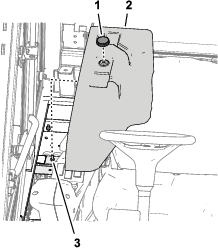
  1. Remove the knob that secures the cover for the power center to the stud on the power-center bracket, and remove the cover (Figure 53).
    g211645
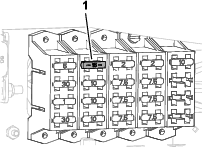
  2. Replace the open (blown) fuse for the road light circuit at fuse-block slot at column in row (Figure 54).
    g211644
  3. Align the hole in the cover for the power center with the stud on the power-center bracket (Figure 53).

  4. Secure the cover to the stud with the knob that you removed in step 1 (Figure 53).

Replacing the Fuses

Groundsmaster 5910 Models 31699 or 31699N
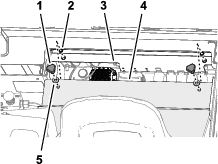
  1. Remove the 2 knobs and 2 washers that secure the cover to the flange of the electrical plate for the power center, and remove the cover (Figure 55).

    Note: Retain the 2 star washers for installation of the cover.
    g211646
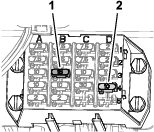
  2. Replace the open (blown) fuse for the following circuits:

    • Road lights fuse (15 A)—fuse-block slot at column in row

    • Hazard flasher fuse (10 A)—fuse-block slot at column in row
    g211647
  3. Align the holes in the cover to the holes in the flange of the electrical plate (Figure 55).

  4. Secure the cover to the power center with the 2 knobs, 2 washers, and 2 star washers that you removed in step 1 (Figure 55).