Safety

Safety and Instructional Decals

Graphic

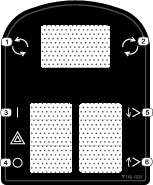
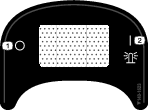
Safety decals and instructions are easily visible to the operator and are located near any area of potential danger. Replace any decal that is damaged or missing.

decal140-1531
decal140-1623

Installation

Preparing the Machine

  1. Park the machine on a level surface and lower the cutting units.

  2. Engage the parking brake.

  3. Shut off the engine and remove the key.

g351500

Disconnecting the Battery

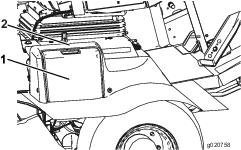
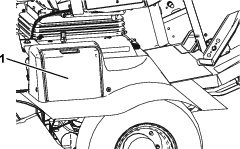
  1. Open the battery cover on the side of the shroud (Figure 2).

    Note: Press down on the flat surface above the battery cover to ease the removal of the cover.

    g020758
  2. Disconnect the negative (black) battery cable.

    g020451
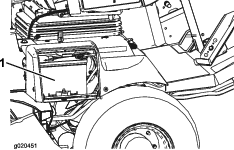
  3. Slip the rubber boot off the positive terminal, and disconnect the cable.

Installing the Reflector Decals

Parts needed for this procedure:

Reflector decal (front—yellow)2
Reflector decal (back—red)2

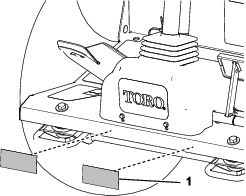
Installing the Front Reflector

Machines with a Roll Bar
  1. Clean the front edge of the platform with alcohol, and allow it to dry (Figure 4).

    g351079
  2. Remove the backing film from the yellow reflector decal.

  3. Align the reflector to the bottom edge of the platform as shown in Figure 4, and adhere it to the platform.

  4. Wrap the edge of the reflector over the top of the platform.

  5. Repeat steps 1 through 4 for the other yellow reflector decal.

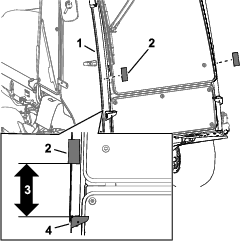
Installing the Front Reflector

Machines with a Cab
  1. Clean the front cab pillar above the headlight bracket with alcohol, and allow it to dry (Figure 5).

    g351129
  2. Remove the backing film yellow reflector decal.

  3. Align the decal 23.8 cm (9-3/8 inches) above the headlight bracket, and adhere the decal to the cab pillar (Figure 5).

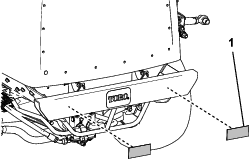
Installing the Rear Reflector

  1. Clean the face of the bumper with alcohol, and allow it to dry (Figure 6).

    g351117
  2. Remove the backing film from the red reflector decal.

  3. Align the reflector to the bumper as shown in Figure 6, and adhere it to the bumper.

  4. Repeat steps 1 through 3 for the other red reflector decal.

Assembling the Headlights to the Brackets

Parts needed for this procedure:

Right headlight—Part No. 140-6772 (light, mount, washer, and nut)1
Left headlight—Part No. 140-6773 (light, mount, washer, and nut)1
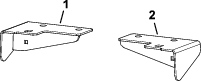
Light mount (machines with a roll bar)2
Left light mount (machines with a cab)1
Right light mount (machines with a cab)1
Flange-head capscrew (1/2 x 1 inch)2
Flange Locknut (1/2 inch)2
Cable tie2

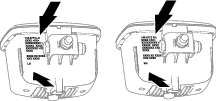
Identifying the Headlights

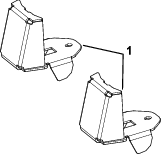
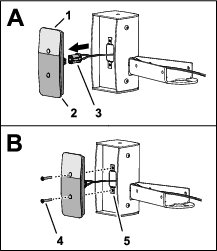
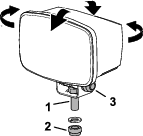
At the bracket side of the headlight, look at the information printed on the housing (Figure 7). Note the part number and the “RH” or “LH” information.

g350385

Identifying the Headlight Mounts

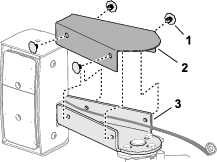
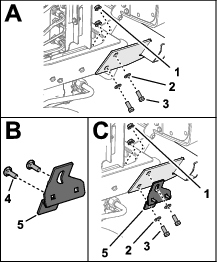
Use Figure 8 and Figure 9 to identify the headlight mounts for your machine.

g350863
g350864

Removing the Floor Panel Hardware

Machines with a Roll Bar

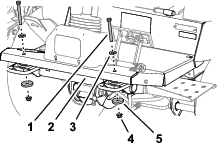
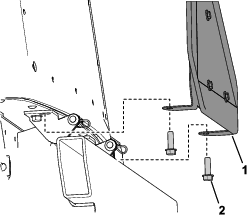
Remove the 2 capscrews and 2 thin washers, 2 thick washers, and 2 flange locknuts that secure the front of the floor panel to the frame of the machine (Figure 10).

Note: Retain the hardware.

g350418

Installing the Light Mounts to the Machine

Machines with a Roll Bar
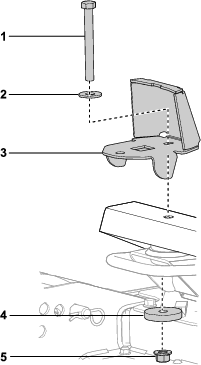
  1. Assemble the light mount to the floor panel and frame of the machine with the capscrew (1/2 x 4-1/2 inches), thin washer (1/2 x 1-3/8 inch), thick washer (1/2 x 2-1/4 x 3/8 inch), and flange locknut (1/2 inch) that you removed in Removing the Floor Panel Hardware.

    g350530
  2. Torque locknut and capscrew and locknut to 91 to 113 N∙m (67 to 83 ft-lb).

  3. Repeat steps 1 and 2 for the light mount at the other side of the machine.

Assembling the Headlights

Machines with a Cab

Important: Ensure that you assemble the headlight marked left and the left light mount, and the headlight marked right and the right light mount.

  1. If assembled, remove the locknut (12 mm) and lock washer (12 mm) from the capscrew in the headlight bracket.

  2. Align the light to the light mount as follows:

    • Groundsmaster 4010 Machines: Use the outside light-mount hole.

    • Groundsmaster 4110 Machines: Use the inside light-mount hole.

    g350532
  3. Assemble the capscrew (12 mm) to the light mount (Figure 12) with the locknut (12 mm) and lock washer (12 mm).

  4. Tighten the locknut and capscrew.

  5. Repeat steps 1 through 4 for the headlight and light mount for the other side of the machine.

Installing the Headlights

Machines with a Roll Bar

Important: Ensure that you assemble the headlight marked left at the left side of the machine, and the headlight marked right at the right side of the machine.

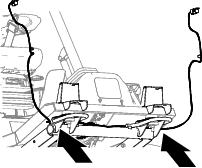
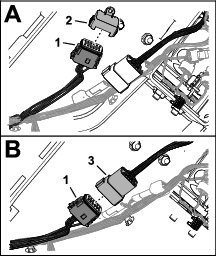
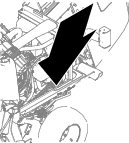
  1. Remove the cable tie securing the 6-socket connector labeled and the 6-socket connector labeled of the machine wire harness to the chassis of the machine (Figure 13).

    g350877
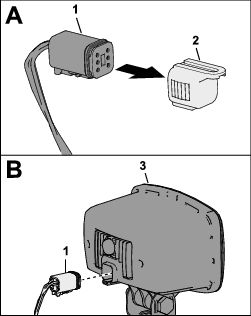
  2. Remove the cap from the 6-socket connector labeled or the 6-socket connector labeled of the machine wire harness, and plug the connector into the headlight (Figure 14).

    g350820
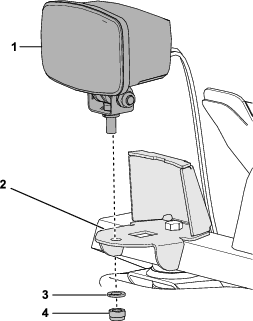
  3. If assembled, remove the locknut (12 mm) and lock washer (12 mm) from the capscrew in the headlight bracket.

  4. Assemble the capscrew (12 mm) to the light mount (Figure 15) with the locknut (12 mm) and lock washer (12 mm).

    g350531
  5. Tighten the locknut and capscrew.

  6. Bundle the excess wire harness and secure it to the chassis with a cable tie.

  7. Repeat steps 2 through 5 for the other headlight at the other side of the machine.

Installing the Headlights and Light Mounts

Machines with a Cab
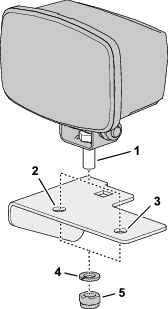
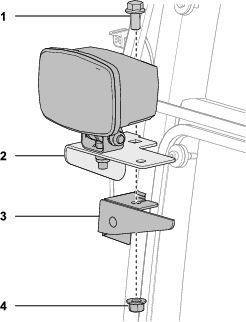
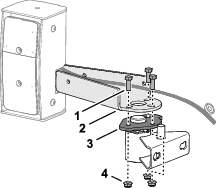
  1. Assemble the headlight and light mount to the headlight bracket (Figure 16) with a flange-head capscrew (1/2 x 1 inch) and flange locknut (1/2 inch).

    g350533
  2. Torque locknut and capscrew and locknut to 91 to 113 N∙m (67 to 83 ft-lb).

  3. Repeat steps 1 and 2 for the other headlight and light mount at the other side of the machine.

  4. Remove the cap from the 6-socket connector labeled or the 6-socket connector labeled of the machine wire harness, and plug the connector into the headlight (Figure 17).

    g350820
  5. Repeat step 4 for the other headlight at the other side of the machine.

Installing the Control Console

Parts needed for this procedure:

Console harness1
Cap plug1
Fuse mount plate1
Clip nut (#10)1
Flasher1
Flange head screw (#10 x 3/8 inch)1
Cable tie1
Bracket mount2
Clip nut (1/4 inch)8
Switch mount1
Multi-function switch1
Switch clip (thick)1
Switch clip (thin)1
Switch plug3
Rocker switch1
Knob2
Fuse cover1
Bolt retainer2
Carriage bolt (1/4 x 2 inches)4
Flange locknuts4
Cable ties2
Push-in fastener2
Flange-heads screw (1/4 x 3/4 inch)4

Installing the Console Harness Connector Plug

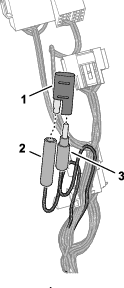
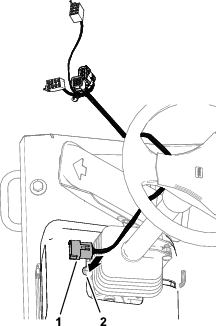
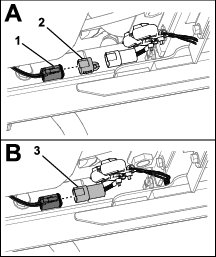
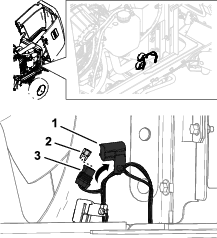
  1. Disconnect the single-pin connector from the single-socket connector labeled (Figure 18).

    g350773
  2. Plug the single-pin connector and the single-socket connector into the cap plug (Figure 18).

Preparing the Steering Cover and Routing the Control Harness

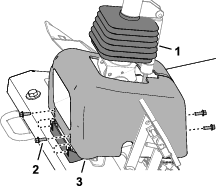
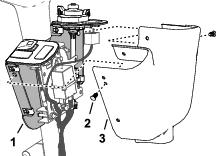
  1. Remove the boot from the steering cover, and slide the boot up (Figure 19).

    g350969
  2. Remove the 4 flange-head screws that secure the steering cover to the cover mounts, and lift the cover (Figure 19).

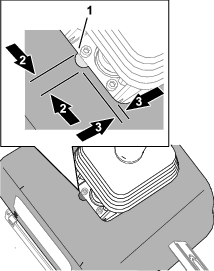
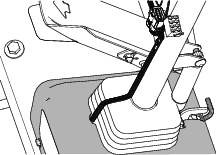
  3. Grind a notch in the steering cover as show in Figure 20.

    g350968
  4. Align the 12-pin connector end of the control harness through notch in the steering cover (Figure 21).

    g350970
  5. Assemble the steering cover to the cover mounts with the 4 flange-head screws.

  6. Pull the boot down and assemble the bottom of it into the steering cover (Figure 22).

    g350967

Assembling the Fuse Mount Plate

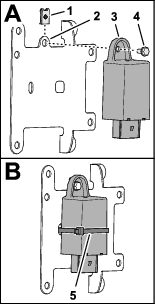
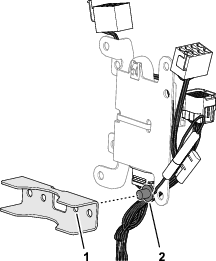
  1. Assemble the clip nut (#10) onto the fuse mount plate (Figure 23).

    g350763
  2. Assemble the flasher to the mount plate (Figure 23) with a flange head screw (#10 x 3/8 inch).

  3. Secure the flasher to the mount plate with a cable tie (Figure 23).

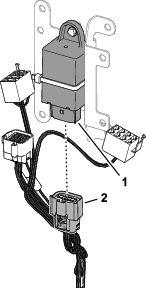
  4. Plug the 12-socket connector of the console harness into the 12-pin connector of the flasher (Figure 24).

    g350765
  5. Insert push-in anchor of the console harness into the 6.4 mm (1/4 inch) hole in the bracket mount (Figure 25).

    g350766

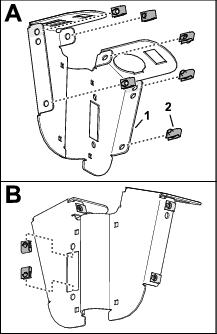
Assembling the Switch Mount

  1. Assemble the 8 clip nuts (1/4 inch) to the switch mount as shown in Figure 26.

    g350767
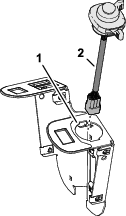
  2. Insert the multi-function switch into the 100 mm (2 inch) hole in the switch mount as shown in Figure 27.

    g350769
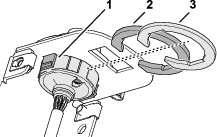
  3. Secure the multi-function switch to the switch mount with the thick and thin switch clips (Figure 28).

    g350778
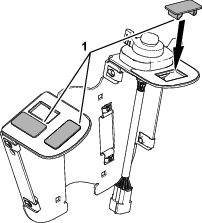
  4. Insert the 3 switch plugs into the switch mount as shown in Figure 29.

    g350770
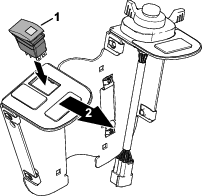
  5. Align the rocker switch to the switch mount with the lens of the light to the front of the switch plate (Figure 30).

    g350768
  6. Assemble the 2 knobs into the fuse cover, and secure the knobs with 2 bolt retainers (Figure 31).

    g350764
  7. Assemble the fuse cover to the switch plate, and tighten the knobs (Figure 31).

Installing the Switch Plate to the Steering Column

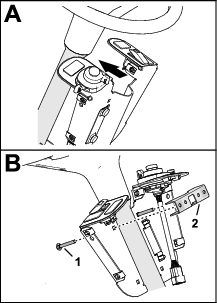
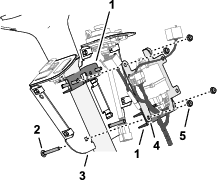
  1. Align the switch plate to the rearward side or the steering column (Figure 33).

    g350762
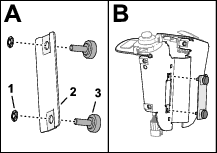
  2. At the upper 6.4 mm (1/4 inch) holes, assemble 2 carriage bolts bolt (1/4 x 2 inches) through the switch plate and the other bracket mount (Figure 32).

  3. Assemble the fuse mount plate to the upper bracket mount and carriage bolts (Figure 33) with 2 flange locknuts (1/4 inch).

    g350772
  4. At the lower 6.4 mm (1/4 inch) holes, assemble 2 carriage bolts bolt (1/4 x 2 inches) through the switch plate, bracket mount, and fuse mount plate (Figure 33) with 2 carriage bolts (1/4 x 2 inches) and 2 flange locknuts (1/4 inch).

  5. Align the switch plate to the operator’s seat, and tighten the 4 flange locknuts.

Connecting the Console Harness to the Switches

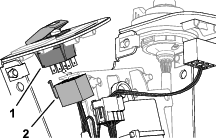
  1. Plug the 8-socket connector of the control harness labeled into the 8-pin connector of the rocker switch (Figure 34).

    g350776
  2. Plug the 9-pin connector of the multi-function switch harness into the 9-socket connector of the console harness (Figure 35).

    g350777
  3. Secure the console harness to the steering column with 2 cable ties.

Installing the Control Cover

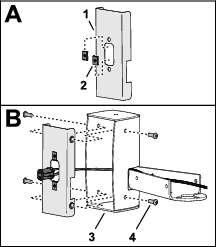
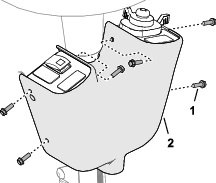
  1. Align the holes in the control cover to the holes in the switch mount (Figure 36).

    g350789
  2. Using the middle holes, secure the cover to the mount with 2 push-in fasteners as shown in Figure 36.

  3. Secure the cover to the mount with 4 flange-heads screws (1/4 x 3/4) as shown in Figure 37.

    g350771

Connecting the Console Harness

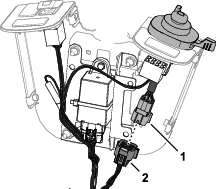
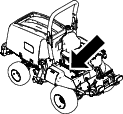
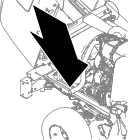
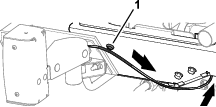
  1. Remove the cap from the 12-socket connector of the machine wire harness (Figure 38 and Figure 39).

    g351028
    g351027
  2. Plug the 12-pin connector of the console harness into the 12-socket connector of the machine wire harness (Figure 39).

Installing the Fuses

Parts needed for this procedure:

Fuse (10 A)1
Fuse (15 A)1

Removing the Electrical Cover

Machines with a Roll Bar

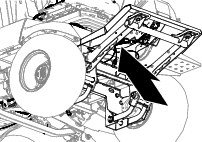
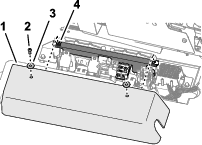
At the floor along right side of the operator’s seat, remove the 2 socket-head screws and 2 washers that secure the controller cover to the electrical-component mount, and remove the cover (Figure 40).

g351012g351093

Removing the Electrical Cover

Machines with a Cab

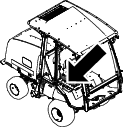
At the floor along right side of the operator’s seat, remove the 2 socket-head screws that secure the controller cover to the electrical-component mount, and remove the cover (Figure 41).

g351105g351092

Inserting the Fuses

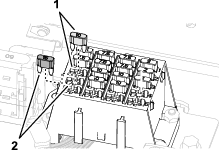
Insert the fuses (Figure 42) into the following fuse-block slots:

Fuse

Fuse-block slot

10 A

A3

15 A

A4

g351014

Installing the Electrical Cover

Machines with a Roll Bar
  1. Align holes in the controller cover with clip nuts on the electrical-component mount (Figure 43).

    g351093
  2. Install the controller cover to the electrical-component mount (Figure 43) with the 2 socket-head screws and 2 washers that you removed in Removing the Electrical Cover.

Installing the Electrical Cover

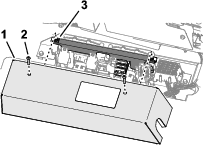
Machines with a Cab
  1. Align holes in the controller cover with clip nuts on the electrical-component mount (Figure 44).

    g351092
  2. Install the controller cover to the electrical-component mount (Figure 44) with the 2 socket-head screws that you removed in Removing the Electrical Cover.

Installing the Taillights

Parts needed for this procedure:

Left light housing1
Left light-housing mount1
Right light housing1
Right light-housing mount1
Carriage bolt (1/4 x 5/8 inch)4
Flange locknut (1/4 inch)4
Left taillight and license plate harness1
Right taillight harness1
Clip nut (1/4 inch)4
Inner mount2
Socket-head screw (1/4 x 3/4 inch)8
Taillight2
Phillips-head screw (#10 x 1-1/4 inches)4
Pivot bracket2
Capscrew (1/4 x 3/4 inch)6
Locknut (1/4 inch)6
Left mount cover1
Right mount cover1
Push-in fasteners8
Swivel-adapter mount2
Carriage bolt (1/4 x 1-1/4 inches)4
Flange locknut (3/8 inch)4

Assembling the Light Housings

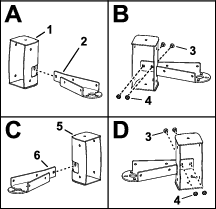
  1. Align the left light-housing mount into the left light housing as shown in Figure 45.

    g350513
  2. Secure the mount to the housing (Figure 45) with 2 carriage bolt (1/4 x 5/8 inch) and flange locknut (1/4 inch).

  3. Align the right mount into the right light-housing mount as shown in Figure 45.

  4. Secure the mount to the housing (Figure 45) with 2 carriage bolt (1/4 x 5/8 inch) and flange locknut (1/4 inch).

Assembling the Harnesses and Inner Mounts

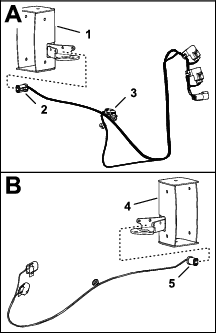
  1. Assemble the 4-socket connector of the left taillight and license plate harness into the left light housing (Figure 46).

    Note: The left taillight and license plate harness has a 2-socket connector for the license-plate light.

    g351322
  2. Assemble the 4-socket connector of the right taillight and license plate harness into the right light housing (Figure 46).

  3. Assemble 2 clip nuts onto the inner mount as shown in Figure 47.
    g350574
  4. Align the 4-socket connector of the harness through the inner mount (Figure 47).
  5. Assemble the inner mount into the light housing, and secure the mount to the housing (Figure 47) with 4 socket-head screws (1/4 x 3/4 inch).

  6. Repeat steps 3 through 5 for the other inner mount and light housing.

Assembling the Taillights

  1. Align the taillight to the light housing with the yellow lens positioned as shown in Figure 48.

    g350575
  2. Plug the 4-socket connector of the harness into the 4-pin connector of the taillight (Figure 48).

  3. Assemble the taillight into the light housing, and secure the light to the housing (Figure 48) with 2 Phillips-head screws (#10 x 1-1/4 inches).

  4. Repeat steps 1 through 3 for the other taillight and light housing.

  5. Install a pivot bracket to the light-housing mount (Figure 49) with 3 capscrews (1/4 x 3/4 inch) and locknuts (1/4 inch).

    g351422
  6. Install the mount cover to the light-housing mount with 4 push-in fasteners (Figure 50).

    g350666
  7. Repeat steps 5 and 6 for the other mount cover and light assembly.

Installing the Pivot Mount

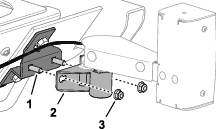
  1. At the left side of the bumper, remove the 2 capscrews (1/2 x 1-1/4 inches), 2 washers (1/2 inch), and 2 flange locknuts (1/2 inch) securing the bumper to the left frame rail (Figure 48).

    g350534
  2. Insert 2 carriage bolts (1/4 x 1-1/4 inches) into the slots in the swivel-adapter mount (Figure 48).

  3. Assemble the swivel-adapter mount and bumper to the left frame rail with the 2 capscrews (1/2 x 1-1/4 inches), 2 washers (1/2 inch), and 2 flange locknuts (1/2 inch) that you removed in step 1.

  4. Torque the capscrews and locknuts to 91 to 113 N∙m (67 to 83 ft-lb).

  5. Install the pivot bracket to the carriage bolts in the swivel-adapter mount (Figure 52) with 2 flange locknuts (3/8 inch).

    g350605
  6. Repeat steps 1 through 4 for the swivel-adapter mount at the other side of the bumper.

Installing the Slow-Moving Vehicle Sign

Parts needed for this procedure:

Slow moving vehicle emblem1
Slow moving vehicle mount1
Capscrew (1/4 x 3/4 inch)3
Washer (1/4 x 3/4 inch)3
Locknut (1/4 inch)3
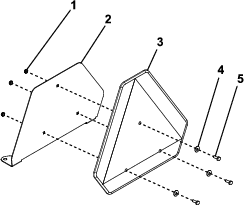
  1. Assemble the slow moving vehicle emblem to the slow moving vehicle mount (Figure 53) with 3 capscrews (1/4 x 3/4 inch), 3 washers (1/4 x 3/4 inch), and 3 locknuts (1/4 inch).

    g351150
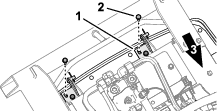
  2. At each hood pivot bracket (Figure 54), remove the rearmost flange-head capscrew (3/8 x 1-1/4 inches).

    g351162g351163
  3. Align the holes on the slow moving vehicle mount with the slots in the hood pivot bracket (Figure 55).

    g351151
  4. Assemble the slow moving vehicle mount to the hood pivot bracket (Figure 55) with the 2 flange-head capscrews (3/8 x 1-1/4 inches).

  5. Torque the capscrews to 37 to 45 N∙m (27 to 33 ft-lb).

Connecting the Taillight Harnesses

Routing and Connecting the Left Taillight

  1. Unlatch and open the hood.

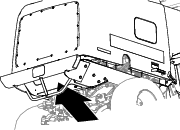
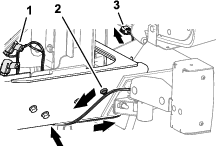
  2. Route the 4-socket connector labeled of the machine wire harness under the left frame rail and forward (Figure 56).

    g351426g351444
  3. Adhere the magnetic harness anchor to the to the frame rail (Figure 56).

  4. Route the 2-socket connector (license-plate light branch) of the left taillight harness under the hood and inboard (Figure 56).

  5. Insert the push-in anchor of the license-plate light branch into the hole in the left hood-hinge mount (Figure 57).

    g351457
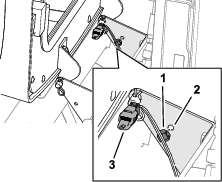
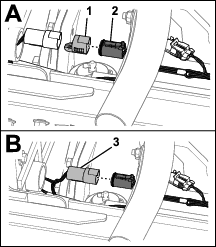
  6. At the inboard side of the frame rail, remove the cap from the 4-socket connector labeled of the machine wire harness (Figure 58).

    g350866
  7. Plug the 4-pin connector labeled LH Rear Lights of the left taillight harness into the 4-socket connector labeled of the machine wire harness (Figure 58).

Routing and Connecting the Right Taillight

  1. Route the 4-socket connector labeled of the machine wire harness under the left frame rail and forward (Figure 59).

    g351427g351445
  2. At the inboard side of the frame rail, remove the cap from the 4-socket connector labeled of the machine wire harness (Figure 60).

    g350907
  3. Plug the 4-pin connector labeled RH Rear Lights of right taillight harness into the 4-socket connector labeled of the machine wire harness (Figure 60).

    Important: Ensure that the harnesses are routed away from the exhaust pipe.

  4. Close and latch the hood.

Connecting the Battery

  1. Connect the positive battery cable to the positive battery post (Figure 61), and slip the rubber boot over the terminal.

    g020451
  2. Connect the negative (black) battery cable.

  3. Close the battery compartment cover (Figure 62) until it securely snaps shut.

    g351816

Operation

Controls

Note: Check the operation of the lights. Make sure that the correct lights are flashing when operating the turn signal switch.

g351549

Using the Lights

g351478
  1. Turn the key switch on and press the light switch to the ON position.

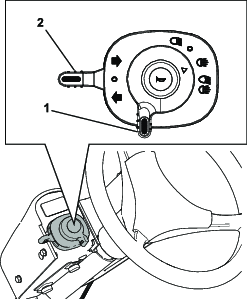
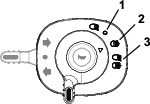
  2. Rotate the light switch (Figure 63 and Figure 64) to the following positions:

    • OFF

    • Road lights ON

    • Road lights and optional work light ON

Using the Turn Signal

  • Move the turn signal switch (Figure 63) up to signal a right turn.

  • Move the switch down to signal a left turn.

  • Move the switch to the middle position to shut off the turn signals.

Using the Hazard Lights

g351460
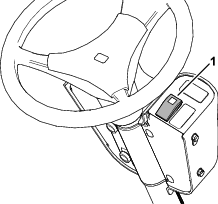
  • Press the top of the switch (Figure 65) to run the hazard lights..

    Note: The hazard switch illuminates when running the hazard lights.

  • Press the bottom of the switch to shut off the hazard lights.

Adjusting the Headlights

  1. Loosen the mounting locknuts and capscrews to adjust the lights (Figure 62).

    g351458
  2. Adjust the lights per local standards.

  3. Tighten the locknuts and capscrews (Figure 62).

Maintenance

Servicing the Fuses

Replacing a Fuse Block Fuse

  1. Park the machine on a level surface, engage the parking brake, lower the cutting units, shut off the engine, and remove the key.

  2. Remove the electrical cover, refer to Removing the Electrical Cover or Removing the Electrical Cover.

  3. Replace the open fuse.

    Fuse-block slot

    Protected Circuits

    Fuse Rating

    A3

    EU light kit power

    10 A

    A4

    Road light kit

    15 A

    g351014
  4. Install the electrical cover; refer to Installing the Electrical Cover or Installing the Electrical Cover.

Replacing a Taillight Fuse

  1. Park the machine on a level surface, engage the parking brake, lower the cutting units, shut off the engine, and remove the key.

  2. Unlatch and open the hood.

  3. Remove the cap from the in-line fuse holder (Figure 68).

    g350865
  4. Replace the fuse; refer to the Fuse Table.

    Fuse Table

    Left taillight harness

    Protected Circuits

    Fuse Rating

    Labeled (left taillight harness)

    Taillights

    5 A

    Labeled

    Brake lights

    5 A

    Left taillight harness

    Protected Circuits

    Fuse Rating

    Labeled (right taillight harness)

    Taillights

    5 A

    Labeled

    Brake lights

    5 A

  5. Install the cap onto the fuse holder (Figure 68).

  6. Close and latch the hood.