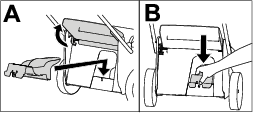
| Maintenance Service Interval | Maintenance Procedure |
|---|---|
| After each use |
|
Introduction
This rotary-blade, walk-behind lawn mower is intended to be used by residential homeowners. It is designed primarily for cutting grass on well-maintained lawns on residential properties. It is not designed for cutting brush or for agricultural uses. It is designed to use Flex-Force Power System® 60V lithium-ion battery packs. These battery packs are designed to be charged only by Flex-Force™ 60V lithium-ion battery chargers. Using these products for purposes other than their intended use could prove dangerous to you and bystanders.
Read this information carefully to learn how to operate and maintain your product properly and to avoid injury and product damage. You are responsible for operating the product properly and safely.
Visit www.Toro.com for more information, including safety tips, training materials, accessory information, help finding a dealer, or to register your product.
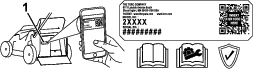
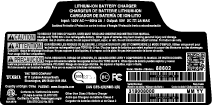
Whenever you need service, genuine Toro parts, or additional information, contact an Authorized Service Dealer or Toro Customer Service and have the model and serial numbers of your product ready. Figure 1 identifies the location of the model and serial numbers on the product. Write the numbers in the space provided.
Important: With your mobile device, you can scan the QR code on the serial number decal (if equipped) to access warranty, parts, and other product information.
Be sure to register your machine at www.Toro.com/register. Registration ensures that you are notified should there be a product recall. Your registration information is never sold or shared with third party companies. To avoid waste and help the environment, a discharge chute does not come with your purchase (most customers prefer to recycle or bag their grass clippings). You can request a discharge chute when you register your product at www.Toro.com/register. Simply check the box in the online registration form and Toro will send you a discharge chute at no additional charge. Discharge chute will be shipped as inventory is available.
Safety-Alert Symbol
The safety-alert symbol (Figure 2) shown in this manual and on the machine identifies important safety messages that you must follow to prevent accidents.

The safety-alert symbol appears above information that alerts you to unsafe actions or situations and is followed by the word DANGER, WARNING, or CAUTION.
DANGER indicates an imminently hazardous situation which, if not avoided, will result in death or serious injury.
WARNING indicates a potentially hazardous situation which, if not avoided, could result in death or serious injury.
CAUTION indicates a potentially hazardous situation which, if not avoided, may result in minor or moderate injury.
This manual uses two other words to highlight information. Important calls attention to special mechanical information and Note emphasizes general information worthy of special attention.
 |
For assistance, please see www.Toro.com/support for instructional resources or contact your Authorized Service Dealer before returning this product. |
Warning
CALIFORNIA
Proposition 65 Warning
The power cord on this product contains lead, a chemical known to the State of California to cause birth defects or other reproductive harm. Wash hands after handling.
Use of this product may cause exposure to chemicals known to the State of California to cause cancer, birth defects, or other reproductive harm.
Safety
General Machine Safety Warnings
Warning
Read all safety warnings, instructions, illustrations and specifications provided with this power tool. Failure to follow all instructions listed below may result in electric shock, fire and/or serious injury.
Save all warnings and instructions for future reference.
The term “power tool” in the warnings refers to your mains-operated (corded) power tool or battery-operated (cordless) tool.
-
Work area safety
-
Keep work area clean and well lit. Cluttered or dark areas invite accidents.
-
Do not operate power tools in explosive atmospheres, such as in the presence of flammable liquids, gasses or dust. Power tools create sparks which may ignite the dust or fumes.
-
Keep children and bystanders away while operating a power tool. Distractions can cause you to lose control.
-
-
Electrical safety
-
Power tool plugs must match the outlet. Never modify the plug in any way. Do not use any adapter plugs with earthed (grounded) power tools. Unmodified plugs and matching outlets will reduce risk of electric shock.
-
Avoid body contact with earthed or grounded surfaces, such as pipes, radiators, ranges and refrigerators. There is an increased risk of electric shock if your body is earthed or grounded.
-
Do not expose power tools to rain or wet conditions. Water entering a power tool will increase the risk of electric shock.
-
Do not abuse the cord. Never use the cord for carrying, pulling or unplugging the power tool. Keep cord away from heat, oil, sharp edges or moving parts. Damaged or entangled cords increase the risk of electric shock.
-
When operating a power tool outdoors, use an extension cord suitable for outdoor use. Use of a cord suitable for outdoor use reduces the risk of electric shock.
-
If operating a power tool in a damp location is unavoidable, use a residual current device (RCD) protected supply. Use of an RCD reduces the risk of electric shock.
-
-
Personal safety
-
Stay alert, watch what you are doing and use common sense when operating a power tool. Do not use a power tool while you are tired or under the influence of drugs, alcohol or medication. A moment of inattention while operating power tools may result in serious personal injury.
-
Use personal protective equipment. Always wear eye protection. Protective equipment such as a dust mask, non-skid safety shoes, hard hat or, or hearing protection used for appropriate conditions will reduce personal injuries.
-
Prevent unintentional starting. Ensure the switch is in the OFF position before connecting to power source and/or battery pack, picking up or carrying the tool. Carrying power tools with your finger on the switch or energizing power tools that have the switch on invites accidents.
-
Remove any adjusting key or wrench before turning the power tool on. A wrench or a key left attached to a rotating part of the power tool may result in personal injury.
-
Do not overreach. Keep proper footing and balance at all times. This enables better control of the power tool in unexpected situations.
-
Dress properly. Do not wear loose clothing or jewelry. Keep your hair and clothing away from moving parts. Loose clothes, jewelry or long hair can be caught in moving parts.
-
If devices are provided for the connection of dust extraction and collection facilities, ensure these are connected and properly used. Use of dust collection can reduce dust-related hazards.
-
Do not let familiarity gained from frequent use of tools allow you to become complacent and ignore tool safety principles. A careless action can cause severe injury within a fraction of a second.
-
-
Power tool use and care
-
Do not force the power tool. Use the correct power tool for your application. The correct power tool will do the job better and safer at the rate for which it was designed.
-
Do not use the power tool if the switch does not turn it on and off. Any power tool that cannot be controlled with the switch is dangerous and must be repaired.
-
Disconnect the plug from the power source and/or remove the battery pack, if detachable, from the power tool before making any adjustments, changing accessories, or storing power tools. Such preventative safety measures reduce the risk of starting the power tool accidentally.
-
Store idle power tools out of the reach of children and do not allow persons unfamiliar with the power tool or these instructions to operate the power tool. Power tools are dangerous in the hands of untrained users.
-
Maintain power tools and accessories. Check for misalignment or binding of moving parts, breakage of parts and any other condition that may affect the power tool’s operation. If damaged, have the power tool repaired before use. Many accidents are caused by poorly maintained power tools.
-
Keep cutting tools sharp and clean. Properly maintained cutting tools with sharp cutting edges are less likely to bind and are easier to control.
-
Use the power tool, accessories and tool bits etc. in accordance with these instructions, taking into account the working conditions and the work to be performed. Use of the power tool for operations different from those intended could result in a hazardous situation.
-
Keep handles and grasping surfaces dry, clean and free from oil and grease. Slippery handles and grasping surfaces do not allow for safe handling and control of the tool in unexpected situations.
-
-
Battery tool use and care
-
Recharge only with the charger specified by the manufacturer. A charger that is suitable for one type of battery pack may create a risk of fire when used with another battery pack.
-
Use power tools only with specifically designated battery packs. Use of any other battery packs may create a risk of injury and fire.
-
When battery pack is not in use, keep it away from other metal objects, like paper clips, coins, keys, nails, screws or other small metal objects, that can make a connection from one terminal to another. Shorting the battery terminals together may cause burns or a fire.
-
Under abusive conditions, liquid may be ejected from the battery; avoid contact. If contact accidentally occurs, flush with water. If liquid contacts eyes, additionally seek medical help. Liquid ejected from the battery may cause irritation or burns.
-
Do not use a battery pack or tool that is damaged or modified. Damaged or modified batteries may exhibit unpredictable behavior resulting in fire, explosion or risk of injury.
-
Do not expose a battery pack or tool to fire or excessive temperature. Exposure to fire temperature above 130°C (265°F) may cause an explosion.
-
Follow all charging instructions and do not charge the battery pack or tool outside the temperature range specified in the instructions. Charging improperly or at temperatures outside the specified range may damage the battery and increase the risk of fire.
-
-
Service
-
Have your power tool serviced by a qualified repair person using only identical replacement parts. This will ensure that the safety of the power tool is maintained.
-
Never service damaged battery packs. Service of battery packs should only be performed by the manufacturer or authorized service providers.
-
Lawn Mower Safety Warnings
-
Do not operate the lawn mower in rain or wet conditions. This may increase the risk of electric shock.
-
Do not use the lawn mower in bad weather conditions, especially when there is a risk of lightning. This decreases the risk of being struck by lightning.
-
Thoroughly inspect the area for wildlife where the lawn mower is to be used. Wildlife may be injured by the lawn mower during operation.
-
Thoroughly inspect the area where the lawn mower is to be used and remove all stones, sticks, wires, bones, and other foreign objects. Thrown objects can cause personal injury.
-
Before using the lawn mower, always visually inspect to see that the blade and the blade assembly are not worn or damaged. Worn or damaged parts increase the risk of injury.
-
Check the grass catcher frequently for wear or deterioration. A worn or damaged grass collector may increase the risk of personal injury.
-
Keep guards in place. Guards must be in working order and be properly mounted. A guard that is loose, damaged, or is not functioning correctly may result in personal injury.
-
Keep all cooling air inlets clear of debris. Blocked air inlets and debris may result in overheating or risk of fire.
-
While operating the lawn mower, always wear non-slip and protective footwear. Do not operate the lawn mower when barefoot or wearing open sandals. This reduces the chance of injury to the feet from contact with the moving blade.
-
While operating the lawn mower, always wear long trousers. Exposed skin increases the likelihood of injury from thrown objects.
-
Do not operate the lawn mower in wet grass. Walk, never run. This reduces the risk of slipping and falling which may result in personal injury.
-
Do not operate the lawn mower on excessively steep slopes. This reduces the risk of loss of control, slipping and falling which may result in personal injury.
-
When working on slopes, always be sure of your footing, always work across the face of slopes, never up or down and exercise extreme caution when changing direction. This reduces the risk of loss of control, slipping and falling which may result in personal injury.
-
Use extreme caution when reversing or pulling the lawn mower towards you. Always be aware of your surroundings. This reduces the risk of tripping during operation.
-
Do not touch blades and other hazardous moving parts while they are still in motion. This reduces the risk of injury from moving parts.
-
When clearing jammed material or cleaning the lawn mower, make sure all power switches are off and the battery pack is disconnected. Unexpected operation of the lawn mower may result in serious personal injury.
Additional Safety Warnings
-
Training
-
The operator of the machine is responsible for any accidents or hazards occurring to others or their property.
-
Do not allow children to use or play with the machine, battery pack, or the battery charger; local regulations may restrict the age of the operator.
-
Do not allow people with reduced physical, sensory, or mental capabilities or without experience and knowledge to use the machine, battery pack, or battery charger unless they receive instruction or supervision on using it safely and understand the hazards involved while using it.
-
Before using the battery pack and battery charger, read all the instructions and cautionary markings on these products.
-
-
Preparation
-
Replace any damaged or unreadable labels.
-
Use only the battery pack specified by Toro. Using other accessories and attachments may increase the risk of injury and fire.
-
Plugging the battery charger into an outlet that is not of the proper voltage can cause a fire or electric shock. For a different style of connection, use an attachment plug adapter of the proper configuration for the power outlet if needed.
-
Do not use a damaged or modified battery pack or battery charger, which may exhibit unpredictable behavior that results in fire, explosion, or risk of injury.
-
If the supply cord to the battery charger is damaged, contact an Authorized Service Dealer to replace it.
-
Do not use non-rechargeable batteries.
-
Charge the battery pack with only the battery charger specified by Toro. A charger suitable for one type of battery pack may create a risk of fire when used with another battery pack.
-
Charge the battery pack in a well-ventilated area only.
-
Do not expose a battery pack or battery charger to fire or to temperatures higher than 68°C (154°F).
-
Follow all charging instructions and do not charge the battery pack outside of the temperature range specified in the instructions. Otherwise, you may damage the battery pack and increase the risk of fire.
-
-
Operation
-
Keep clear of any discharge opening.
-
Disengage the self-propel drive (if equipped) before starting the machine.
-
Prevent unintentional starting—Ensure that the electric-start button is removed from the ignition before connecting the battery pack and handling the machine.
-
Stop the machine, remove the electric-start button, remove the battery pack from the machine, and wait for all movement to stop before servicing or cleaning the machine.
-
Remove the battery pack and electric-start button from the machine whenever you leave it unattended or before changing accessories.
-
Do not direct the discharge material toward anyone. Avoid discharging material against a wall or obstruction; material may ricochet toward you. Stop the blade(s) when crossing gravel surfaces.
-
Watch for holes, ruts, bumps, rocks, or other hidden objects. Uneven terrain could cause you to lose your balance or footing.
-
If the machine strikes an object or starts to vibrate, immediately shut off the machine, remove the electric-start button, remove the battery pack, and wait for all movement to stop before examining the machine for damage. Make all necessary repairs before resuming operation.
-
Stop the machine and remove the electric-start button before loading the machine for hauling.
-
Under abusive conditions, the battery pack may eject liquid; avoid contact. If you accidently come into contact with the liquid, flush with water. If the liquid contacts your eyes, seek medical help. Liquid ejected from the battery pack may cause irritation or burns.
-
-
Maintenance and Storage
-
Stop the machine, remove the electric-start button, remove the battery pack from the machine, and wait for all movement to stop before servicing or cleaning the machine.
-
Do not attempt to repair the machine except as indicated in the instructions. Have an Authorized Service Dealer perform service on the machine using identical replacement parts.
-
Sharpen a dull blade on both sides to maintain balance. Clean the blade and ensure that it is balanced.
-
When servicing the blade, be aware that the blade can still move even though the power source is off.
-
For best performance, use only genuine Toro replacement parts and accessories. Other replacement parts and accessories could be dangerous, and such use could void the product warranty.
-
Maintain the machine—Keep cutting edges sharp and clean for the best and safest performance. Keep handles dry, clean, and free from oil and grease. Keep guards in place and in working order. Keep blades sharp. Use identical replacement blades only.
-
Unless indicated in the instructions, have an Authorized Service Dealer repair or replace a damaged guard or part.
-
When the battery pack is not in use, keep it away from metal objects such as paper clips, coins, keys, nails, and screws that can make a connection from one terminal to another. Shorting the battery terminals may cause burns or a fire.
-
Check the blade and motor mounting bolts frequently for tightness.
-
CAUTION—A mistreated battery pack may present a risk of fire or chemical burn. Do not disassemble the battery pack. Do not heat the battery pack above 68°C (154°F) or incinerate it. Replace the battery pack with a genuine Toro battery pack only; using another type of battery pack may cause a fire or explosion. Keep battery packs out of the reach of children and in the original packaging until you are ready to use them.
-
Do not dispose of the battery in a fire. The cell may explode. Check with local codes for possible special disposal instructions.
-
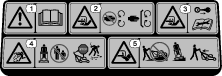
Safety and Instructional Decals
 |
Safety decals and instructions are easily visible to the operator and are located near any area of potential danger. Replace any decal that is damaged or missing. |




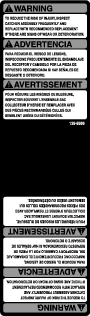
Model 88980

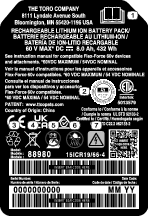
Model 88602

Setup
Important: Remove and discard the protective plastic sheet that covers the motor and any other plastic or wrapping on the machine.The battery pack is not fully charged when it is purchased. Before using the machine for the first time, refer to Charging the Battery Pack.
Mounting the Battery Charger (Optional)
Parts needed for this procedure:
| Mounting hardware (not included) | 2 |
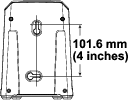
If desired, mount the battery charger securely on a wall using the wall-mount key holes on the back of the charger.
Mount it indoors (such as a garage or other dry place), near a power outlet, and out of the reach of children.
Refer to Figure 4 for assistance in mounting the charger.
Slide the charger over the appropriately positioned hardware to secure the charger in place (hardware not included).
Assembling the Grass Bag
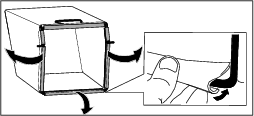
Unfolding the Handle
Warning
Folding or unfolding the handle improperly can damage the cables, causing an unsafe operating condition.
-
Do not damage the cable(s) when folding or unfolding the handle.
-
Ensure that the cable(s) are routed to the outside of the handle.
-
If a cable is damaged, contact an Authorized Service Dealer.
Important: Remove and discard the protective plastic sheet that covers the motor and any other plastic or wrapping on the machine.
-
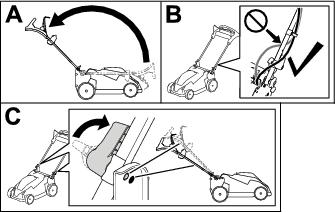
Move the handle rearward to the operating position (A of Figure 6).
-
Ensure that the cables are routed in front of the handle (B of Figure 6).
-
Engage the handle locks until the pin clicks in place to lock the handle into the operating position (C of Figure 6).
Note: You may adjust the height of the handle by changing the hole for the handle lock.
Product Overview
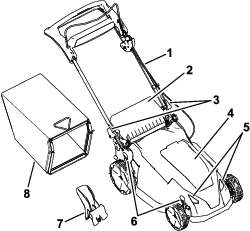
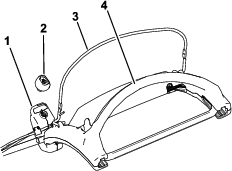
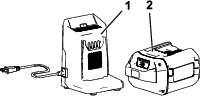
| Model | 88980 | ||
| Battery pack capacity | 8.0 Ah | ||
| 432 Wh | |||
|
Battery manufacturer rating = 60V maximum and 54V nominal. Actual voltage varies with load. |
|||
| Model | 88602 |
| Type | 60V MAX Lithium-Ion Battery Charger |
| Input | 120V AC ~2.0A, 60Hz |
| Output | 60V DC  2.0A MAX 2.0A MAX |
| Charge/store the battery pack at | 5°C (41°F) to 40°C (104°F)* |
| Use the battery pack at | -30°C (-22°F) to 49°C (120°F)* |
| Use the machine at | 0°C (32°F) to 49°C (120°F)* |
*Charging time will increase if you do not charge the battery pack within this range.
Store the machine, battery pack, and battery charger in an enclosed clean, dry area.
Attachments/Accessories
A selection of Toro approved attachments and accessories is available for use with the machine to enhance and expand its capabilities. Contact your Authorized Service Dealer or authorized Toro distributor or go to www.Toro.com for a list of all approved attachments and accessories.
To ensure optimum performance and continued safety certification of the machine, use only genuine Toro replacement parts and accessories. Replacement parts and accessories made by other manufacturers could be dangerous.
Operation
Note: Determine the left and right sides of the machine from the normal operating position.
Before Operation
Installing the Battery Pack
Important: Use the battery pack only in temperatures that are within the appropriate range; refer to Specifications.
-
Ensure that the vents on the battery are clear of any dust and debris.
-
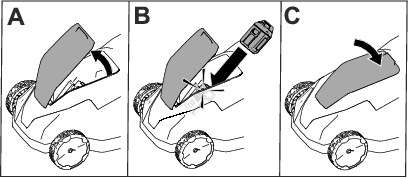
Lift up the battery-compartment lid (A of Figure 10).
-
Line up the cavity in the battery pack with the tongue on the machine and slide the battery pack into the compartment until it locks into place (B of Figure 10).
-
Close the battery-compartment lid (C of Figure 10).
Note: If the battery-compartment lid does not close completely, the battery is not fully installed.
Adjusting the Handle Height
You may raise or lower the handle to a position comfortable for you. The Personal Pace® feature of the machine also works best when your arms are comfortably out in front of you and parallel to the ground while holding the handle.
To adjust the handle height, do the following:
-
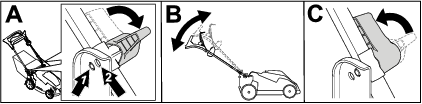
On both sides of the machine, rotate the handle locks (A of Figure 11).
-
Adjust the position of the handle to the upper (high handle height) or lower (lower handle height) position (B of Figure 11).
-
When the handle is in the desired position, rotate the handle locks back until the pin clicks to secure the handle (C of Figure 11).
Adjusting the Cutting Height
Danger
Adjusting the height-of-cut could bring your hands into contact with a moving blade and result in serious injury.
-
Shut off the motor, remove the battery, and wait for all moving parts to stop before adjusting the cutting height.
-
Do not put your fingers under the housing when adjusting the cutting height.
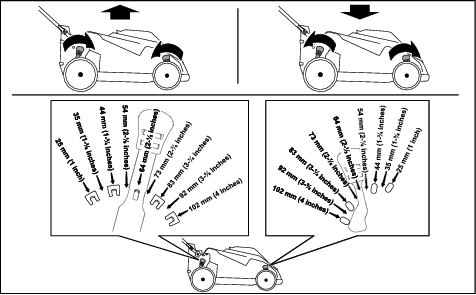
Adjust the cutting height as desired. Set all wheels to the same cutting height (Figure 12).
During Operation
Starting the Machine
-
Install the battery pack in the machine; refer to Installing the Battery Pack.
-
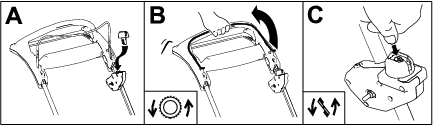
Insert the electric-start button into the electric-start switch (A of Figure 13).
-
Squeeze the control bar and hold it to the handle to power on the machine and engage the self-propel drive (B of Figure 13).
-
Press the electric-start button to engage the blades (C of Figure 13).
Using the Self-Propel Drive
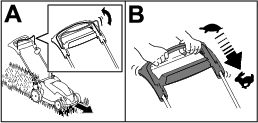
Simply walk with your hands on the upper handle and your elbows at your sides, and the machine will automatically keep pace with you (Figure 14).
Note: If the self-propel drive is not operating smoothly, refer to .
Note: If the machine does not freely roll backward after self-propelling, stop walking, hold your hands in place, and allow the machine to roll a couple of centimeters (inches) forward to disengage the wheel drive. You can also try reaching just under the upper handle to the metal handle and pushing the machine forward a couple of centimeters (inches). If the machine still does not roll backward easily, contact an Authorized Service Dealer.
Recycling the Clippings
Bagging the Clippings
Use the grass bag when you want to collect grass and leaf clippings from the lawn.
Installing the Grass Bag
-
Shut off the machine and wait for all moving parts to stop; refer to Shutting Off the Machine.
-
Remove the battery pack from the machine; refer to Removing the Battery Pack from the Machine.
-
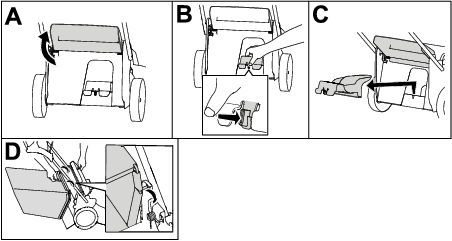
Raise and hold up the rear deflector (A of Figure 16).
-
Remove the rear-discharge plug by pushing in the latch with your thumb and pulling the plug out from the machine (B and C of Figure 16).
-
Install the bag-rod ends into the notches at the base of the handle, and rock the bag back and forth to ensure that the bag-rod ends are seated at the bottom of both notches (D of Figure 16).
-
Lower the rear deflector until it rests on the grass bag.
Removing the Grass Bag
Danger
The machine can throw grass clippings and other objects through an opening in the machine housing. Objects thrown with enough force could cause serious personal injury or death to you or to bystanders.
-
Never remove the grass bag and then start the machine without the discharge plug installed on the machine.
-
Never open the rear deflector on the machine when the machine is running.
Shutting Off the Machine
-
Release the control bar (A of Figure 17).
-
Remove the electric-start button from the electric-start switch (B of Figure 17).
-
Remove the battery pack; refer to Removing the Battery Pack from the Machine.
Note: Whenever you are not using the machine, remove the battery pack.
Removing the Battery Pack from the Machine
-
Lift up the battery-compartment lid.
-
Press the battery-pack latch to release the battery pack and remove the battery pack.
-
Close the battery-compartment lid.
Operating Tips
General Mowing Tips
-
Inspect the area where you will use the machine and remove all objects that the machine could throw.
-
Avoid striking solid objects with the blade. Never deliberately mow over any object.
-
If the machine strikes an object or starts to vibrate, immediately shut off the machine, wait for all moving parts to stop, remove the battery pack from the machine, and examine the machine for damage.
-
For best performance, install a new Toro blade before the cutting season begins or when necessary.
Cutting Grass
-
Cut only about a third of the grass blade at a time. For improved quality of cut, runtime, and bagging, cut grass at a higher height of cut.
-
Do not cut below 51 mm (2 inches) unless the grass is sparse or it is late fall when grass growth begins to slow down.
-
When cutting grass over 15 cm (6 inches) tall, mow at the highest cutting height setting and walk slower; then mow again at a lower setting for the best lawn appearance. If the grass is too long, the machine may plug and cause the motor to stall.
-
Wet grass and leaves tend to clump on the yard and can cause the machine to plug or the motor to stall. Avoid mowing in wet conditions.
-
Be aware of a potential fire hazard in very dry conditions, follow all local fire warnings, and keep the machine free of dry grass and leaf debris.
-
Alternate the mowing direction. This helps disperse the clippings over the lawn for even fertilization.
-
If the finished lawn appearance is unsatisfactory, try 1 or more of the following:
-
Replace the blade or have it sharpened.
-
Walk at a slower pace while mowing.
-
Raise the cutting height on your machine.
-
Cut the grass more frequently.
-
Overlap cutting swaths instead of cutting a full swath with each pass.
-
Cutting Leaves
-
After cutting the lawn, ensure that half of the lawn shows through the cut leaf cover. You may need to make more than a single pass over the leaves.
-
If there are more than 13 cm (5 inches) of leaves on the lawn, mow at a higher cutting height and then again at the desired cutting height.
-
Slow down your mowing speed if the machine does not cut the leaves finely enough.
After Operation
Charging the Battery Pack
Important: The battery pack is not fully charged when you purchase it. Before using the tool for the first time, place the battery pack in the charger and charge it until the LED display indicates the battery pack is fully charged. Read all safety precautions.
Important: Charge the battery pack only in temperatures that are within the appropriate range; refer to Specifications.
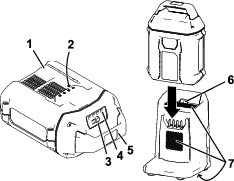
Note: At any time, press the battery-charge-indicator button on the battery pack to display the current charge (LED indicators).
-
Ensure that the vents and charging terminals on the battery pack and charger are clear of any dust and debris.
-
Line up the cavity in the battery pack (Figure 18) with the tongue on the charger.
-
Slide the battery pack into the charger until it is fully seated (Figure 18).
-
To remove the battery pack, slide the battery backward out of the charger.
-
Refer to the following table to interpret the LED indicator light on the battery charger.
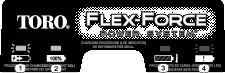
Indicator light Indicates Off No battery pack inserted Green blinking Battery pack is charging Green Battery pack is charged Red Battery pack and/or battery charger is over or under the appropriate temperature range Red blinking Battery pack charging fault*
*Refer to for more information.
Important: The battery pack can be left on the charger for short periods between uses.If the battery pack will not be used for longer periods, remove the battery pack from the charger; refer to Before storage.
Cleaning the Machine
Cleaning under the Machine
For best results, clean under the machine soon after you have completed mowing.
-
Shut off the machine and remove the battery pack and electric-start button.
-
Lower the machine to its lowest cutting-height setting.
-
Set the machine in the vertical-stow position; refer to Storing the Machine in the Vertical-Stow Position.
-
Using a brush or broom, clean any debris away from the underside of the machine.
Important: Do not use water to clean the machine; water may damage electrical components.
-
Clean the rear-discharge chamber.
Folding the Handle
Warning
Folding or unfolding the handle improperly can damage the cables, causing an unsafe operating condition.
-
Do not damage the cable(s) when folding or unfolding the handle.
-
Ensure that the cable(s) are routed to the outside of the handle.
-
If a cable is damaged, contact an Authorized Service Dealer.
-
Hold the handle while disengaging the handle locks to avoid pinching your hands.
-
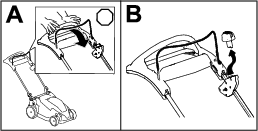
Disengage the handle locks until you can move the upper handle freely (A of Figure 19)
-
Fold the handle forward to the fully forward position and engage the handle locks (B of Figure 19).
Important: Route the cables to the outside of the handle locks as you fold the handle.
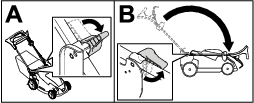
Note: To unfold the handle, refer to Unfolding the Handle.
Storing the Machine in the Vertical-Stow Position
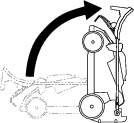
You can store your machine in the vertical position to minimize storage space.
Danger
The vertical-stow position exposes the bottom of the machine.
-
Remove the battery pack and the electric-start button before moving the machine into the vertical-stow position.
-
Do not transport the machine in the vertical-stow position.
-
Do not attempt to start the machine in the vertical-stow position.
-
Remove the electric-start button and battery from the machine.
-
Disengage the handle locks.
-
Fold the handle fully forward; refer to Folding the Handle.
Important: Route the cables to the outside of the handle knobs as you fold the handle.
-
Engage the handle locks.
-
Lift the front of the machine by the handle and move it into a storage space (Figure 20).
Maintenance
Remove the electric-start button and battery pack from the machine before maintaining or cleaning the machine.
Always shut off the machine, wait for all moving parts to stop, and allow the machine to cool before adjusting, servicing, cleaning, or storing it.
Use only the manufacturer’s recommended replacement parts and accessories.
Inspect and maintain the machine regularly. Have the machine repaired only by an Authorized Service Dealer.
Recommended Maintenance Schedule(s)
| Maintenance Service Interval | Maintenance Procedure |
|---|---|
| After each use |
|
| Yearly |
|
Lubricating the Machine
You do not need to lubricate the machine; all the bearings have been lubricated at the factory for the life of the machine.
Replacing the Blades
| Maintenance Service Interval | Maintenance Procedure |
|---|---|
| Yearly |
|
Important: You will need a torque wrench to install the blade properly. If you do not have a torque wrench or are uncomfortable performing this procedure, contact an Authorized Service Dealer.
If the blade is damaged or cracked, replace it immediately. If the blade edge is dull or nicked, have it sharpened and balanced, or replace it.
Warning
When servicing the blade, the blade can still move even though the power source is off. The blade is sharp; contacting the blade can result in serious personal injury.
-
Keep your hands and feet away from a moving blade.
-
Wear gloves when servicing the blade.
-
Remove the electric-start button and battery pack from the machine.
-
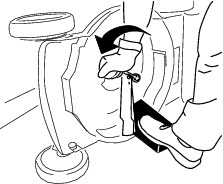
Use a block of wood to hold the blade steady (Figure 21).
-
Remove the blades, saving all mounting hardware (Figure 21).
-
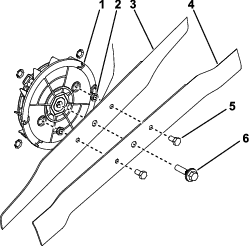
Remove the bolts and nuts securing the top and bottom blades together.
-
Secure the new blades to each other as shown in Figure 22; torque the nuts securing blades together to 18.9 to 19.6 N∙m (167 to 173 in-lb).
Note: Ensure that the blade is installed between the tabs on the underside of the fan.
-
Install the new blades using the blade bolt (Figure 22).
-
Use a torque wrench to tighten the blade bolt to 61 to 74 N∙m (45 to 55 ft-lb).
Preparing the Battery Pack for Recycling
Important: Upon removal, cover the terminals of the battery pack with heavy-duty adhesive tape. Do not attempt to destroy or disassemble the battery pack or remove any of its components.
Contact your local municipality or your authorized Authorized Service Dealer or distributor for more information on how to responsibly recycle the battery.
 |
Lithium-ion battery packs labeled with the Call2Recycle seal can be recycled at any participating retailer or battery recycling facility in the Call2Recycle program (US and Canada only). To locate a participating retailer or facility closest to you, please call 1-800-822-8837 or visit www.call2recycle.org. |
 |
Lithium-ion battery packs labeled with the High Energy Battery (HEB) seal shown here, and any 60V Flex-Force batteries 6.0 Ah or greater, can be recycled at any participating dealer or retailer in the Call2Recycle HEB program. To locate a participating dealer or retailer closest to you, please visit www.hebattery.org. |
If you cannot locate a participating retailer or facility nearby, or have questions about which recycling program your battery pack may qualify for, please visit the customer support site listed in the operator’s manual for your tool/equipment for more information on how to responsibly recycle the battery pack.
If you are located outside of the US and Canada, please contact your Authorized Service Center or distributor for more information on how to responsibly recycle the battery pack.
Storage
Important: Store the machine, battery pack, and charger only in temperatures that are within the appropriate range; refer to Specifications.
Important: If you are storing the machine for a year or longer, remove the battery pack from the machine and charge the battery pack until 1 or 2 LED indicators turn green on the battery. Do not store a fully charged or fully depleted battery. When you are ready to use the machine again, charge the battery pack until the left indicator light turns green on the charger or all 4 LED indicators turn green on the battery.
-
Disconnect the machine from the power supply (i.e., remove the battery pack) and check for damage after use.
-
Clean all foreign material from the machine.
-
Do not store the machine or charger with the battery pack installed.
-
When not in use, store the machine, battery pack, and battery charger out of the reach of children.
-
Keep the machine, battery pack, and battery charger away from corrosive agents such as garden chemicals and de-icing salts.
-
To reduce the risk of serious personal injury, do not store the battery pack outside or in vehicles.
-
Store the machine, battery pack, and battery charger in an enclosed clean, dry area.
Troubleshooting
Perform only the steps described in these instructions. All further inspection, maintenance, and repair work must be performed by an authorized service center or a similarly qualified specialist if you cannot solve the problem yourself.
| Problem | Possible Cause | Corrective Action |
|---|---|---|
| The machine does not start. |
|
|
| The machine does not run or does not run continuously. |
|
|
| The machine does not reach full power. |
|
|
| The battery pack loses charge quickly. |
|
|
| The battery charger is not working. |
|
|
| The self-propel drive is not operating smoothly. |
|
|
| The LED indicator light on the battery charger is red. |
|
|
| The LED indicator light on the battery charger is blinking red. |
|
|
| The machine is producing a beeping sound. |
|
|
| The quality of cut is decreased or unsatisfactory. |
|
|
| The bagging is decreased or unsatisfactory. |
|
|
| The machine is cutting unevenly. |
|
|
| The machine is vibrating. |
|
|