


Introduction

This trimmer is intended to be used by residential homeowners to trim grass as needed outdoors. It is designed to use Flex-Force 60V lithium-ion battery packs. These battery packs are designed to be charged only by Flex-Force 60V lithium-ion battery chargers. Using this product for purposes other than its intended use could prove dangerous to you and bystanders.

Important: If you are using this machine with a battery pack that is 8.0 Ah or greater you must install quick-release harness Model 139-5334 (not included) for proper support and balance.Do not use other harnesses or multiple harnesses when operating the machine.

Model 51811T does not include a battery or a charger.

Read this information carefully to learn how to operate and maintain your product properly and to avoid injury and product damage. You are responsible for operating the product properly and safely.

Visit www.Toro.com for product safety and operation training materials, accessory information, help finding a dealer, or to register your product.

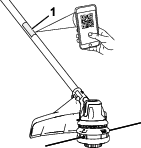
Whenever you need service, genuine Toro parts, or additional information, contact an Authorized Service Dealer or Toro Customer Service and have the model and serial numbers of your product ready. Figure 1 identifies the location of the model and serial numbers on the product. Write the numbers in the space provided.

Important: With your mobile device, you can scan the QR code on the serial number decal (if equipped) to access warranty, parts, and other product information.

g511783

Safety-Alert Symbol

The safety-alert symbol (Figure 2) shown in this manual and on the machine identifies important safety messages that you must follow to prevent accidents.

g000502

The safety-alert symbol appears above information that alerts you to unsafe actions or situations and is followed by the word DANGER, WARNING, or CAUTION.

DANGER indicates an imminently hazardous situation which, if not avoided, will result in death or serious injury.

WARNING indicates a potentially hazardous situation which, if not avoided, could result in death or serious injury.

CAUTION indicates a potentially hazardous situation which, if not avoided, may result in minor or moderate injury.

This manual uses two other words to highlight information. Important calls attention to special mechanical information and Note emphasizes general information worthy of special attention.

Graphic

For assistance, please see www.Toro.com/support for instructional resources or contact your Authorized Service Dealer before returning this product.

Safety

Warning

Read all safety warnings, instructions, illustrations and specifications provided with this machine.

Failure to follow all instructions listed below may result in electric shock, fire and/or serious injury.

Save all warnings and instructions for future reference.

The term “machine” in all the warnings refers to your mains-operated (corded) machine or battery-operated (cordless) machine.

I. Work area safety

  1. Keep work area clean and well lit.Cluttered or dark areas invite accidents.

  2. Do not operate machines in explosive atmospheres, such as in the presence of flammable liquids, gases, or dust.Machines create sparks which may ignite the dust or fumes.

  3. Keep children and bystanders away while operating a machine.Distractions can cause you to lose control.

II. Electrical safety

  1. Machine plugs must match the outlet. Never modify the plug in any way. Do not use any adapter plugs with earthed (grounded) machines.Unmodified plugs and matching outlets will reduce risk of electric shock.

  2. Avoid body contact with earthed or grounded surfaces, such as pipes, radiators, ranges and refrigerators.There is an increased risk of electric shock if your body is earthed or grounded.

  3. Do not expose machines to rain or wet conditions.Water entering a machine will increase the risk of electric shock.

  4. Do not abuse the cord. Never use the cord for carrying, pulling or unplugging the machine. Keep cord away from heat, oil, sharp edges or moving parts.Damaged or entangled cords increase the risk of electric shock.

  5. When operating a machine outdoors, use an extension cord suitable for outdoor use.Use of a cord suitable for outdoor use reduces the risk of electric shock.

  6. If operating a machine in a damp location is unavoidable, use a residual current device (RCD) protected supply.Use of an RCD reduces the risk of electric shock.

III. Personal safety

  1. Stay alert, watch what you are doing and use common sense when operating a machine. Do not use a machine while you are tired or under the influence of drugs, alcohol, or medication.A moment of inattention while operating machines may result in serious personal injury.

  2. Use personal protective equipment. Always wear eye protection.Protective equipment such as a dust mask, non-skid safety shoes, hard hat, or hearing protection used for appropriate conditions reduces personal injuries.

  3. Prevent unintentional starting. Ensure the switch is in the OFF-position before connecting to power source and/or battery pack, picking up or carrying the tool.Carrying machines with your finger on the switch or energizing machines that have the switch on invites accidents.

  4. Remove any adjusting key or wrench before turning the machine on.A wrench or a key left attached to a rotating part of the machine may result in personal injury.

  5. Do not overreach. Keep proper footing and balance at all times.This enables better control of the machine in unexpected situations.

  6. Dress properly. Do not wear loose clothing or jewelry. Keep your hair and clothing away from moving parts.Loose clothes, jewelry, or long hair can be caught in moving parts.

  7. If devices are provided for the connection of dust extraction and collection facilities, ensure these are connected and properly used.Use of dust collection can reduce dust-related hazards.

  8. Do not let familiarity gained from frequent use of tools allow you to become complacent and ignore tool safety principles.A careless action can cause severe injury within a fraction of a second.

IV. Machine use and care

  1. Do not force the machine. Use the correct machine for your application.The correct machine will do the job better and safer at the rate for which it was designed.

  2. Do not use the machine if the switch does not turn it on and off.Any machine that cannot be controlled with the switch is dangerous and must be repaired.

  3. Disconnect the plug from the power source and/or remove the battery pack, if detachable, from the machine before making any adjustments, changing accessories, or storing machines.Such preventive safety measures reduce the risk of starting the machine accidentally.

  4. Store idle machines out of the reach of children and do not allow persons unfamiliar with the machine or these instructions to operate the machine. Machines are dangerous in the hands of untrained users.

  5. Maintain machines and accessories. Check for misalignment or binding of moving parts, breakage of parts, and any other condition that may affect the machine’s operation. If damaged, have the machine repaired before use.Many accidents are caused by poorly maintained machines.

  6. Keep cutting tools sharp and clean.Properly maintained cutting tools with sharp cutting edges are less likely to bind and are easier to control.

  7. Use the machine, accessories, and tool bits etc. in accordance with these instructions, taking into account the working conditions and the work to be performed.Use of the machine for operations different from those intended could result in a hazardous situation.

  8. Keep handles and grasping surfaces dry, clean and free from oil and grease.Slippery handles and grasping surfaces do not allow for safe handling and control of the tool in unexpected situations.

V. Battery tool use and care

  1. Recharge only with the charger specified by the manufacturer.A charger that is suitable for one type of battery pack may create a risk of fire when used with another battery pack.

  2. Use machines only with specifically designated battery packs.Use of any other battery packs may create a risk of injury and fire.

  3. When battery pack is not in use, keep it away from other metal objects, like paper clips, coins, keys, nails, screws or other small metal objects, that can make a connection from one terminal to another.Shorting the battery terminals together may cause burns or a fire.

  4. Under abusive conditions, liquid may be ejected from the battery; avoid contact. If contact accidentally occurs, flush with water. If liquid contacts eyes, additionally seek medical help.Liquid ejected from the battery may cause irritation or burns.

  5. Do not use a battery pack or tool that is damaged or modified.Damaged or modified batteries may exhibit unpredictable behavior resulting in fire, explosion or risk of injury.

  6. Do not expose a battery pack or tool to fire or excessive temperature.Exposure to fire or temperature above 130 °C (265 °F) may cause explosion.

  7. Follow all charging instructions and do not charge the battery pack or tool outside the temperature range specified in the instructions.Charging improperly or at temperatures outside the specified range may damage the battery and increase the risk of fire.

VI. Service

  1. Have your machine serviced by a qualified repair person using only identical replacement parts.This will ensure that the safety of the machine is maintained.

  2. Never service damaged battery packs.Service of battery packs should only be performed by the manufacturer or authorized service providers.

VII. String Trimmer safety

  1. Do not use the machine in bad weather conditions, especially when there is a risk of lightning.This decreases the risk of being struck by lightning.

  2. Thoroughly inspect the area for wildlife where the machine is to be used.Wildlife may be injured by the machine during operation.

  3. Thoroughly inspect the area where the machine is to be used and remove all stones, sticks, wires, bones, and other foreign objects.Thrown objects can cause personal injury.

  4. Before using the machine, always visually inspect to see that the cutter and the cutter assembly are not damaged.Damaged parts increase the risk of injury.

  5. Keep guards in place. Guards must be in working order and be properly mounted.A guard that is loose, damaged, or is not functioning correctly may result in personal injury.

  6. Keep all cooling air inlets clear of debris.Blocked air inlets and debris may result in overheating or risk of fire.

  7. Wear eye protection and ear protection.Adequate protective equipment will reduce personal injury..

  8. While operating the machine, always wear non-slip and protective footwear. Do not operate the machine when barefoot or wearing open sandals.This reduces the chance of injury to the feet from contact with the moving cutter.

  9. Always wear clothing such as trousers that covers the operator's legs while operating the machine.Contact with the moving cutter or line may cause injury.

  10. Keep bystanders away while operating the machine.Thrown debris can result in serious personal injury.

  11. Do not operate the machine above waist height.This helps prevent unintended cutter contact and enables better control of the machine in unexpected situations.

  12. Exercise caution when operating the machine in wet grass. Walk, never run.This reduces the risk of slipping and falling which may result in personal injury.

  13. Do not operate the machine on excessively steep slopes.This reduces the risk of loss of control, slipping and falling which may result in personal injury.

  14. When working on slopes, always be sure of your footing, always work across the face of slopes, never up or down and exercise extreme caution when changing direction.This reduces the risk of loss of control, slipping and falling which may result in personal injury.

  15. Keep all power cords and cables away from cutting area.Power cords or cables may be hidden in hedges or bushes and can be accidentally cut or damaged by the line or cutter.

  16. Keep all parts of the body away from the moving trimmer cutter or line. Do not clear material from the machine until it has been disconnected from the power source.The moving trimmer cutter or line may result in serious personal injury.

  17. Carry the machine with the machine switched off and away from your body.Proper handling of the machine will reduce the likelihood of accidental contact with a moving trimmer cutter or line.

  18. Only use replacement cutting heads and trimmer cutters or lines specified by the manufacturer. Do not replace the trimmer cutters or lines with metal wires or blades.Incorrect replacement parts may cause loss of control, breakage and injury.

  19. When clearing jammed material or servicing the machine, make sure the switch is off and the battery pack is removed.Unexpected starting of the machine while clearing jammed material or servicing may result in serious personal injury.

SAVE THESE

INSTRUCTIONS

Safety and Instructional Decals

Graphic

Safety decals and instructions are easily visible to the operator and are located near any area of potential danger. Replace any decal that is damaged or missing.

decal161-7070
decal139-5210
decal139-5346

Setup

Unfolding the Shaft

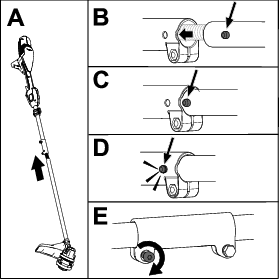
  1. Unfold the handle (A of Figure 3).

  2. Align the locking button on the lower shaft with the slotted hole on the upper shaft and slide the 2 shafts together (B and C of Figure 3).

    Note: The locking button clicks into the slotted hole when the shafts are secured (D of Figure 3).

  3. Using an Allen wrench, tighten the screw on the shaft connector until it is secure (E of Figure 3).

    g511798

Installing the Auxiliary Handle

Parts needed for this procedure:

Auxiliary handle assembly1
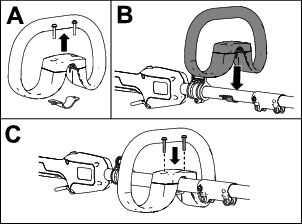
  1. Using a Phillips head screwdriver, separate the auxiliary handle from the handle plate by removing the 2 screws (A of Figure 4).

    g511799
  2. Align the auxiliary handle with auxiliary handle plate on the trimmer shaft (B of Figure 4).

  3. Secure the auxiliary handle to the handle plate with the 2 previously removed screws (C of Figure 4).

Installing the Guard

Parts needed for this procedure:

Guard1
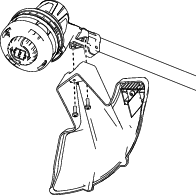
  1. Remove the 2 phillips-head screws from the trimmer base.

  2. Secure the guard onto the base of the trimmer with the 2 screws.

g511976

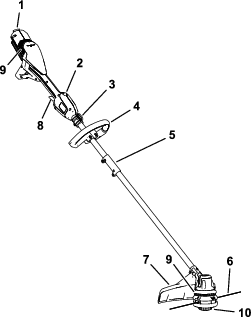
Product Overview

g511977
Model51811T
Rated Voltage60V DC maximum, 54 VDC nominal usage
Charger TypeFlex-Force 60V lithium-ion chargers
Battery TypeFlex-Force 60V lithum-ion batteries*

If you are using this machine with a battery pack that is 8.0 Ah or greater, you must install quick-release harness Model 139-5334 (not included).

Appropriate Temperature Ranges

Charge/store the battery pack at5°C (41°F) to 40°C (104°F)*
Use the battery pack at -30°C (-22°F) to 49°C (120°F)
Use the trimmer at0°C (32°F) to 49°C (120°F)
Store the trimmer at0°C (32°F) to 49°C (120°F)*

*Charging time will increase if you do not charge the battery within this range.

Store the tool, battery pack, and battery charger in an enclosed clean, dry area.

Attachments/Accessories

A selection of Toro approved attachments and accessories is available for use with the machine to enhance and expand its capabilities. Contact your Authorized Service Dealer or authorized Toro distributor or go to www.Toro.com for a list of all approved attachments and accessories.

To ensure optimum performance and continued safety certification of the machine, use only genuine Toro replacement parts and accessories. Replacement parts and accessories made by other manufacturers could be dangerous.

Operation

Starting the Trimmer

  1. Ensure that the vents on the trimmer are clear of any dust and debris.

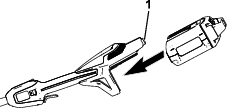
  2. Align the cavity in the battery pack with the tongue on the power head (Figure 7).

  3. Push the battery pack into the power head until the battery locks into the latch (Figure 7).

    g511989
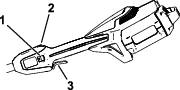
  4. To start the trimmer, pull back the lockout switch, then squeeze the variable-speed trigger (Figure 8).

    Note: Slide the speed range switch to change the speed of the trimmer.

    g511990

Shutting Off the Trimmer

To shut off the trimmer, release the trigger and the lockout switch.

Whenever you are not using the trimmer or are transporting the trimmer to or from the work area, remove the battery pack.

Removing the Battery Pack from the Trimmer

Press the battery latch to release the battery pack and slide the battery pack out of the machine (Figure 9).

g511991

Adjusting the Auxiliary Handle Position

  1. Loosen, but do not remove, the screws on the top of the auxiliary handle.

  2. Adjust the position of the auxiliary handle on the shaft until the trimmer can held in a neutral, comfortable position while operating.

  3. Tighten the screws to secure auxiliary handle in place.

Advancing the Line Using the Bump Feed

  1. Run the tool at full throttle.

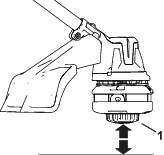
  2. Tap the bump button on the ground to advance the line. The line advances each time the bump button is tapped.

    Important: Do not hold the bump button on the ground while running the trimmer.

    Note: The line trimming cut-off blade on the grass deflector cuts the line to the correct length.

    Note: If the line is worn too short, you may not be able to advance the line by tapping it on the ground. If so, release both the trigger and the lockout switch and refer to Advancing the Line Manually.

g511994

Advancing the Line Manually

Remove the battery pack from the trimmer, then push the bump button at the base of the spool retainer while pulling on the trimmer line to manually advance the line.

Using the Shoulder Harness

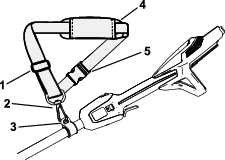
Important: If you are using the string trimmer with a 8.0 Ah or greater battery pack installed, install a shoulder harness (not included). Do not use the shoulder harness if you are powering the string trimmer with the backpack and backpack tether; use only the backpack harness.

Connect the clip on the shoulder harness to the strap collar at the top of the shaft (Figure 11).

g512005

The strap length is adjustable; slide the strap adjuster up to decrease the length of the strap, or down to increase the length of the strap (Figure 11).

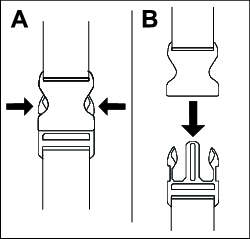
If there you ever need to rapidly remove the harness, disconnect the quick-release buckle as follows:

  1. Press in on the sides of the buckle (A of Figure 12).

  2. Allow the buckle to disconnect (B of Figure 12).

g340477

Operating Tips

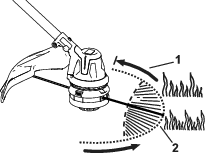
  • Keep the trimmer tilted toward the area being cut; this is the best cutting area.

  • The string trimmer cuts when you move it from right to left. This prevents the trimmer from throwing debris at you.

  • Use the tip of the cutting line to do the cutting; do not force the trimmer head into uncut grass.

  • Wire and picket fences can cause the cutting line to wear rapidly and even break. Stone and brick walls, curbs, and wood can also cause the cutting line to wear rapidly.

  • Avoid trees and shrubs. The cutting line can easily damage tree bark, wood moldings, siding, and fence posts.

g512017

Maintenance

After each use of the trimmer, complete the following:

  1. Remove the battery pack from the trimmer.

  2. Wipe the trimmer clean with a damp cloth. Do not hose the trimmer down or submerge it in water.

    Caution

    The line cutoff blade on the deflector is sharp and can cut you.

    Do not use your hands to clean the deflector shield and blade.

  3. Wipe or scrape clean the cutting head area any time there is an accumulation of debris.

  4. Check and tighten all fasteners. If any part is damaged or lost, repair or replace it.

  5. Brush debris away from air intake vents on the power head and the exhaust on the motor housing to prevent the motor from overheating.

Replacing the Cutting Line

Important: Use only 2.0 mm (0.080 inch) diameter monofilament cutting line or 2.4 mm (0.095 inch) diameter twisted monofilament cutting line from Toro.

  1. Remove the battery pack and clean any debris from the trimmer head.

  2. Remove any cutting line by repetitively pressing the bump button while pulling the line out equally from both sides of the trimmer.

  3. Cut a piece of line according to the following specifications.

    • If you are using 2 mm (0.080 inch) cutting line, cut one piece of line approximately 4.9 m (16 ft).

    • If you are using 2.4 mm (0.095 inch) twisted cutting line, cut one piece of line approximately 3.0 m (10 ft).

    Important: Do not use any other gauge or type of cutting line, and do not exceed the recommended length as this could damage the trimmer.

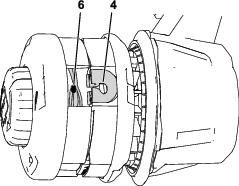
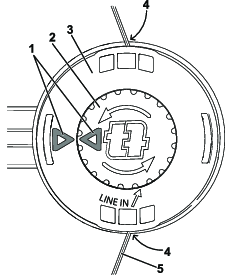
  4. Press and turn the knob on the trimmer head until arrow on the knob aligns with arrow on the trimmer head (Figure 14).

  5. Insert 1 end of the line at an angle into the LINE IN eyelet and push the line through the trimmer head track until it comes out through the eyelet on the other side. Pull the line though the trimmer head until there is an equal amount on each side.

    Important: Do not disassemble the trimmer head.

  6. Hold the trimmer head in place with one hand. With your other hand, rotate the knob in the direction shown by the arrows (clockwise).

  7. Wind the line in until there is about 102 mm (4 inches) extending beyond the eyelet on each side.
    g278518g285202

Storage

Important: Store the machine, battery pack, and charger only in temperatures that are within the appropriate range; refer to Specifications.

Important: If you are storing the machine for a year or longer, remove the battery pack from the machine and charge the battery pack until 1 or 2 LED indicators turn green on the battery. Do not store a fully charged or fully depleted battery. When you are ready to use the machine again, charge the battery pack until the left indicator light turns green on the charger or all 4 LED indicators turn green on the battery.

  • Disconnect the machine from the power supply (i.e., remove the battery pack) and check for damage after use.

  • Clean all foreign material from the machine.

  • Do not store the machine or charger with the battery pack installed.

  • When not in use, store the machine, battery pack, and battery charger out of the reach of children.

  • Keep the machine, battery pack, and battery charger away from corrosive agents such as garden chemicals and de-icing salts.

  • To reduce the risk of serious personal injury, do not store the battery pack outside or in vehicles.

  • Store the machine, battery pack, and battery charger in an enclosed clean, dry area.

  • When the machine is folded for storage, do not hang it from the electrical wire harness.

Troubleshooting

Perform only the steps described in these instructions. All further inspection, maintenance, and repair work must be performed by an authorized service center or a similarly qualified specialist if you cannot solve the problem yourself.

Always remove the battery from the tool when troubleshooting, inspecting, maintaining, or cleaning the tool.

ProblemPossible CauseCorrective Action
The tool does not run or does not run continuously.
  1. The battery is not fully installed in the tool.
  2. The battery pack is not charged.
  3. The battery pack is over or under the appropriate temperature range.
  4. There is moisture on the leads of the battery pack.
  5. The battery pack is damaged.
  6. There is another electrical problem with the tool.
  1. Remove and then replace the battery into the tool, making sure that it is fully installed and latched.
  2. Remove the battery pack from the tool and charge it.
  3. Move the battery pack to a place where it is dry and the temperature is between 5°C (41°F) and 40°C (104°F).
  4. Allow the battery pack to dry or wipe it dry.
  5. Replace the battery pack.
  6. Contact an Authorized Service Dealer.
The tool does not reach full power or the motor housing is getting hot.
  1. The battery pack charge capacity is too low.
  2. The air vents are blocked.
  1. Remove the battery pack from the tool and fully charge the battery pack.
  2. Clean the air vents.
The tool is producing excessive vibration or noise.
  1. There is debris under the grass shield or in the bump head housing on the trimmer.
  2. The spool is not properly wound.
  1. Clean any debris from under the grass shield or in the bump head housing.
  2. Advance the line using the bump head and/or remove the line on the spool and wind the spool again.
The bump head does not advance the line.
  1. The trimmer is out of line.
  2. The line is tangled in the bump head housing.
  3. There is debris under the grass shield or in the bump head housing on the trimmer.
  1. Add more line to the bump head.
  2. Remove the bump head cover and untangle the line.
  3. Clean any debris from under the grass shield or in the bump head housing.
The battery pack loses charge quickly.
  1. The battery pack is over or under the appropriate temperature range.
  2. The trimmer is overloaded.
  1. Move the battery pack to a place where it is dry and the temperature is between 5°C (41°F) and 40°C (104°F).
  2. Trim at a slower pace.