Charge Station

Turf Pro Series Robotic Mowers and Range Pro Series Ball Pickers

Disclaimers and Regulatory Information
 
CALIFORNIA
 
Proposition 65
 
This product contains a chemical or chemicals known to the State of California to cause cancer, birth defects, or reproductive harm.
 

Introduction

Warning
Failing to follow the operating instructions or to receive training from an authorized Toro distributor may result in death or serious injury.
  • To maximize the safety, performance, and proper operating of this machine, carefully read and fully understand the content of this Operator's Manual.
  • For more information on safe operating practices, including safety tips and training materials, go to www.Toro.com.
 
This manual covers the installation and maintenance of the charging station for the Turf Pro series robotic mowers and Range Pro series ball pickers.
Note: Information about the peripheral wires and loop wires is located in the Operators Manual for each mower.
This charging station is intended to be used by professional, hired operators for autonomous, programmable lawn care. It is designed for charging the batteries on the Turf Pro and Range Pro autonomous robots. Using the autonomous robots, battery, charging station, and base station for purposes other than their intended use could endanger you and bystanders.
Read this information carefully to learn how to operate and maintain your product properly and to avoid injury and product damage. You are responsible for operating the product properly and safely.

Getting Help

Visit www.Toro.com for product safety and operation training materials, accessory information, help finding a dealer, or to register your product.
Whenever you need service, genuine Toro parts, or additional information, contact an Authorized Service Dealer or Toro Customer Service and have the model and serial numbers of your product ready. These numbers are located on the serial plate on your product. Write the numbers in the space provided.
Important  
With your mobile device, you can scan the QR code on the serial number decal (if equipped) to access warranty, parts, and other product information.
 
Model Number:
Serial Number:

Manual Conventions

This manual identifies potential hazards and has safety messages identified by the safety-alert symbol, which signals a hazard that may cause serious injury or death if you do not follow the recommended precautions.
Graphic
G405934
This manual uses 2 words to highlight information. Important calls attention to special mechanical information and Note emphasizes general information worthy of special attention.
Safety Alert Classifications
The safety-alert symbol shown in this manual and on the machine identifies important safety messages that you must follow to prevent accidents.
Safety-alert symbol appears above information that alerts you to unsafe actions or situations and is followed by the word DANGER, WARNING, or CAUTION.
Danger
Danger indicates an imminently hazardous situation which, if not avoided, will result in death or serious injury.
 
Warning
Warning indicates a potentially hazardous situation which, if not avoided, could result in death or serious injury.
 
Caution
Caution indicates a potentially hazardous situation which, if not avoided, may result in minor or moderate injury.
 

Safety

IMPORTANT SAFETY INSTRUCTIONS

  1. SAVE THESE INSTRUCTIONSThis manual contains important safety and operating instructions for the Turf Pro and Range Pro battery charger.
  2. Before using the battery charger, read all the instructions and cautionary markings on the battery charger, battery, and product using the battery pack.
  3. CAUTIONTo reduce risk of injury, charge the Turf Pro and Range Pro batteries with the Turf Pro and Range Pro charging station only. Other brands of battery packs may burst, causing personal injury and damage.

General Safety

  • Read, understand, and follow all of these instructions and warnings before using the machine.

Operation Safety

  • Do not place any object on the charging station.
  • Do not modify the charging station.
  • Do not use or operate a damaged or improperly functioning charging station.
  • Do not plug the charging station into a power strip or an extension cord.
  • Do not operate a charging station that has received a sharp or heavy blow.
  • Do not use a charging station other than that designed for the mower; refer to the Operators Manual for proper charging instructions.
  • Do not connect a damaged power supply cord. Do not touch a live damaged cord.
  • Wipe the charging terminals on the charging station and mower using a clean, dry cloth if they are dirty.
  • Do not stand or sit on the charging station or allow others to do so.
  • Keep bystanders and children away from the charging station during operation.
  • When the robotic mower or ball picker needs to be charged, it automatically travels to the charging station and starts charging. When the required amount of charge is completed, charging is terminated. For more information, refer to the robot mower or ball picker Operators Manual.
  • This product is intended for charging batteries (type: lithium-ion iron phosphate battery, cell number: 3.2 V x 8, voltage: 25.6 V, capacity: 19.0 Ah/486.4 Wh) in robot mowers and ball pickers. Do not use to charge other batteries.

Maintenance Safety

  • Disconnect the charging station before performing maintenance on or cleaning it to reduce the risk of electric shock.
  • Do not attempt to repair, open, or disassemble the charging station unless you are authorized to do so.
  • Take the charging station to an Authorized Service Dealer for service repair. Do not disassemble the charging station.

Safety and Instructional Decals

Image
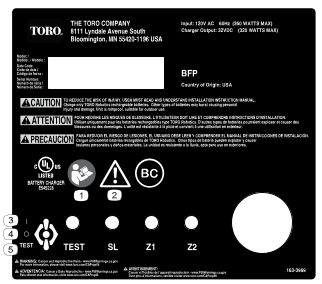
Safety decals and instructions are easily visible to the operator and are located near any area of potential danger. Replace any decal that is damaged or missing.
Decal Part: 163-3969
Graphic
s_decal163-3969
  1. Read the Operators Manual.
  2. Warning
  3. On position
  4. Off position
  5. Test position

Product Overview

Graphic
G525892
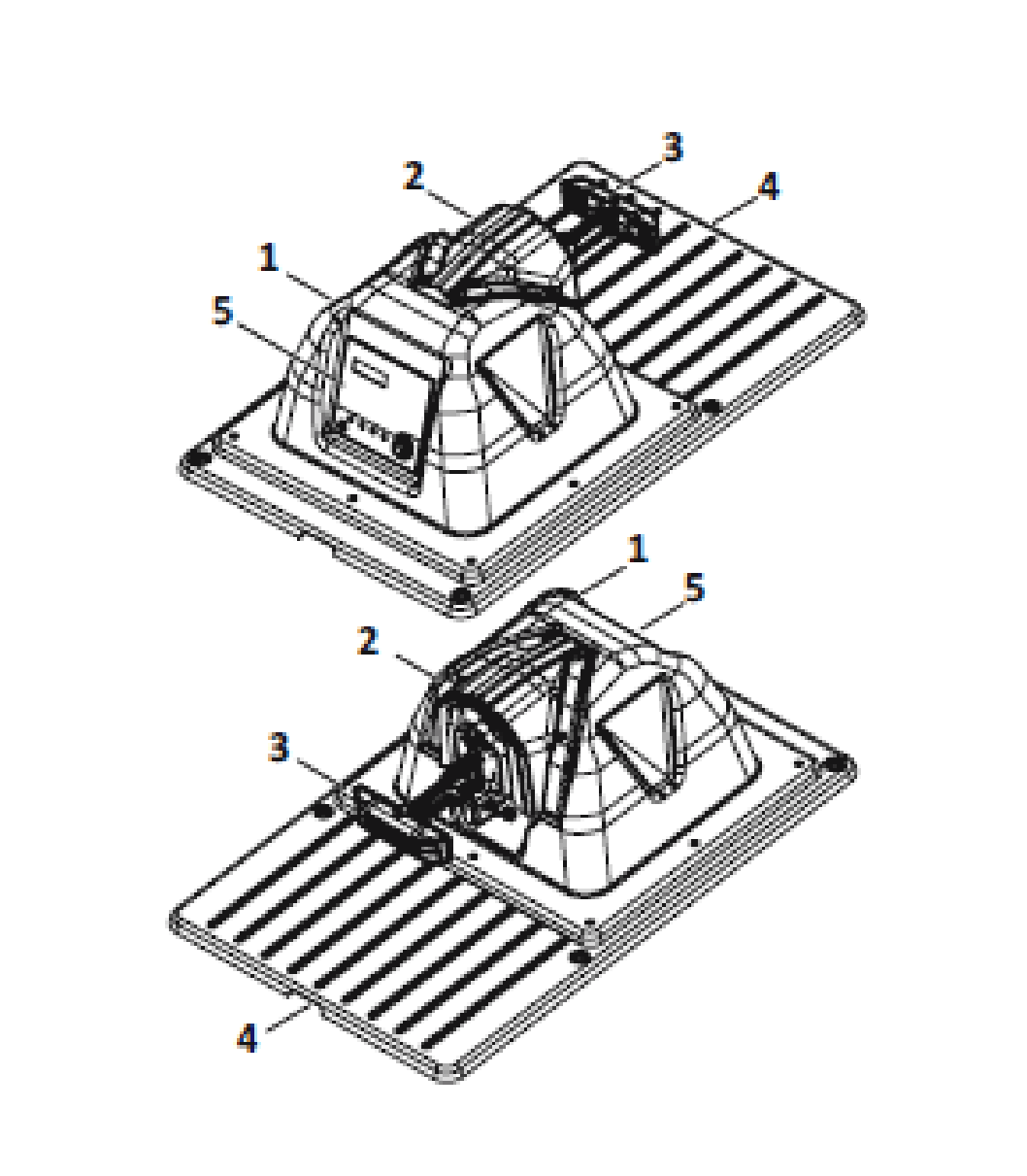
  1.  Enclosure top
  2.  Debris cover
  3.  Charging arm
  4.  Enclosure base
  5.  Input panel/serial number location

LED Indicators

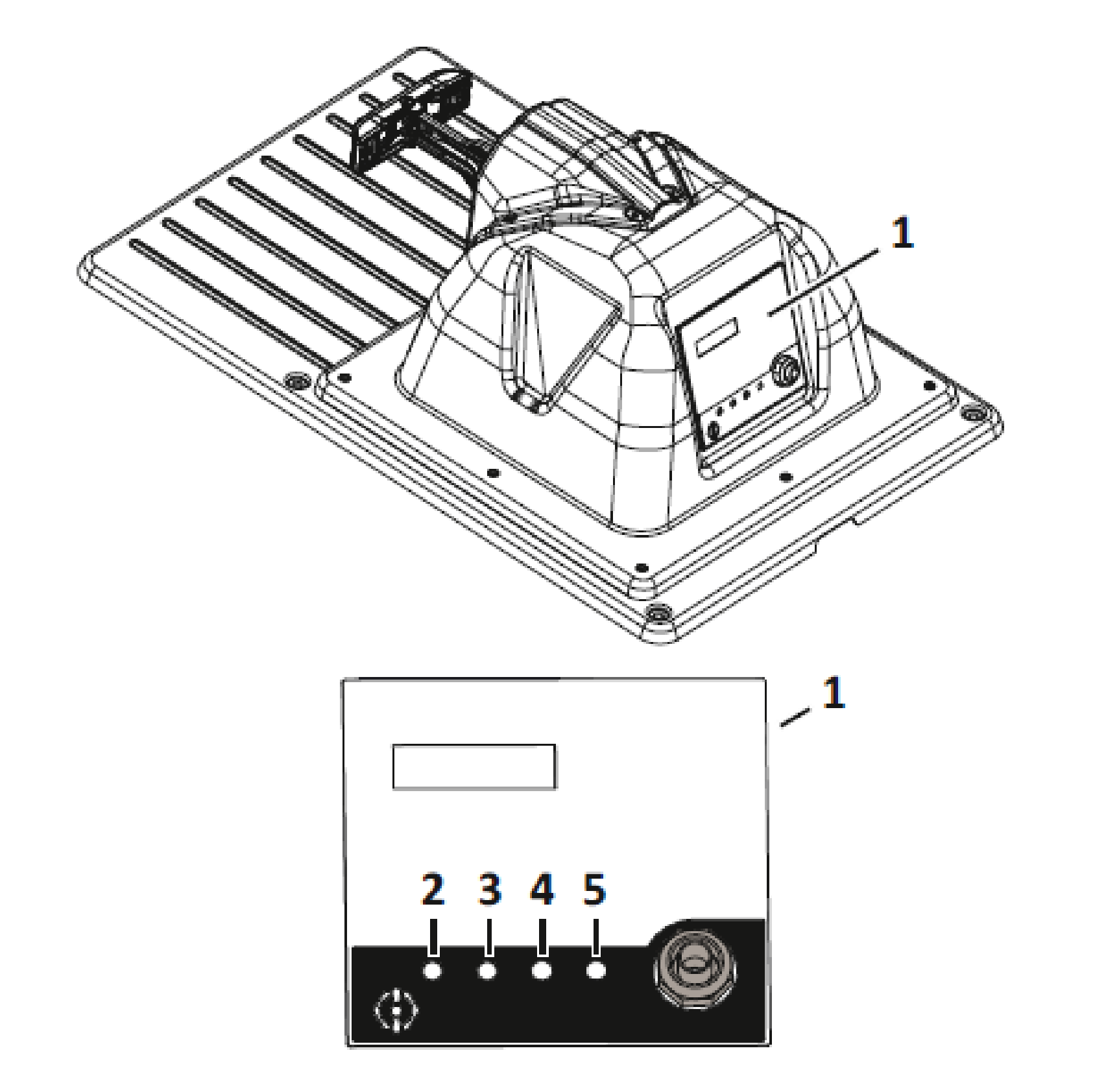
There are four LED indicators located on the input
Important  
If an LED is not illuminated, AC power may still be present.
 
Graphic
G525895
  1.  Input panel
  2.  TEST LED
  3.  SL (Station Loop) LED
  4.  Z1 (Field Zone 1) LED
  5.  Z2 (Field Zone 2) LED
TEST LED
Illuminates green when AC power is present and the power switch is in the TEST position.
SL (Station Loop) LED
Blinks green when the station loop peripheral wire is correctly connected, blinks red when an issue is detected.
Z1 (Field Zone 1) LED
Blinks green when Field Zone 1 peripheral wire is correctly connected, blinks red when an issue is detected.
Z2 (Field Zone 2) LED
Blinks green when Field Zone 2 peripheral wire is correctly connected, blinks red when an issue is detected.
Green - blinking
The wire is operating normally.
Red - blinking
No peripheral wire can be detected. This could be because the wire has been cut or that it is too long.
Red - steady
This indicates a problem. This could be due to the wire being too short, less than 200 m (656 ft), or there is a problem with the electronics.
Note: If you are using a charging station with multiple loops and you are not using one of the loops, the LED will blink red. To stop the LED from blinking red, turn the channel on the board to 9.
Specifications
Note: Specifications and design are subject to change without notice.
These charging station models are rated for intermittent use. The charging station is designed to have a controlled output that will charge the battery but does not keep continuous charging power available on the charging contacts.
Length
993 mm (39.1 inches)
Width
646 mm (25.4 inches)
Height
356 mm (14 inches)
Operating Temperature
0 to 50°C (32 to 122°F)
Input
120 VAC - 60 Hz 3.5 A (360 W
maximum)
Charge Outputs
32 VDC 10.7 A (320 W maximum)
Output Circuits
Class 2

Installation

Charging Station Installation Requirements

Required Tools
1
Deep-well socket/driver (8 mm)
1
Flat-blade screwdriver (3 mm)
1
Phillips screwdriver (#1)
1
Adjustable wrench
1
Wire strippers
1
Tape measure
1
Hammer
1
Slip-joint pliers
1
Driver (T-27) (supplied with charging station)
This is a basic installation procedure. Each installation varies by application. Contact an Authorized Service Dealer if you have specific questions.
One station is required for each robot.
If installing a charger for a Range Pro, refer to Adapting the Drop Pit Station.
Important  
Turn off the AC power at the mains.
The installation is required to be performed by a qualified professional.
Follow all of the national and regional codes.
 
Important
Do no bend, warp or crack the base during the installation process.
 
  • Develop an installation plan and a map of the site. If the installation is for ball picker, make sure to determine the area needed for the ball drop.
  • Identify a location for installing the AC power supply, station loop peripheral wire(s), and field zone peripheral wire(s).
  • There should be no risk of flooding after heavy rain.
  • Obstacles must be more than 6 m (19.7 ft) away from the charging station. For more details concerning water obstacles, refer the following section that details positioning the station near water.
  • When GPS navigation is being used, the station should be positioned in the following ways to optimize the GPS precision:
    • to the south of the site, if the site is in the northern hemisphere
    • to the north of the site, if the site is in the southern hemisphere
  • The charging station must lie within the range of the 4G RTK base or Wi-Fi repeater and receive a good signal level. A signal level of 1.2 is required for the robot to be able to leave the station and signal level of 2.0 is required for 4G RTK.
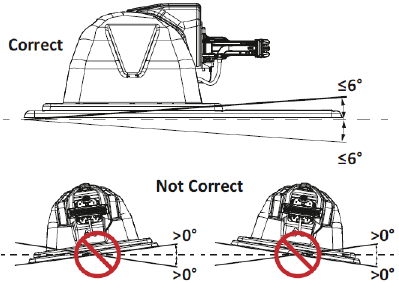
  • Install the charging station on flat ground where flooding or water accumulation will not occur.
    Graphic
    G526897
    Note: If the entire field is on a slope, install the charging station on a flat portion at the top. The robot has no brake when it is in charge mode and can slide away from the charging arm contacts if the longitudinal slope is greater than 0°.
Positioning the Charging Station Near Water
Important  
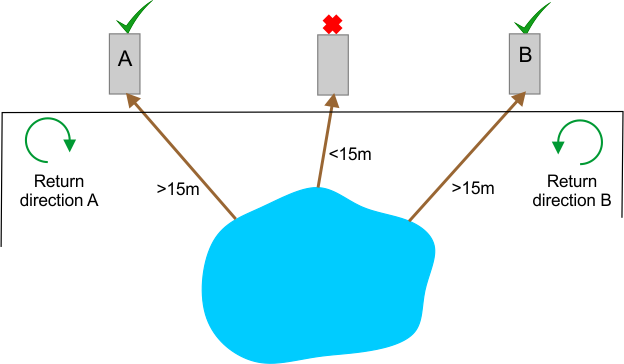
The charging station must be located at least 15 m (49 ft) from the water's edge.
 
The figure below summarizes critical factors associated with the placement of the charging station near a water feature.
Graphic
G520980
In the situation illustrated above, two possible locations for a charging station have been shown. The robot should return to the station from the direction away from the water. So if the charging station is located in point A, the robot must return to it in a clockwise direction. If the charging station is located in point B, the robot must return to it from a counter-clockwise direction.
Charging Station and Wire Distance
Graphic
G528591
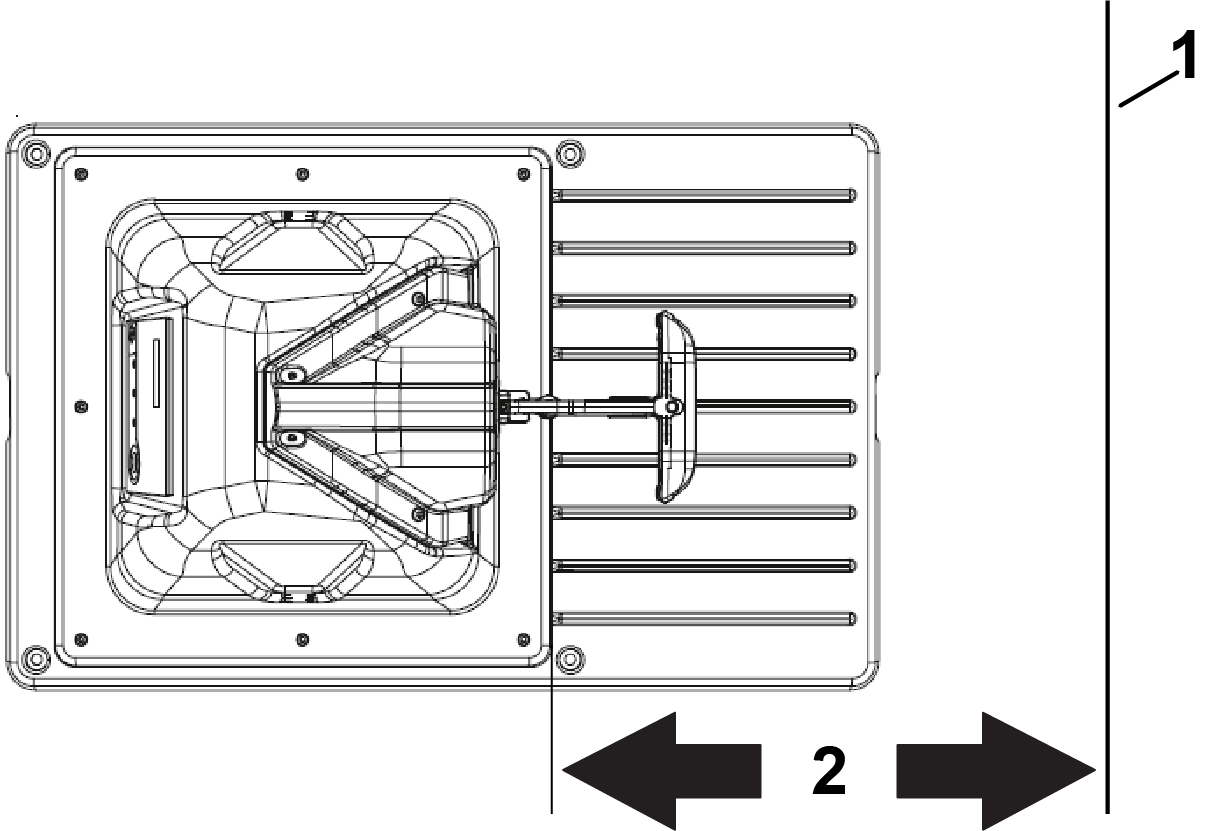
  1. Wire
  2. Distance between the station and wire
Turf Pro 300 only: The distance between the station and the loop wire is 610 mm (24 inches).
Turf Pro 500 only: The distance between the station and the loop wire is 720 mm (28.3 inches).
Range Pro only: The distance between the station and the loop wire is 760 mm (30 inches).

Installing the Peripheral Wire

  1. Important
    Turn off the AC power the at mains.
    The installation must be performed by qualified professional.
    Follow all of the national and regional codes.
     
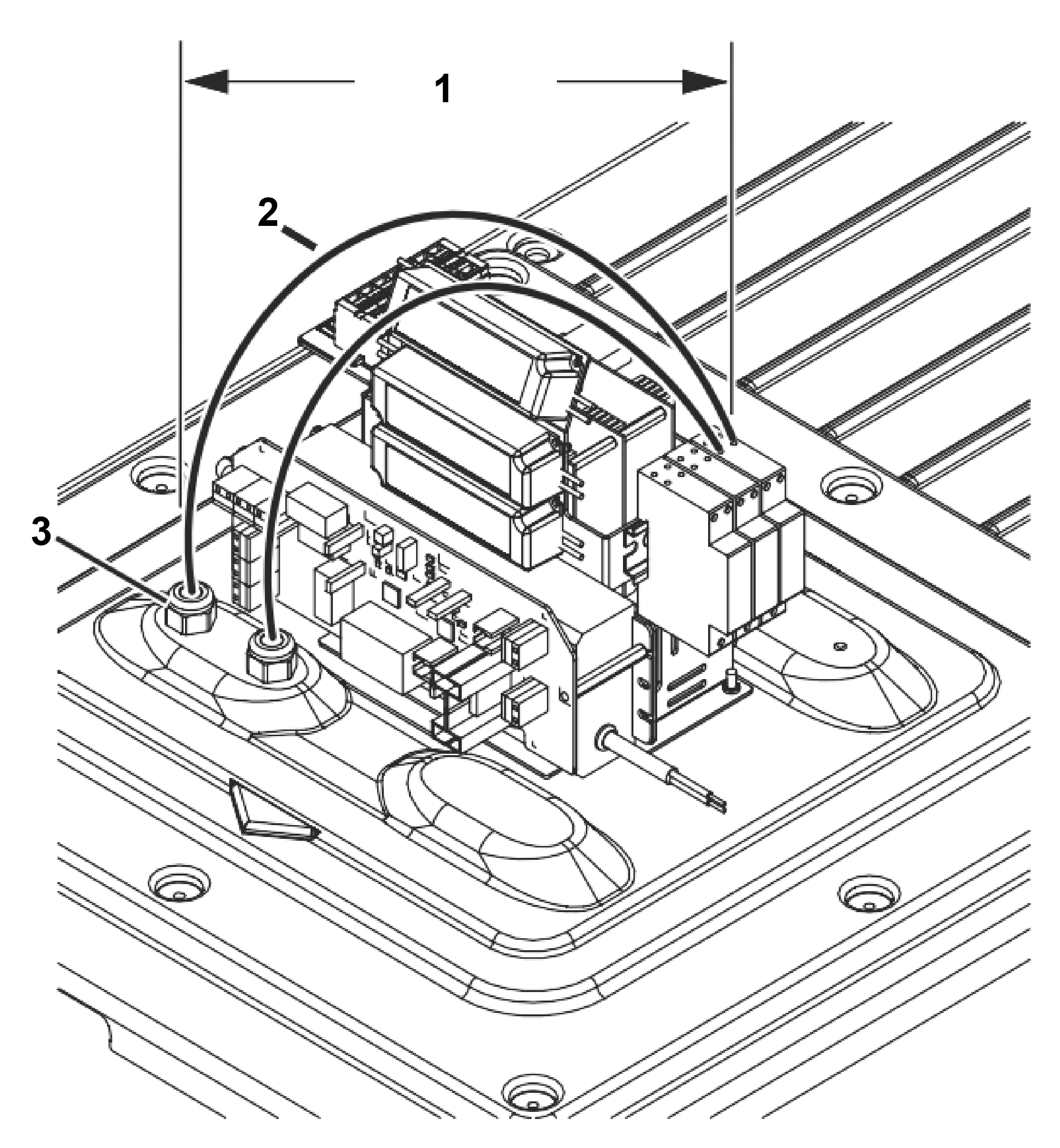
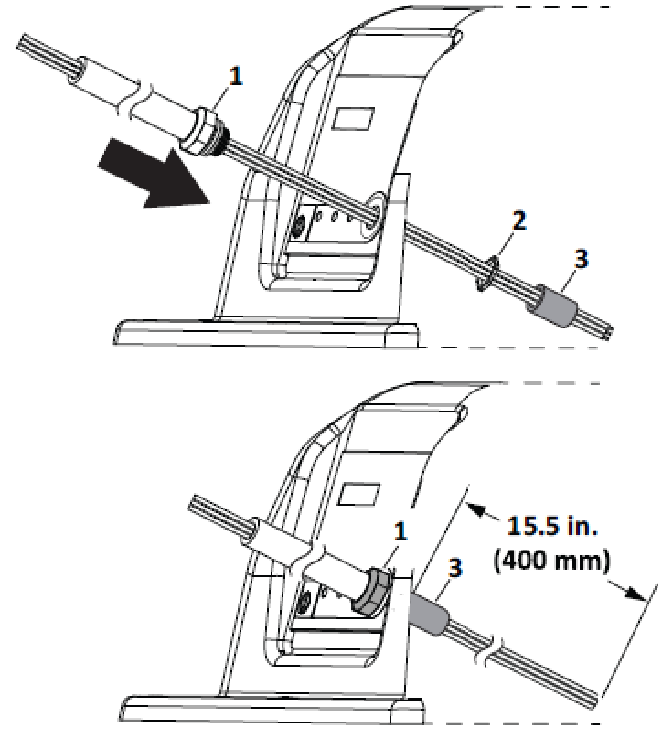
    Route all peripheral wires under the base and up through a cord grip. Allow a minimum length of 400 mm (15-1/2 inches) of each wire inside the enclosure top. Provide excess wire under the base for future repositioning.
    Graphic
    G525815
    1. 400 mm (15-1/2 inches)
    2. Peripheral wire
    3. Cord grip
  2. Remove 11 mm (1/2 inch) of insulation from the end of each wire.
  3. Hand-tighten the cord grips.
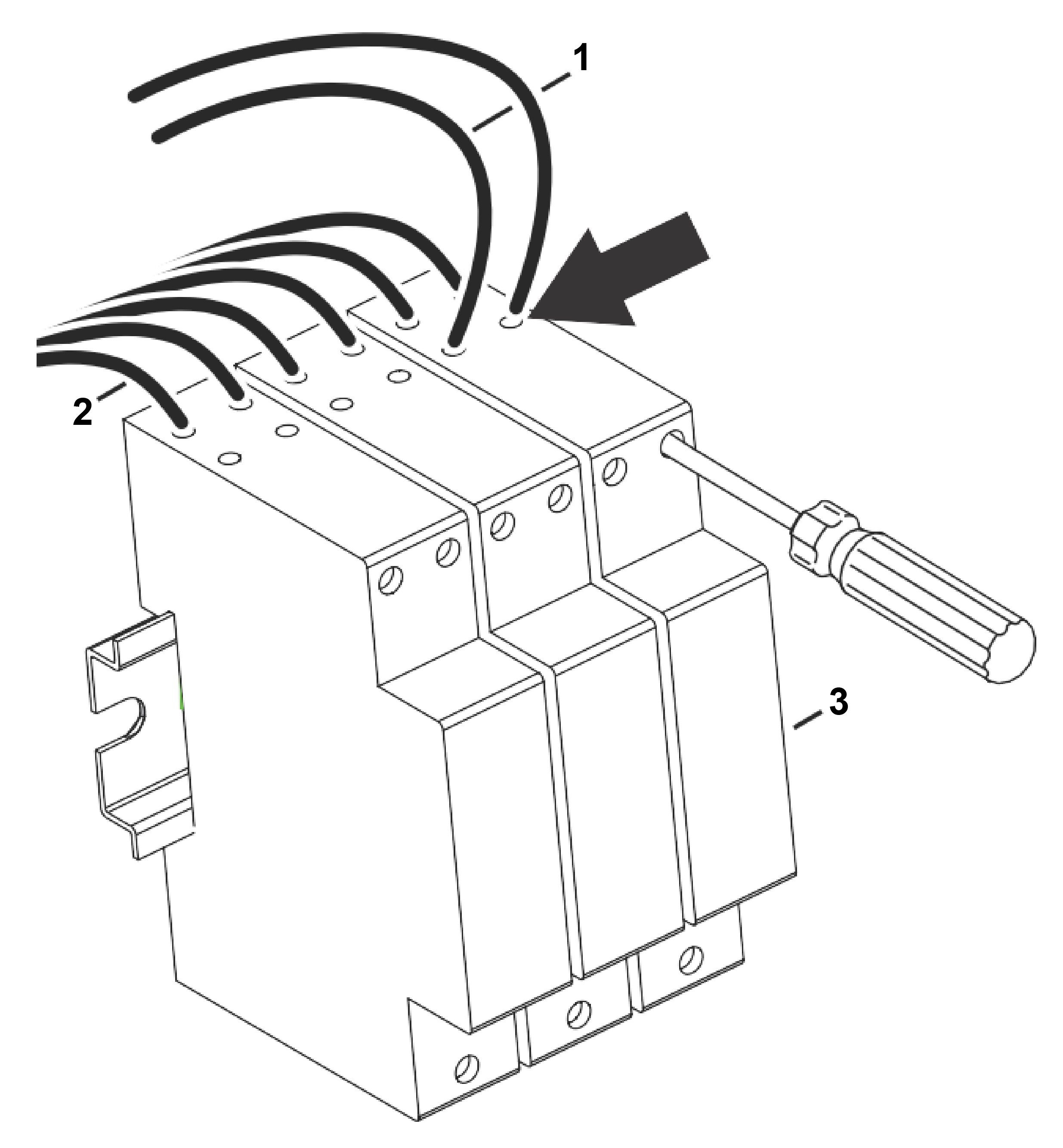
  4. Loosen the surge protector(s) terminal screws and insert the ends of the wires into the surge protector(s) at the locations shown. Securely tighten the terminal screws.
    Graphic
    G525816
    1. Peripheral wire
    2. Power wires (factory-assembled to surge protectors)
    3. Surge protector
  5. Firmly pull on each wire to verify a secure connection.

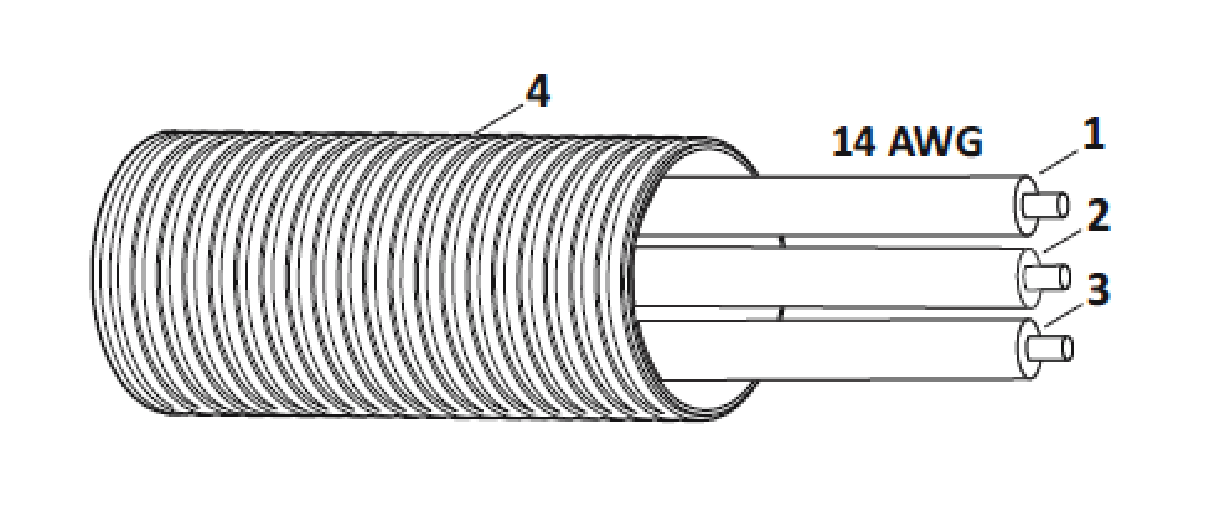
Installing the 14 AWG AC Wire

Important  
Turn off the AC power the at mains.
The installation must be performed by qualified professional.
Follow all of the national and regional codes.
 
Use a 14 AWG electrical wire and 1-1/4 cm (1/2 inch) diameter liquid-tight electrical conduit for AC power into the charging station.
Note: Wire and conduit are not included with the charging station.
Graphic
G525893
  1. Ground (green)
  2. Neutral (white)
  3. Line (black)
  4. Liquid-tight electrical conduit
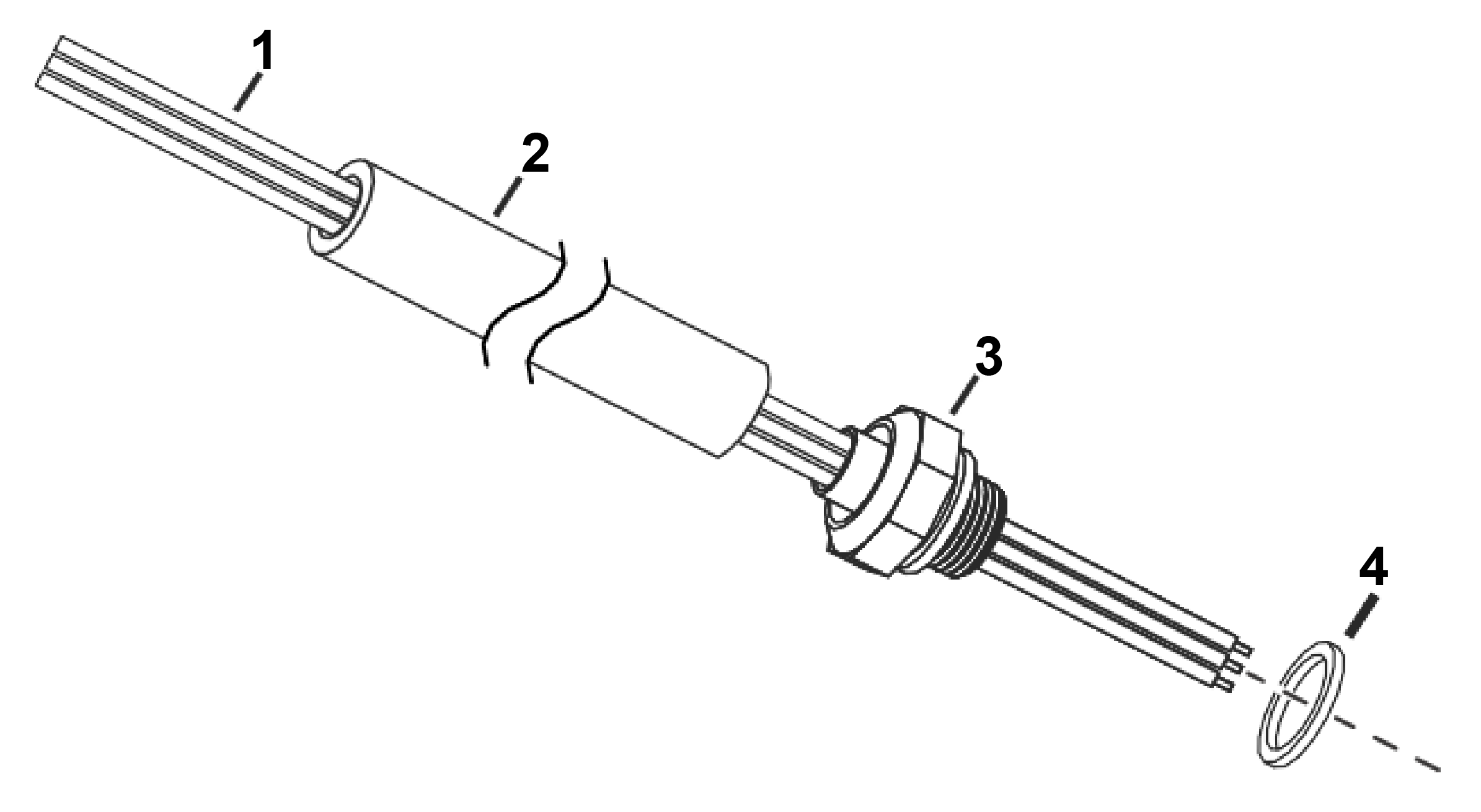
  1. Pull the wires through the conduit and the connector. Place the seal on the threaded side of the connector.
    Graphic
    G525818
    1. 14 AWG AC wires
    2. Liquid-tight conduit
    3. Conduit connector
    4. Seal
  2. Assemble the nut (from inside of panel) onto the connector. Allow 400 mm (15-1/2 inches) of wire on the inside of the enclosure top. Install the ferrite core around the AC wires. Place the core as close to the input plate as possible. Secure the core to the AC wires using electrical tape or cable tie(s).
    Graphic
    G540715
    1. Conduit connector
    2. Nut
    3. Ferrite core
  3. Remove 11 mm (1/2 inch) of insulation from the end of each wire.
  4. Install each wire into the terminal block.
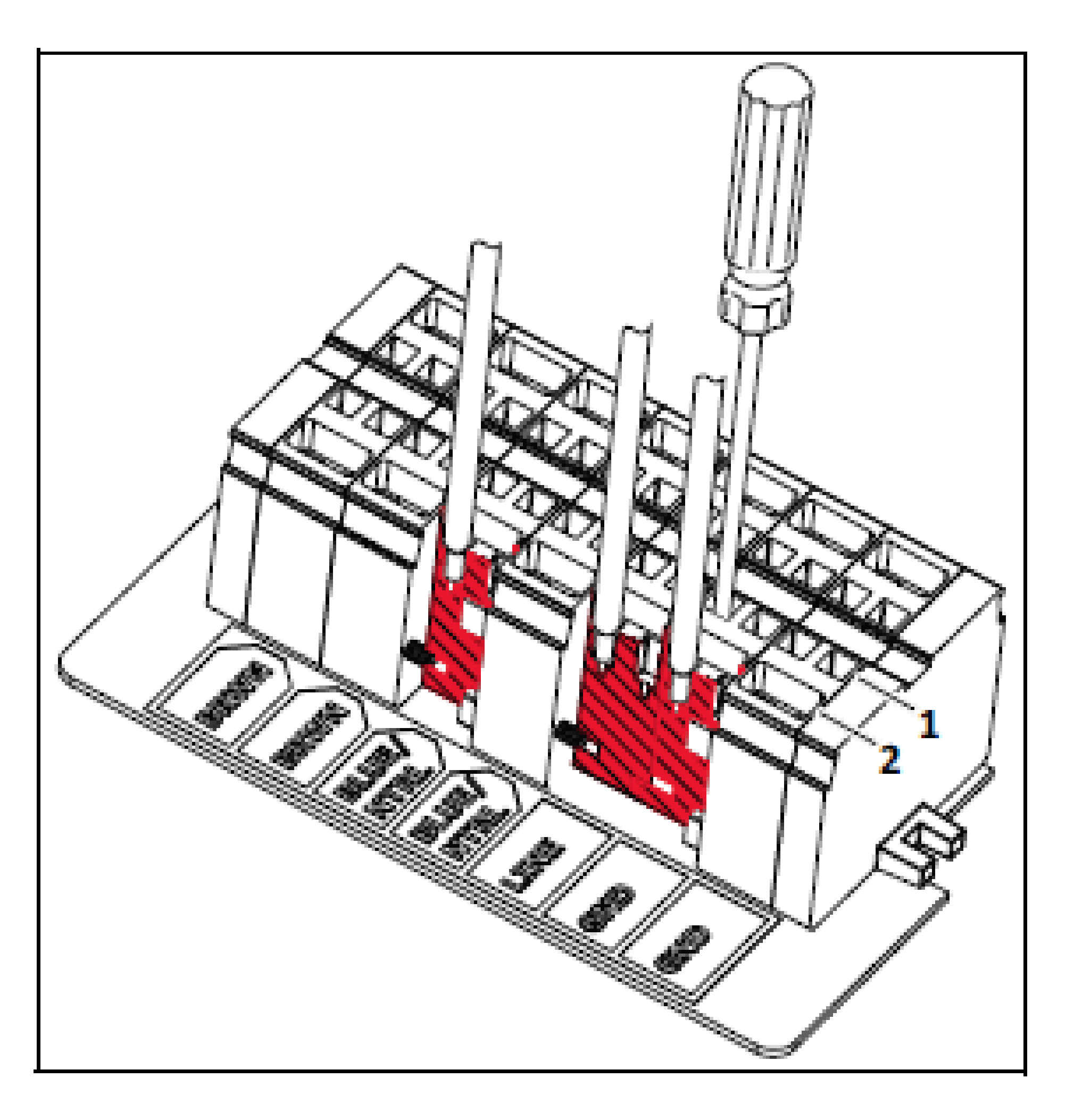
    Insert a flat-blade screwdriver into the small opening of the terminal block directly behind the wire and pry the spring contact open. Only install one wire per large terminal block opening. The stripped ends of the wire (or stray strands of wire) must remain on the inside of the terminal block.
    Graphic
    G525821
    1. Small terminal block openings
    2. Large terminal block openings
  5. Remove the screwdriver. Firmly pull each wire to verify a secure connection.

Station and Robot Alignment

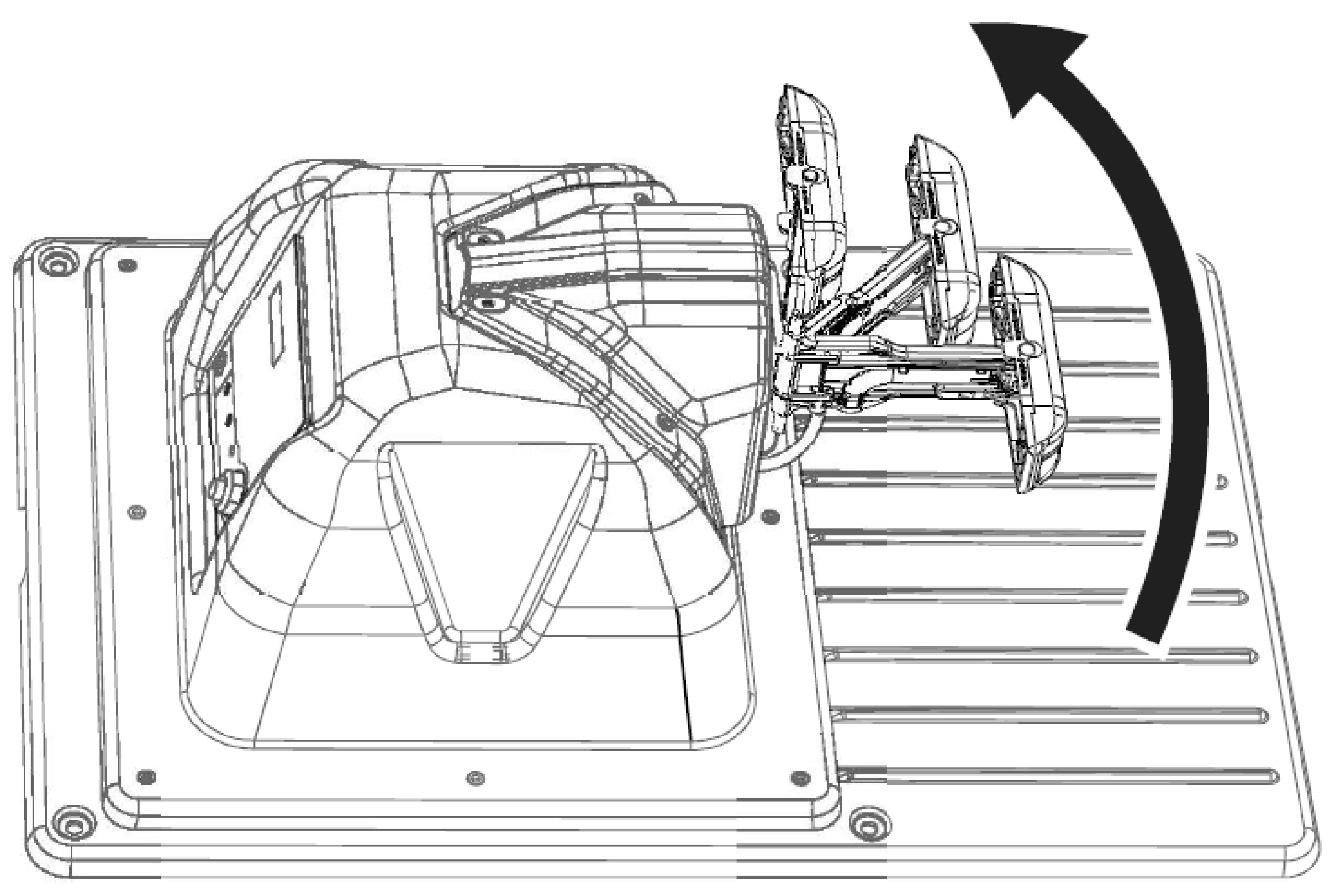
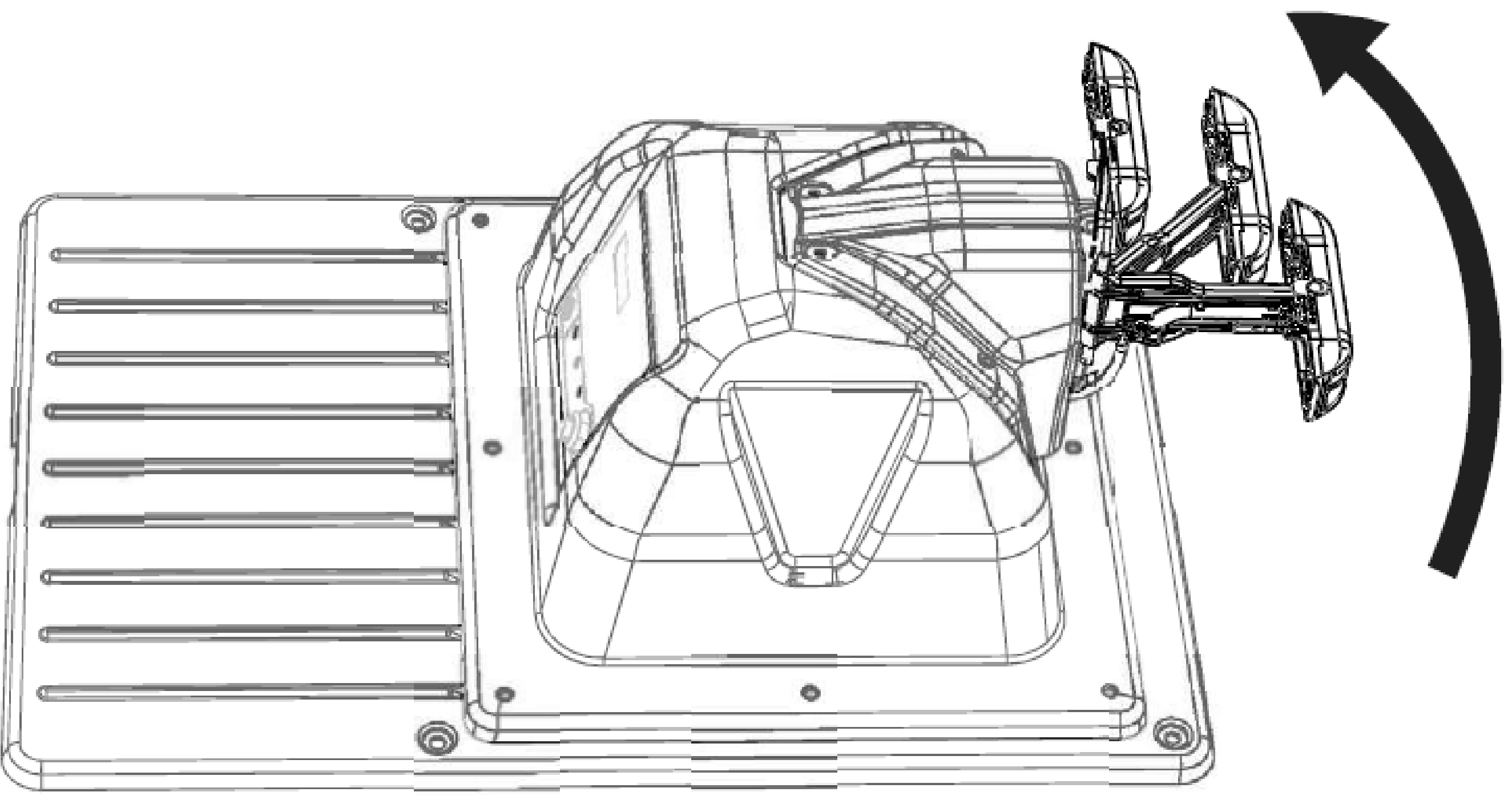
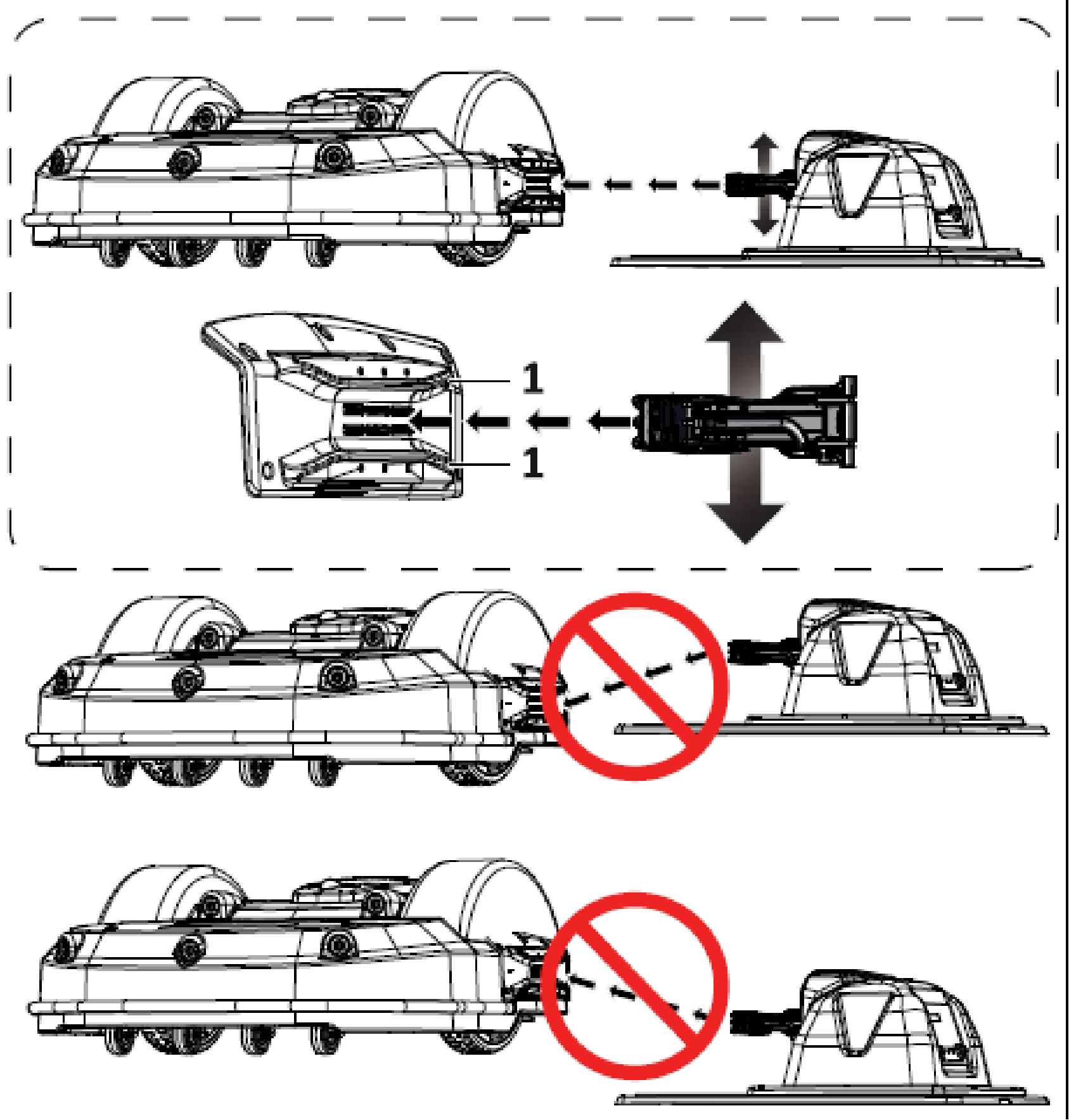
The charging arm will move horizontally allowing for correct alignment to the robot.
Mower Configuration
Graphic
G541848
Range Picker Configuration
Graphic
G541849
Aligning the Robot to the Station
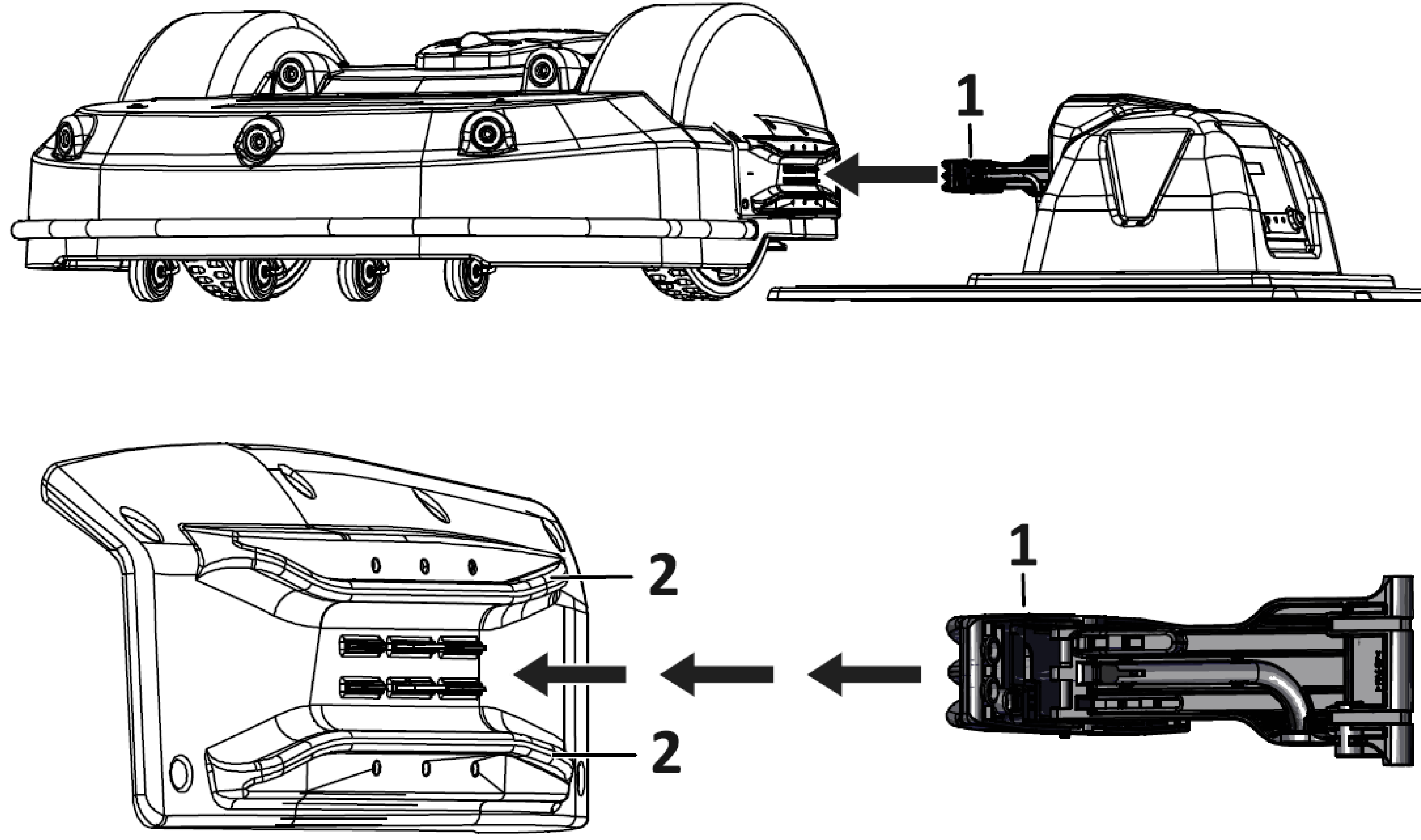
  1. Push the robot to the charging station along the station loop wire. Place the robot on the charging station, do not allow charging arm to contact the robot. Visually inspect the height and alignment of charging arm to the location of alignment tabs on the robot.
    Graphic
    G541870
    1. Charging arm
    2. Alignment tabs
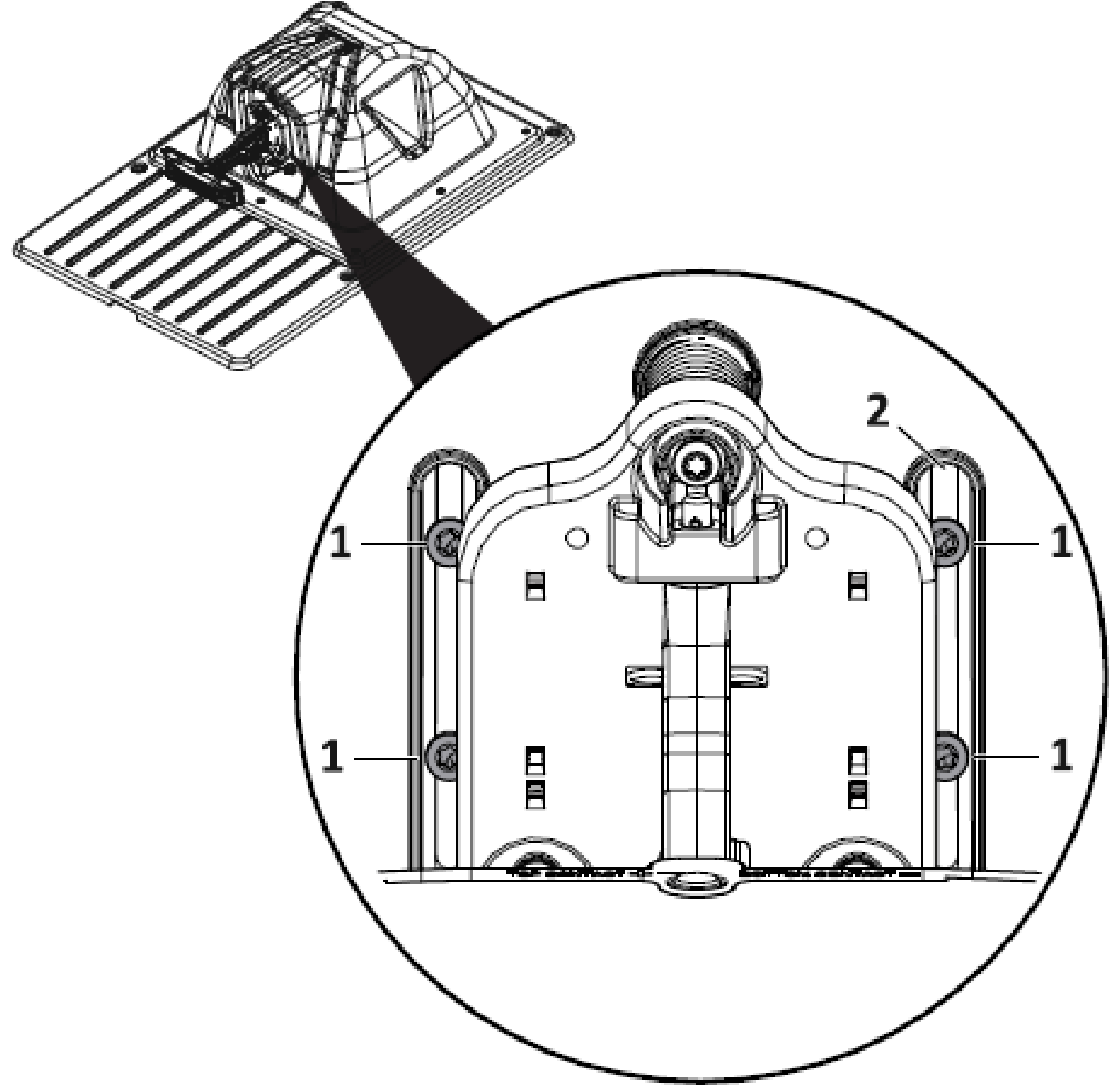
  2. Use a T-27 driver to loosen the 4 mounting screws on the charging arm mounting plate.
    Graphic
    G541883
    1. Mounting screws
    2. Charging arm mounting plate
  3. Position the charging arm height to align with the robot side housing alignment tabs.
    Graphic
    G541884
    1. Side housing alignment tabs
  4. Tighten the four mounting screws on the charge arm mounting plate.
  5. Verify the alignment of the base to the station loop wire(s). Push the robot away from the charging station, staying inside the station loop. Point it towards the station loop wire so that there is enough time for robot to be straight while entering the charging station.
  6. Program the robot to charge and stay. This instructs the robot to move towards the station loop and proceed to the charging station.
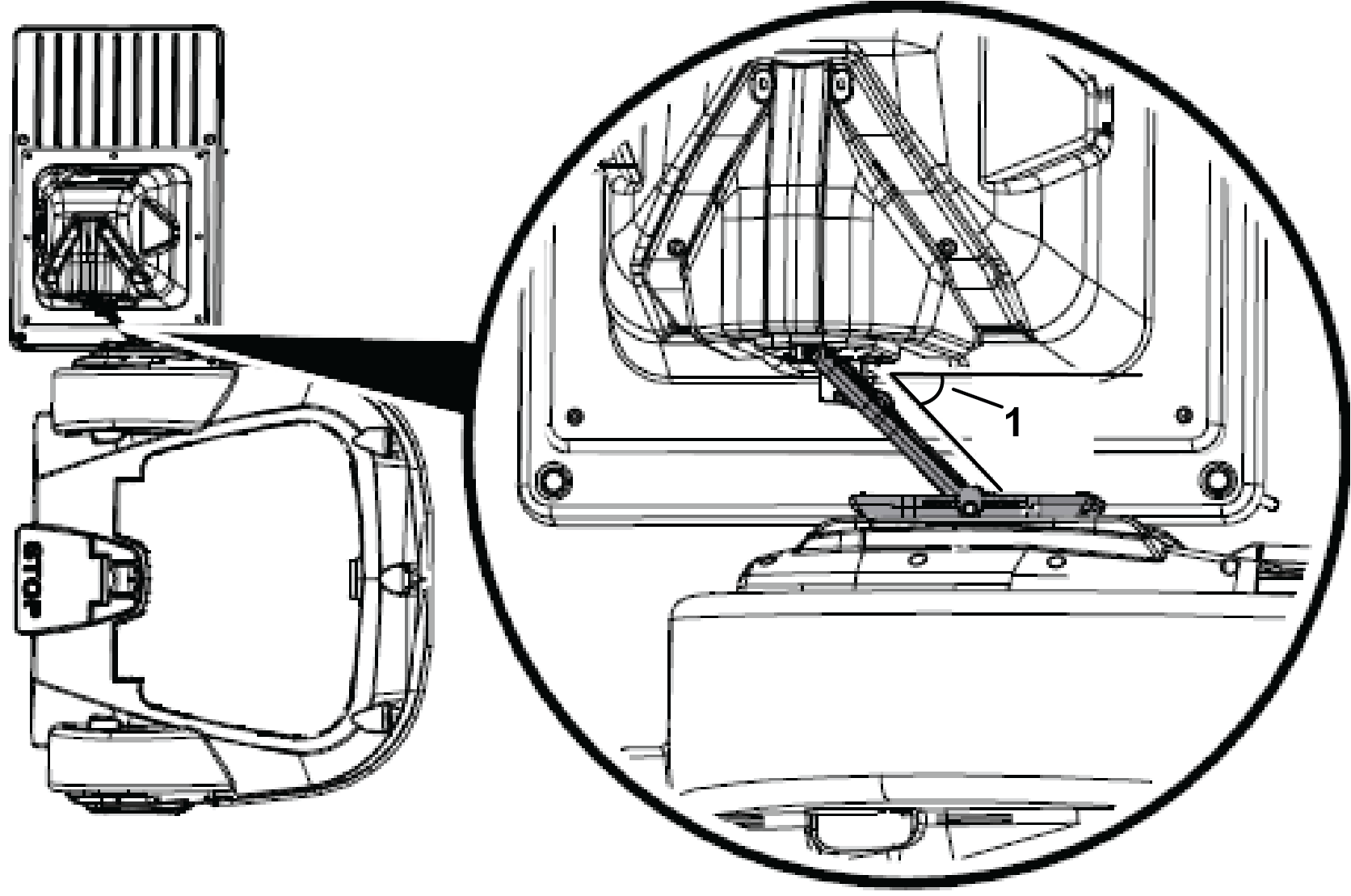
  7. Observe the robot as it approaches the charging station. Position the charging station so the charge arm is at a 30° through 45° angle when the robot is docked. Adjust the charging station as required.
    Graphic
    G545370
    1. 30° through 45°

Installing the Charger Base

  1. Remove underground hazards below the charging station.
  2. Secure the charging station.
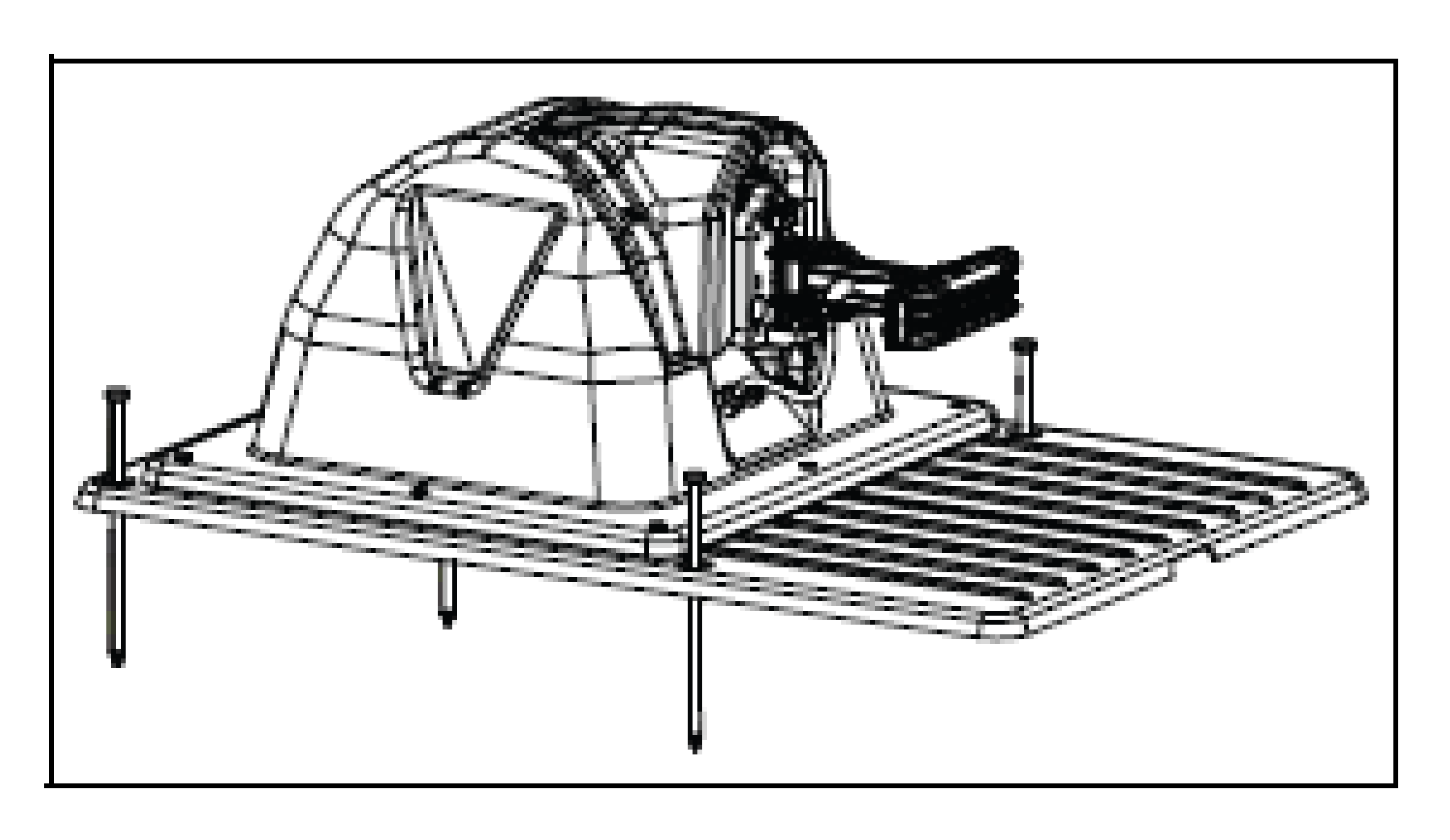
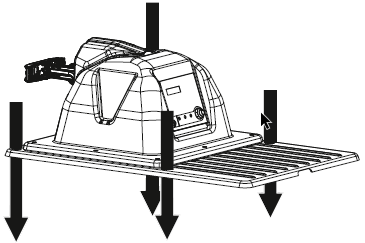
    • Mower application only: Use a hammer to install the four landscaping spikes to secure the base to the ground.
      Graphic
      G525845
    • Range Picker application only: Use the appropriate size and type of fastener to secure the charging station to the foundation of the ball collection system.
      Graphic
      G526909

Multiple Station Installation

When considering the position of multiple stations, the criteria listed below should be taken into account.
In the case of a multi-station installation, it is recommended to place the stations as a group in a location with easy access to a power supply.
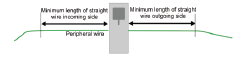
The station should be positioned on a straight section of the peripheral wire with defined minimum free distances on both the incoming and outgoing sides.
  • The minimum length of wire on the incoming side is 3.5 m (11.5 ft).
  • The minimum length of wire on the outgoing side is 3.5 m (11.5 ft).
Graphic
G527277
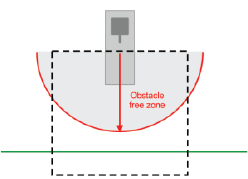
An obstacle free zone of at least 6 m (20 ft) is required.
Graphic
G527278
Multiple Stations Position
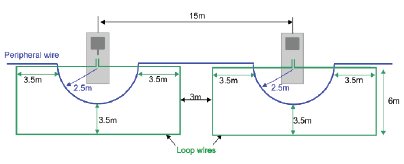
The dimensions associated with the positioning of multiple stations are shown below.
The minimum distance between stations is 15 m (49 ft).
In the example shown below, the peripheral wire bends around the station with a 2.5 m (8 ft) radius. This is to ensure that a working robot does not collide with a robot that is parked at the station.
Graphic
G527279

Ball-Collecting Robot Information

Stations on a Golf Course

A typical installation arrangement for a golf course includes ball-collecting and mowing robots.
The ball-collecting robots require one station which is connected to a drop pit where the balls are unloaded. One charging station is also required for each of the other ball-collecting and mowing robots.
All stations require a station loop wire to enable the robot to locate the station where it needs to charge. It is possible to connect multiple loops to a single station.
If there is more than one ball-collecting robot an additional busy loop is required around the drop pit station, which indicates that the drop pit is in use and that the other ball-collecting robot must wait until it is free.

Adapting the Drop Pit Station

A station needs to be attached to the drop pit.
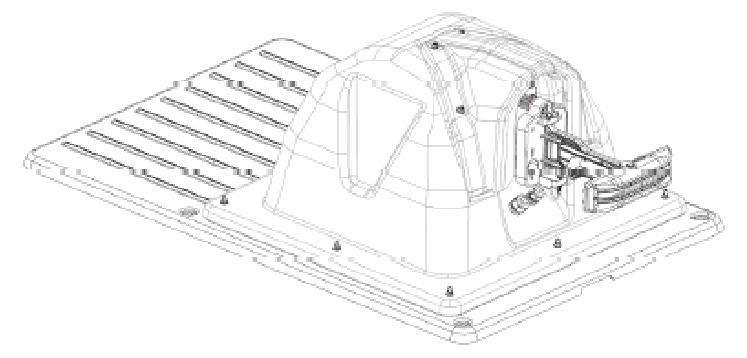
The base that is normally supplied with the station must be rotated. You need to rotate the plastic base so it is on the other side of the charger.
Graphic
G540874

Drop Pit

The drop pit is required for the ball-collecting robot to deposit the balls it has collected. When the robot arrives at the drop pit station, contact with the station arms triggers the release of the balls.
  • If there is only one ball-collecting robot, only one station is required: this acts as the trigger for the discharge of the balls and charges the robot's battery when needed.
  • If there is more than one ball-collecting robot, the drop pit station needs to be accessible to all of them. In this case an additional wire is required to indicate that the drop pit is in use and that a second robot must wait to access it.
Drop Pit Dimensions
When the robot has collected a certain number of balls, or after a defined time period, it moves to the drop pit. The contact with the charging station triggers the robot to release the balls into the pit.
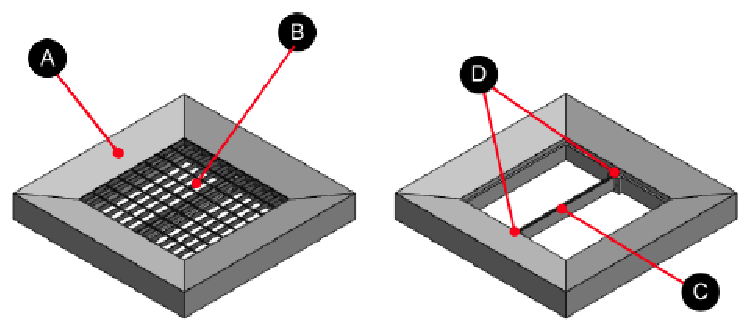
This topic describes the basic elements of the drop pit. Various ball drop options are shown below.
Graphic
G540875
  1. Housing
  2. Grid
  3. Peripheral wire support
  4. Attachment for the peripheral wire support
Grid Dimensions
Grating
800 x 800 x 30mm (31.5 x 31.5 x 1.2 inches)
Mesh size
66 x 99 mm (2.6 x 3.9 inches)
Steel thickness
3 mm (0.118 inches)
Finish
Galvanized
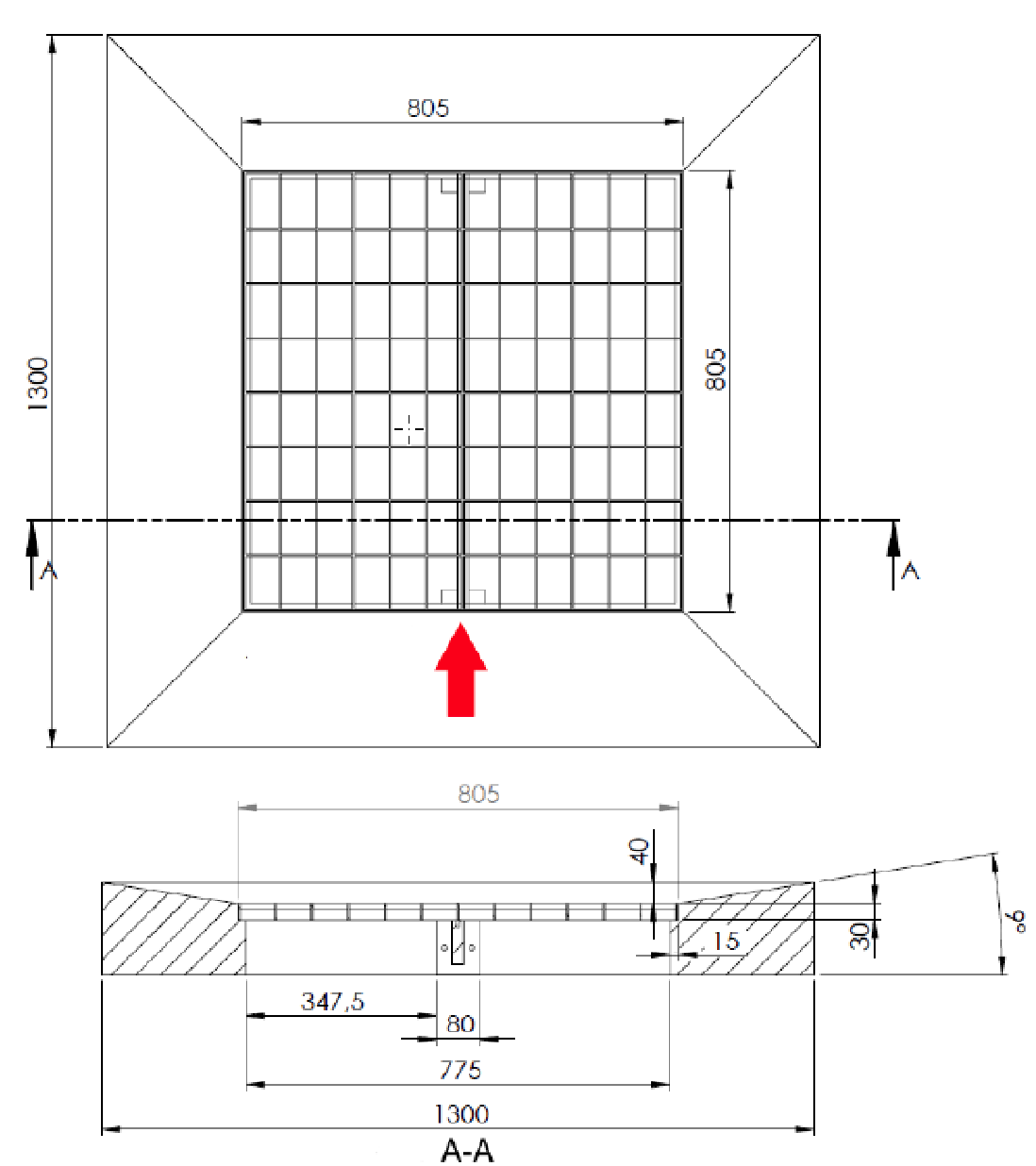
The figure below shows the dimensions of the concrete housing required for the drop pit. The red arrow indicates the direction in which the robot approaches the drop pit.
Note: All measurements on the figure below are in millimeters.
Graphic
G540889
Millimeters Converted to Inches
1,300 mm
51.18 inches
805 mm
31.7 inches
775 mm
30.5 inches
347.5 mm
13.68 inches
80 mm
3.15 inches
40 mm
1.57 inches
30 mm
1.18 inches
15 mm
0.6 inches
Drop Pit Ramp
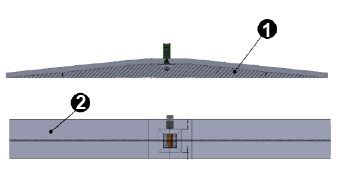
If the station connected to the drop pit is not at ground level, a ramp is required.
The support for the ramp must be made of wood, in order to avoid any interference with the signal.
Anti-slip stickers must be attached to the surface to prevent the robot slipping as it ascends and descends the ramp.
Graphic
G541006
  1. Wooden support
  2. Anti-slip stickers
Drop Pit Collection
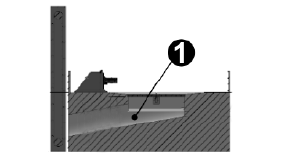
When using a ramp, balls can drop into an open cart that can pull from under the ramp.
There are also automated third party range ball handling systems that are available.
Graphic
G540995
  1. Plastic tube
The plastic tube is used to evacuate the balls from the pit. It must be 300 mm (11.8 inches) in diameter.

Operation

Using the Power Switch

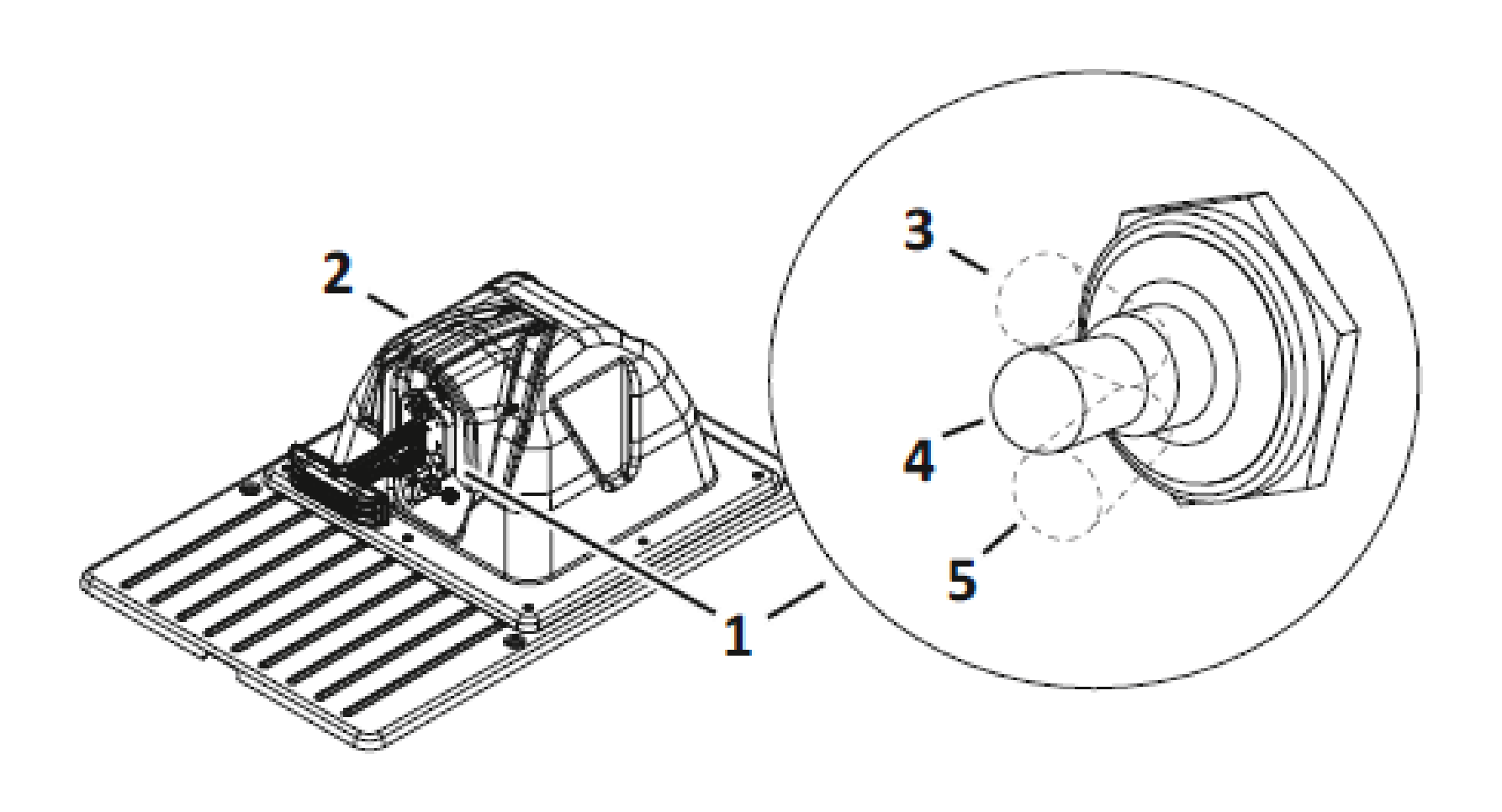
The power switch is located under the debris cover.
Move the power switch to the On position to energize the DC output of the charging station and the peripheral wires.
Note: When the power switch is in the On position, the TEST LED will not illuminate.
Move the power switch to the Off position to turn off the DC output. Move the power switch to the TEST position to energize the DC output of the charging station to the peripheral wire(s).
Note: When the power switch is in the Test position, the TEST LED will illuminate.
Graphic
G525932
  1. Power switch
  2. Debris cover
  3. On position
  4. Off position
  5. Test position

Maintenance

Inspecting and Cleaning the Charge Station

During periods of wet weather, perform inspection and cleaning on a regular basis.
  1. Remove robot from charging station (if required).
  2. Visually inspect the unit, replace damaged components.
  3. Check all electrical connectors, reconnect if necessary.
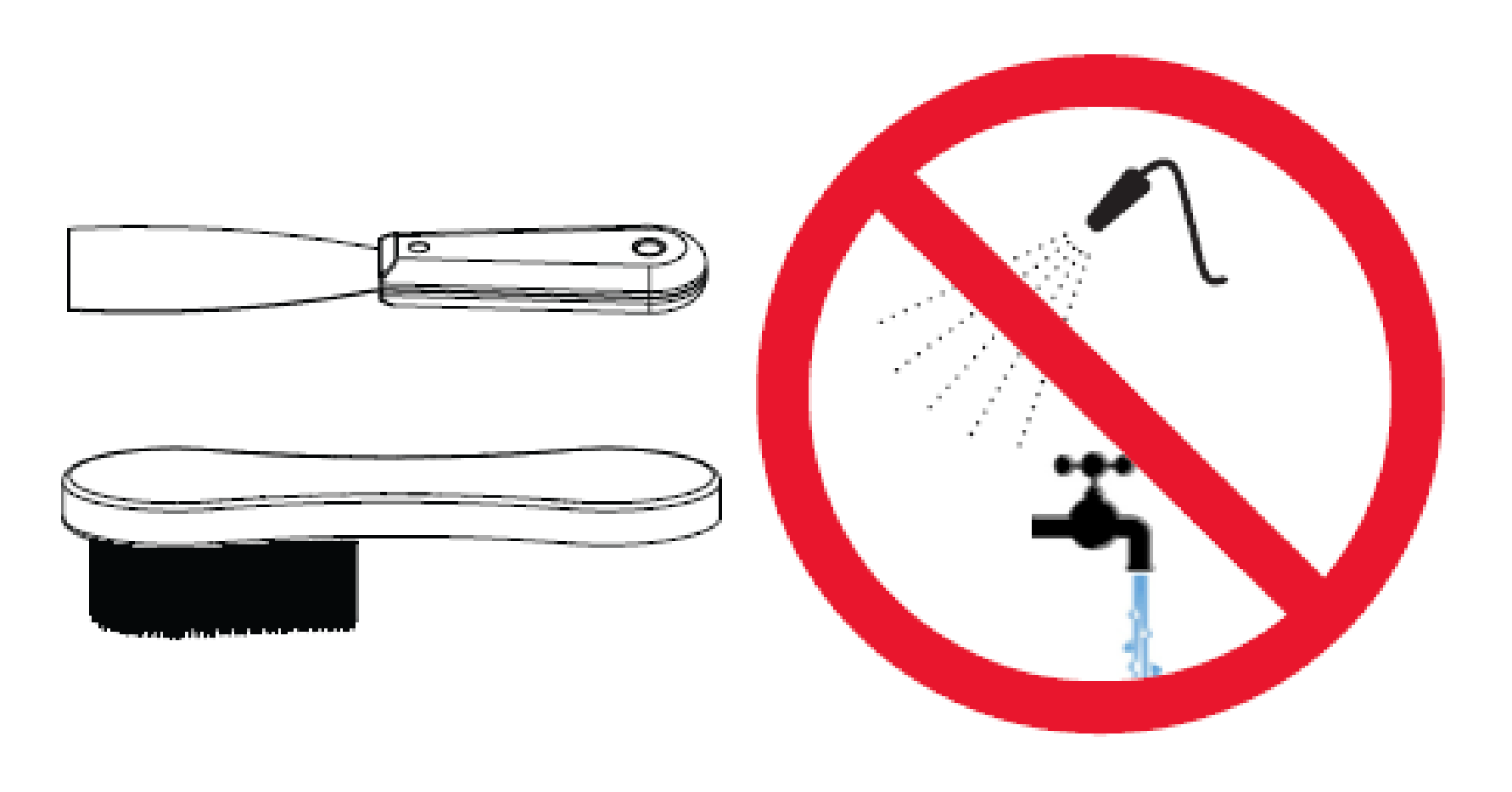
  4. Use a plastic scraper, nylon brush, compressed air, or a damp cloth to clean dirt, grass, sticks, or obstructions.
    Note: Do not use a high-pressure washer or running water for cleaning. Never use solvents.
    Graphic
    G525933

Storage

Storing the Charge Station

  1. Move the power switch to the Off position.
  2. Turn off AC power at the mains.
  3. Cover the charge station with a non-conductive, waterproof barrier.

Storing the Unit (removed from location)

  1. Move the power switch to the Off position.
  2. Turn off the AC power at the mains.
  3. Remove the 8 nuts (M5) from the base of the enclosure top. Save the nuts for reassembly.
  4. Remove the AC wires (neutral-white, line-black, ground-green) from the terminal block.
  5. Loosen the conduit connector lock nut (located on inside of input panel). Pull conduit, connector, and AC wires out of the input panel.
    Graphic
    G540715
    1. Conduit connector
    2. Nut
    3. Ferrite core
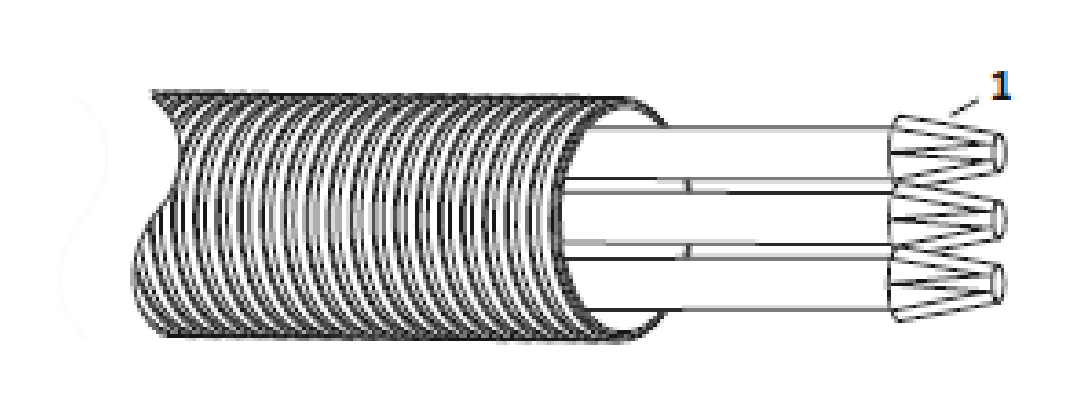
  6. Assemble a wire nut to the end of each wire. Safely secure the wires and the liquid-tight conduit.
    Graphic
    G525945
    1. Wire nut
  7. Label the peripheral wires based on type (SL, Z1 and Z2), loosen the cord grip and remove the wires from the station. It is recommended to cap the wires and place a cone over them to protect them from damage.
  8. Remove the landscaping spikes at the charger enclosure base and store the charging station in a safe place.