Brush Kit

Turf Pro 300 and 500 Series Robotic Mower

Preparing the Machine

  1. Press the red Stop button on the rear of the machine.
  2. Lift up the front of the machine and stand the machine on its rear.
  3. Set the power switch to the Off position.

Installing the Brush Kit

Parts Required
2
Wheel brush
2
Brush bracket
10
Washer-head bolt (M6 x 12.8 mm)
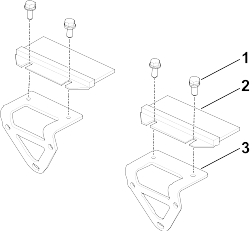
  1. Assemble the wheel brushes to the brush brackets using 4 washer-head bolts .
    Graphic
    G550851
    1. Washer-head bolt (4)
    2. Wheel brush (2)
    3. Brush bracket (2)

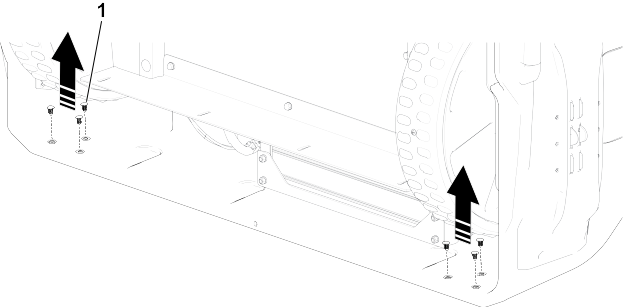
  2. Remove and discard the 6 push-in fasteners at the bottom of the machine.
    Graphic
    G550852
    1. Push-in fastener
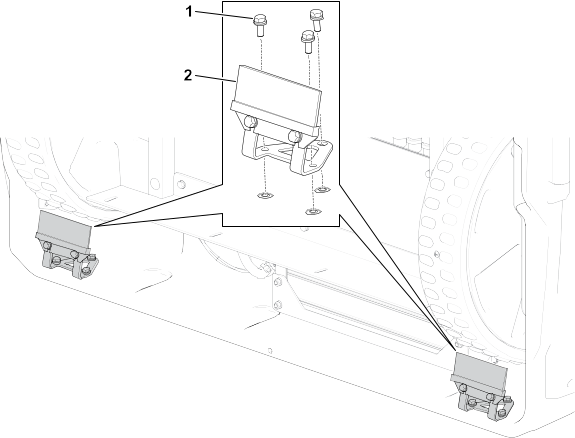
  3. Secure the brushes to the machine using 6 washer-head bolts.
    Graphic
    G550856
    1. Washer-head bolt (6)
    2. Wheel brush (2)
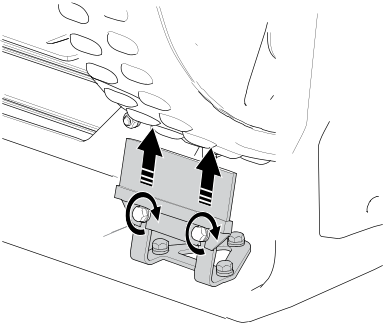
  4. Graphic
    G568743
  5. Adjust the brushes so that they contact the wheels. Tighten the bolts.