Read this information carefully to learn how to operate the InfoCenter control on your product. You are responsible for operating the product properly and safely.
Visit www.Toro.com for product safety and operation training materials, accessory information, help finding a dealer, or to register your product.
Introduction
The Software Guide for the Groundsmaster 5900 or 5910 rotary mower provides information for using the system information and control the system functions.
Operation
Overview of the InfoCenter Display
The display shows information about your machine such as the operating status, various diagnostics, and other information about the machine. There are multiple screens on the display. You can switch between the screens at any time by pressing any of the display buttons and then selecting the appropriate directional arrow.
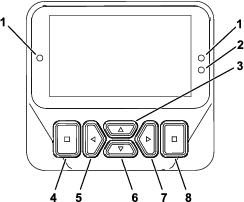
Note: The purpose of each button may change depending on what is required at the time. Each button is labeled with an icon displaying its current function.
 | Hour meter |
 | Page change |
 | Virtual pedal stop settings |
 | The glow plugs are active. |
 | The operator must sit in the seat. |
 | The parking brake is engaged. |
 | Neutral |
 | Fan reverse |
 | Engine coolant temperature (°C or °F) |
 | Traction or Traction Pedal |
 | The cruise control is engaged. |
 | Reset-standby regeneration request |
| Parked or recovery regeneration request | |
 | A parked or recovery regeneration is processing. |
 | High exhaust temperature |
 | NOx control diagnosis malfunction; drive the machine back to the shop and contact your authorized Toro distributor (software version U and later). |
 | The power take-off is disabled. |
 | The PTO is on. |
 | Battery |
 | Fuel level |
 | Warning |
 | Active |
 | Inactive |
 | Previous |
 | Next |
 | The cutting units are raising. |
 | The cutting units are lowering. |
 | Previous screen |
 | Fast |
 | Slow |
 | Increase value |
 | Decrease value |
 | Menu |
 | Scroll up/down |
 | Scroll left/right |
 | Locked |
 | PIN Passcode |
Using the Menus
To access the InfoCenter menu system, press the menu access button while at the main screen. This brings you to the main menu. Refer to the following tables for a synopsis of the options available from the menus:
| Main Menu—Menu Item | Description |
| Service | The Service menu contains information on the machine such as hours of use, counters, and other similar numbers. |
| Diagnostics | The Diagnostics menu displays the state of each machine switch, sensor, and control output. You can use this to troubleshoot certain issues as it quickly tells you which machine controls are ON and which are OFF. |
| Settings | The Settings menu allows you to customize and modify configuration variables on the display. |
| Machine Settings | The Machine Settings menu allows you to adjust the auto idle, speed, Smart Power, backup alarm, and slope sensor thresholds. |
| About | The About menu lists the model number, serial number, and software version of your machine. |
| Service—Menu Item | Description |
| Hours | Lists the total number of hours that the machine, engine, and PTO have been on, as well as the number of hours the machine has been transported and service due. |
| DPF Regeneration | The diesel particulate filter regeneration option and DPF submenus |
| Fuel Rate | Lists the average fuel rate. |
Traction Pedal  | Lists the traction pedal calibration values and allows the traction pedal to be calibrated. |
| Fan Override | This screen allows the direction and speed of the radiator and hydraulic oil cooler cooling fans to be operated manually for testing purposes only. |
| Fan Demo | This screen allows the cooling fans to be put into a demonstration cycle for testing or demonstration purposes only. |
| Diagnostics—Menu Item | Description |
| Faults | The Faults menu contains a list of the recent machine faults. Refer to the Service Manual or contact your authorized Toro distributor for more information on the Faults menu and the information contained there. |
| Left Deck | Indicates the input and output for these components. |
| Center Deck | |
| Right Deck | |
| Traction Pedal | |
| Traction | |
| Range Hi/Low | |
| PTO | |
| Engine | |
| Cruise Control | |
| Air Filter |
| Settings—Menu Item | Description |
| Enter PIN | Allows a person (superintendent/mechanic) authorized by your company with the PIN code to access protected menus. |
| Protected Settings | Allows a person authorized by your company with the PIN code to access protected settings. |
| Reset Defaults | Resets the settings to the default settings. |
| Backlight | Controls the brightness of the LCD display. |
| Language | Controls the language used on the InfoCenter. |
| Units | Controls the units used on the InfoCenter (English or Metric). |
Note: The Machine Settings menu will only show when the PIN is entered.
| Machine Settings—Menu Item | Description |
| Auto Idle | Controls the amount of time allowed before idling the engine when the machine is not in use |
| Mow Speed | Controls the maximum speed while in mow (low range). |
| Transport Speed | Controls the maximum speed while in transport (high range). |
| Smart Power | Turns Smart Power on and off. |
| Engine | Allows access to the following screens:
|
| Speed Limits | Use the speed limits settings to limit the maximum ground speed
for the machine in the desired direction and speed range. Allows access
to the following speed limit screens:
|
| Backup Alarm | Indicates there is a backup alarm installed. |
| About—Menu Item | Description |
| GM5900 | Lists the model number and serial number of the machine. |
| Info Center | Lists the software revision of the InfoCenter. |
| TEC5002–1 | Lists the software revision of the primary controller. |
| TEC5002–1 | Lists the software revision of the secondary controller. |
| Engine | Lists the engine information. |
Protected
under Protected Menus—accessible only by entering PIN
Protected Menus
There are operating configuration settings that are adjustable within the SETTINGS of the InfoCenter. To lock these settings, use the PROTECTED MENU.
Note: At the time of delivery, the initial password code is programmed by your distributor.
Accessing Protected Menus
Note: The factory default PIN code for you machine is either 0000 or 5900.If you changed the PIN code and forgot the code, contact your authorized Toro distributor for assistance.
-
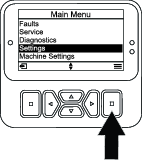
From the MAIN MENU, scroll down to the SETTINGS menu and press the select button (Figure 2).
-
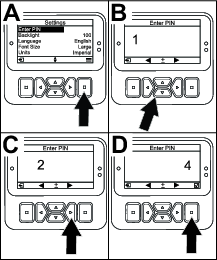
In the SETTINGSmenu, scroll to the ENTEER PIN and press the select button (Figure 3A).
-
To enter the PIN code, press the up/down navigation buttons until the correct first digit appears, then press the right navigation button to move on to the next digit (Figure 3B and Figure 3C). Repeat this step until the last digit is entered.
-
Press the select button.
Note: If the display accepts the PIN code and the protected menu is unlocked, the word “PIN” displays in the upper right corner of the screen.
-
To lock the protected menu, rotate the key switch to the OFF position and then to the ON position.
Viewing and Changing the Protected Menu Settings
-
In SETTINGS, scroll down to PROTECT SETTINGS.
-
To view and change the settings without entering a PIN code, use the select button to change the PROTECT SETTINGS to
 (Off).
 -
To view and change the settings with a PIN code, use the select button to change the PROTECT SETTINGS to
 (On),
set the PIN code, and turn the key in the ignition switch to the OFF position and then to the ON position.
(On),
set the PIN code, and turn the key in the ignition switch to the OFF position and then to the ON position.
Setting the Service Due Timer
The service due timer resets the service due hours after a scheduled maintenance procedure is performed.
-
In SETTINGS , scroll to ENTER PIN and press the select button.
-
Enter PIN; refer to Accessing Protected Menus.
-
In SERVICE , navigate to HOURS and press the select button.
-
Scroll down to SERVICE DUE.
Note: If service is currently due, NOW appears next to SERVICE DUE.
-
Highlight the service interval and press the select button.
Note: The service interval (250 Hrs, 500 Hrs, etc) is located next to SERVICE DUE. Service interval is a protected menu item.
-
When the RESET SERVICE TIMER? screen appears, press the select button for YES or the back button for NO.
-
After you select YES, the interval screen clears and reverts back to the service hours selections.
Setting the Auto Idle
-
In the Settings Menu, scroll down to Auto Idle.
-
Press the inner right or left button to change the auto idle time between OFF, 8S, 10S, 15S, 20S, and 30S.
Setting the Maximum Allowed Mow Speed
-
In the Settings Menu, Scroll down to Mow Speed and press the right button.
-
Use the inner right button to increase the maximum full mow speed (50%, 75%, or 100%).
-
Use the inner left button to decrease the maximum full mow speed (50%, 75%, or 100%).
-
Press the left button to exit.
Setting the Maximum Allowed Transport Speed
-
In the Settings Menu, scroll down to Transport Speed and press the right button.
-
Use the inner right button to increase the maximum transport speed (50%, 75%, or 100%).
-
Use the inner left button to decrease the maximum transport speed (50%, 75%, or 100%).
-
Press the left button to exit.
When finished with the Protected Menu, press the left button to exit to the Main Menu, then press the left button to exit to the Run Menu.
Turning the Smart Power ON/OFF
-
In SETTINGS, scroll down to SMART POWER.
-
Press the right navigation button to switch between ON and OFF.
Understanding the Diagnostic Light
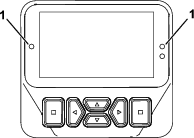
-
Flashing red—active fault
-
Solid red—active advisory
-
Solid green—normal operation
-
Blinking green—updating code
Audible Alarm from the InfoCenter
The alarm sounds during the following scenarios:
Lowering the deck
-
The engine is not running
-
Any deck is being lowered
Deck is out of float
-
The PTO is requested and qualified
-
Any deck is below the limit, but not floating
Machine sends a request to the InfoCenter
-
The engine sends a red, stop lamp message
Note: If the alarm stops or if the operator acknowledges the alarm by pressing any button on the InfoCenter, then the alarm should stop.
-
Regeneration requested by the engine
-
Any engine fault
-
Any advisory; refer to InfoCenter Advisories
-
The engine sends an amber warning message
-
The fuel level is below 2.2%
InfoCenter Advisories
Operator advisories automatically display on the InfoCenter screen when a machine function requires additional action. For example, if you attempt to start the engine while pressing the traction pedal, an advisory displays, indicating that the traction pedal must be in the NEUTRAL position.
For each advisory that occurs, there is a condition (e.g., start denied, PTO denied, cruise control denied), an advisory code (number), a qualifier (the cause of the advisory displayed), and a display text (what the advisory displays as text on the screen).
Note: Advisories do not log into the fault log.
Note: You can clear an advisory from the display screen by pressing any of the InfoCenter keys.
Refer to the following table for all the InfoCenter advisories:
| Condition | Code | Qualifier | Display Text |
| Start Denied | 1 | Cause unknown | N/a |
| Start Denied | 4 | Teach engaged | N/A |
| Start Denied | 5 | PTO engaged | To start, disengage PTO |
| Start Denied | 6 | Not in NEUTRAL | To start, move traction pedal to NEUTRAL |
| Start Denied | 7 | Neither in seat nor parking brake applied | To start, must be seated or set parking brake |
| Start Denied | 8 | Deck switch engaged | To start, disengage deck switch |
| Start Denied | 9 | Recycle power | To start, turn key switch off, then on |
| PTO Denied | 101 | Cause unknown | N/A |
| PTO Denied | 102 | In high range (only cut in low) | To engage PTO, must be in low range |
| PTO Denied | 106 | Out of seat | To engage PTO, operator must be seated |
| PTO Denied | 107 | No decks floating (hit a down key) | To engage PTO, lower decks |
| PTO Denied | 108 | Engine hot | To engage PTO, let engine cool |
| PTO Denied | 109 | Loss of CAN bus (service required) | To engage PTO, requires service |
| Cruise Control Denied | 202 | Too slow to capture cruise control | Increase ground speed |
| Deck Lower Denied | 302 | Can’t lower in transport | To lower deck, return traction pedal to NEUTRAL |
| Deck Lower Denied | 303 | Out of seat | To lower deck, operator must be seated |
| Deck Lower Denied | 304 | Service required | To lower deck, requires service |
| Deck Not Floating (on engine start) | 402 | Advise operator to press down switches | To float, lower decks |
| Range Hi Denied | 502 | Left deck not up | To set high range, lift left deck |
| Range Hi Denied | 503 | Center deck not up | To set high range, lift center deck |
| Range Hi Denied | 504 | Right deck not up | To set high range, lift right deck |
| Range Hi Denied | 505 | Left deck floating | To set high range, lift left deck fully |
| Range Hi Denied | 506 | Center deck floating | To set high range, lift center deck fully |
| Range Hi Denied | 507 | Right deck floating | To set high range, lift right deck fully |
| Range Hi Denied | 508 | PTO switch engaged | To set high range, disengage PTO |
| Range Hi Denied | 509 | Cruise engaged | To set high range, disengage cruise |
| Range Hi Denied | 510 | Speed too high | To set high range, reduce ground speed |
| Range Hi Denied | 511 | Loss of CAN bus (service required) | To set high range, requires service |
| Range Hi Denied | 512 | Hydraulic fluid too cold | To set high range, let hydraulic fluid warm up |
| Range Lo Denied | 602 | Cruise control engaged | To set low range, disengage cruise |
| Range Lo Denied | 603 | Speed too high | To set low range, reduce ground speed |
| Range Lo Denied | 604 | Loss of CAN bus (service required) | To set low range, requires service |
| Traction Disabled | 804 | Parking brake ON | For traction, release parking brake |
| Traction Disabled | 805 | Not in NEUTRAL | For traction, move traction pedal to NEUTRAL |
| Traction Disabled | 806 | Out of seat | For traction, operator must be seated |
| Engine Advisory | 1205 | Starter has been active for 30 seconds | Engine 30 second starter time out |
| Engine Advisory | 1206 | Replace engine air filter | Check the air filter |
| Engine Advisory | 1207 | Service due | Engine service due approaching |
| Engine Advisory | 1208 | Service past due | Engine service past due |
| Engine Advisory | 1209 | DPF service required | Regeneration required within 30 minutes |
| Engine Advisory | 1210 | Engine derate due to high temperature | Let engine cool |
| Engine Advisory | 1211 | Engine speed restricted: hydraulic fluid too cold | Hydraulic fluid is less than 4°C (40°F), so derate the engine speed to 1,650 rpm |
| Fuel Level | 1302 | Fuel level is low | Add fuel |
| TP Not Calibrated | 1402 | Traction pedal is out of calibration | Calibrate the traction pedal |
| Teach | 1502 | Traction pedal is out of NEUTRAL | Return traction pedal to NEUTRAL |
| Teach | 1503 | Slowly move the traction pedal forward | Slowly move the traction pedal forward |
| Teach | 1504 | Neutral forward capture passed | Neutral forward capture passed |
| Teach | 1505 | Neutral forward capture failed—too fast | Neutral forward capture failed—movement too fast; try again |
| Teach | 1506 | Neutral forward capture failed (out of range)—voltage captured was out of specification | Restart teach mode |
| Teach | 1507 | Move traction pedal to MAX FORWARD and hold | Move traction pedal to MAX FORWARD and hold |
| Teach | 1508 | Max forward capture passed | Max forward capture passed |
| Teach | 1509 | Max forward capture failed (out of range)—voltage captured was out of specification | Restart teach mode |
| Teach | 1510 | Slowly move the traction pedal in REVERSE | Slowly move the traction pedal in REVERSE |
| Teach | 1511 | Neutral rev capture passed | Neutral rev capture passed |
| Teach | 1512 | Neutral rev capture failed—too fast | Neutral rev capture failed—movement too fast; try again |
| Teach | 1513 | Neutral rev capture failed (out of range)—voltage captured was out of specification | Restart teach mode |
| Teach | 1514 | Move traction pedal to MAX REVERSE and hold | Move traction pedal to MAX REVERSE and hold |
| Teach | 1515 | Max reverse capture passed | Max reverse capture passed |
| Teach | 1516 | Max reverse capture failed (out of range)—voltage captured was out of specification | Restart teach mode |
| Teach | 1517 | TP teach done/values stored | Exit teach |
| Teach | 1518 | TP teach was unsuccessful | Exit teach and try again |
| Deck Raise Denied | 1601 | Unknown cause (software issue) | N/A |
| Deck Raise Denied | 1602 | Out of seat | Operator must be seated |
| Deck Raise Denied | 1603 | Parking brake not set | Set parking brake |
| Deck Raise Denied | 1604 | Not in NEUTRAL | Return traction pedal to NEUTRAL |
| Deck Raise Denied | 1605 | Service required | Contract your Toro distributor |
| Deck Raise Denied | 1606 | All decks not raising together | Increase the engine speed to 2,000 rpm, and the decks will raise one at a time when all 3 switches are held down simultaneously |