Introduction

This charger is intended to be used by homeowners and professional operators. Flex-Force™ 60V lithium-ion battery packs are designed to be charged only by Flex-Force 60V lithium-ion battery chargers. This charger is designed to charge only Flex-Force 60V lithium-ion battery packs. It is not designed to charge any other batteries. Using these products for purposes other than their intended use could prove dangerous to you and bystanders.

Read this information carefully to learn how to operate and maintain your product properly and to avoid injury and product damage. You are responsible for operating the product properly and safely.

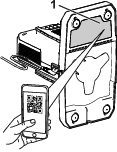
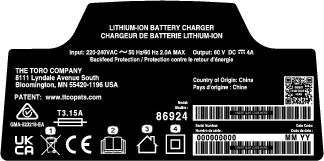
Whenever you need service, genuine manufacturer parts, or additional information, contact an Authorized Service Dealer or distributor, or the tool manufacturer’s Customer Service, and have the model and serial numbers of your product ready. Figure 1 identifies the location of the model and serial numbers on the product. Write the numbers in the space provided.

Important: With your mobile device, you can scan the QR code on the serial number decal (if equipped) to access warranty, parts, and other product information.

g492140

Safety-Alert Symbol

The safety-alert symbol (Figure 2) shown in this manual and on the machine identifies important safety messages that you must follow to prevent accidents.

g000502

The safety-alert symbol appears above information that alerts you to unsafe actions or situations and is followed by the word DANGER, WARNING, or CAUTION.

DANGER indicates an imminently hazardous situation which, if not avoided, will result in death or serious injury.

WARNING indicates a potentially hazardous situation which, if not avoided, could result in death or serious injury.

CAUTION indicates a potentially hazardous situation which, if not avoided, may result in minor or moderate injury.

This manual uses two other words to highlight information. Important calls attention to special mechanical information and Note emphasizes general information worthy of special attention.

Safety

IMPORTANT SAFETY INSTRUCTIONS

  1. SAVE THESE INSTRUCTIONS—This manual contains important safety and operating instructions for Flex-Force 60V lithium-ion battery packs and Flex-Force 60V lithium-ion battery chargers.

  2. Before using the battery charger or battery pack, read all the instructions and cautionary markings on the battery charger, battery pack, and product using the battery pack.

  3. CAUTION—To reduce risk of injury, charge Flex-Force 60V lithium-ion battery packs with Flex-Force 60V lithium-ion battery chargers only. Other brands of battery packs may burst, causing personal injury and damage.

  4. WARNING—Plugging the battery charger into an outlet that is not 220 to 240V can cause a fire or electric shock. Do not plug the battery charger into an outlet other than 220 to 240V. For a different style of connection, use an attachment plug adapter of the proper configuration for the power outlet if needed.

  5. These devices comply with Part 15 of the FCC rules. Operation is subject to the following 2 conditions: (1) These devices may not cause harmful interference; and (2) these devices must accept any interference received, including interference that may cause undesired operation.

I. Training

  1. Do not allow children or untrained people to operate or service this device. Allow only people who are responsible, trained, familiar with the instructions, and physically capable to operate or service the device.

  2. Do not allow children to use or play with the battery pack or battery charger; local regulations may restrict the age of the operator.

II. Preparation

  1. Use appliances only with specifically designated battery packs. Using other types of battery packs may create a risk of injury and/or fire.

  2. Do not use a damaged or modified battery pack or battery charger. It may exhibit unpredictable behavior, resulting in fire, explosion, or risk of injury.

  3. If the supply cord to the battery charger is damaged, contact an Authorized Service Dealer or distributor to service it.

III. Operation

  1. Charge the battery pack with only the battery charger specified by the tool manufacturer. A charger suitable for 1 type of battery pack may create a risk of fire when used with another battery pack.

  2. Charge the battery pack in a well-ventilated area only.

  3. Follow all charging instructions and do not charge the battery pack outside of the temperature range specified in the instructions. Otherwise, you may damage the battery pack and increase the risk of fire.

  4. Under abusive conditions, the battery pack may eject liquid; avoid contact. If you accidently come into contact with the liquid, flush with water. If the liquid contacts your eyes, seek medical help. Liquid ejected from the battery pack may cause irritation or burns.

  5. Do not expose a battery pack or tool to fire or excessive temperature. Exposure to fire or temperature above 130°C (265°F) may cause explosion.

  6. CAUTION—A mistreated battery pack may present a risk of fire, explosion, or chemical burn.

    • Do not disassemble the battery pack.

    • Replace the battery pack with a genuine Flex-Force battery pack only; using another type of battery pack may cause a fire or risk of injury.

    • Keep battery packs out of the reach of children and in the original packaging until you are ready to use them.

IV. Maintenance and Storage

  1. Do not allow children to clean or maintain the battery charger.

  2. When the battery pack is not in use, keep it away from metal objects such as paper clips, coins, keys, nails, and screws that can make a connection from 1 terminal to another. Shorting the battery terminals may cause burns or a fire.

  3. Do not attempt to repair the battery pack or battery charger. Have an Authorized Service Dealer or distributor perform service on the battery pack or battery charger using identical replacement parts to ensure that the product is safely maintained.

  4. Check with local codes for possible special battery disposal instructions.

SAVE THESE INSTRUCTIONS

Safety and Instructional Decals

Graphic

Safety decals and instructions are easily visible to the operator and are located near any area of potential danger. Replace any decal that is damaged or missing.

decal161-3797
decal161-3793

Product Overview

Battery Charger

Model86924
Type60V MAX 2-Pod Lithium-Ion Battery Charger
Input220 to 240V AC ~2A MAX, 50Hz/60Hz
Output60V DC Graphic 4A

Appropriate Temperature Ranges

Charge battery pack at5°C (41°F) to 40°C (104°F)*
Use battery pack at-30°C (-22°F) to 49°C (120°F)
Store battery pack/charger at5°C (41°F) to 40°C (104°F)*

*Charging time will increase if you do not charge the battery within this range.

Store the tool, battery pack, and battery charger in an enclosed clean, dry area.

Compatible Batteries

ModelBattery quantityCapacity
8892522.5 Ah (135 Wh)
8894124.0 Ah (216 Wh)
8896026.0 Ah (324 Wh)
8897527.5 Ah (405 Wh)
8898028.0 Ah (432 Wh)
66910210.0 Ah (540 Wh)

Warning

Do not recharge non-rechargeable batteries.

Operation

Charging the Battery Pack

Important: The battery pack is not fully charged when you purchase it. Before using the tool for the first time, place the battery pack in the charger and charge it until the LED display indicates the battery pack is fully charged. Read all safety precautions.

Important: Charge the battery pack only in temperatures that are within the appropriate range; refer to Specifications.

Note: At any time, press the battery-charge-indicator button on the battery pack to display the current charge (LED indicators).

  1. Ensure that the vents on the battery charger are clear of any dust and debris.

    g499830
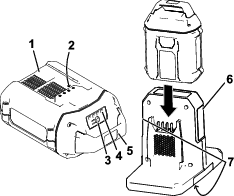
  2. Line up the cavity in the battery pack (Figure 3) with the tongue on the charger.

  3. Slide the battery pack into the charger until it is fully seated (Figure 3).

    Note: During normal operation, a fan sound is audible from the charger while the battery pack is charging.

  4. If multiple battery packs are connected to the charger, you can switch between batteries or charge both at the same time by pressing the charging mode button on the side of the charger.

    • Parallel charging: All connected battery packs are charged in parallel, to the same level. This results in all connected batteries being evenly charged.

    • Sequential Rapid charging: A single battery is given charging priority. This results in the priority battery being fully charged before the other attached battery.

      Note: The LED indicator lights to the left and right of the button tells you which side has charging priority; if both are lit at once the charger is in the Parallel charging setting.

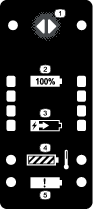
  5. Refer to the following table to interpret the LED indicator lights on the battery charger.

    Indicator lightStatusIndicates
    State of charge lightsOffNo battery pack inserted
    Green, blinkingBattery pack is charging
    Green, blinking slowlyBattery pack is completing optimized charging*
    GreenBattery pack is fully charged
    Temperature lightBlueBattery pack and/or battery charger is under the appropriate temperature range
    RedBattery pack and/or battery charger is over the appropriate temperature range
    GreenBattery pack and/or battery charger is within the appropriate temperature range
    Fault lightRed, blinkingBattery pack charging fault**

*When the battery pack is almost completely charged, the charger switches to optimized charging; this is to ensure the long-term health of the lithium-ion batteries.

**Refer to for more information.

Important: The battery can be left on the charger for short periods between uses.If the battery will not be used for longer periods, remove the battery from the charger; refer to Storage.

Maintenance

Maintenance and servicing are not required under normal conditions.

When you clean the surface of the equipment, wipe it only with a dry cloth.

Do not disassemble the equipment; if it is damaged, contact your Authorized Service Dealer or distributor.

Storage

Important: Store the tool, battery pack, and charger only in temperatures that are within the appropriate range; refer to Specifications.

Important: If you are storing the tool for a year or longer, remove the battery pack from the tool and charge the battery pack until 1 or 2 LED indicators turn green on the battery. Do not store a fully charged or fully depleted battery. When you are ready to use the tool again, charge the battery pack until the left indicator light turns green on the charger or all 4 LED indicators turn green on the battery.

  • Disconnect the product from the power supply (i.e., remove all battery packs) and check for damage after use.

  • Clean all foreign material from the product.

  • Do not store a machine or charger with a battery pack installed.

  • When not in use, store the tool, battery pack, and battery charger out of the reach of children.

  • Keep the tool, battery pack, and battery charger away from corrosive agents, such as garden chemicals and de-icing salts.

  • To reduce the risk of serious personal injury, do not store the battery pack outside or in vehicles.

  • Store the tool, battery pack, and battery charger in an enclosed clean, dry area.

Troubleshooting

Perform only the steps described in these instructions. All further inspection, maintenance, and repair work must be performed by an Authorized Service Dealer or a similarly qualified specialist if you cannot solve the problem yourself.

ProblemPossible CauseCorrective Action
The battery charger is not working.
  1. The battery charger is over or under the appropriate temperature range.
  2. The outlet that the battery charger is plugged into does not have power.
  1. Unplug the battery charger and move it to a place where it is dry and the temperature is between 5°C (41°F) and 40°C (104°F).
  2. Contact your licensed electrician to repair the outlet.
The LED temperature indicator light on the battery charger is blue.
  1. The battery charger and/or battery pack is under the appropriate temperature range.
  1. Unplug the battery charger and move the battery charger and battery pack to a place where it is dry and the temperature is between 5°C (41°F) and 40°C (104°F).
The LED temperature indicator light on the battery charger is red.
  1. The battery charger and/or battery pack is over the appropriate temperature range.
  1. Unplug the battery charger and move the battery charger and battery pack to a place where it is dry and the temperature is between 5°C (41°F) and 40°C (104°F).
The LED fault indicator light on the battery charger is blinking red.
  1. There is an error in the communication between the battery pack and the charger.
  2. The battery pack is weak.
  1. Remove the battery pack from the battery charger, unplug the battery charger from the outlet, and wait 10 seconds. Plug the battery charger into the outlet again and place the battery pack on the battery charger. If the LED indicator light on the battery charger is still blinking red, repeat this procedure again. If the LED indicator light on the battery charger is still blinking red after 2 attempts, properly dispose of the battery pack at a battery recycling facility.
  2. Contact your Authorized Service Dealer or distributor if the battery is in warranty, or properly dispose of the battery pack at a battery recycling facility.