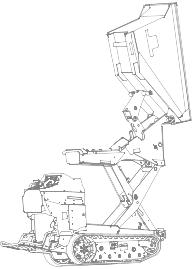
Ultra Buggy® e2500-TS and e2500-THL

Disclaimers and Regulatory Information

 
CALIFORNIA
 
Proposition 65
 
The power cord on this product contains lead, a chemical known to the State of California to cause birth defects or other reproductive harm. Wash hands after handling.
 
Battery posts, terminals, and related accessories contain lead and lead compounds, chemicals known to the State of California to cause cancer and reproductive harm. Wash hands after handling.
 
Use of this product may cause exposure to chemicals known to the State of California to cause cancer, birth defects, or other reproductive harm.
 
FCC
This device complies with Part 15 of the FCC Rules. Operation is subject to the following conditions: (1) this device may not cause harmful interference, and (2) this device must accept any interference received, including interference that may cause undesired operation. Changes or modifications not expressly approved by Toro could void the users authority to operate the equipment.
In addition, while in charging mode this equipment has been tested and found to comply with the limits for a Class B digital device, pursuant to Part 15 of the FCC rules. These limits are designed to provide reasonable protection against harmful interference in a residential installation. This equipment generates, uses and can radiate radio frequency energy and, if not installed and used in accordance with the instructions, may cause harmful interference to radio communications. However, there is no guarantee that interference will not occur in a particular installation. If this equipment does cause harmful interference to radio or television reception, which can be determined by turning the equipment off and on, the user is encouraged to try to correct the interference by one or more of the following measures:
  • Reorient or relocate the receiving antenna.
  • Increase the separation between the equipment and receiver.
  • Connect equipment into an outlet on a circuit different from that to which the receiver is connected.
  • Consult the dealer or an experienced radio/TV technician for help.


Introduction
 

Intended Use

This machine is intended to be used by professional, hired operators on indoor and outdoor improved surfaces in commercial applications. It is primarily designed to move concrete, mortar, gravel, dirt, or debris around job sites. Using this product for purposes other than its intended use could prove dangerous to you and bystanders.

Support

Visit www.Toro.com for product safety and operation training materials, accessory information, help finding a dealer, or to register your product.
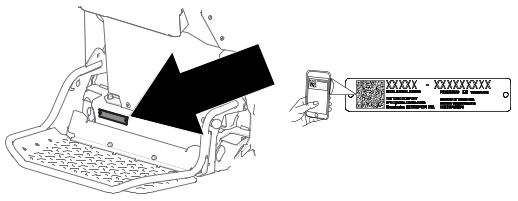
Whenever you need service, genuine Toro parts, or additional information, contact an Authorized Service Dealer or Toro Customer Service and have the model and serial numbers of your product ready. These numbers are located on the serial plate on your product .
Model and Serial Number Location
Graphic
G530596
Important  
With your mobile device, you can scan the QR code on the serial number decal (if equipped) to access warranty, parts, and other product information.
 
Model Number:
Serial Number:

Manual Conventions

This manual identifies potential hazards and has safety messages identified by the safety-alert symbol, which signals a hazard that may cause serious injury or death if you do not follow the recommended precautions.
Graphic
G405934
This manual uses 2 words to highlight information. Important calls attention to special mechanical information and Note emphasizes general information worthy of special attention.
Safety Alert Classifications
The safety-alert symbol shown in this manual and on the machine identifies important safety messages that you must follow to prevent accidents.
Safety-alert symbol appears above information that alerts you to unsafe actions or situations and is followed by the word DANGER, WARNING, or CAUTION.
Danger
Danger indicates an imminently hazardous situation which, if not avoided, will result in death or serious injury.
 
Warning
Warning indicates a potentially hazardous situation which, if not avoided, could result in death or serious injury.
 
Caution
Caution indicates a potentially hazardous situation which, if not avoided, may result in minor or moderate injury.


Safety
 

General Safety

  • Read and understand the contents of this Operators Manual before starting the machine.
  • Do not operate the machine without all guards and other safety protective devices in place and functioning properly on the machine.
  • Park the machine on a level surface, lower the hopper, shut off the machine, and remove the key (if applicable) before leaving the operating position.
  • Keep your hands and feet away from moving parts. If possible, do not make adjustments with the machine running.
Improperly using or maintaining the machine can result in injury.
Personal Protective Equipment (PPE)
Jobsite hazards can cause death or serious injury.
  • Wear appropriate clothing, including:
    • Eye protection
    • Long pants
    • Substantial slip-resistant footwear
    • Hearing protection
  • Tie back long hair.
  • Do not wear loose clothing or jewelry.

Preparation

Preparation Safety
  • The owner/user can prevent and is responsible for accidents that may cause personal injury or property damage.
  • Read and understand the contents of this Operators Manual before starting the machine.
  • Do not allow children to operate the machine. Allow only people who are responsible, trained, familiar with the instructions, and physically capable to operate the machine.
  • Use only an approved machine in hazardous locations, as defined in the appropriate safety standards.
  • Become familiar with the safe operation of the equipment, operator controls, and safety signs.
  • Check that the operator's presence controls, safety switches, and shields are attached and functioning properly. Do not operate the machine unless they are functioning properly.
  • Locate the pinch point areas marked on the machine and keep your hands and feet away from these areas.
  • Before each work shift, inspect the machine components: the tracks; warning devices; lights; battery; speed and directional controllers; brakes; safety interlocks; and steering mechanism. If the machine needs repair or is in any way unsafe, report it immediately and do not use the machine until it has been restored to safe operating condition.
  • Know and mark the locations of all utility lines.
  • Inspect the area where you will use the machine and remove all objects that could interfere with the operation of the machine.
  • Identify sharp turns, blind spots, bridge approaches, and other potentially hazardous areas with a suitable warning to operators of the nature of the hazard and stating the proper precautions for them to take to avoid the hazard.
  • Keep bystanders, especially children, out of the operating area. Ensure that the area is clear of bystanders before operating the machine. Shut off the machine if a bystander enters the area.
  • Park the machine on a level surface, lower the hopper, shut off the machine, and remove the key (if applicable) before leaving the operating position.

Operation Safety

  • Do not exceed the rated operating capacity, as the machine may become unstable, which may result in loss of control.
  • Use your full attention while operating the machine. Do not engage in any activity that causes distractions; otherwise, injury or property damage may occur.
  • Do not operate the machine while ill, tired, or under the influence of alcohol or drugs.
  • Do not carry passengers on the machine.
  • Operate the machine only in good light, keeping away from holes and hidden hazards.
  • Ensure that all drives are in the Neutral position before starting the machine. Start the machine only from the operating position.
  • Do not jerk the controls; use a steady motion.
  • Keep your hands and feet away from moving parts. If possible, do not make adjustments with the machine running.
  • Keep away from potential hazards, such as edges of ramps and platforms.
  • Use care when approaching blind corners, shrubs, trees, or other objects that may obscure your vision.
  • Slow down and use caution when making turns and crossing roads and sidewalks with the machine.
  • Always yield the right of way.
  • Operate the machine only in appropriate weather conditions. Do not operate the machine when there is the risk of lightning.
  • Be aware of obstacles in close proximity to you. Failure to maintain adequate distance from trees, walls, and other barriers may result in injury as the machine backs up during operation if you are not attentive to the surroundings.
  • Check for overhead clearance (i.e., electrical wires, branches, and doorways) before driving under any objects and do not contact them.
  • Do not overload the hopper and always keep the load level when operating the machine.
  • Keep the hopper lowered and straight (if applicable) when moving, storing, loading, transporting, and cleaning the machine.
  • Distribute loads evenly to improve the stability and control of the machine.
  • Liquid loads shift, which can cause the machine to tip over.
  • Do not modify the machine.
  • Use care and slow down when you are operating the machine on a slippery surface.
  • Always look down and behind you before moving the machine in reverse.
  • If you feel uneasy operating the machine because the terrain is rough, slippery, or unfamiliar, do not do it.
  • Avoid operating the machine on loose terrain. Loose terrain could cause the machine to lose traction, affecting steering, stability, and braking.
  • Do not operate the vehicle in a dangerous manner, such as stunt driving or horseplay.
  • Do not deliberately drive the machine over loose objects, potholes, or bumps.
  • Observe all traffic regulations, including authorized speed limits. Under normal traffic conditions, keep to the right. Maintain a safe distance, based on speed of travel, from a machine or vehicle ahead; and keep the machine under control at all times.
  • Park the machine on a level surface, engage the parking brake (if applicable), shut off the machine, and remove the key. Wait for all movement to stop and allow the machine to cool before adjusting, servicing, cleaning, or storing the machine.
  • Do not touch parts that may be hot from operation. Allow them to cool before attempting to maintain, adjust, or service the machine.
  • Use care when loading or unloading the machine into a trailer or truck.
  • Clean debris from drives and the motor to help prevent fires.
  • Report all accidents involving personnel, building structures, and equipment.
  • If during the machine becomes unsafe to use in any way, report it immediately. Do not use the machine until it has been restored to safe operating condition.
Slope Safety
  • Slopes are a major factor related to loss-of-control and tip-over accidents, which can result in severe injury or death. You are responsible for safe slope operation. Operating the machine on any slope requires extra caution. Before using the machine on a slope, do the following:
    • Review and understand the slope instructions in the manual and on the machine.
    • Evaluate the site conditions of the day to determine if the slope is safe for machine operation. Always use common sense and good judgment when performing this evaluation. Changes in the terrain, such as moisture, can quickly affect the operation of the machine on a slope.
  • Do not raise the hopper on a slope. Raising the hopper on a slope affects the stability of the machine. Keep the hopper in the lowered and straight position when on slopes.
  • When operating on a slope, fold the platform up and walk behind the machine until it is on flat ground.
  • Operate up and down slopes with the heavy end of the machine uphill. Weight distribution changes with a full hopper. A full hopper makes the front of the machine the heavy end, so walk behind the machine with the full hopper uphill.
  • Identify hazards at the base of the slope. Do not operate the machine near drop-offs, ditches, embankments, water or other hazards. The machine could suddenly roll over if a wheel or track goes over the edge or the edge collapses. Keep a safe distance (twice the width of the machine) between the machine and any hazard.
  • Avoid starting, stopping, or turning the machine on a slope. Avoid making sudden changes in speed or direction; turn slowly and gradually.
  • Keep all movements on slopes slow and gradual. Do not make sudden changes in speed or direction.
  • Do not operate the machine under any conditions where traction, steering, or stability is in question. Be aware that operating the machine on wet grass, across slopes or downhill may cause the machine to lose traction. Loss of traction to the wheels or tracks may result in sliding and a loss of braking and steering. The machine can slide even if the wheels or tracks are stopped.
  • Remove or mark obstacles such as ditches, holes, ruts, bumps, rocks or other hidden hazards. Tall grass can hide obstacles. Uneven terrain could overturn the machine.
  • If you lose control of the machine, step off and away from the direction of travel of the machine.
Battery and Charger Safety
WARNING: Risk of fire and electric shockThe batteries have no user-serviceable parts.
  • Confirm the voltage that is available in your country before using the charger.
  • Do not get the charger wet; keep it protected from rain and snow.
  • A risk of fire, electric shock, or injury may result from using an accessory not recommended or sold by Toro.
  • To reduce risk of a battery explosion, follow these instructions and the instructions for any equipment that you intend to use near the charger.
  • Batteries could emit explosive gasses if they are significantly overcharged.
  • Refer to an Authorized Service Dealer to service or replace a battery.
  • Never allow children or untrained people to operate or service the charger. Local regulations may restrict the age of the operator. The owner is responsible for training all operators and mechanics.
  • Read, understand, and follow all instructions on the charger and in the manual before operating the charger. Be familiar with the proper use of the charger.
  • Keep bystanders and children away while charging.
  • Shut off the machine and wait until the machine has completely powered down before charging. Failure to do this may cause arcing.
  • Ensure that the area is well ventilated while charging
  • Use the charger only within the voltage range specified in this Operator's Manual, and use only a power cord approved by Toro.
  • Contact your Authorized Service Dealer for the proper charger and power cord.
  • Do not charge a frozen battery.
  • Do not abuse the cord. Do not carry the charger by the cord or pull on the power supply cord to disconnect the charger from the receptacle. Store the cord away from heat, oil, and sharp edges.
  • Connect the charger directly to a grounding receptacle. Do not use the charger on an ungrounded outlet, even with a grounding adapter.
  • Do not alter the provided power cord or plug.
  • Remove metal items such as rings, bracelets, necklaces, and watches when working with a lithium-ion battery. A lithium-ion battery can produce enough current to cause a severe burn.
  • Use an extension cord that can handle the charging amperage specified in this Operator's Manual. If you are charging outdoors, use an extension cord rated for outdoor use.
  • If the power supply cord is damaged while it is plugged in, disconnect the cord from the wall receptacle and contact an Authorized Service Dealer for a replacement.
  • Unplug the charger from the electrical outlet when not in use, before moving it to another location, or prior to servicing it.
  • Store the charger indoors in a dry, secure place that is out of the reach of unauthorized users.
  • Do not disassemble the charger.
  • Take the charger to an Authorized Service Dealer when service or repair is required.
  • Unplug the power cord from the outlet before starting any maintenance or cleaning to reduce risk of electric shock.
  • Maintain or replace safety and instruction labels as needed
  • Do not operate the charger with a damaged cord or plug. Contact an Authorized Service Dealer to obtain a replacement cord.
  • If the charger is damaged, do not use it; take it to an Authorized Service Dealer.

Maintenance Safety

  • Park the machine on a level surface, engage the parking brake (if applicable), shut off the machine, and remove the key. Wait for all movement to stop and allow the machine to cool before adjusting, servicing, cleaning, or storing the machine.
  • Do not make repairs or adjustments on the machine unless you are specifically trained and authorized to do so.
  • Before returning the machine to service, follow the recommended procedures.
  • Support the machine with jack stands whenever you work under the machine.
  • Use the cylinder lock to secure the hopper in the raised position.
  • Carefully release pressure from components with stored energy.
  • Never tamper with safety devices.
  • Modifying this machine in any manner may affect machine operation, performance, durability, or its use, and result in injury or death.
  • Keep the machine clean to minimize hazards and make inspecting the machine for servicing easier.
  • Inspect and maintain the battery, motor, controllers, switches, safety protective devices, electrical wiring, and connections according to the instructions.
  • Regularly inspect a machine designed and approved for use in hazardous areas to ensure that it has its original and approved safe-operating features.
  • Maintain and keep all plates, tags, and decals with capacity, operation, and maintenance information in legible condition.
  • Keep all parts in good working condition and all hardware tightened. Replace all worn or damaged decals.
  • After performing maintenance on the machine, check its performance in an authorized area away from vehicular and pedestrian traffic.
  • To ensure safe, optimal performance of the machine, use only genuine Toro replacement parts. Replacement parts made by other manufacturers could be dangerous, and such use could void the product warranty.
  • Contain hazardous material spills immediately according to hazardous materials regulations.
  • Seek immediate medical attention if fluid is injected into skin. Injected fluid must be surgically removed within a few hours by a doctor.
  • Ensure that all hydraulic-fluid hoses and lines are in good condition and all hydraulic connections and fittings are tight before applying pressure to the hydraulic system. Keep your body and hands away from pinhole leaks or nozzles that eject high-pressure hydraulic fluid.
  • Use cardboard or paper to find hydraulic leaks.
  • Safely relieve all pressure in the hydraulic system before performing any work on the hydraulic system.

Storage Safety

Park the machine on a level surface, engage the parking brake (if applicable), shut off the machine, and remove the key. Wait for all movement to stop and allow the machine to cool before adjusting, servicing, cleaning, or storing the machine.

Safety and Instructional Decals

Image
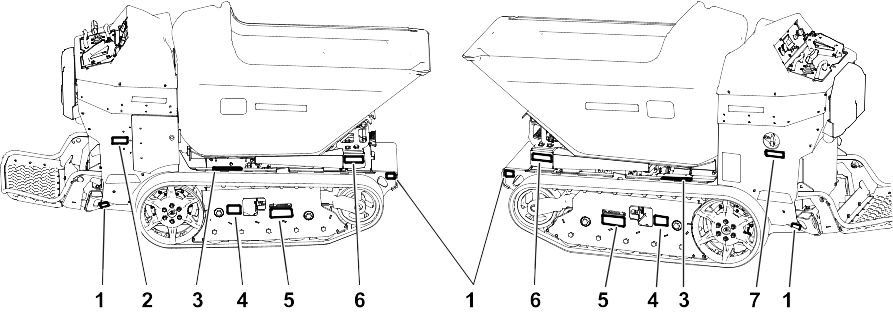
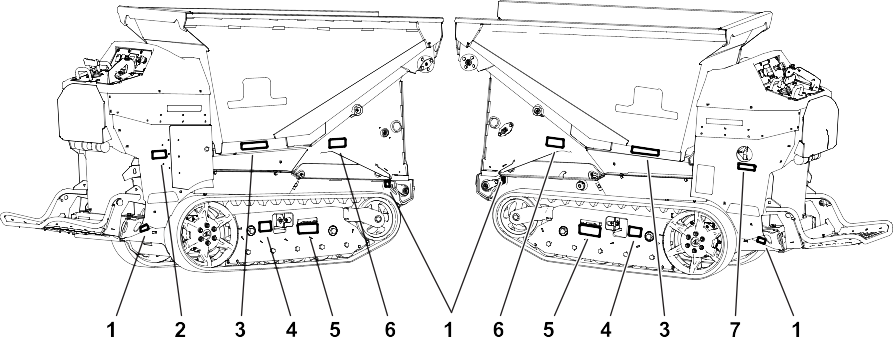
Safety decals and instructions are easily visible to the operator and are located near any area of potential danger. Replace any decal that is damaged or missing.
Safety Decal Locations
Model 68140
Graphic
G563707
  1. 147-6707
  2. 161-2443
  3. 115-4858
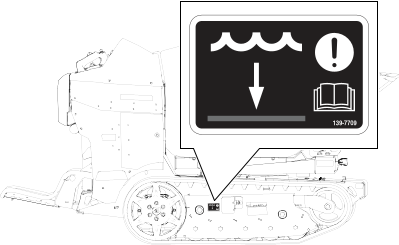
  4. 139-7709
  5. 139-7201
  6. 161-5517
  7. 145-1175
Safety Decal Locations
Model 68142
Graphic
G563708
  1. 147-6707
  2. 161-2443
  3. 115-4858
  4. 139-7709
  5. 139-7201
  6. 125-4959
  7. 145-1175
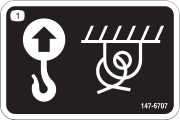
Decal Part: 147-6707
Graphic
s_decal147-6707
  1.  Lift point and tie-down point
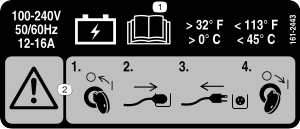
Decal Part: 161-2443
Graphic
s_decal161-2443
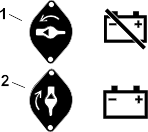
  1.  Read the Operators Manual for charging information.
  2.  Warning1) Turn the key to the Off position; 2) Plug in the power supply cord; 3) Unplug the power cord supply cord; 4) Turn the key to the On position..
Decal Part: 115-4858
Graphic
decal115-4858
  1.  Force from above can cause crushing of fingers, hands, toes, or feetinstall the cylinder lock.
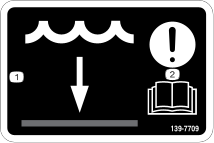
Decal Part: 139-7709
Graphic
s_decal139-7709
  1.  Water level
  2.  Attentionread the Operators Manual.
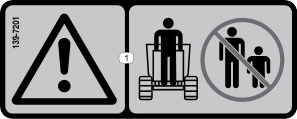
Decal Part: 139-7201
Graphic
s_decal139-7201
  1.  Warningkeep bystanders away.
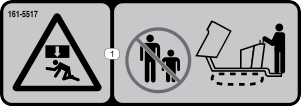
Decal Part: 161-5517
Model 61840
Graphic
s_decal161-5517
  1.  Crushing hazardkeep bystanders away from the machine.
Decal Part: 125-4959
Model 61842
Graphic
decal125-4959
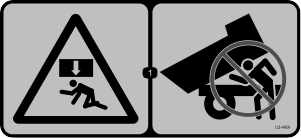
  1.  Force from above can cause crushing of the whole bodynever place your head under the hopper.
Decal Part: 145-1175
Graphic
decal145-1175
  1.  Warningturn the battery disconnect switch to the Off position before performing maintenance.
Decal Part: 133-8061
Graphic
s_decal133-8061
Decal Part: 144-0275
Graphic
decal144-0275
  1.  Batteries are flammable.
Decal Part: 145-5301
Graphic
145-5301
  1. Negative battery terminal
Decal Part: 145-5338
Graphic
decal145-5338
  1. Warningread the Operators Manual.
  2. Warningdo not open the battery; do not use a damaged battery.
  3. Explosion hazarddo not expose to sparks or open flame.
  4. Electric shock hazarddo not perform maintenance on the battery.
  5. Electric shock hazard
Decal Part: 147-9708
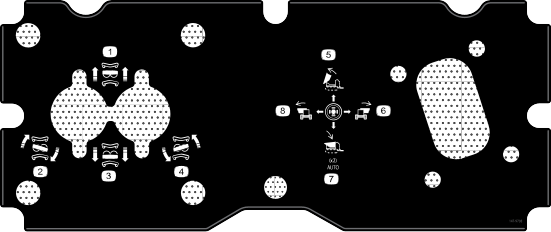
Model 61840
Graphic
s_decal147-9708
  1. Move forward
  2. Turn right
  3. Move rearward
  4. Turn left
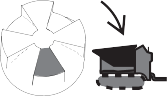
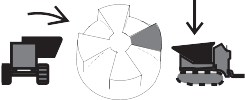
  5. Dump the hopper
  6. Swivel the hopper right
  7. Lower the hopper
  8. Swivel the hopper left.
Decal Part: 147-9720
Model 61842
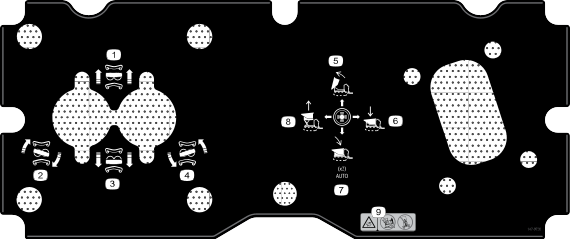
Graphic
s_decal147-9720
  1. Move forward
  2. Turn right
  3. Move rearward
  4. Turn left
  5. Dump the hopper.
  6. Lower the hopper platform.
  7. Lower the hopper.
  8. Raise the hopper platform.
  9. Tipping hazarddo not drive the machine with the hopper raised; never drive down a slope with the hopper raised; do not drive across a slope.
Decal Part: 147-9721
Graphic
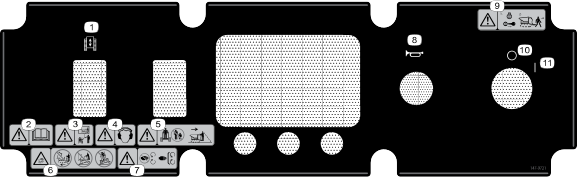
s_decal147-9721
  1. Machine enable switch
  2. Warningread the Operator's Manual.
  3. Warningreceive training before operating the machine.
  4. Warningwear hearing protection.
  5. Warningkeep bystanders away from the machine; always check behind you before reversing the machine.
  6. Tipping hazarddo not drive the machine with the hopper raised; never drive down a slope with the hopper raised; do not drive across a slope.
  7. Warningkeep hands away from moving parts; keep all guards and shields in place.
  8. Horn
  9. Warningshut off the machine and remove the key from the key switch before leaving the machine.
  10. Off
  11. On
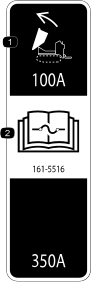
Decal Part: 161-5516
Graphic
s_decal161-5516
  1.  Hopper lift100A
  2.  Read the Operators Manual for fuse information.
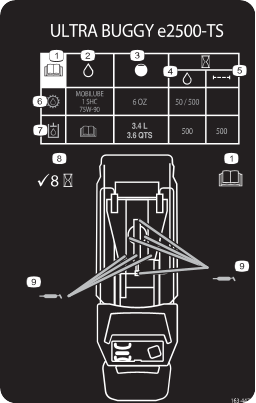
Decal Part: 163-4473
Graphic
s_decal163-4473
  1.  Read the Operators Manual.
  2.  Fluid specification
  3.  Capacity
  4.  Fluid change interval (hours)
  5.  Filter change interval (hours)
  6.  Gearbox fluid
  7.  Hydraulic fluid
  8.  Check every 8 hours
  9.  Grease points
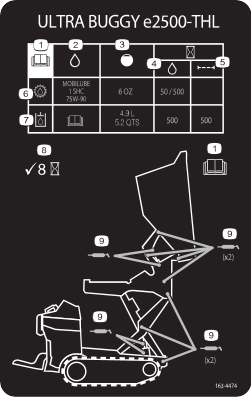
Decal Part: 163-4474
Graphic
s_decal163-4474
  1.  Read the Operators Manual.
  2.  Fluid specification
  3.  Capacity
  4.  Fluid change interval (hours)
  5.  Filter change interval (hours)
  6.  Gearbox fluid
  7.  Hydraulic fluid
  8.  Check every 8 hours
  9.  Grease points


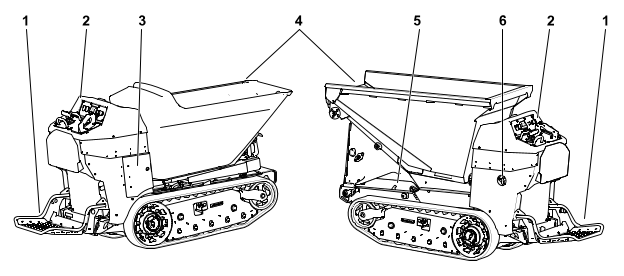
Product Overview
 

Graphic
G530184
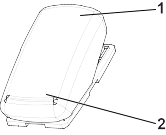
  1. Operator platform
  2. Control panel
  3. Charging station
  4. Hopper
  5. Safety lock (high-lift model only)
  6. Battery disconnect switch
Controls
Graphic
G527509
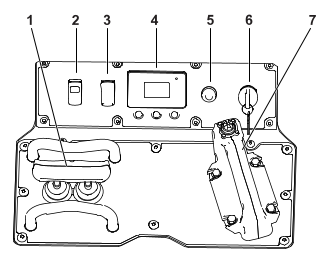
  1.  Traction control
  2.  Traction enable switch
  3.  Light switch
  4.  Display
  5.  Horn
  6.  Key Switch
  7.  Joystick/Hopper control
Light Switch
Graphic
G431514
  1.  Off
  2.  On
Battery Disconnect Switch
Graphic
G423989
  1.  Offto de-energize the machine electrically
  2.  Onto energize the machine electrically
Machine Enable Switch
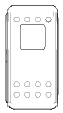
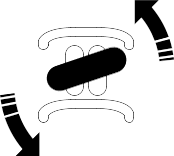
The light will turn on when the machine is in standby mode. Push the switch to enable the controls.
Graphic
G530195
Hopper Control
Graphic
G549140
Graphic
G549139
Graphic
G549136
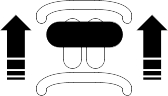
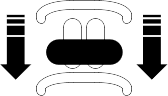
Dump the hopper
Return the hopper
Graphic
G549137
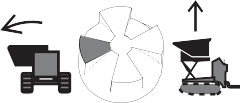
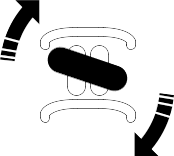
Swivel the hopper left / Raise the hopper platform
Graphic
G549138
Swivel the hopper right / Lower the hopper platform
Traction Control
Graphic
G531309
  1.  Reference bar
  2.  Traction control
The farther you move the traction control in any direction, the faster the machine moves in that direction.
To stop the machine, release the traction control.
Graphic
G407439
Graphic
G407440
Move forward
Move rearward
Graphic
G407442
Graphic
G407441
Turn right
Turn left
Important  
When reversing, look behind you for obstructions and keep your hands on the reference bar and joystick.
 
Display
Image Protected under Protected Menusaccessible only by entering PIN.
Display Icon Descriptions
Icon
Description
Image
Info icon
Image
Menu access
Image
Next
Image
Previous
Image
Scroll down
Image
Next
Image
Enter
Image
Increase
Image
Decrease
Image
Exit menu
Image
Check box unchecked
Image
Check box checked
Image
Parking brake is engaged.
Image
Hour meter
Image
Battery voltage
Image
Battery chargeeach solid bar represents the change in 10% increments.
Image
Fast OR Maximum machine speed
Image
Standby
Image
Maximum traction speed controlpress the middle button twice to adjust.
Display Main Menu
Menu Item
Description
Faults
A list of the recent machine faults. Refer to the Service Manual or your Authorized Service Dealer for more information on the faults menu.
Service
Machine information such as hours of use and other similar numbers.
Diagnostics
Displays the state of each machine switch, sensor, and control output. This tells you which machine controls are on and off which assists in troubleshooting.
Settings
Customize and modify configuration variables on the InfoCenter display.
About
Lists the model number, serial number, and software version.
Display Faults Menu
Menu Item
Description
Current
Lists the total number of key-on hours (i.e., hours that the key has been in the ON position).
Last
Indicates the last key-on hour that the fault occurred on.
First
Indicates the first key-on hour that the fault occurred on.
Occurrences
Indicates the number of fault occurrences.
Display Service Menu
Menu Item
Description
Hours
Lists the total number of hours that the key and motor have been on and the traction controls have been engaged.
Counts
Lists the number of times the motor has been started and the amperage hours for the battery.
Traction CalibrationImage
The Calibration menu assists in calibration.
Display Diagnostics Menu
Menu Item
Description
Battery
Indicates the inputs and outputs for the battery. Inputs include the current battery voltage; outputs include the battery current and percentage state of charge.
Battery Packs
Indicates the inputs and outputs for each battery pack. Inputs include the current battery voltage; outputs include the battery current and percentage state of charge.
CAN
Indicates the inputs and outputs for the CAN.
Display
Indicates inputs and outputs.
Left Motor
Indicates the speed and current of the left motor.
Right Motor
Indicates the speed and current of the right motor.
Display Settings Menu
Menu Item
Description
Units
Indicates the inputs and outputs for the battery. Inputs include the current battery voltage; outputs include the battery current and percentage state of charge.
Language
Controls the language used on the InfoCenter.
Back Light
Controls the brightness of the LCD display.
Contrast
Controls the contrast of the LCD display.
Protected Menus
Allows you to access protected menus by inputting a passcode.
Protected Settings
Allows the ability to change the settings in the protected settings
Machine Speed
Controls the maximum speed.
Display About Menu
Menu Item
Description
Model
Lists the model number of the machine.
Serial
Lists the serial number of the machine.
Software
Lists the part number and software revision.
Left Motor
Lists the part number and software revision of the motor controller.
Right Motor
Lists the part number and software revision of the motor controller.
Battery
Lists the part number software revision of the battery
Specifications
Note: Specifications and design are subject to change without notice.
 
Model 68140
Model 68142
Width
80 cm (31.5 inches)
Length (platform up)
223.3 cm (87.9 inches)
225.3 cm (88.7 inches)
Length (platform down)
255.8 cm (100.7 inches)
257.8 cm (101.5 inches)
Height (Bucket and Lift lowered)
132.3 cm (52.1 inches)
150.6 cm (59.3 inches)
Weight
943.5 kg (2080 lb)
1202 kg (2650 lb)
Hopper Capacity
12.8 cu ft (0.36 m3)
14.0 cu ft (0.40 m3)
Maximum Load
1134 kg (2500 lb)
1134 kg (2500 lb) lowered position
567 kg (1250 lb) lifted position
Discharge Height
45 cm (17.8 inches)
105.9 cm (41.7 inches) lowered position
197 cm (77.6 inches) lifted position

Attachments/Accessories

A selection of Toro approved attachments and accessories is available for use with the machine to enhance and expand its capabilities. Contact your Authorized Service Dealer or authorized Toro distributor or go to www.Toro.com for a list of all approved attachments and accessories.
To ensure optimum performance and continued safety certification of the machine, use only genuine Toro replacement parts and accessories.


Operation
 

Performing Daily Maintenance

Before starting the machine each day, perform the Each Use/Daily procedures listed in the Maintenance Schedule.

Starting the Machine

  1. Ensure that the battery-disconnect switch is in the On position.
  2. Ensure that the traction control lever is in the Neutral position.
  3. Insert the key into the key switch and turn it to the On position.
    Note: The machine may have difficulty starting under severe cold conditions. When starting a cold machine, keep the machine above -7°C (20°F).

Shutting Off the Machine

  1. Park the machine on a level surface and lower the hopper.
  2. Ensure that the traction control lever is in the Neutral position.
  3. Turn the key switch to the Off position and remove the key.
    Note: The parking brake engages after 30 seconds of inactivity.

Driving the Machine

  1. Step onto the machine.
    Caution
    When mounting the machine, slippery or uneven ground may cause you to fall.
    Always have 3 out of 4 arms/legs in contact with the machine when you mount or dismount the machine.
     
    Note: Do not drive through standing water. Refer to the water level decal on your machine.
    Graphic
    G540635
  2. Turn the key to the on position.
  3. Push the traction enabled switch.
  4. Use the traction control to move the machine in the desired direction.
    The farther you move the traction controls in any direction, the faster the machine moves in that direction.
  5. Release the traction control to stop the machine.
  6. Put the drive controls in the neutral position and turn the key switch to the off position.

Operating the Hopper

Important  
Do not exceed the load capacity of the machine.
 
  1. Position the machine on a level surface where you intend to dump the load.
  2. Swivel the hopper or raise the hopper platform as needed.
  3. Dump the hopper.
  4. Lower the hopper.

Using the Auto Return Feature

  1. Double tap the specific button on the joystick to use the auto return feature:
    • Bottom buttonreturn the hopper
    • Left buttoncenter the hopper when the hopper is swiveled to the right
    • Right buttonlower the high-lift hopper; center the hopper when the hopper is swiveled to the left

Operator Platform

You can use the machine with the platform in the up or down position.
Warning
The operator platform is heavy and may cause injury when you raise or lower it. Carefully lower or raise the operator platform, as suddenly dropping it could injure you.
  • Do not put your hands or fingers in the platform-pivot area when lowering or raising the operator platform.
  • Make sure that the platform is supported when you pull the latch pin out.
  • Make sure that the latch secures the platform when folding it up. Push it tight against the cushion for the latch pin to lock into place.
  • Keep bystanders away from the machine when raising or lowering the platform.
 
Operate the machine with the platform up for the following conditions:
  • Using the machine near drop-offs
  • Using the machine in small areas where the machine is too large
  • Areas with low-hanging branches or obstacles
  • When loading or unloading the machine from a trailer for transport
  • Driving up slopes
Operate the machine with the platform down for the following conditions:
  • Using the machine in most areas
  • Driving across slopes
  • Driving down slopes
Lowering the Platform
    Graphic
    G384424
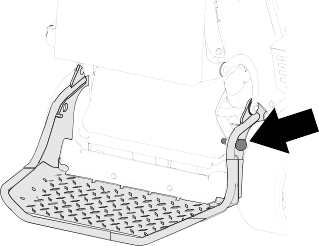
  1. Push the platform against the cushion to release pressure on the latch pin.
  2. Pull the latch pin knob out and lower the platform.
Raising the Platform
    Graphic
    G424961
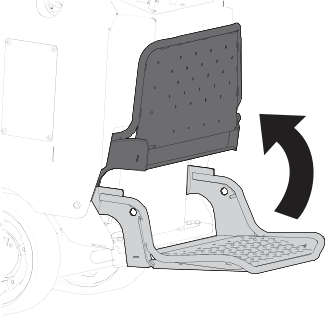
  1. Lift the platform up until it locks into place.
    Note: Raising the platform reduces the speed to 2.5 mph (moving forward) and 1.5 mph (moving in reverse).


Transport
 

Hauling the Machine

Use a heavy-duty trailer or truck to haul the machine. Use a full-width ramp. Ensure that the trailer or truck has all the necessary brakes, lighting, and marking as required by law. Please carefully read all the safety instructions. Knowing this information could help you or bystanders avoid injury. Refer to your local ordinances for trailer and tie-down requirements.
Warning
Driving on the street or roadway without turn signals, lights, reflective markings, or a slow-moving-vehicle emblem is dangerous and can lead to accidents causing personal injury.
Do not drive the machine on a public street or roadway.
 
Trailer Requirements
Warning
Loading a machine onto a trailer or truck increases the possibility of tip-over and could cause serious injury or death.
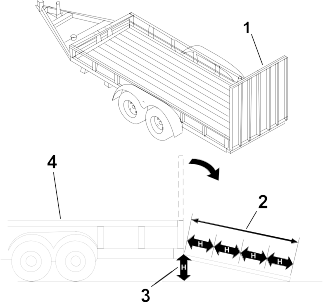
  • Use only a full-width ramp; do not use individual ramps for each side of the machine.
  • Ensure that the length of ramp is at least 4 times as long as the height of the trailer or truck bed to the ground.
 
Graphic
G229507s
  1.  Full-width ramp in stowed position
  2.  Ramp is at least 4 times as long as the height of the trailer or truck bed to the ground
  3.  H = height of the trailer or truck bed to the ground
  4.  Trailer
Loading the Machine
Warning
Loading a machine onto a trailer or truck increases the possibility of tip-over and could cause serious injury or death.
  • Use extreme caution when operating a machine on a ramp.
  • Load and unload the machine with the heavy end up the ramp.
  • Avoid sudden acceleration or deceleration while driving the machine on a ramp as this could cause a loss of control or a tip-over situation.
 
Important
Ensure that the hopper is empty before loading the machine onto a truck or trailer.
 
  1. If using a trailer, connect it to the towing vehicle and connect the safety chains.
  2. If applicable, connect the trailer brakes.
  3. Lower the ramp(s).
  4. Back the machine up the trailer ramp.
  5. Shut off the machine.
  6. Raise the operator platform.
  7. Use the metal tie-down loops to securely fasten the machine to the trailer or truck with straps, chains, cable, or ropes. Refer to local regulations for tie-down requirements.
Tie-Down Points
Graphic
G408867
Tie-down points are identified by the tie-down decals. Securing the machine to the trailer at other points is unsafe and can damage the machine.
Tying Down the Machine
  1. Use the metal tie-down loop to securely fasten the machine to the trailer or truck with straps, chains, cable, or ropes. Refer to local regulations for tie-down requirements.
Unloading the Machine
  1. Lower the ramp(s).
  2. Lower the operator platform.
  3. Drive the machine forward down the ramp.


Maintenance
 

Recommended Maintenance Schedule

Pre-Maintenance Procedures

Lowering the Hopper without Power
Model: 68140
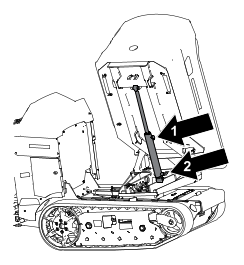
  1. Install the cylinder lock.
  2. Ensure that the hopper is empty.
  3. Graphic
    G543993
  4. Remove the bottom cover and place a large drain pan under the dump cylinder.
  5. Loosen the fitting on the rod end of the cylinder to allow air to flow in.
  6. Disconnect the fitting on the base end of the cylinder and allow the fluid to drain.
    Note: Dispose of the used fluid at a certified recycling center.
  7. Use a hoist or have 2 people hold up the hopper and remove and store the cylinder lock.
  8. Carefully lower the hopper.
  9. After making repairs, raise the hopper, install the cylinder lock.
  10. After lubricating the fitting seal with clean hydraulic fluid, re-torque both hoses to 18-20 ft-lbs (24 to 27 N·m) while using a backup wrench on the hose fitting to eliminate twist.
  11. Add hydraulic fluid.
  12. Remove the cylinder lock
  13. Retract the cylinder through the entire stroke while avoiding running over relief at the end of stroke.
  14. Fully extend the cylinder through the entire stroke while avoiding running over relief at the end of stroke.
  15. Check that the hydraulic fluid level is adequate and add/remove fluid as necessary.
  16. Repeat steps 12 and 13 for three additional cycles
  17. Repeat step 14.
Lowering the Hopper Platform without Power
Model: 68142
    Graphic
    G543779
  1. Pull and hold the manual override knob until the hopper fully lowers.
Lowering the Hopper without Power
Model: 68142
  1. Install the cylinder lock.
  2. Ensure that the hopper is empty.
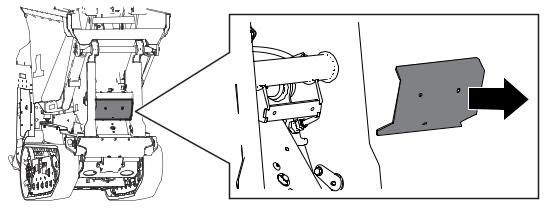
  3. Use a hoist hold up the hopper and remove and store the cylinder lock.
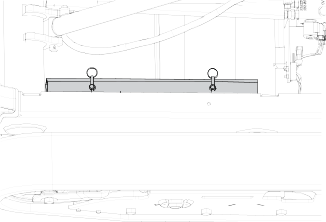
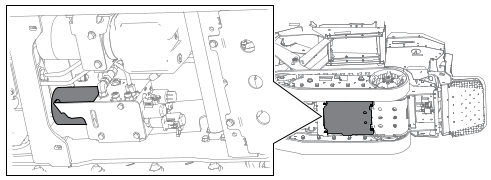
  4. Remove the guard and place a large drain pan under the hydraulic fittings.
    Image
  5. Loosen the fitting on the rod end of the cylinder to allow air to flow in.
    Image
  6. Disconnect the fitting on the base end of the cylinder and allow the fluid to drain.
    Note: Dispose of the used fluid at a certified recycling center.
  7. Slowly lower the hopper using the hoist.
  8. After making repairs, raise the hopper and install the cylinder lock.
  9. After lubricating the fitting seal with clean hydraulic fluid, re-torque both hoses to 30-33 ft-lbs (41 to 45 N·m).
  10. Retract the dump cylinder through the entire stroke while avoiding running over relief at the end of stroke.
  11. To access the hydraulic reservoir, fully extend hopper lift cylinder to end of stroke while avoiding running over relief at the end of stroke.
  12. Check that the hydraulic fluid level is adequate and add/remove fluid as necessary.
  13. Fully extend the dump cylinder to end of stroke while avoiding running over relief at the end of stroke.
  14. Check that the hydraulic fluid level is adequate and add/remove fluid as necessary.
  15. Retract the cylinder through the entire stroke while avoiding running over relief at the end of stroke.
  16. Fully extend the cylinder through the entire stroke while avoiding running over relief at the end of stroke.
  17. Repeat steps 15 and 16 for three additional cycles.
  18. Check that the hydraulic fluid level is adequate and add/remove fluid as necessary.
Raising the Hopper without Power
  1. Remove any material from the hopper.
  2. Raise the machine and support it using jack stands rated for the weight of the machine.
  3. Place a large drain pan under the manual lower valve.
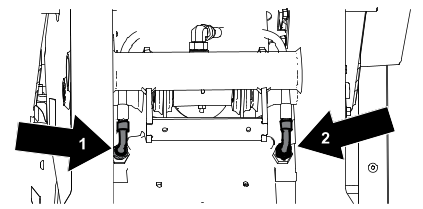
  4. Loosen C1 and C2 hose fittings.
  5. Attach the proper lifting mechanism to the hopper and lift the high lift platform until the safety lockout can be installed.
  6. Install the safety lockout.
  7. After making repairs, lubricate the C1 and C2 fitting seals using clean hydraulic fluid and re-torque both hoses to 30-33 ft-lbs (41 to 45 N·m) while using a backup wrench on the hose fitting to eliminate twist.
  8. Lower the hopper platform halfway, then extend fully while avoiding running over relief at the end of stroke.
  9. Install the safety lockout.
  10. Check that the hydraulic fluid level is adequate and add/remove fluid as necessary.
  11. Lower the hopper platform fully while avoiding running over relief at the end of stroke.
  12. Raise the hopper platform fully while avoiding running over relief at the end of stroke.
  13. Check that the hydraulic fluid level is adequate and add/remove fluid as necessary.
  14. Repeat steps 11 and 12 for three additional cycles.
  15. Extend the hopper dump cylinder fully.
  16. Check that the hydraulic fluid level is adequate and add/remove fluid as necessary.
Retrieving the Machine
Under normal conditions, do not tow the machine. If the machine becomes disabled and retrieval is needed:
  • Do not tow the machine for more than 180 m (200 yd).
  • Tow the machine at less than 1.5 to 3.0 km/h (1 to 2 mph).
  • You cannot steer the machine as it is towed.
  • Use a maximum towing force of 1.5 times the machine weight.
  1. Drive the towing vehicle to the front of the machine.
  2. Attach the machine to the towing vehicle using the tie-down points.
  3. Ensure that all controls are in Neutral.
  4. After towing:
    1. Move the controls to Neutral.
    2. Disconnect the machine from the towing vehicle.
Lifting the Machine
Important  
Ensure that the hopper is empty before lifting the machine.
 
  1. Place the platform in the raised position.
  2. Ensure that the hopper is in the lowered position.
  3. Hoist the machine using the 4 lifting points.
    Note: Take up the slack in the chain or straps to properly balance the unit.
Using the Safety Lock
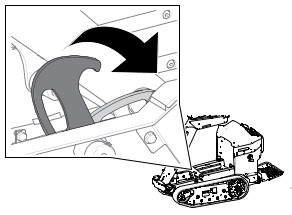
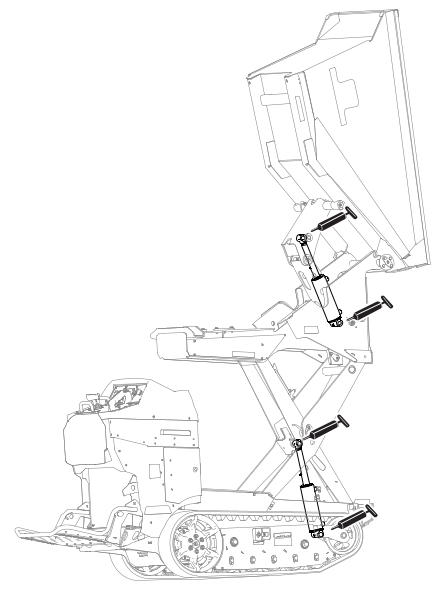
  1. Park the machine on a level surface, ensure that the control levers are in the Neutral position, fully raise the hopper, and turn off the machine.
  2. Graphic
    G539703
  3. Rotate the safety lock until it hooks onto the machine.
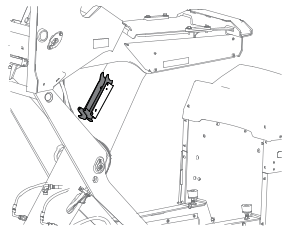
Using the Cylinder Lock
Installing the Cylinder Lock
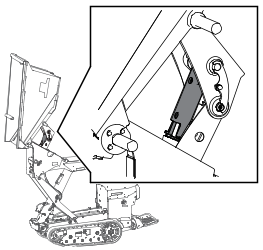
  1. Park the machine on a level surface, ensure that the control levers are in the Neutral position, fully raise the hopper, and turn off the machine.
  2. Graphic
    G538070
  3. Remove the 2 cotterless pins securing the cylinder lock to the machine.
  4. Graphic
    G324856s
  5. Slide the cylinder lock over the lift-cylinder rod and secure with the cotterless pins.
Removing and Storing the Cylinder Lock
Important  
Remove the cylinder lock from the lift-cylinder rod and fully secure it in the storage position before operating the machine.
 
  1. Start the machine.
  2. Fully raise the hopper.
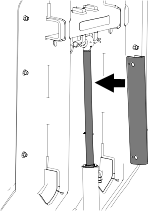
  3. Remove the cotterless pins securing the cylinder lock.
  4. Graphic
    G539702.SVG
  5. Place the cylinder lock on the posts inside the machine frame and secure with the cotterless pins.
  6. Graphic
    G375954
  7. Lower the hopper.
  8. Shut off the machine.

Lubrication

Greasing the Machine
Model: 68140
Grease Type: General-purpose grease.
Note: Remove the blue protection caps, if applicable, before greasing and replace when finished.
  1. Park the machine on a level surface.
  2. Shut off the machine.
  3. Clean the grease fittings with a rag.
  4. Connect a grease gun to each fitting.
    Graphic
    G563710
  5. Pump grease into the fittings until grease begins to ooze out of the fittings (approximately 3 pumps).
  6. Wipe up any excess grease.
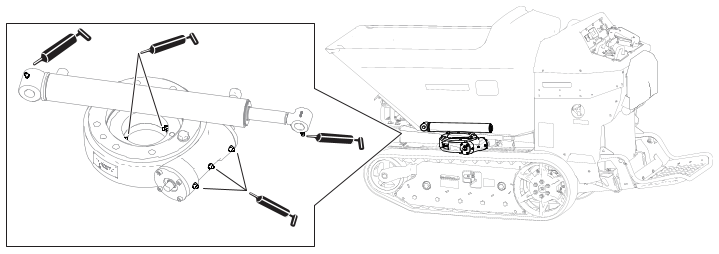
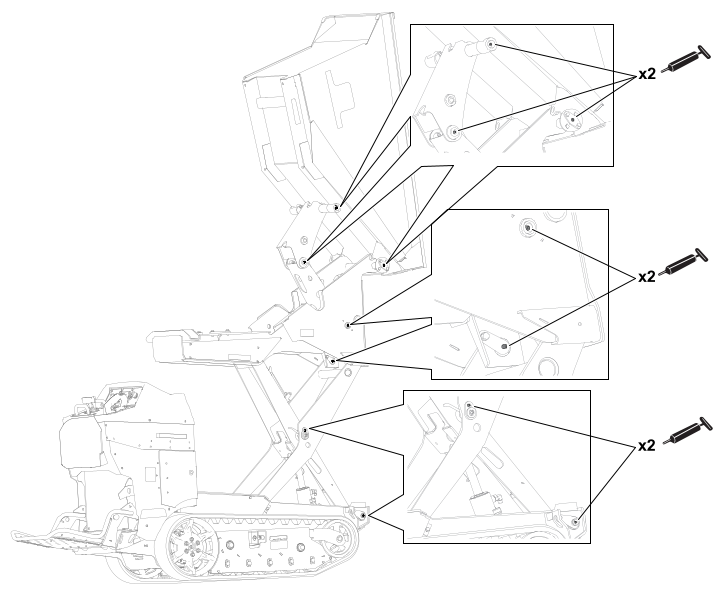
Greasing the Machine
Model: 68142
Grease Type: General-purpose grease.
Note: Remove the blue protection caps, if applicable, before greasing and replace when finished.
  1. Park the machine on a level surface.
  2. Shut off the machine.
  3. Clean the grease fittings with a rag.
  4. Connect a grease gun to each fitting.
    Graphic
    G540405
    Graphic
    G540407
  5. Pump grease into the fittings until grease begins to ooze out of the fittings (approximately 3 pumps).
  6. Wipe up any excess grease.

Electrical System Maintenance

Electrical System Safety
  • Disconnect the battery before repairing the machine. Disconnect the negative terminal first and the positive last. Connect the positive terminal first and the negative last.
  • Charge the battery in an open, well-ventilated area, away from sparks and flames. Unplug the charger before connecting or disconnecting the battery. Wear protective clothing and use insulated tools.
  • Battery acid is poisonous and can cause burns. Avoid contact with skin, eyes, and clothing. Protect your face, eyes, and clothing when working with a battery.
  • Battery gases can explode. Keep cigarettes, sparks, and flames away from the battery.
Battery Service
Note: The machine is equipped with 6 lithium-ion batteries.
Dispose of or recycle lithium-ion batteries in accordance with local and federal regulations. If a battery requires service, contact your Authorized Service Dealer for assistance.
The only user serviceable parts on a battery are the labels. If you are having problems with a battery, contact your Authorized Service Dealer for assistance.
Battery Maintenance
Warning
The batteries contain high voltage, which could burn or shock you.
  • Do not attempt to open the batteries.
  • Use extreme care when handling a battery with a cracked case.
  • Use only the charger designed for the batteries.
 
The lithium-ion batteries hold a sufficient charge to perform intended work during its life span.
To achieve maximum life and use from your batteries, follow these guidelines:
  • Do not open the battery.
  • Store/park the machine in a clean, dry garage or storage area, away from direct sunlight, heat sources, rain, and wet conditions. Do not store it in a location where the temperature exceeds the range specified in the Battery Storage Requirements.
    Important  
    Temperatures outside of this range will damage your batteries. High temperatures during storage, especially at a high state of charge, reduces the life of the batteries.
     
  • When storing the machine for more than 10 days, ensure that the machine is in a cool and dry location, out of sunlight, rain, and wet conditions.
  • If you are using the machine in hot conditions or in strong, direct sunlight, the batteries may overheat. If this happens, a high-temperature alert will appear on the display and the machine will slow down.
    Immediately drive the machine to a cool location out of the sun, turn off the machine, and allow the batteries to cool fully before resuming operation.
Charging the Batteries
Danger
Contact with water while charging the machine could cause electric shock, causing injury or death.
  • Do not handle the plug with wet hands or while standing in water.
  • Do not charge the batteries in the rain or in wet conditions.
 
Warning
A damaged charger cord can cause an electrical shock or a fire.
Thoroughly inspect the charger cord before charging the machine. If the cord is damaged, do not charge the machine until you obtain a replacement.
 
To reduce the risk of electric shock, this charger has a 3-prong grounded plug (type B). If the plug does not fit into the wall receptacle, other grounded plug types are available; contact an Authorized Service Dealer.
Do not change the charger plug in any way.
Important
Check the charger cord periodically for holes or cracks in the insulation. Do not use a damaged cord. Do not run the cord through standing water or wet grass.
 
Recommended temperature range for charging: 0° to 45°C (32° to 113°F).
Important
Charge the batteries only in temperatures that are within the recommended range.
 
Note: The charger will not function in temperatures exceeding the minimum or maximum temperatures.
  1. Park the machine in the designated location for charging.
  2. Shut off the machine and remove the key.
  3. Ensure that the electrical service disconnect switch is in the On position.
  4. Plug the charger cord into the machine.
  5. Plug the other end of the charger cord into a grounded electrical outlet.
  6. Observe the display to ensure that the batteries are charging.
    Note: The display shows the battery charge percentage and amperage. Batteries with a lower voltage charge first; once they reach the voltage of the other batteries, all batteries charge simultaneously. The fan may turn on while the machine is charging. When charging is complete, the display shuts off.
  7. When the machine reaches a sufficient level, disconnect the charger cord from the outlet.
  8. Store the charger cord in the storage compartment and close the cover.
  9. Start the machine and verify the charge level using the display.
Charger Maintenance
Important  
All electrical repairs should be performed by an Authorized Service Dealer only.
 
The charger requires little maintenance other than protecting it from damage and weather.
  • Clean the charger cord with a slightly damp cloth after each use.
  • Coil the cord when not in use.
  • Periodically examine the cord for damage, and replace it when necessary with Toro-approved parts.

Drive System Maintenance

Track Service
Cleaning the Tracks
  1. Park the machine on a level surface, move the motion-control levers to the Neutral-lock position, engage the parking brake, and lower the hopper.
  2. Shut off the machine, remove the key, and allow the machine to cool.
  3. Lift/support the side of the machine to be worked on so that the track is 7.6 to 10 cm (3 to 4 inches) off the ground.
  4. Using a water hose or pressure washer, remove dirt from each track system.
    Important  
    Ensure that you use high-pressure water to wash only the track area. Do not use a high-pressure washer to clean the rest of the machine. Do not use high-pressure water between the drive sprocket and the machine or you may damage the motor seals. High-pressure washing can damage the electrical system and hydraulic valves or deplete grease.
     
    Important
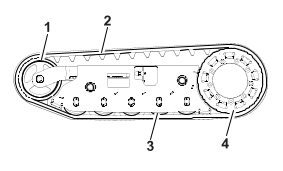
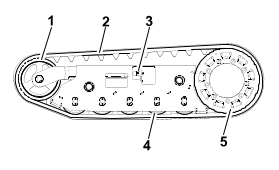
    Ensure that you fully clean the road wheels, the front wheel, and the drive sprocket. The road wheels should rotate freely when clean.
     
    Graphic
    G543780
    1.  Front wheel
    2.  Track
    3.  Road wheel
    4.  Drive sprocket
Checking the Track Tension
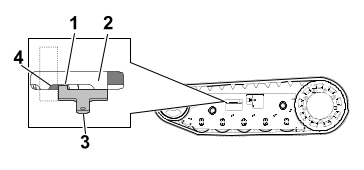
  1. Place the tab of the tensioning tool along the rear edge of the tension nut , the other end of the tensioning tool should align with the edge of the tension arm . If the distance is not correct, adjust the track tension.
    Note: If the tensioning tool is not available, the distance between the nut and edge of the tension arm should be 7.1 cm (2-13/16 inches).
    Graphic
    G546674
Adjusting the Track Tension
  1. Park the machine on a level surface, move the motion-control levers to the Neutral-lock position, engage the parking brake, and lower the hopper.
  2. Shut off the machine, remove the key, and allow the machine to cool.
  3. Clean the tracks with high-pressure water.
    Important  
    Ensure that you use high-pressure water to wash only the track area. Do not use a high-pressure washer to clean the rest of the machine. Do not use high pressure water between the drive sprocket and the machine or you may damage the motor seals. High-pressure washing can damage the electrical system and hydraulic valves or deplete grease.
     
  4. Raise the machine so that the tracks are off the ground.
  5. Clean the drive sprocket, the front wheel, and the road wheels. The road wheels should spin freely when clean.
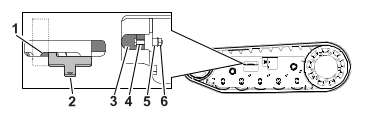
  6. Remove the bolt (1/4 x 1-5/8 inches) , spacer , and nut .
  7. Turn the tensioning bolt to adjust the distance between the tension nut and the end tangent of the tension tube until the distance is correct.
  8. Align the closest notch in the tensioning bolt to the bolt hole and secure the tensioning bolt with the bolt (1/4 x 1-5/8 inches), spacer, and nut.
    Graphic
    G546677
Replacing the Tracks
Removing a Track
  1. Park the machine on a level surface, move the motion-control levers to the Neutral-lock position, engage the parking brake, and lower the hopper.
  2. Shut off the machine, remove the key, and allow the machine to cool.
  3. Lift/support the side of the machine to be worked on so that the track is 7.6 to 10 cm (3 to 4 inches) off the ground.
  4. Remove the retaining bolt for the tensioning screw.
    Graphic
    G546676
    1.  Front wheel
    2.  Track
    3.  Tensioning screw and retaining bolt
    4.  Road wheel
    5.  Drive sprocket
  5. Release the drive tension by turning the tensioning screw clockwise.
  6. Remove the track at the top of the front wheel, peeling it off the wheel while rotating the track forward.
  7. When the track is off the front wheel, remove it from the drive sprocket and road wheels.
  8. Inspect the condition of the wheels. If the wheels show signs of wear, replace them at this time.
Installing a Track
  1. Park the machine on a level surface, move the motion-control levers to the Neutral-lock position, engage the parking brake, and lower the hopper.
  2. Shut off the machine, remove the key, and allow the machine to cool.
  3. Lift/support the side of the machine to be worked on.
    Graphic
    G546676
    1.  Front wheel
    2.  Track
    3.  Tensioning screw and retaining bolt
    4.  Road wheel
    5.  Drive sprocket
  4. Beginning at the drive sprocket, coil the new track around the sprocket, ensuring that the lugs on the track fit between the spacers on the sprocket.
  5. Push the track under the lugs and between the road wheels.
  6. Starting at the bottom of the front wheel, install the track around the wheel by rotating the track rearward while pushing the lugs into the wheel.
  7. Tension the track.
  8. Lower the machine to the ground.
Drive-Motor Gear Oil Specifications
Note: Specifications and design are subject to change without notice.
Oil Type
Mobilube 1 SHC 75W-90
Capacity
177.4 ml (6 fl oz) per gearbox
Changing the Drive-Motor Gear Oil
  1. Start the machine and drive it for 5 minutes.
    Note: This warms the gear oil so that it drains better.
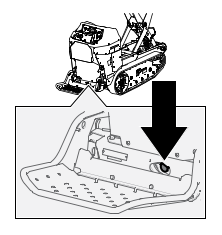
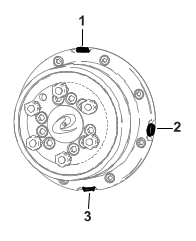
  2. Park the machine on a level surface so that a drain plug on the front motor is in the 6 oclock position.
  3. Graphic
    G543992
  4. Shut off the machine and remove the key.
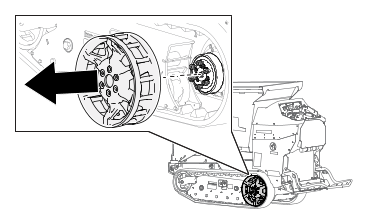
  5. Remove the wheel drive.
  6. Place a drain pan under the drive motor.
  7. Graphic
    G543991
  8. Remove the check and drain plugs and allow the gear oil to drain.
  9. Install the drain plug.
  10. Remove the fill plug and fill the drive motor with gear oil until the oil starts dripping from the check hole.
  11. Install the fill and check plugs.
  12. Repeat the procedure for the other drive motor.
  13. Start the machine and drive it for a few minutes.
  14. Park the machine on a level surface so that a drain plug is in the 3 oclock position, shut off the machine, and remove the key.
  15. Remove the plug in the 3 oclock position and verify that the oil level is at the bottom of the oil-level check hole. Add oil as needed.
  16. Install the plug and torque plugs to 5 to 6 Nm (50 to 60 in-lb).

Controls Maintenance

Adjusting the Controls
The factory adjusts the controls before shipping the machine. However, after many hours of use, you may need to adjust the traction control alignment, the Neutral position of the traction control, and the tracking of the traction control in the full forward position.
  1. Contact your Authorized Service Dealer to adjust the controls of your machine.

Hydraulic System Maintenance

Hydraulic Fluid Specifications
Model
Hydraulic-Fluid type
Hydraulic fluid capacity
68140
Mobil ATF Dexron
3.40 L (3.60 US qt)
68142
Mobil ATF Dexron
4.90 L (5.20 US qt)
Checking the Hydraulic Fluid
Model: 68140
Important  
Always use the correct hydraulic fluid. Unspecified fluids will damage the hydraulic system.
 
Caution
The hydraulic breather/filler cap is designed to pressurize the reservoir to 34 kPa (5 psi).
Loosen the cap slowly to avoid injury whenever adding oil or working on the hydraulic system. Use a wrench on the hex directly under the cap.
 
    Graphic
    G540410
  1. Rotate the hopper, put it in the dump position , and install the cylinder lock.
  2. Shut off the machine, remove the key, and allow the machine to cool.
  3. Lift the lid on the hydraulic storage area .
  4. Clean the area around the filler neck of the hydraulic tank.
  5. Remove the filler-neck cap.
  6. Wipe the dipstick with a clean cloth and insert it into the reservoir without threading it in.
  7. Remove and check the fluid level on the dipstick.
    The fluid level should be between the marks on the dipstick.
  8. If the level is low, add enough fluid to raise it to the proper level.
  9. Install the filler-neck cap.
Checking the Hydraulic Fluid
Model: 68142
Important  
Always use the correct hydraulic fluid. Unspecified fluids will damage the hydraulic system.
 
Caution
The hydraulic breather/filler cap is designed to pressurize the reservoir to 34 kPa (5 psi).
Loosen the cap slowly to avoid injury whenever adding oil or working on the hydraulic system. Use a wrench on the hex directly under the cap.
 
    Graphic
    G558138
  1. Raise and dump the hopper, and install the safety lock.
  2. Shut off the machine, remove the key, and allow the machine to cool.
  3. Clean the area around the filler neck of the hydraulic tank.
  4. Graphic
    G539825
  5. Remove the filler-neck cap.
  6. Wipe the dipstick with a clean cloth and insert it into the reservoir without threading it in.
  7. Remove and check the fluid level on the dipstick.
    The fluid level should be between the marks on the dipstick.
  8. If the level is low, add enough fluid to raise it to the proper level.
  9. Install the filler-neck cap.
Changing the Hydraulic Fluid
Model: 68140
Caution
The hydraulic breather/filler cap is designed to pressurize the reservoir to 34 kPa (5 psi).
Loosen the cap slowly to avoid injury whenever adding oil or working on the hydraulic system.
 
  1. Park the machine on a level surface and shut off the machine.
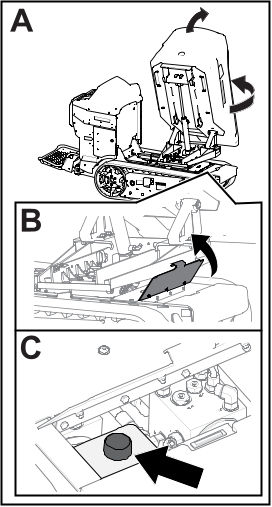
  2. Remove the access panel.
    Graphic
    G539704
  3. Slowly loosen the hydraulic tank cap.
  4. Place a large drain pan under the drain plug located at the bottom of the hydraulic tank.
  5. Remove the drain plug and allow the oil to drain into the pan.
  6. Install and tighten the drain plug.
    Note: Dispose of the used oil at a certified recycling center.
  7. Torque the drain plug to 1.1 to 1.4 Nm (10 to 12 in-lb).
  8. Install the access panel.
  9. Fill the hydraulic tank with the specified fluid.
  10. Install the cap.
Changing the Hydraulic Fluid
Model: 68142
Caution
The hydraulic breather/filler cap is designed to pressurize the reservoir to 34 kPa (5 psi).
Loosen the cap slowly to avoid injury whenever adding oil or working on the hydraulic system.
 
  1. Park the machine on a level surface and shut off the machine.
  2. Remove the access panel.
  3. Slowly loosen the hydraulic tank cap.
  4. Graphic
    G540403
  5. Place a large drain pan under the drain plug located at the bottom of the hydraulic tank.
  6. Remove the drain plug and allow the oil to drain into the pan.
  7. Install and tighten the drain plug.
    Note: Dispose of the used oil at a certified recycling center.
  8. Torque the drain plug to 1.1 to 1.4 Nm (10 to 12 in-lb).
  9. Install the access panel.
  10. Fill the hydraulic tank with the specified fluid.
  11. Install the cap.
Replacing the Hydraulic Filter
Model: 68140
Important  
Do not use an automotive oil filter, or severe hydraulic system damage may result.
 
  1. Park the machine on a level surface, shut off the machine, and allow the machine to cool.
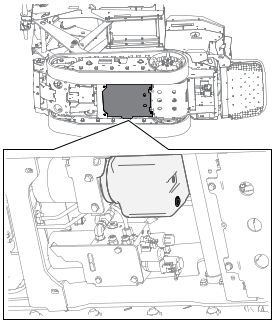
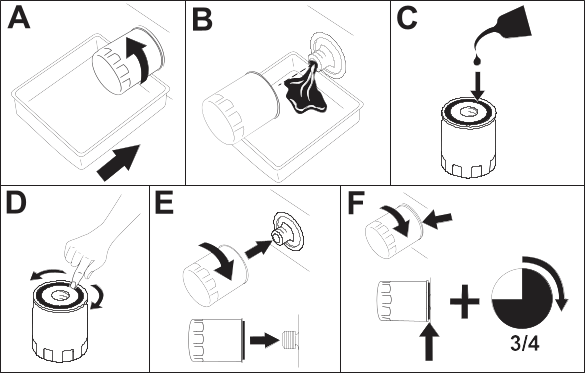
  2. Place a drain pan under the filter and replace it:
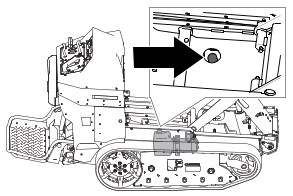
    Graphic
    G539704
    Graphic
    g376169s
  3. Clean up any spilled fluid.
  4. Start the machine and let it run for 2 minutes to purge air from the system.
  5. Shut off the machine and check for leaks.
  6. Check the fluid level in the hydraulic tank.
Replacing the Hydraulic Filter
Model: 68142
Important  
Do not use an automotive oil filter or severe hydraulic system damage may result.
 
  1. Park the machine on a level surface, shut off the machine, and allow the machine to cool.
  2. Place a drain pan under the filter and replace it as shown:
    Graphic
    G540404
    Graphic
    g376169s
  3. Clean up any spilled fluid.
  4. Start the machine and let it run for 2 minutes to purge air from the system.
  5. Shut off the machine and check for leaks.
  6. Check the fluid level in the hydraulic tank.
Checking the Hydraulic Lines
  1. Check the hydraulic lines for leaks, loose fittings, kinked lines, loose mounting supports, wear, and deterioration. Make necessary repairs before operating.

Cleaning

Removing Debris
  1. Park the machine on a level surface, shut off the machine, and remove the key.
  2. Clean any debris from the machine.
    Important  
    Blow the dirt out rather than wash it out. If you use water, keep it away from electrical items and hydraulic valves.
    Clean electrical connectors using compressed air; do not use contact cleaner.
     
Washing the Machine
When pressure-washing the machine, do the following:
  • Wear appropriate personal protective equipment for the pressure washer.
  • Keep all guards in place on the machine.
  • Avoid spraying at electronic components.
  • Avoid spraying at edges of decals.
  • Spray the exterior of the machine only. Do not spray directly into openings in the machine.
  • Spray only the dirty parts of the machine.
  • Use a 40-degree or larger spray nozzle. 40-degree nozzles are usually white.
  • Keep the tip of the pressure washer at least 61 cm (2 ft) away from the surface being washed.
  • Use only pressure washers with pressure below 13790 kpa (2000 psi) and flow below 7.6 L (2 US gallons) per minute.
  • Replace damaged or peeling decals.
  • Grease all grease points after washing.


Storage
 

Storage Safety

Park the machine on a level surface, engage the parking brake (if applicable), shut off the machine, and remove the key. Wait for all movement to stop and allow the machine to cool before adjusting, servicing, cleaning, or storing the machine.

Preparing the Machine for Storage Over 30 Days

  1. Park the machine on a level surface and lower the hopper.
  2. Shut off the machine and remove the key.
  3. Remove dirt and grime from the entire machine.
  4. Grease the machine.
  5. Check and tighten all fasteners. Repair or replace any worn, damaged, or missing parts.
  6. Paint all scratched or bare metal surfaces with paint available from your Authorized Service Dealer.
  7. Store the machine in a clean, dry garage or storage area. Remove the key and keep it in a memorable place.
  8. Cover the machine to protect it and keep it clean.

Battery Storage Requirements

Note: You do not need to remove the batteries from the machine for storage.
Temperature Limits for Storage
Storage Temperature
Appropriate Storage Time
45° to 55°C (113° to 131°F)
1 week
25° to 45°C (77° to 113°F)
3 weeks
-20° to 25°C (-4° to 77°F)
52 weeks
Important
Temperatures outside of these ranges will damage your batteries.
The temperature that the batteries are stored at will affect their long-term life. Storage for long periods of time at extreme temperatures will reduce the battery life. For temperatures above 25°C (77°F), only store the machine for the appropriate amount of time indicated in the table.
 
  • Before you store the machine, charge or discharge the batteries to between 40% and 60% (54.3V and 57.3V).
    Note: A 50% charge is optimal to ensure a maximum battery life. When the batteries are charged to 100% before storage, the battery life shortens.
    If you anticipate that the machine will be stored for a longer period of time, charge the batteries to around 60%.
  • For every 6 months of storage, check the battery-charge level and ensure that it is between 40% to 60%. If the charge is below 40%, charge the batteries between 40% to 60%.
  • You can use a multimeter to check the charge level when the machine is off. Refer to the following table for the amount of voltage that is equal to the charge level:
    Voltage
    Charge Level
    54.3V
    40%
    55.4V
    50%
    57.3V
    60%
  • After charging the batteries, disconnect the charger plug from power during storage to minimize the discharging of the batteries.
  • The machine and charger will shut off after the batteries are fully charged and does not turn back on unless the charger cord is disconnected and reconnected.


Troubleshooting
 

The machine does not drive.
Possible Cause
Corrective Action
The machine has been inactive for more than 30 seconds and is in standby mode.
  1. Push the traction enable switch.
The machine has been inactive for more than 5 minutes and has shut off.
  1. Restart the machine.
One or more of the electrical connections are loose.
  1. Check and tighten any loose connections.
The machine does not start.
Possible Cause
Corrective Action
The batteries need to be charged.
  1. Check the display for the battery status.
  2. Charge the machine.
The battery disconnect switch is in the off position.
  1. Turn the battery disconnect switch to the on position.
The machine batteries do not charge.
Possible Cause
Corrective Action
The electrical service disconnect switch is in the off position.
  1. Turn the electrical service disconnect switch to the on position.
The charging cord plug is not fully plugged in.
  1. Ensure that both sides of the charging cord is fully plugged in.
The charger is bad.
  1. Contact your Authorized Service Dealer.
The hopper is not functioning properly.
Possible Cause
Corrective Action
The hydraulic fluid is low.
  1. Check the hydraulic fluid.
There is air in the hydraulic system.
  1. Bleed the air out of the hydraulic system.
The sensor is not working.
  1. Adjust the sensor to 8 mm (5/16 inch) above the mounting bracket.
  2. Check if the sensor has gone bad.
The switch is loose or disconnected.
  1. Check the electric connections.
  2. The switch has gone bad. Contact your Authorized Service Dealer.
The hydraulic system is damaged.
  1. Contact your Authorized Service Dealer.