Safety
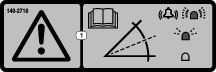
Safety and Instructional Decals
 |
Safety decals and instructions are easily visible to the operator and are located near any area of potential danger. Replace any decal that is damaged or missing. |
Installation
Determine the left and right sides of the machine from the normal operating position.
Preparing the Machine
-
Park the machine on a level surface.
-
Disengage the power takeoff and lower the attachments.
-
Engage the parking brake.
-
Shut off the engine and remove the key.
-
Wait for all movement to stop.
-
Allow machine components to cool.
Installing the Kit
Parts needed for this procedure:
| Sensor module | 1 |
| LED light | 1 |
| Bolt (1/4 x 1-1/4 inch) | 2 |
| Flange nut (1/4 inch) | 4 |
| Bolt (1/4 x 3/4 inch) | 2 |
| Mounting bracket | 1 |
| Wire harness | 1 |
| Alarm | 1 |
| Decal | 1 |
| Cable tie | 2 |
Installing the Sensor Module
-
Disconnect the battery. Refer to the Operator’s Manual for disconnecting the battery.
-
Remove the hood on the machine. Refer to the Operator’s Manual for removing the hood.
-
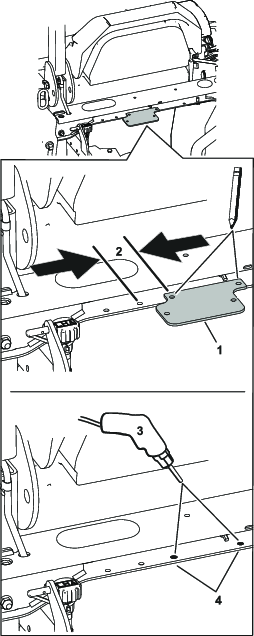
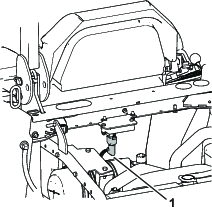
Check the machine frame shown in Figure 1 for existing holes. If there are existing holes, proceed to step 6.
-
Using the mounting bracket as a template, mark the location of the hole to drill (Figure 1).
-
Drill 9/32 inch holes into the machine frame (Figure 1).
-
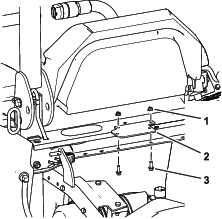
Install the mounting bracket to the machine frame with 2 bolts (1/4 x 3/4 inch) and 2 flange nuts (1/4 inch).
-
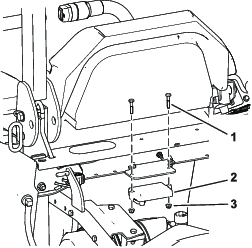
Mount the sensor to the mounting bracket with 2 bolts (1/4 x 1-1/4 inch) and 2 nuts (1/4 inch).
-
Plug the 90° connector into the sensor (Figure 4 and Figure 8).
-
Flip the seat forward.
-
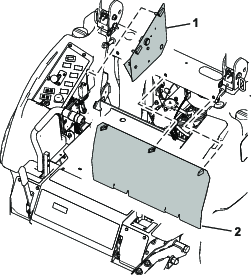
Remove the access panel behind the seat and on the side of the console (Figure 5).
-
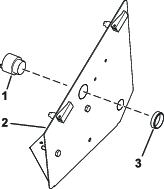
Install the alarm to the console panel (Figure 6).
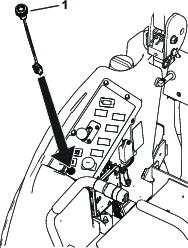
Note: Installing the light and removing the decal area is for machines without an InfoCenter only.
-
For machines with no InfoCenter, cut out the hole in the console decal for the light.
-
Install the light into the top of the console (Figure 7).
Routing the Wire Harness
-
Route the wire harness under the seat pan and along the along the existing wire harness in the cross channel (Figure 8).
-
Install the middle connector to the machine wire harness connector labeled TELEMATICS port or EXPANSION port (Figure 8).
-
Connect the wire harness to the light and the alarm (Figure 8).
Route the harness to the controls along the machine’s existing wire harness.
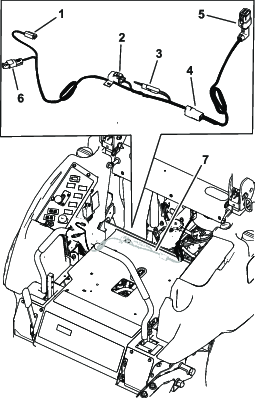
-
Use the cable ties to connect the new harness to the existing machine harness.
Note: Ensure the harnesses are secured away from moving parts and hot surfaces.
-
Connect the battery. Refer to the Operator’s Manual for the procedure.
Installing the Decal
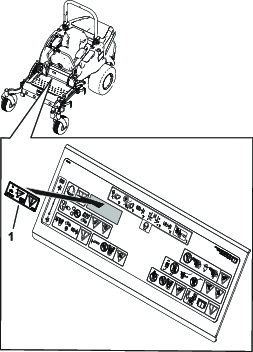
Calibrating the Sensor
-
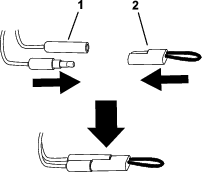
While on a flat surface, remove the plug from the calibration connectors (Figure 10).
-
Plug the calibration connectors together as shown in Figure 10.
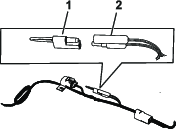
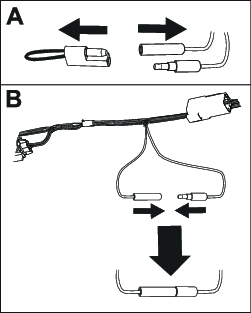
-
Turn the ignition key to the ON position, but do not start the engine.
-
Use the following processes depending what LED light your machine has installed.
-
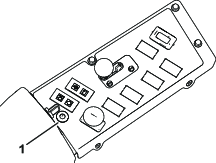
Console LED light (Figure 11):
-
The LED light (Figure 11) blinks as the sensor calibrates.
-
When the LED light turns off and the sensor beeps once, the sensor is calibrated.
-
Turn the ignition key to the OFF position.
-
-
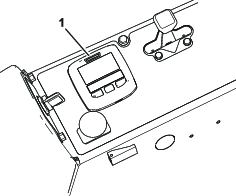
InfoCenter LED light (Figure 12):
-
The InfoCenter shows advisory 195, Slope Sensor Calibrating.
Note: The LED light at the top of the display screen (Figure 12) blinks as the sensor calibrates.
-
When the InfoCenter shows advisory 196, Slope Sensor Calibrated, the light no longer blinks, and the alarm beeps once, turn the ignition key to the OFF position.
-
-
-
Disconnect the calibration connectors and install the plug onto the connectors (Figure 13).
Operation
Use the following procedures depending what your machine has installed.
Warning
Slopes are a major factor related to loss-of-control and tip-over accidents, which can result in severe injury or death.
Use extreme caution when operating the machine on a slope.
Using the Slope Sensor with the LED Light
The light and alarm indicates the severity of the slope (Figure 11):
-
No light—normal operating conditions
-
Slow, flashing red light—moderate slope
-
Fast, flashing red light and audible alarm—steep slope; proceed to a more shallow slope.
Using the Slope Sensor with an InfoCenter
The light and alarm indicates the severity of the slope (Figure 12):
-
No light—normal operating conditions
-
Slow, flashing red light—moderate slope
-
Fast, flashing red light, audible alarm—steep slope; proceed to a more shallow slope.