Turf Pro 500, 500S, and 300 Robotic Mower


Introduction
 

Manual Conventions

This manual identifies potential hazards and has safety messages identified by the safety-alert symbol, which signals a hazard that may cause serious injury or death if you do not follow the recommended precautions.
Graphic
G405934
This manual uses 2 words to highlight information. Important calls attention to special mechanical information and Note emphasizes general information worthy of special attention.
This manual is used in conjunction with the Turf Pro and Range Pro series Operators Manuals.


Safety
 

General Safety

  • The operator/supervisor of the machine is responsible for any accidents or hazards occurring to others or their property.
  • Read, understand, and follow all these instructions and warnings before using the machine.
  • Improperly using or maintaining the machine could result in serious injury or death. To reduce this potential, follow all safety instructions.
  • Do not allow children or untrained people to operate or service this machine. Allow only people who are responsible, trained, familiar with the instructions, and physically capable to operate or service the machine.

Operation Safety

  • Before operating the machine, ensure that there is a physical barrier (e. g., a low fence or a boundary wire) or that the boundary of the operating area is set at least 8 m (26 ft) away from hazards.
  • Keep bystanders and children away from the machine and charging station during operation.
  • Wear appropriate clothing, including long pants and substantial, slip-resistant footwear, whenever you manually operate the machine.
  • Do not operate the machine without all safety protective devices in place and working properly.
  • Inspect the area where you will use the machine and remove all objects that could interfere with the operation of the machine.
  • The blades are sharp; contacting the blades can result in serious personal injury. Press the stop button and wait for all moving parts to stop before unclogging, servicing, or transporting the machine.
  • Keep your hands and feet away from moving parts on and under the machine.
  • Do not overreach. Keep proper footing and balance at all times. This enables better control of the machine in unexpected situations. Walk, never run when training the machine.
  • Do not stand, sit, or ride on the machine or allow others to do so.
  • If the machine strikes an object and/or starts to vibrate abnormally, immediately shut off the machine and wait for all movement to stop before examining the machine for damage. Make all necessary repairs before resuming operation.
  • Press the stop button on the machine, wait for all movement to stop, and disable the machine in the following situations:
    • Before clearing blockages on the machine
    • Before checking, cleaning, or maintaining the machine (especially the blades), and the charging station
    • After the machine strikes a foreign object, is in an accident, or breaks down; examine the machine for damage and make repairs before resuming operation
    • If the machine begins to vibrate abnormally; examine the machine for damage and make repairs before resuming operation
  • Do not place any object on either the machine or the charging station.
  • Do not modify the machine, software, charging station, or base station.
  • Do not modify or override the machine controls or safety devices.
  • Do not use a modified machine, charging station, or base station.
  • We recommend not using the machine while watering or irrigating the operating area.
  • Use only accessories approved by Toro to avoid the risk of fire, electric shock, or injury.
  • Press the stop button on the machine and wait for the blades to come to a complete stop before handling the machine.
  • Do not connect a damaged power cord. Do not touch a live damaged cord.
  • Do not use the charging station power supply during severe weather.


4G RTK Installation Requirements
 

4G RTK allows the robot to work within an area that is not defined by a peripheral wire. This section describes the various requirements for a robot to operate using 4G RTK.

Overview of the RTK GPS

  • Standard GPS positioning data retrieved from satellites using GNSS (Global Navigation Satellite System) is accurate to between 5 m and 10 m (16.4 ft to 33 ft). This is because the signal received from a satellite is distorted due to atmospheric and environmental conditions. Higher precision positioning can be achieved by using an RTK (Real-Time Kinematic) technique.
  • This technique involves the use of an RTK base station placed in a fixed position, which receives GNSS signals from satellites. Since the base station is fixed, the data it receives relates to its precise location.
  • The robots are also fitted with antennas, which receive GNSS signals from satellites in order to determine their position. Both the base station and the robots receive the GNSS signals from satellites in different constellations (GPS, GLONASS, Galileo, BeiDou). Since the robots are moving however, the evaluation of their position is less precise than that of the fixed base.
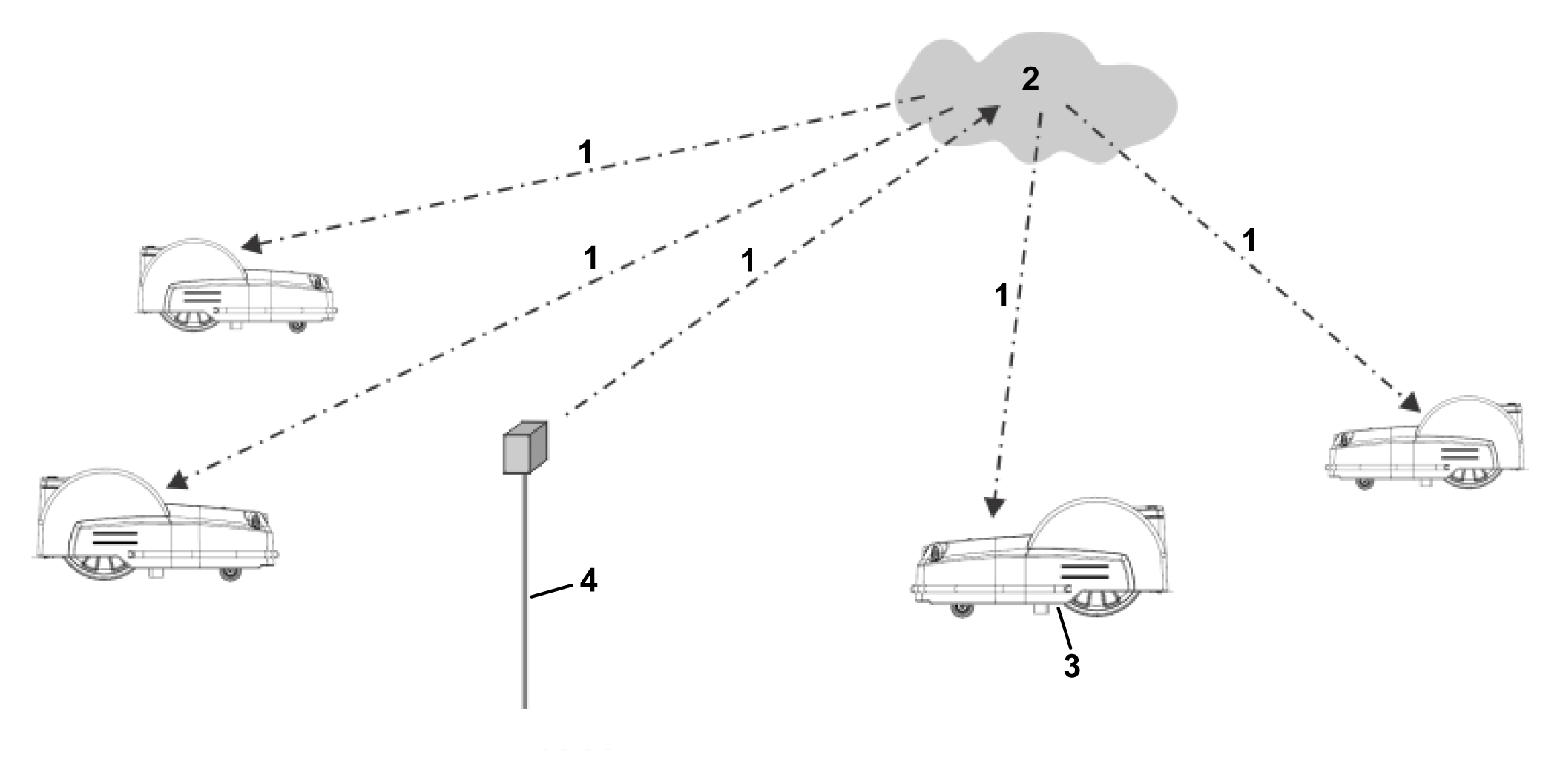
  • The RTK base station, via a cloud-based server, computes correctional data for each of the satellites and sends these to the robot. The robot uses these corrections to achieve positional accuracy. With such accurate positioning, the robot is able to follow a defined pattern and cover the field in a series of straight lines.
Corrections can also be made via the cloud using 4G cellular service. In this case, obstacles do not impede the transfer of correctional data and the base can connect to an unlimited number robots at distances of up to 15 km (9.3 mi).
Transfer of corrections using 4G Cellular Service
Graphic
G578572
  1. 4G corrections
  2. Cloud
  3. Robot with antenna
  4. RTK base station
One base station can feed corrections to multiple robots, but each robot must receive corrections from only 1 base station to keep corrections consistent.
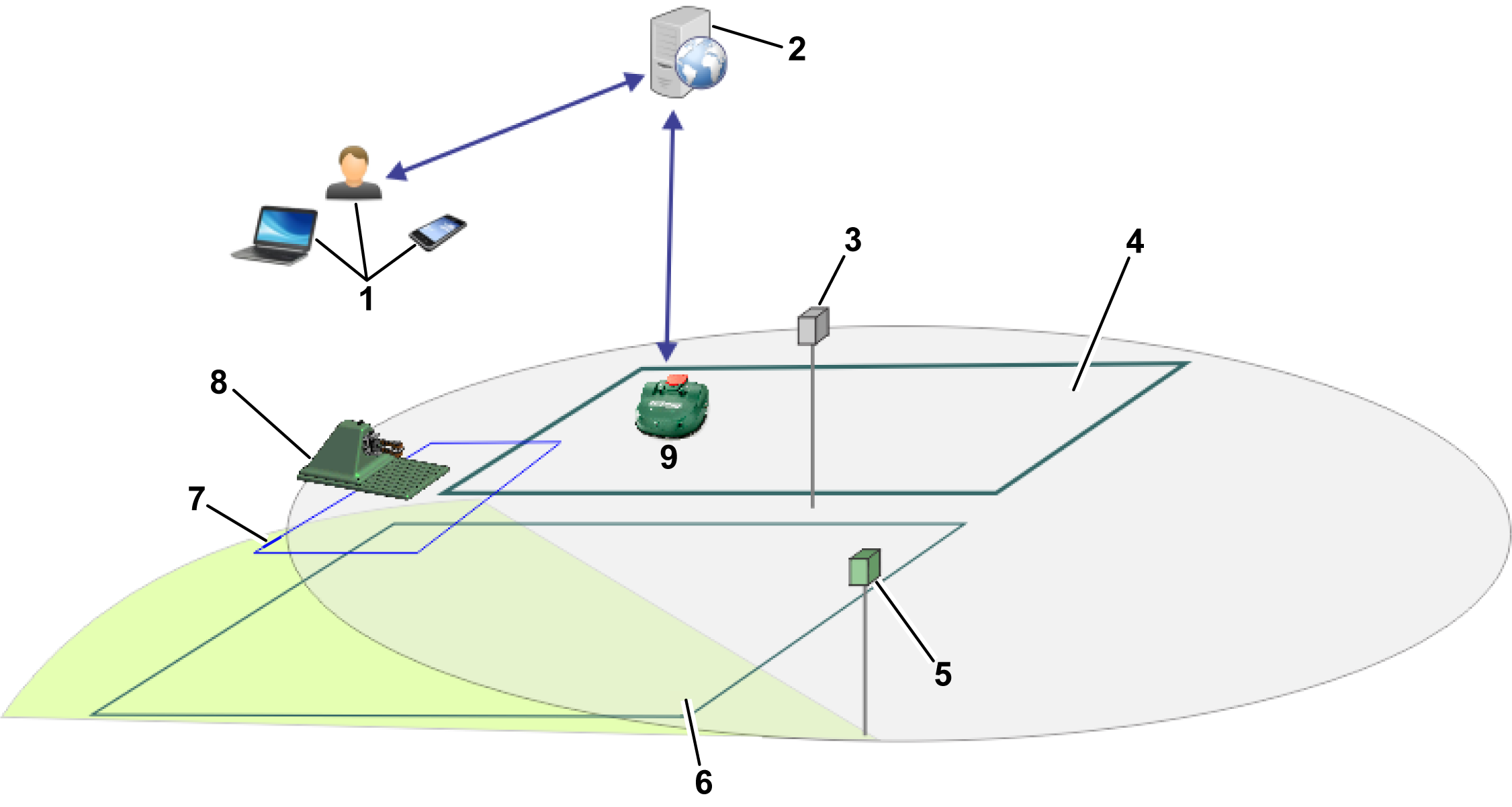
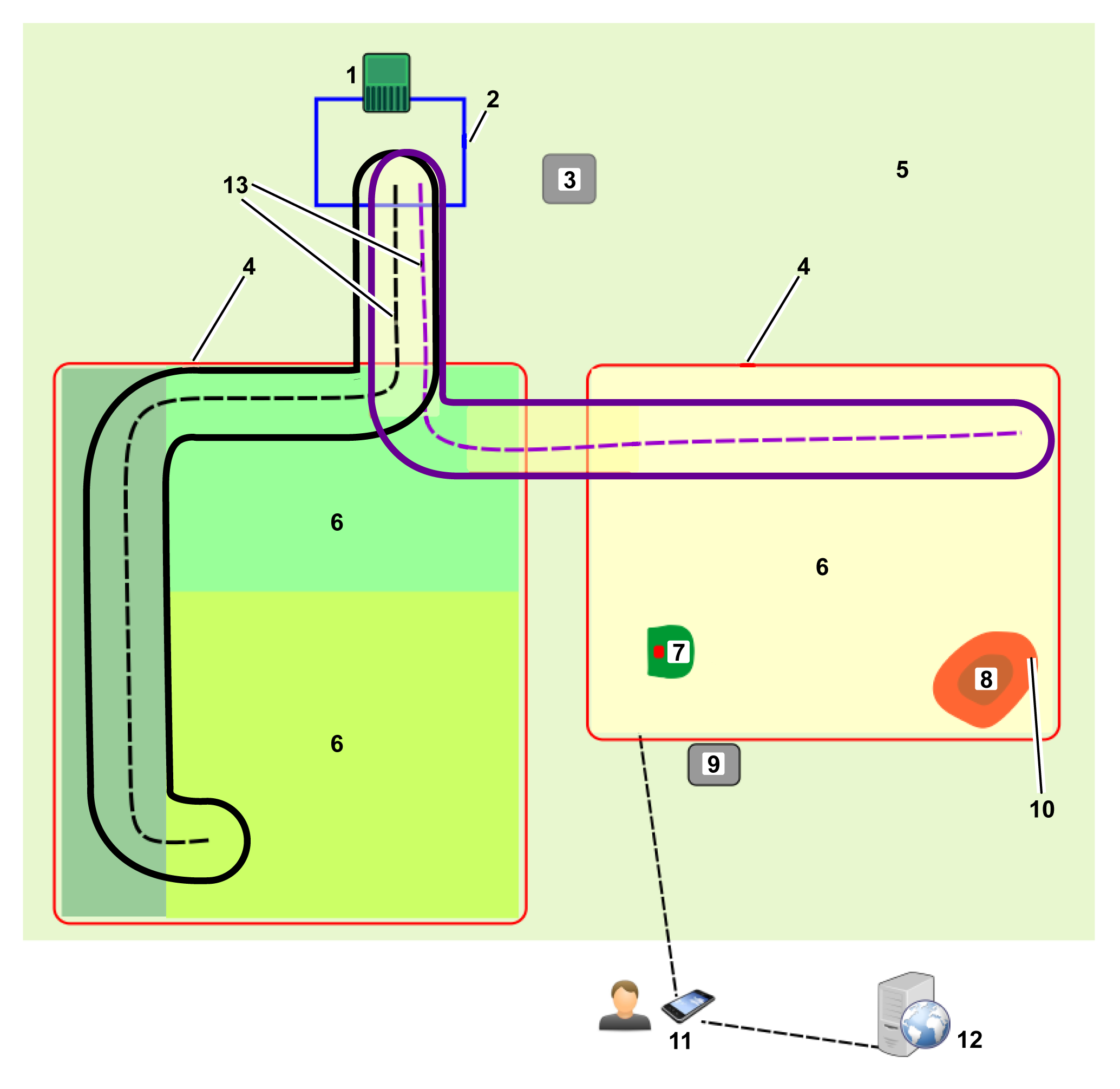
Basic components of the RTK GPS mowing system
Graphic
G578574
  1. User
  2. Portal on web server
  3. RTK base station
  4. Working area
  5. Wi-Fi repeater
  6. Working area
  7. Loop wire
  8. Charging station
  9. Robot with antenna
This topic describes the mechanical characteristics of the robot.
A user can exercise direct control over the robot using the User Interface. Once a robot is registered on the portal running on a web server:
  • The robot can send information to this server which can be seen by the user.
  • The user can issue commands to the robot, assess its performance, and adjust the configuration.

Site Requirements

GPS Signal Quality
An important criteria in determining whether a site is suitable for a wireless installation is the quality of the GPS signal.
Note: The GPS signal quality close to the boundary of the site (along the edge of the GPS working area) must be 2.
For those areas where the GPS signal is insufficient, wired parcels can be used as part of the installation. They can be linked with other working areas and the station loop through the use of navigational paths.
GPS signal quality depends on variables such as weather conditions, satellite constellations, and field conditions. It is important to take this into account when assessing the site.
Open Sky View
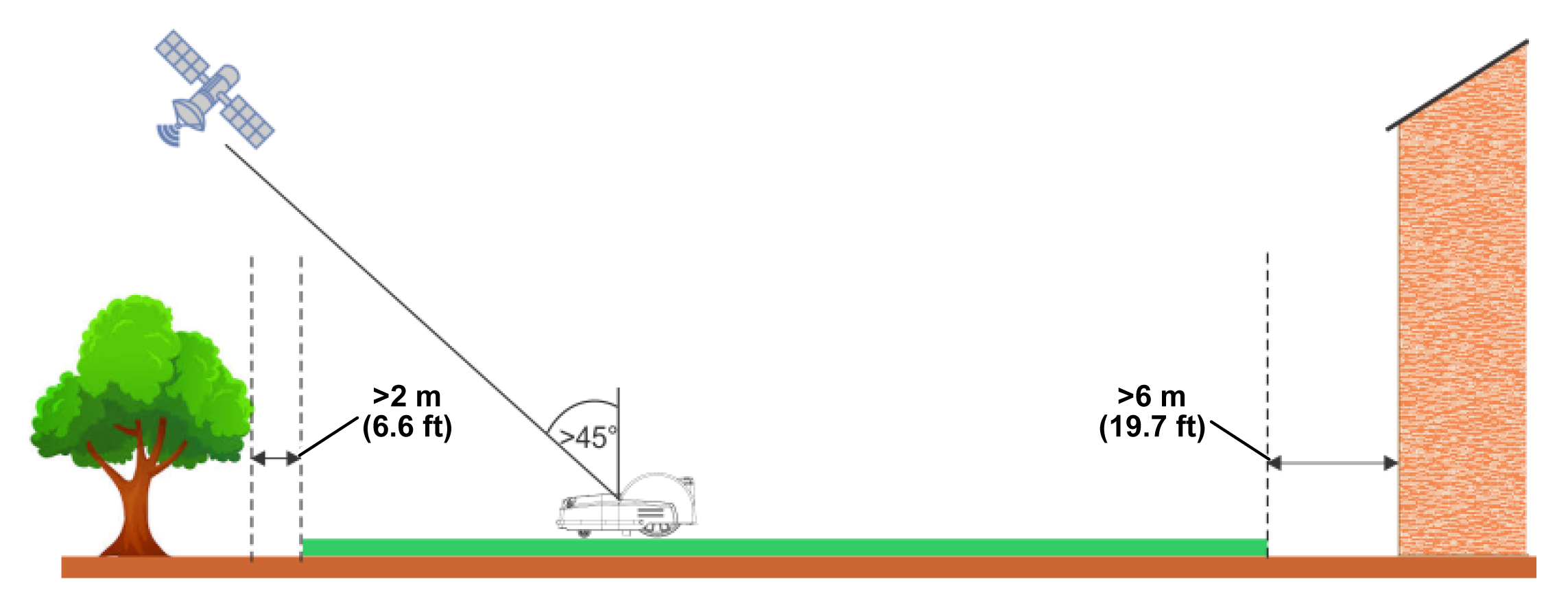
Note: It is essential for a 4G RTK installation that there is an open sky view over the entire site for the robots and the RTK base station.
Trees and buildings can reduce the signal level. It is important to bear in mind that in winter, when the trees are bare, you may obtain a signal level that is higher than in summer when the trees are in leaf and when the robot needs to work.
Critical distances to buildings and trees are shown in the following figure.
Graphic
G578585
Slopes
The maximum slope allowed at the GPS boundary is 30% (17°), or 45% (24°) for slope model (S) versions.
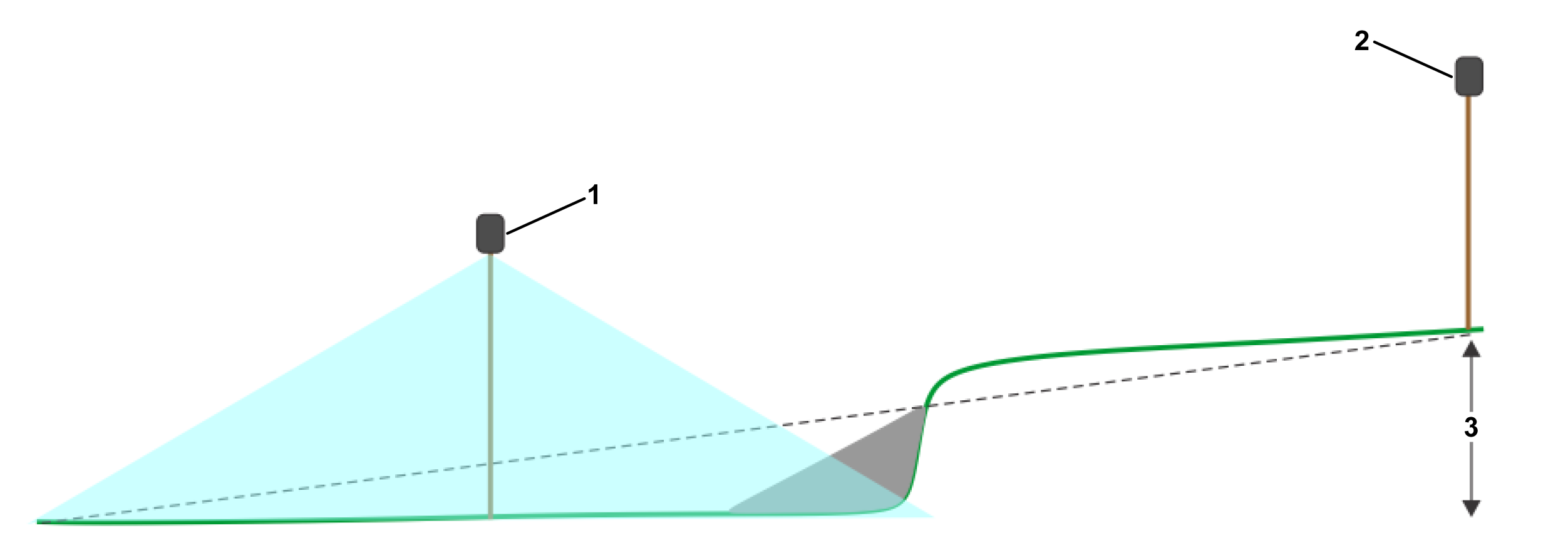
If the RTK data corrections are being transferred using Wi-Fi, short and steep slopes can cause problems. These can cause a shadow which hides the satellite signals. In such a situation, a Wi-Fi repeater or 4G can be used.
Graphic
G578586
  1. Wi-Fi repeater
  2. RTK base station
  3. Maximum: 3 m (9.8 ft)
Distance from Hazardous Features
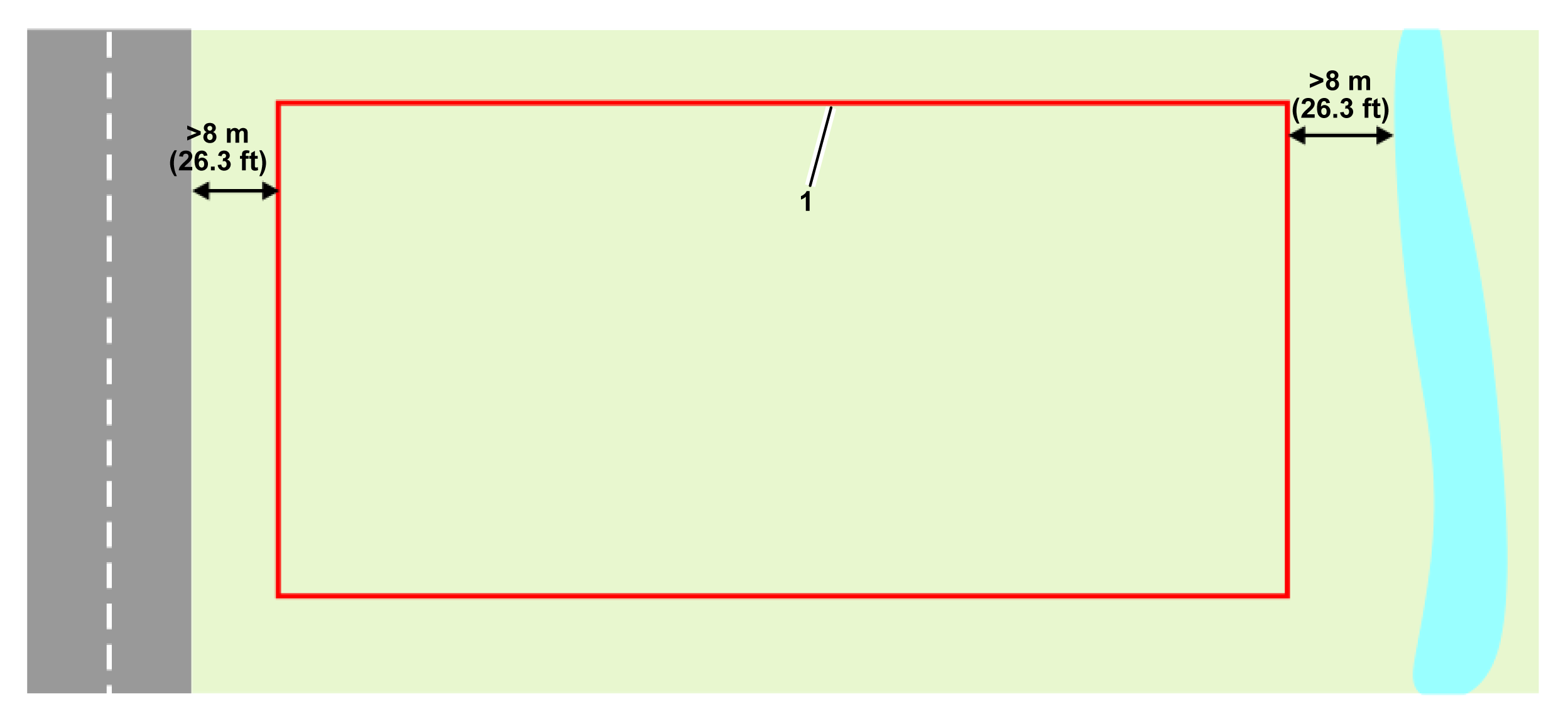
If the distance between a hazardous feature and the working area boundary in the following figure is less than 8 m (26.3 ft), a physical barrier of at least 15 cm (6 inches) in height must be installed.
Hazardous features would include roads and water.
Graphic
G578587
  1. GPS working area boundary
Shape and Size
The shape and size of the site is less important than the complexity of the working area within that site. Calculation of the GPS route depends on the overall working area, its shape, and whether it contains complexities such as narrow passages, obstacles, and NoGo zones. Large and complex sites can be managed through the use of multiple working areas.

GPS Signal Requirements

Problems in the installation can mean that the robot does not receive a GPS signal with sufficiently high quality. The required signal levels for different operations are listed in the following sections, along with the actions that the robot takes when the signal is too low for the required operation.
Signal quality levels can be seen on the robot by using Technician's menu (9) > GPS RTK, or on the app via the Technician menu button > Sensors data > GPS.
Border Discovery via Remote Control
Required signal level: =>2.
Robot actions: Nothing
An icon appears on the smartphone app informing the user that the point cannot be registered.
Border Verification
Required signal level: =>2.
Robot actions: After 10 minutes, the robot issues the following message: Precise position lost. Check connection with reference base station.
GPS Navigation
This operation refers to the robot using GPS navigation to leave or return to the station with or without NoGo zones.
Required signal level: =>2.
GPS signal quality level must be =>2.
Robot actions:
  • After 5 minutes, the robot reboots the RTK module.
  • After 30 minutes, the robot rotates itself to better align the antenna with the satellites.
  • After 3 hours, an alarm is triggered.
Exit Station for Pattern Working
This refers to the robot exiting the station along the station loop wire.
Required signal level: >1.2.
Robot actions:
  • After 5 minutes, the robot reboots the RTK module.
  • After 3 hours, an alarm is triggered.
Leave the Station Loop Wire to Start Working
This refers to the robot leaving the station loop wire and starting to work in pattern mode.
Required signal level: =>2.
Robot actions: After 10 minutes, the robot returns to the station using the station loop wire and tries to start the mission again.

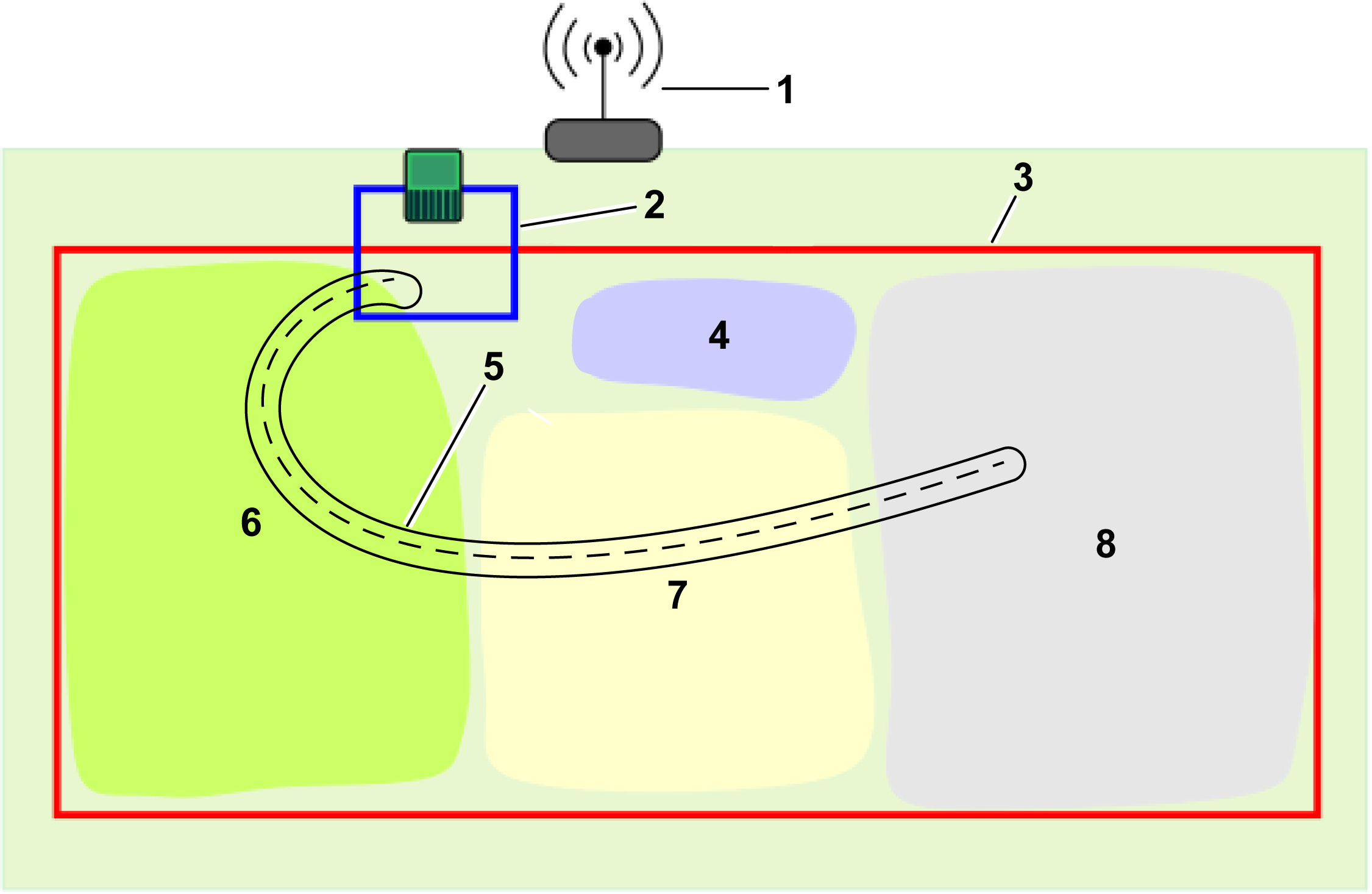
4G RTK GPS Zones

In the absence of a physical peripheral wire, working areas are defined by GPS coordinates.
Graphic
G584382
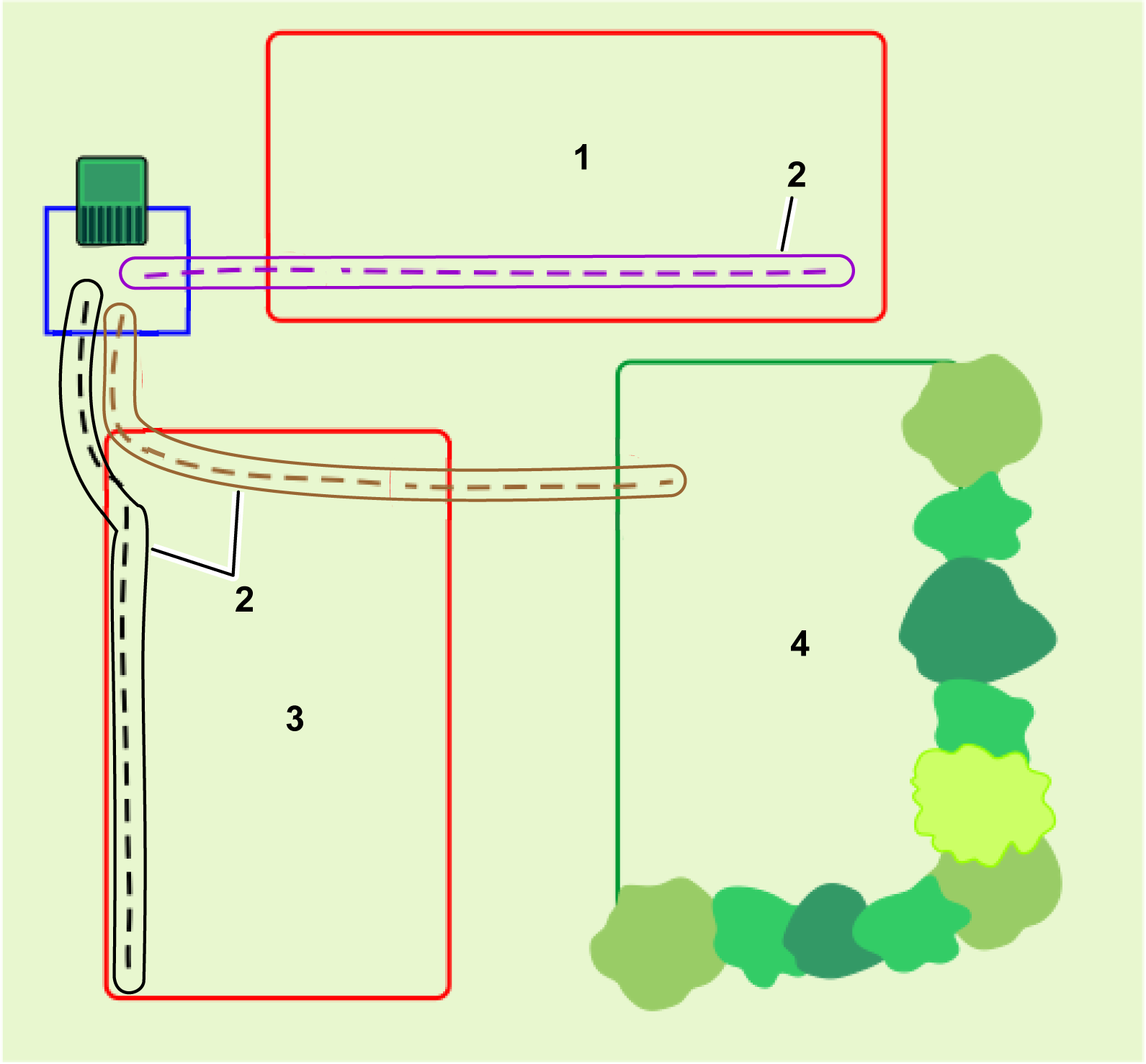
  1. Loop wire
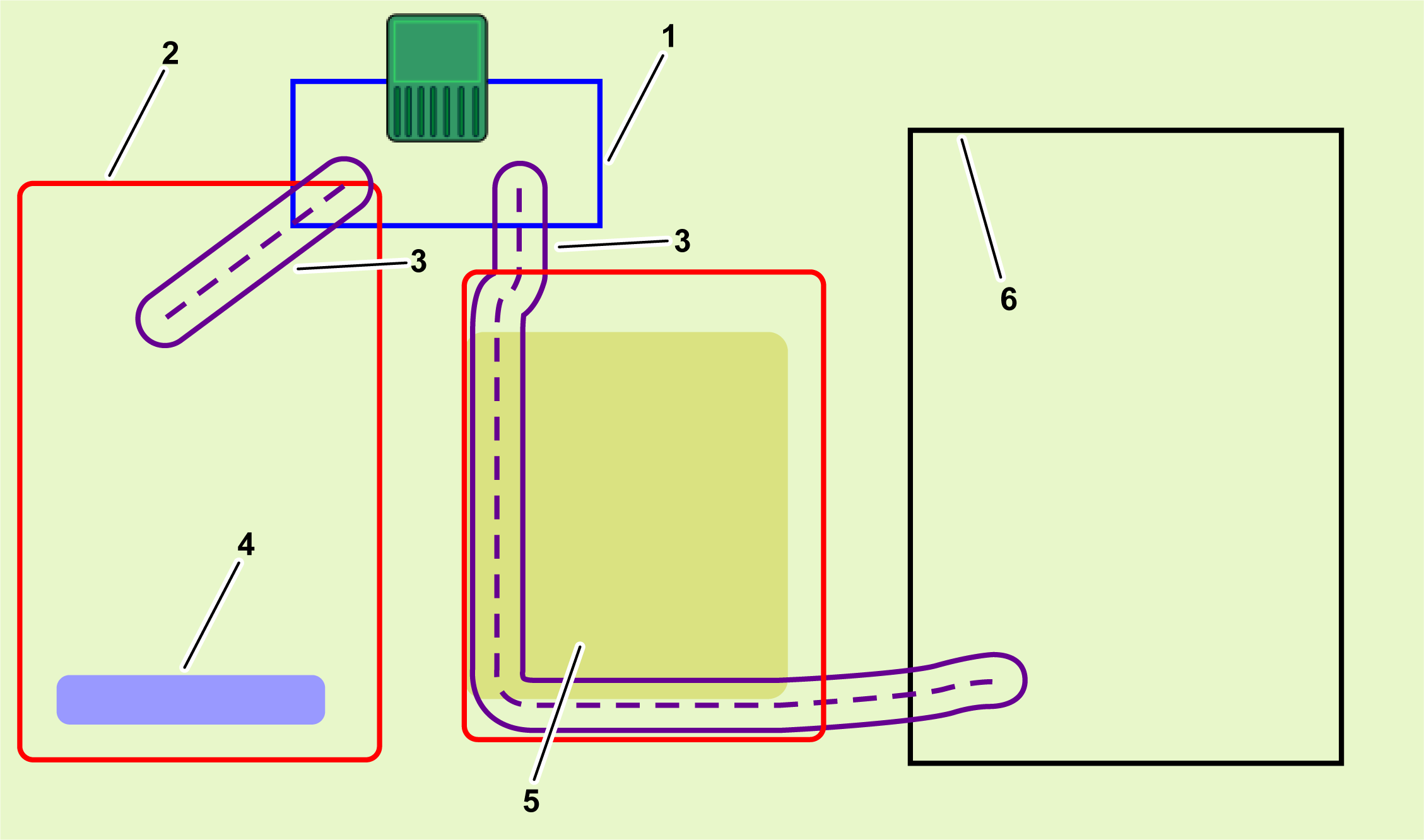
  2. Working area. These encompass the entire working area for the robot and can surround internal GPS zones or paths.
  3. Path
  4. NoGo zone where the robot is excluded from working.
  5. Internal GPS zones where the robot can work at different times and under different conditions.
  6. A wired working area, which can be used in areas where the GPS signal is insufficient for a 4G RTK zone.
Site Layout
The area that the robot works is defined by working areas that can use either peripheral wire or 4G RTK to define the boundaries. Additionally, internal GPS zones, NoGo zones, and paths can be created to control mowing frequency, patterns, or other user input.
The Station Loop Wire
A wired station loop must be used to enable the robot to access the charging station.
The Working Area
This defines the outer envelope of the robot's working area. It is essential that the robot does not move outside of this zone.
  • At least 1 zone must be configured and designated as the working area.
  • A working area can be used to enclose an internal GPS zone.
  • The working area is defined by a process of border discovery. After the discovery, it is required that the working area must be verified.
  • The definition of the working area can only be done by users who have the role of technician. User roles are set on the web portal.
  • The configuration parameters used to define the working area are registered. Any modifications made to these parameters require verification and confirmation.
  • If any changes to the parameters are detected (e.g., the RTK Base position has changed) or if the connection to the base station is lost, the robot will stop operating.
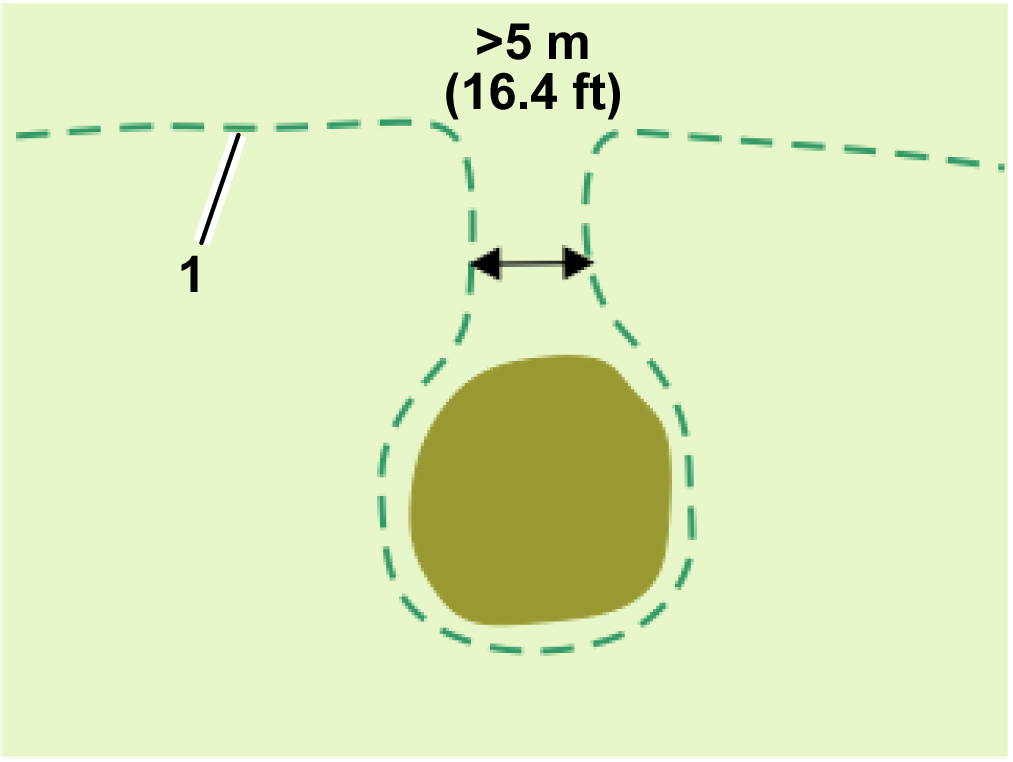
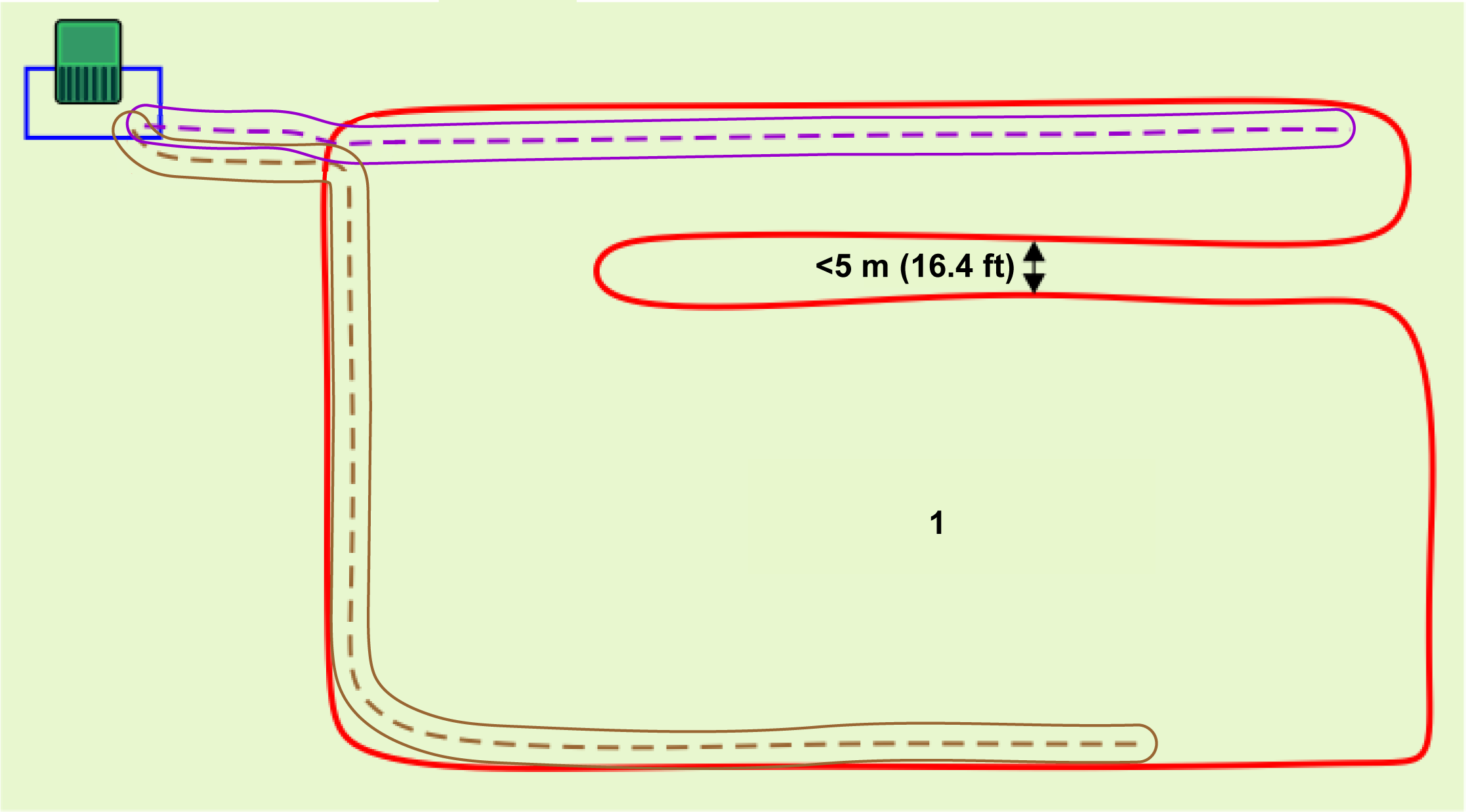
  • If a single area contains a narrow passage between edges of the working area, the passage must be at least 5 m (16.4 ft) wide.
    Graphic
    G580699
    1. Working boundary
Internal GPS Zones
  • Any number of internal GPS zones can be defined to optimize the operation of the robot which define the areas in which the robot works at particular times and frequencies.
  • All of these internal zones must be within the overall working area.
  • They do not need to be defined by a border discovery process. They can be defined and edited on the web portal or the app by any type of user who has access to the robot.
  • The cutting height in the internal GPS zones are the same as that of the encompassing working area.
NoGo Zones (Exclusion Zones)
NoGo zones (exclusion zones) are areas, usually around obstacles, from which the robot is excluded.
  • NoGo zones must be defined by a process of border discovery.
  • They can only be defined or modified by users who have the user role of technician.
  • NoGo zone borders must be verified.
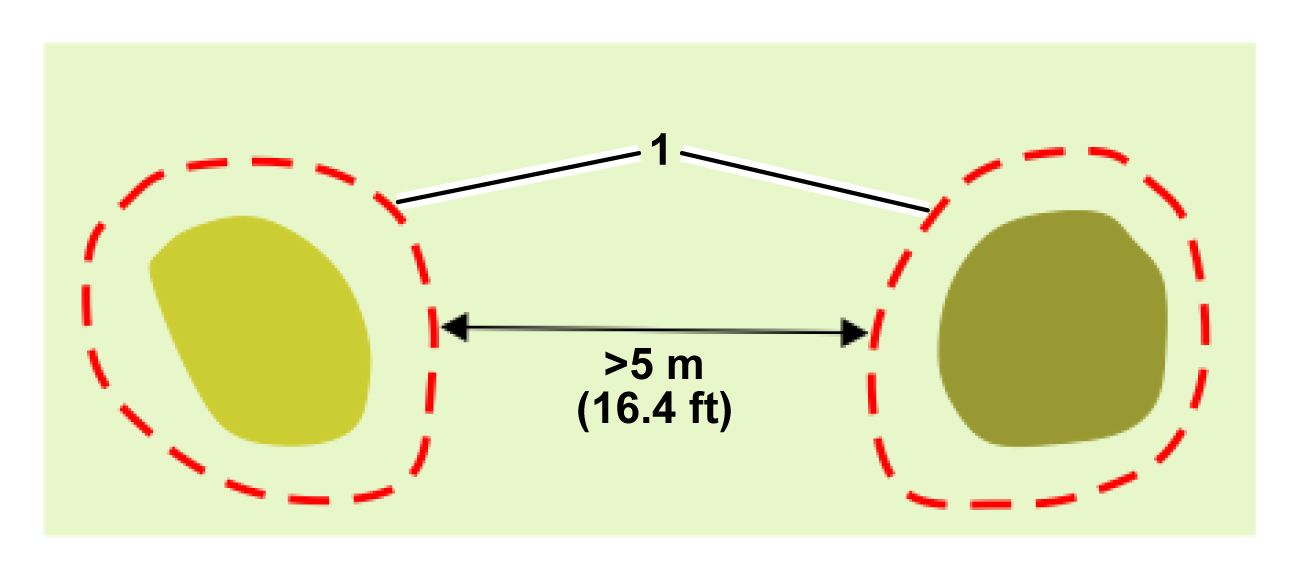
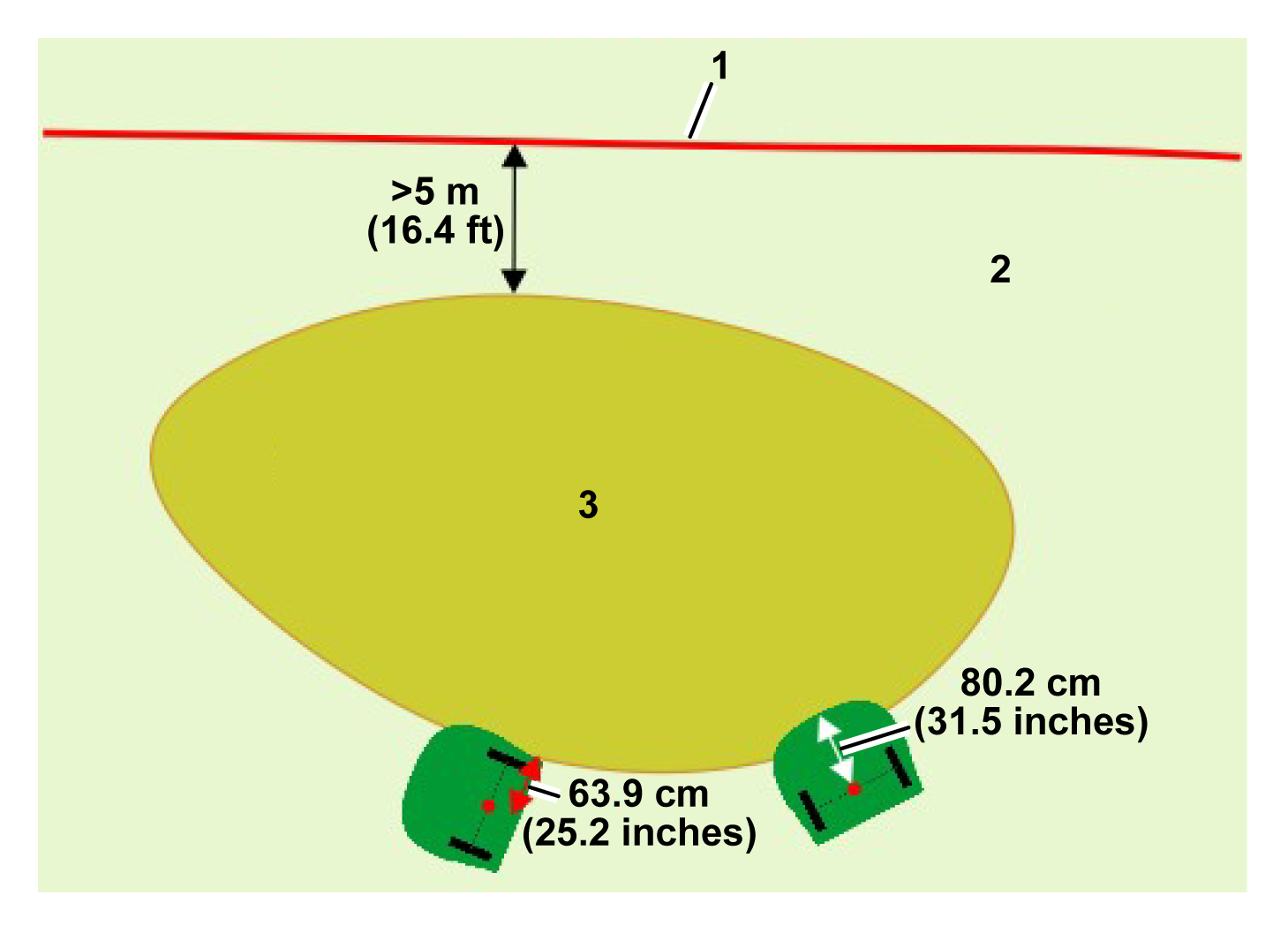
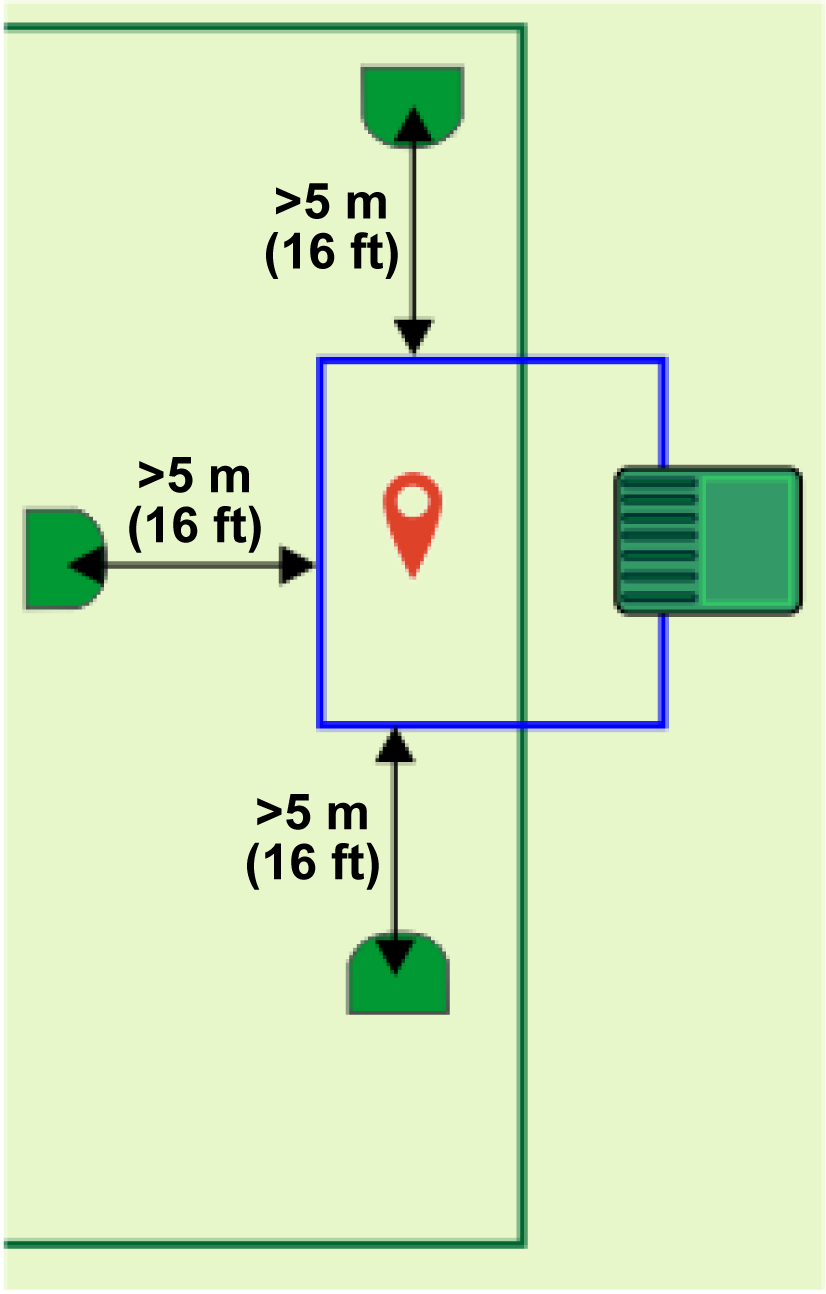
  • NoGo zones need to be at least 5 m (16.4 ft) from the edge of the working area and other NoGo zones.
  • NoGo zones must be a minimum of 1 m (3.2 ft) wide in all directions.
  • Long NoGo zones need to be a minimum of 5 m (16.4 ft) wide.
Paths
Paths are a useful and efficient means of connecting separate working areas. These working areas can be wired parcels or 4G RTK zones. There is no limit to the number areas that can be connected by paths.
  • A path is automatically enclosed by a working area after the path is created.
  • Paths can be placed outside of other working areas.
  • They can only be defined or modified by users who have the user role of technician.
  • Paths must be discovered by the process of point discovery.
  • Path borders must be verified.
  • Paths can have different widths.
  • Paths may have branches. When these are connected correctly to the main trunk path, they are indicated by a blue dot.
  • If using paths, one of the paths must start at the station loop and the entire width of the path must cross the loop wire.
Wired Parcels
Wired parcels can be used for those areas where the GPS signal quality is insufficient to allow a 4G RTK zone to be defined.

Station and Loop

At least one loop wire must be installed around the station to enable the robot to exit and return to the station. One working area or path must intersect with the station loop wire. While the installation may include multiple working areas or paths (or wired parcels), only one needs to intersect with the station loop, though multiple working areas and paths may intersect with the station loop.
This section defines the critical dimensions associated with the loop for a 4G RTK installation.
Single Loop with a Single Working Area or Path
Graphic
G587127
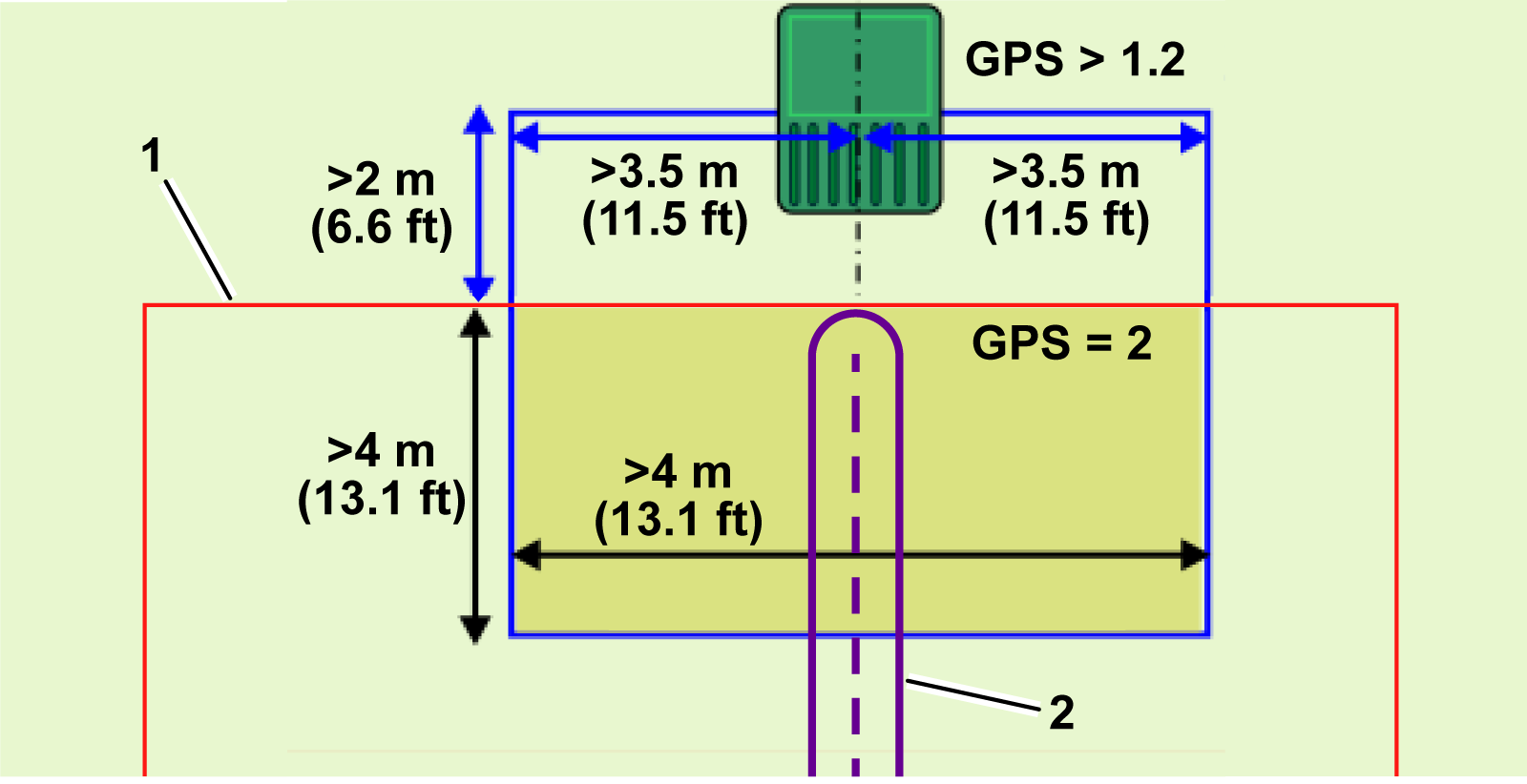
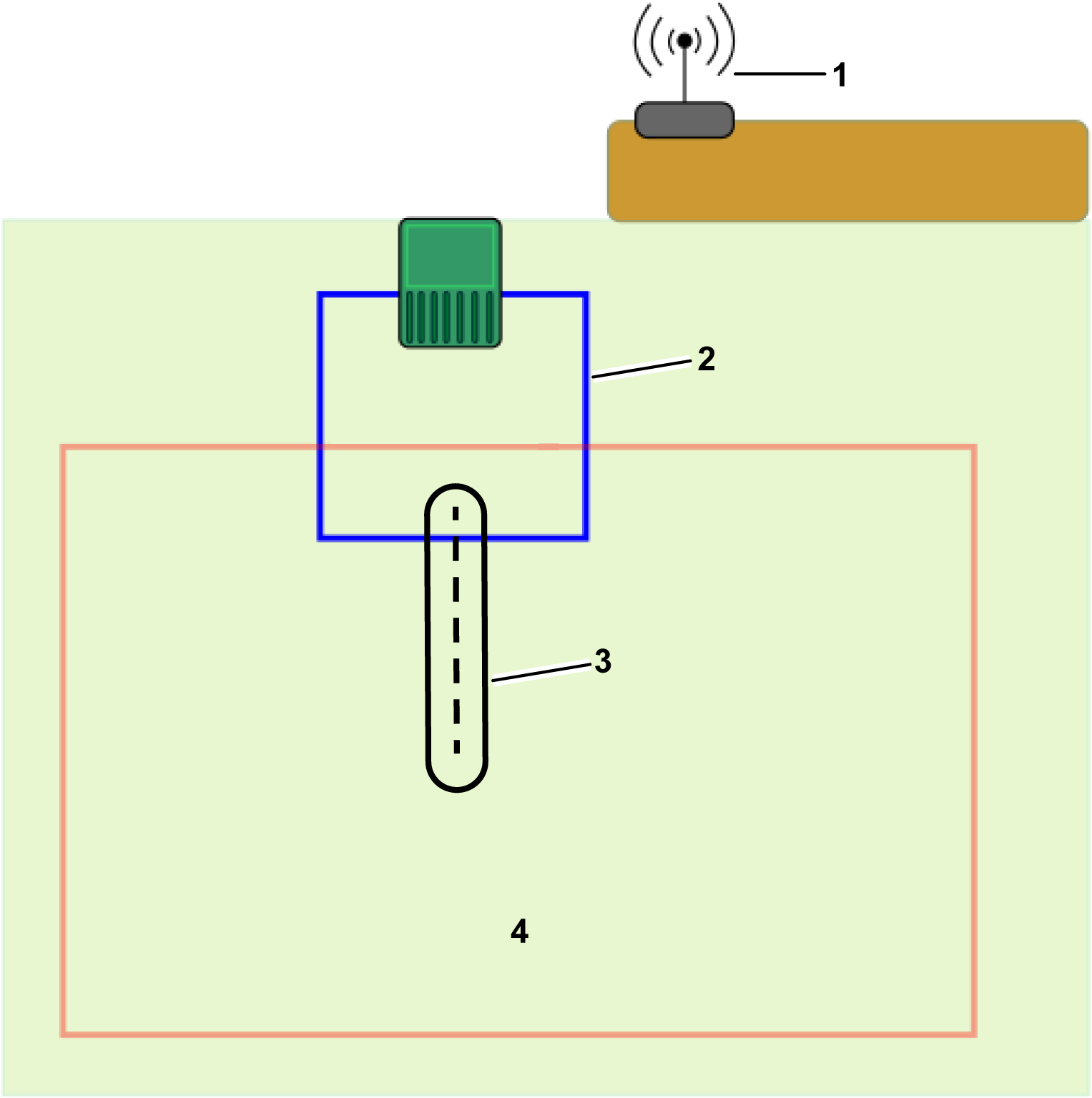
  1. Working area
  2. Path
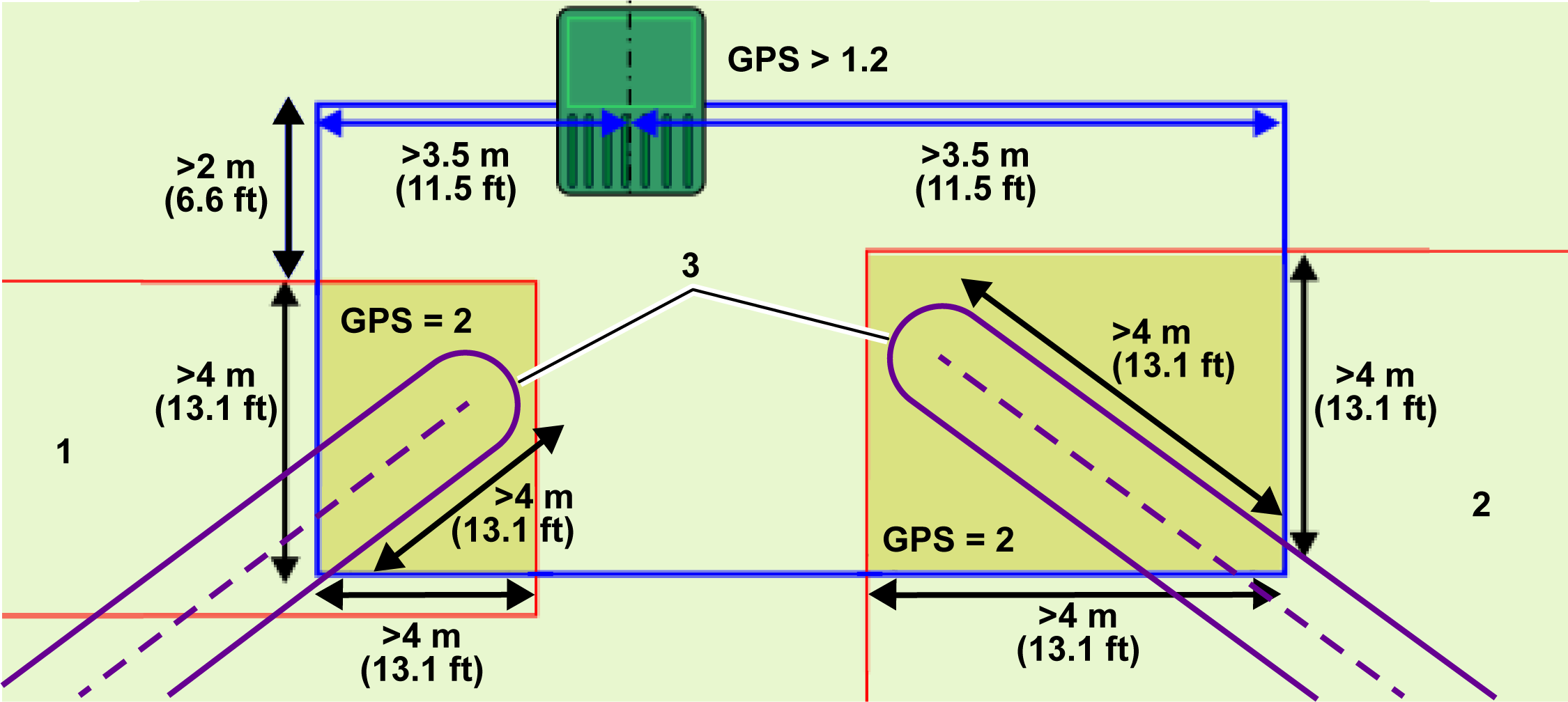
The following conditions apply:
  • The station loop must intersect with the working area or a path and be set as its neighboring parcel.
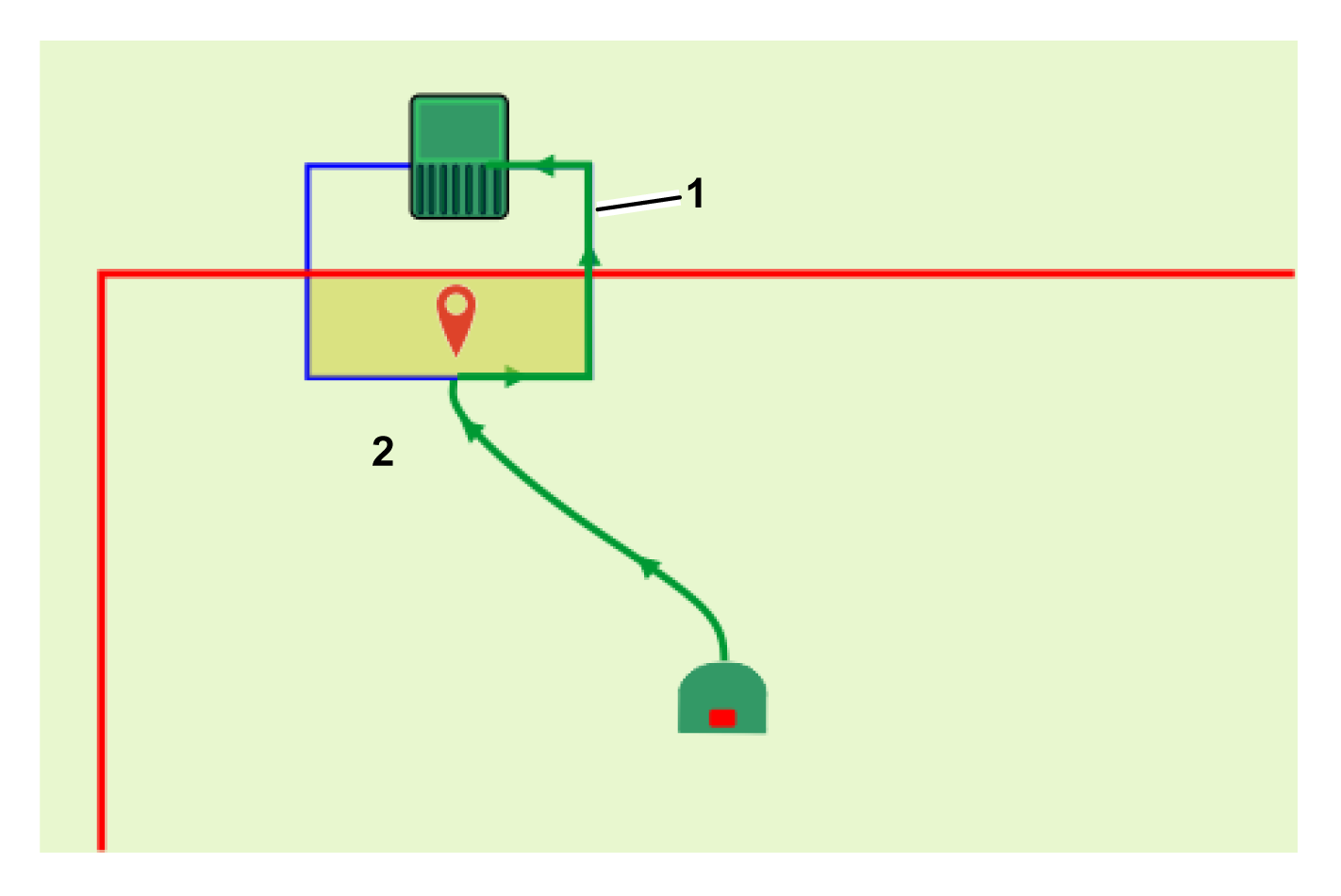
  • The station loop must overlap the working area or path by at least 4 m (13.1 ft) in both directions.
  • The signal level detected by the robot when it is at the station must be at least 1.2.
  • The signal level within the overlap area must be 2.
  • The length of straight wire on the incoming and outgoing sides must be >3.5 m (11.5 ft).
  • The distance between the station and the working area or path must be >2 m (6.6 ft).
  • A mechanism must be defined to allow the robot to return to the station loop. This can be a path or a GPS return point.
Single Loop with Multiple Working Areas or Paths
Multiple working areas or paths can be connected to the loop wire. This may be multiple working areas or the zones that surround paths.
Graphic
G587189
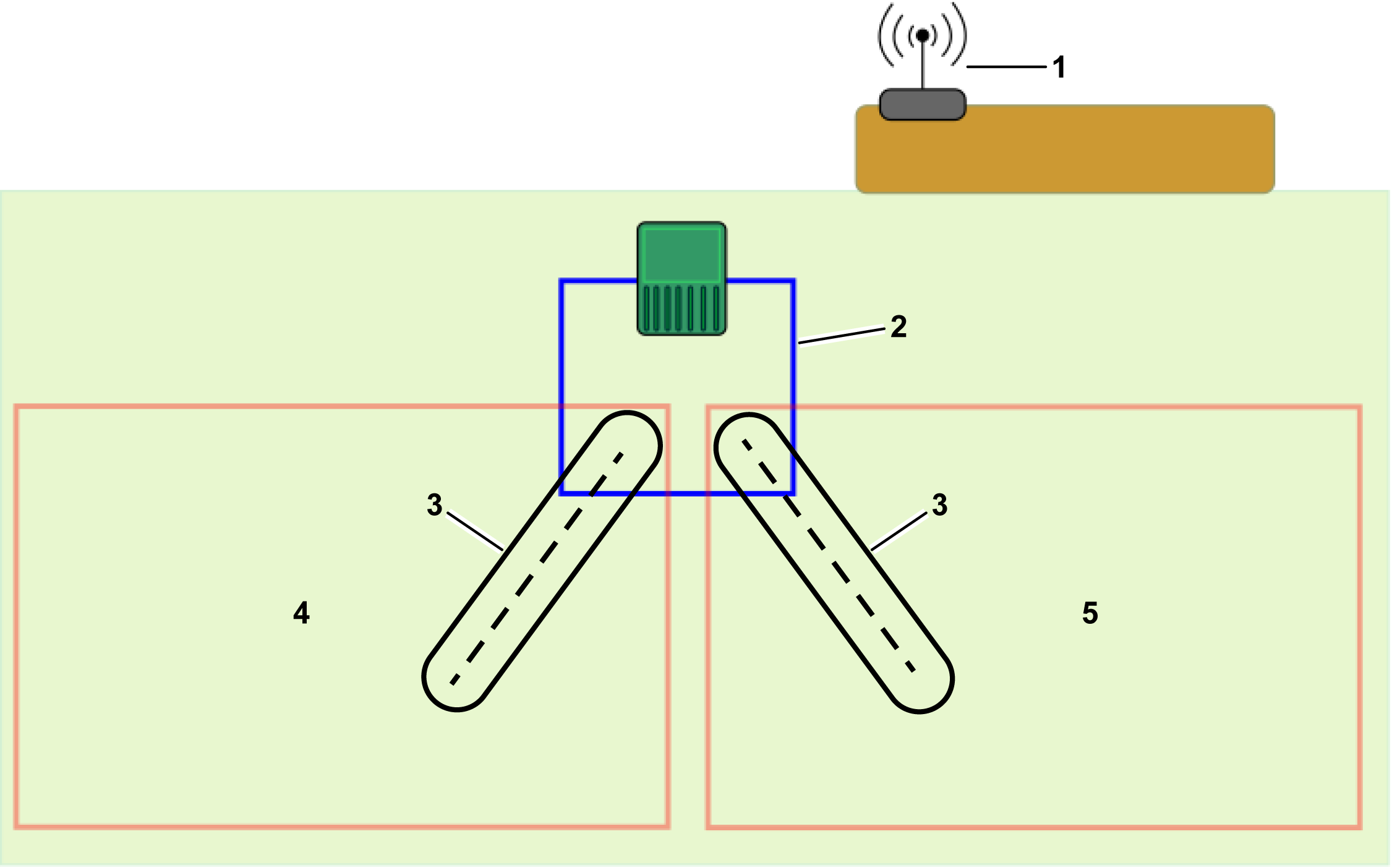
  1. Working area 1
  2. Working area 2
  3. Paths
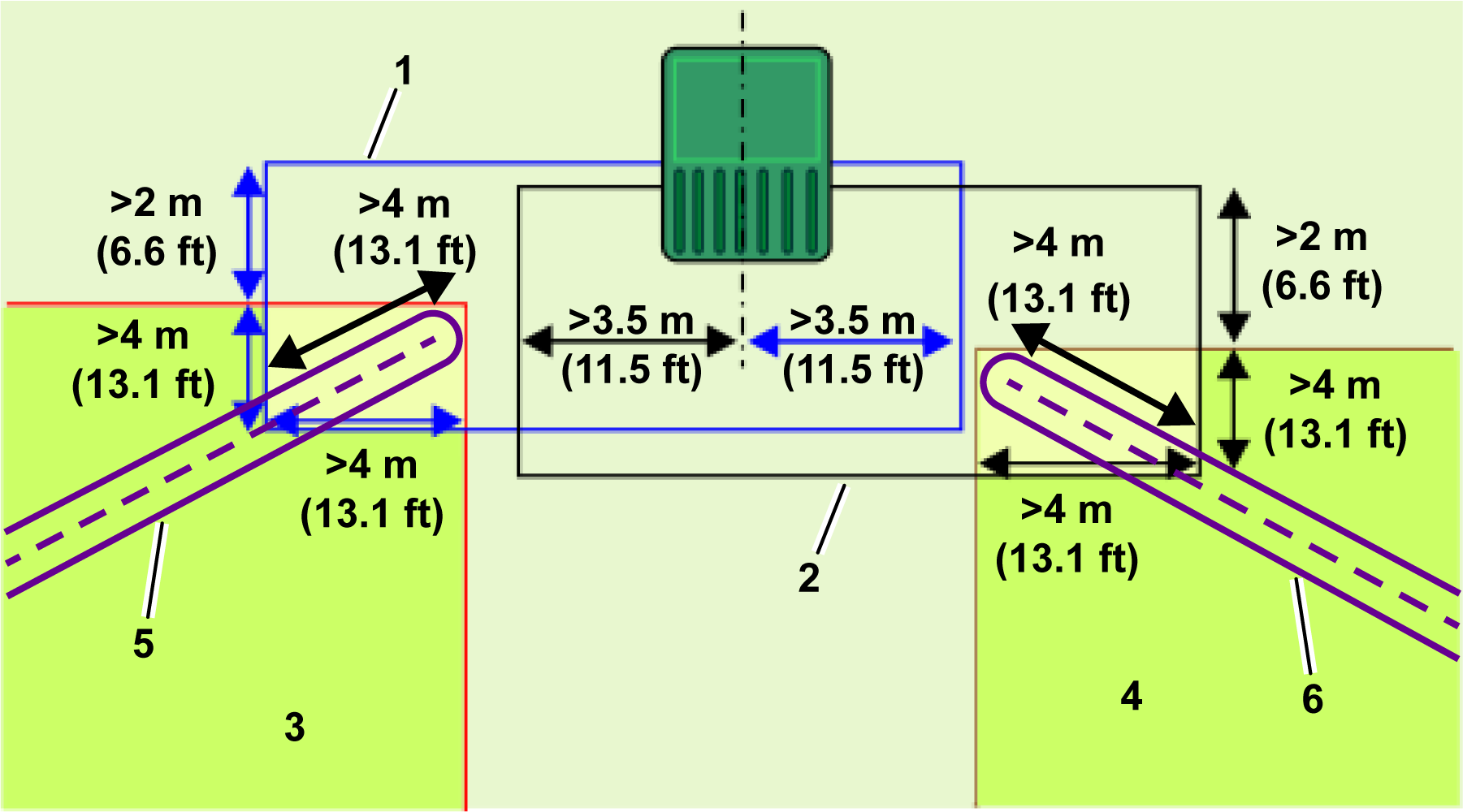
The following conditions apply:
  • The station loop must intersect with each working area or path. Each one needs to be set as a neighboring parcel to the loop.
  • The station loop must overlap each working area or path by at least 4 m (13.1 ft) in both directions.
  • The signal level detected by the robot when it is at the station must be at least 1.2.
  • The signal level within the overlap area must be 2.
  • The length of straight wire on the incoming and outgoing sides must be >3.5 m (11.5 ft).
  • The distance between the station and the path must be >2 m (6.6 ft).
  • A mechanism must be defined to allow the robot to return to the station loop. This can be a path or a GPS return point.
Multiple Station Loops
When multiple loops are connected to the station, the required signal levels are the same as for the single loop shown in the previous section. The dimensions associated with the loop wires are as shown:
Graphic
G587193
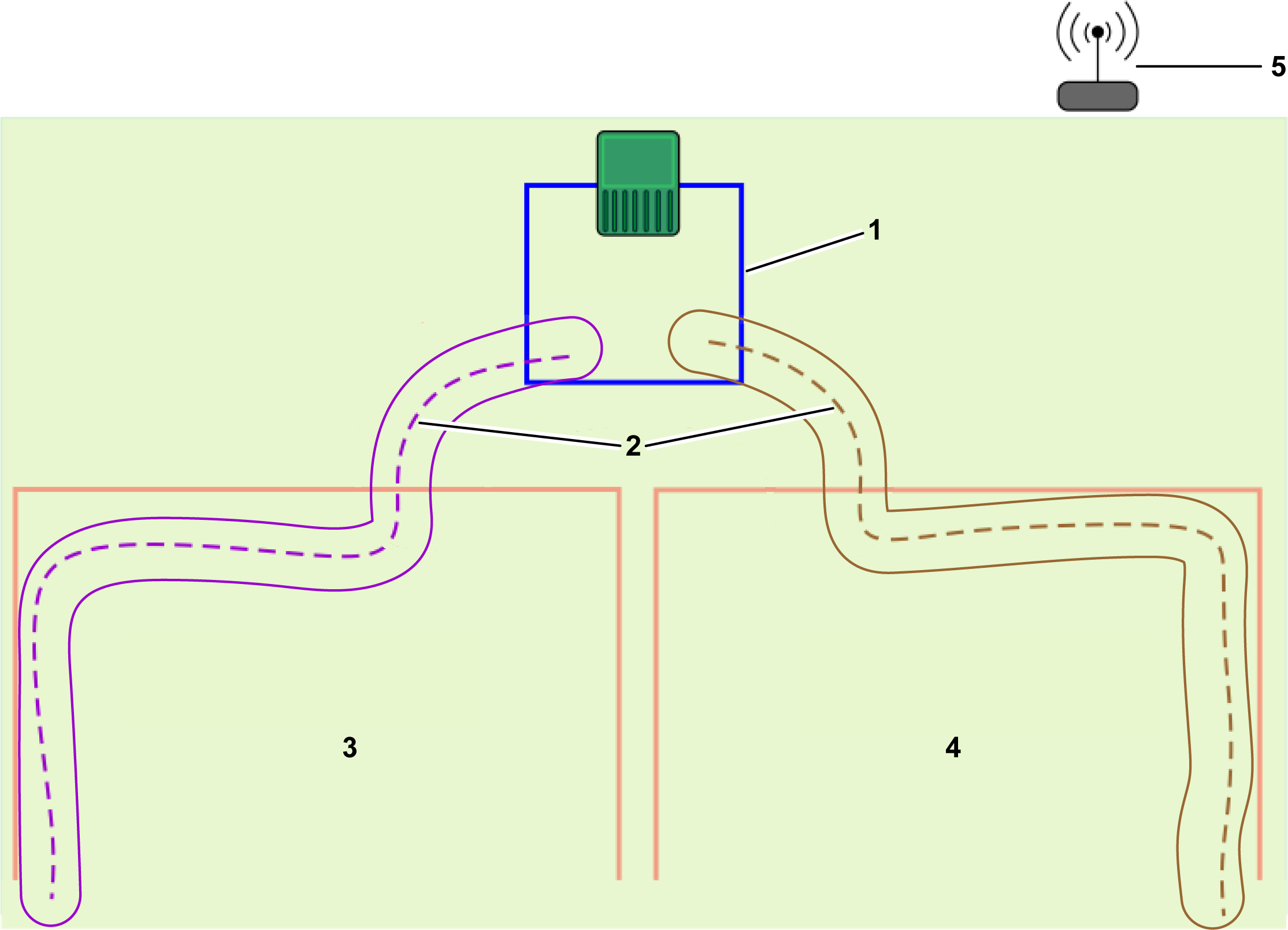
  1. Loop 1
  2. Loop 2
  3. GPS working area 1
  4. GPS working area 2
  5. Path 1
  6. Path 2
  • Each loop must intersect with its working area or path and be set as its neighboring parcel.
  • The loop must overlap the working area or path by at least 4 m (13.1 ft) in both directions.
  • The signal level detected by the robot when it is at the station must be at least 1.2.
  • The signal level within the overlap area must be 2.
  • The length of straight wire on the incoming and outgoing sides of each loop must be >3.5 m (11.5 ft).
  • The distance between the station and the working area or path must be >2 m (6.6 ft).
  • Do not use neighboring signal channels for the different station loops.
  • Wires should not be twisted.
  • Each loop should be a single line of wire.
  • The wires for Loop 1 and Loop 2 can be placed in the same slot in the ground for the charger entrance and exit.
  • A mechanism must be defined to allow the robot to return to the station loop. This can be a path or a GPS return point.

Requirements Relating to Paths

Paths are a useful and efficient means of connecting separate working areas. These working areas can be wired parcels or 4G RTK zones. There is no limit to the number of areas that can be connected by paths.
Paths Must Have a Minimum Width and a GPS Signal
Paths have a defined width. By default, the width is 3 m (9.8 ft). The minimum value is 1.4 m (4.6 ft), and the maximum value is 10 m (33 ft). When the robot is navigating along the path, it takes a random route between the start and the end of the path to reduce the risk of tracks occurring in the grass.
Paths enable the robot to navigate along relatively narrow passages. The maximum speed and the action of the cutting heads when the robot navigates along the path can be configured to allow zones to be connected by narrow and difficult passages.
A GPS signal level of 2 is required in the area where the path is to be created.
Paths are created and discovered in the same way as working areas.
Paths Must Overlap the Connecting Zones
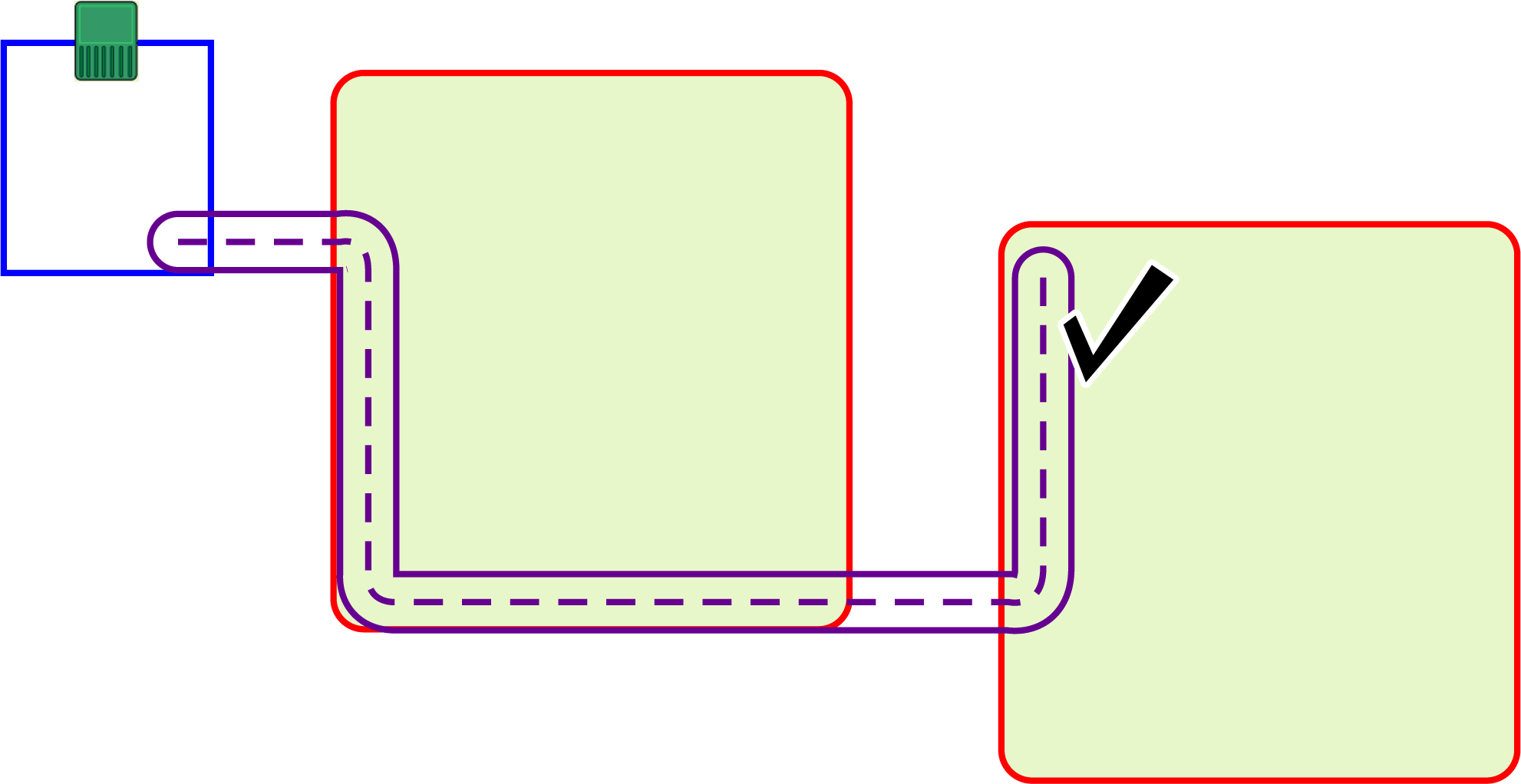
The beginning and ending path points must be inside of any connecting working areas or station loops.
If the path zone is overlapping a working area, there is no need to set the zones as neighboring parcels.
Paths Can Connect Wireless and Wired Parcels
Paths can be used to connect wireless and wired areas. In all 4G RTK installations, the station must be surrounded by a loop wire.
It is also possible to use wired working areas for those areas where the GPS signal level is not high enough to use a 4G RTK area.
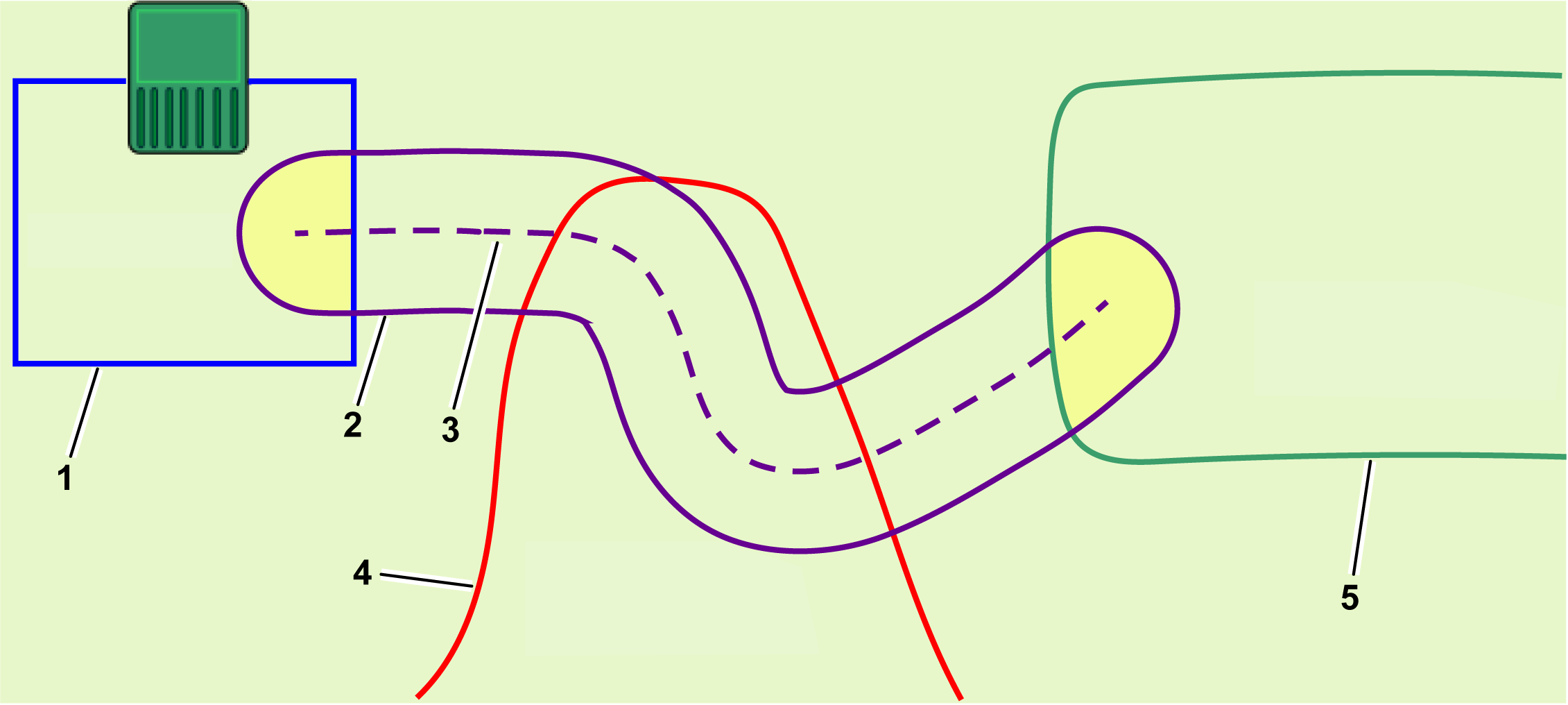
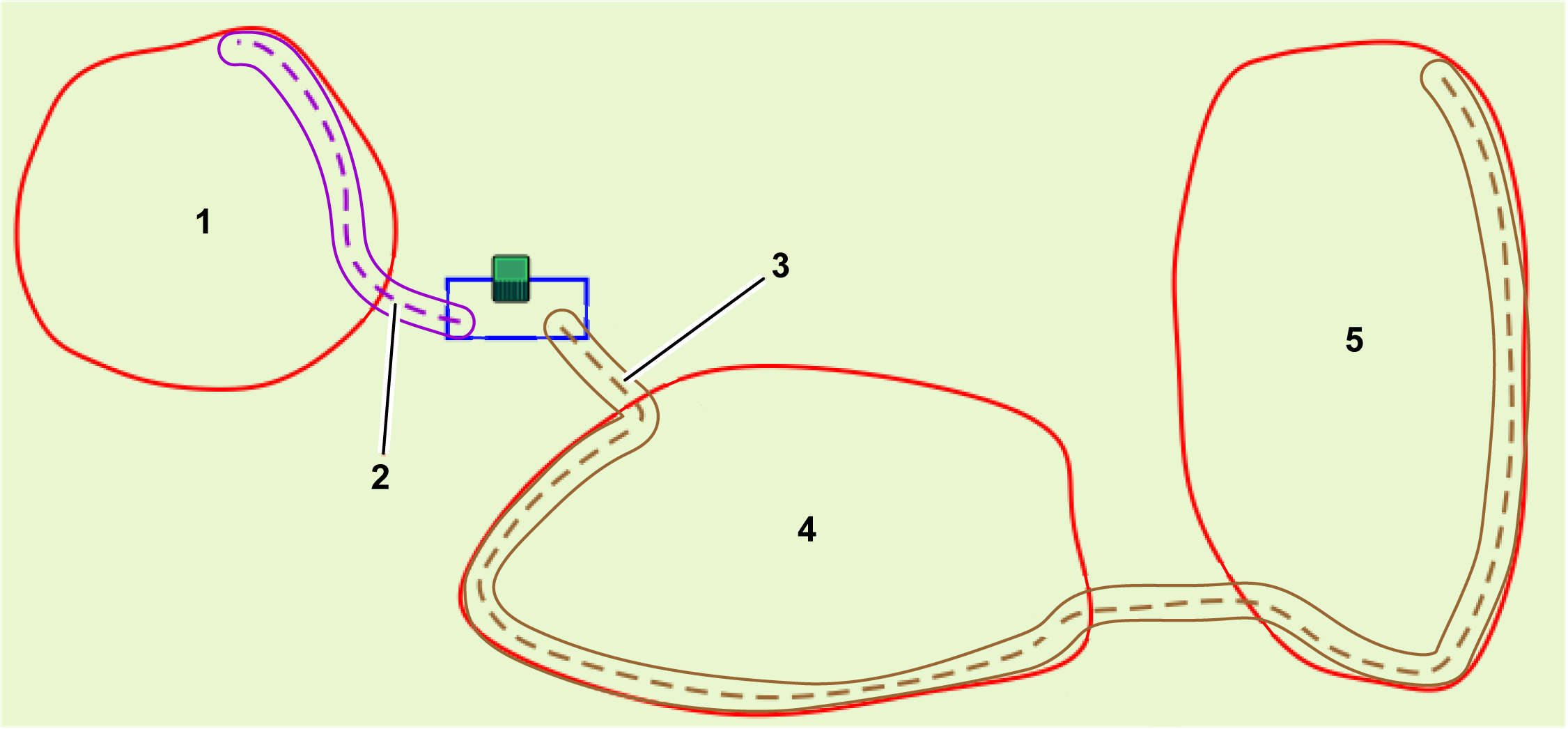
Graphic
G584427
  1. Loop wire
  2. Path zone
  3. Path
  4. Wireless working area
  5. Wired working area
When a path zone overlaps with a wired working area, the path zone must be set as the neighboring parcel and to the loop as indicated in the previous figure.
Where the paths overlap with wireless working areas, there is no need to set the areas as neighbors.
Discovering Paths
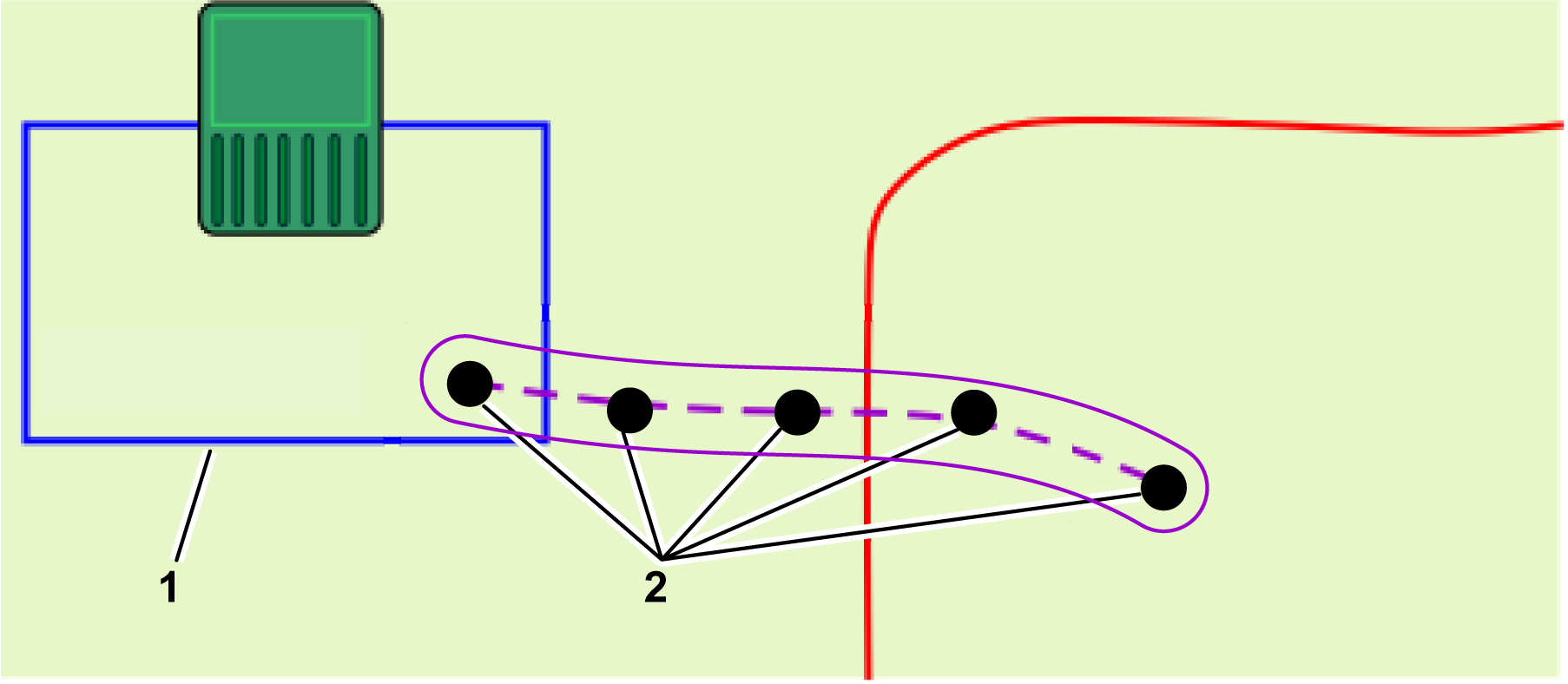
Paths are a series of GPS waypoints. These are defined by the same discovery process as when discovering the border of an area. The following conditions apply:
  • When discovering a path that is connecting to the loop parcel, the first point to be discovered must lie within the loop wire area. The neighboring parcel also needs to be set to the loop.
  • Do not add too many points when discovering a path. On straight sections, a distance between points of between 3 m (9.8 ft) and 4 m (13.1 ft) is sufficient. On curved sections, the points should be closer together. Limiting the number of points keeps the navigation by the robot smooth and fast.
  • At least one point on the path must lie in the area that is being connected. Normally, multiple points will be located in the working area to aid in robotic path navigation.
Graphic
G587196
  1. Loop wire
  2. Point
Path Design
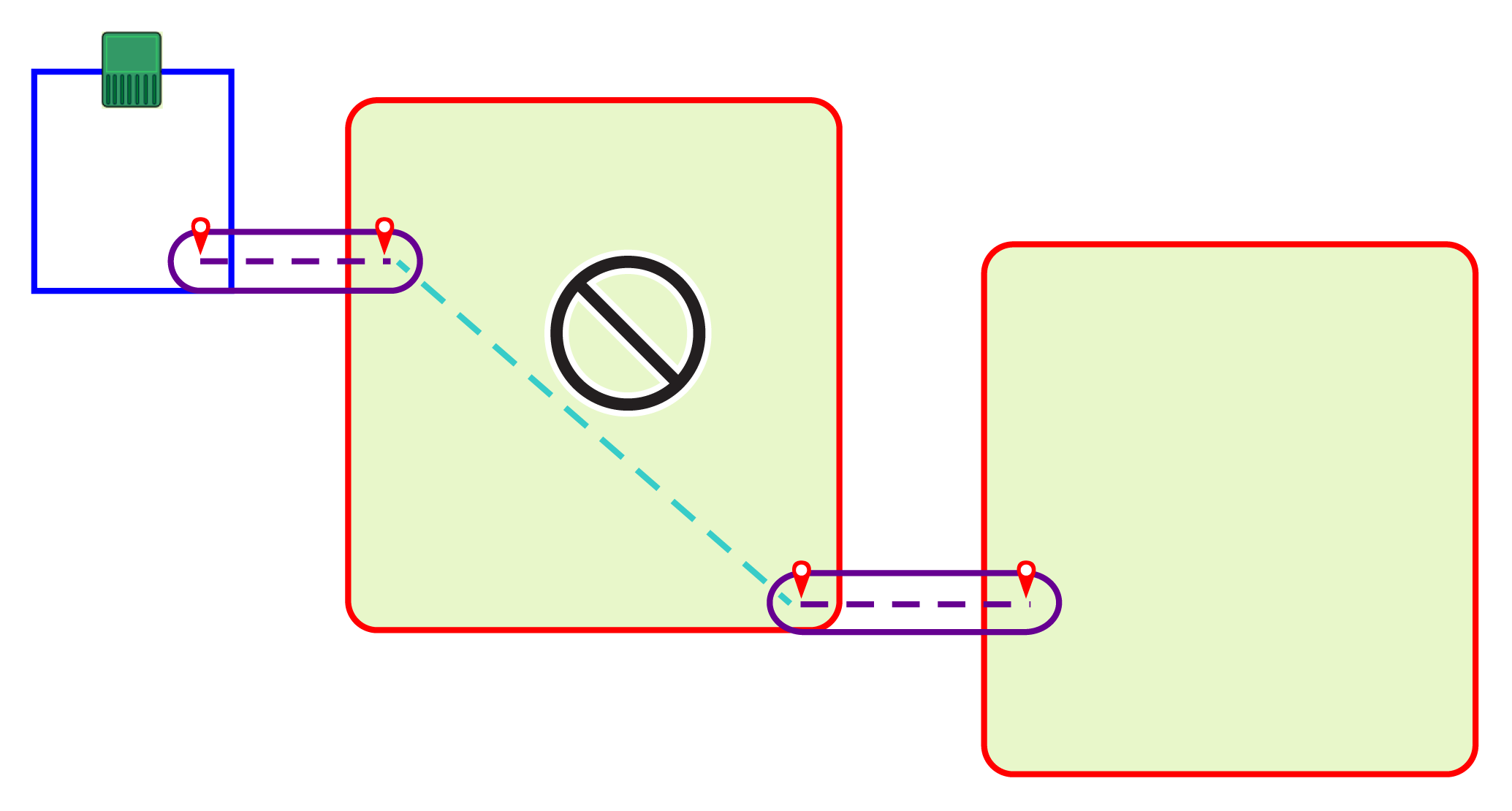
When developing paths, it is better to use single long paths rather than segmented paths. This is illustrated in the following figure:
Graphic
G580758
Segmented paths are not recommended because the robot will use GPS navigation to move from the end of one path to the start of the other. This is likely to create tracks in the grass since the robot will always be following exactly the same route.
Graphic
G578629
It is also recommended to extend the paths well into the target working area. This greatly improves the navigation used by the robot when it needs to return to the station.
Multiple paths can be configured in the same zone. The robot will automatically optimize trajectory according to the paths available and the target area.
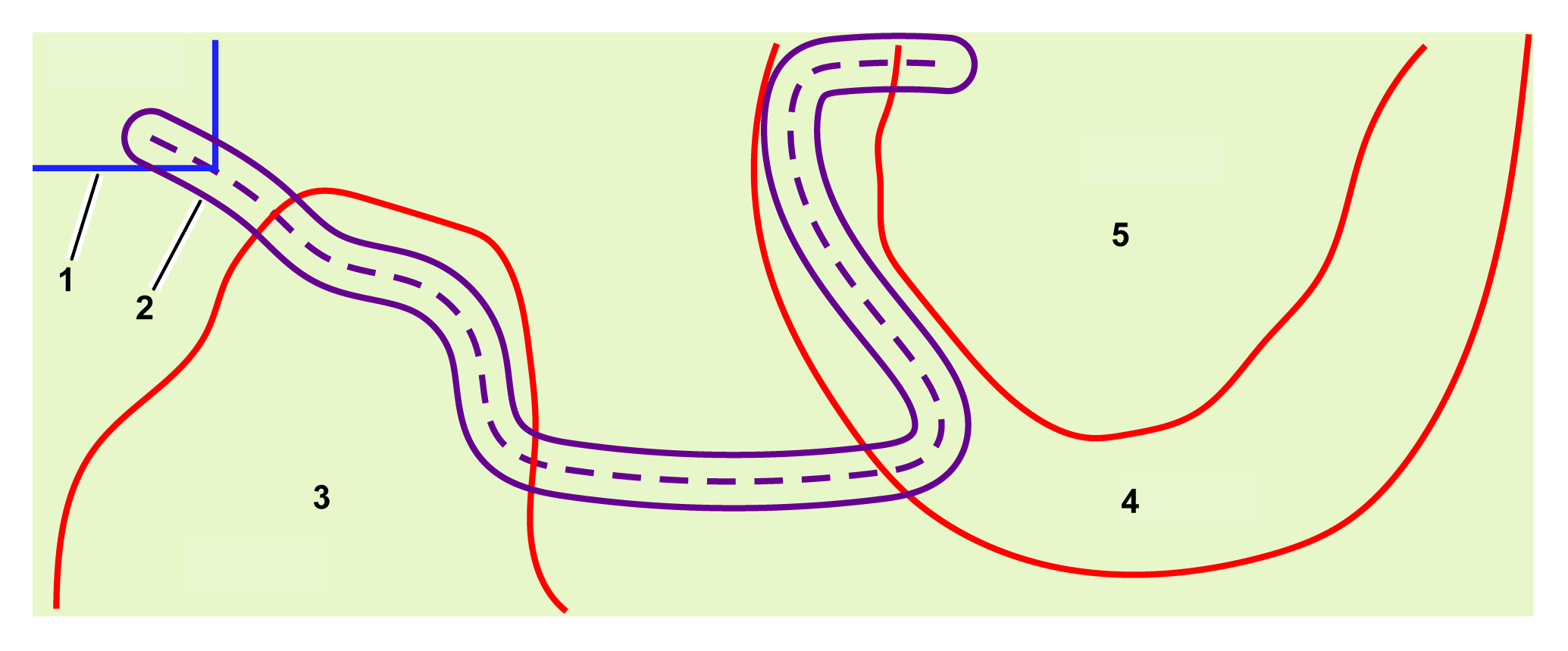
Automatically Detecting Path Zones
The path shown below passes through several areas. The robot automatically recognizes the areas that it passes through.
Graphic
G578630
  1. Loop wire
  2. Path
  3. Area 1
  4. Area 2
  5. Area 3
This list appears as part of the characteristics of the path when viewed on the portal. In this example, the path would be characterized as:
  • From parcel: Loop
  • To parcel: Area 1, Area 2, Area 3

The RTK Base

The RTK base can use either Wi-Fi or 4G to transmit data corrections to the robots. The requirements and configuration of the installation depends on the method used. Details on each of these bases are contained in the corresponding base Operators Manual.
The manual includes:
  • A description of the base and its operational functions.
  • Installation requirements and procedure.
  • Troubleshooting the base.
  • Information about the Wi-Fi repeater.

Requirements Relating to Permanent Obstacles

The robot detects temporary obstacles with its sensors. This topic is concerned with permanent obstacles that the robot has to avoid when computing its working pattern and when it is working.
All such obstacles must be surrounded by a working area or a NoGo zone; both are regarded as safe boundaries.
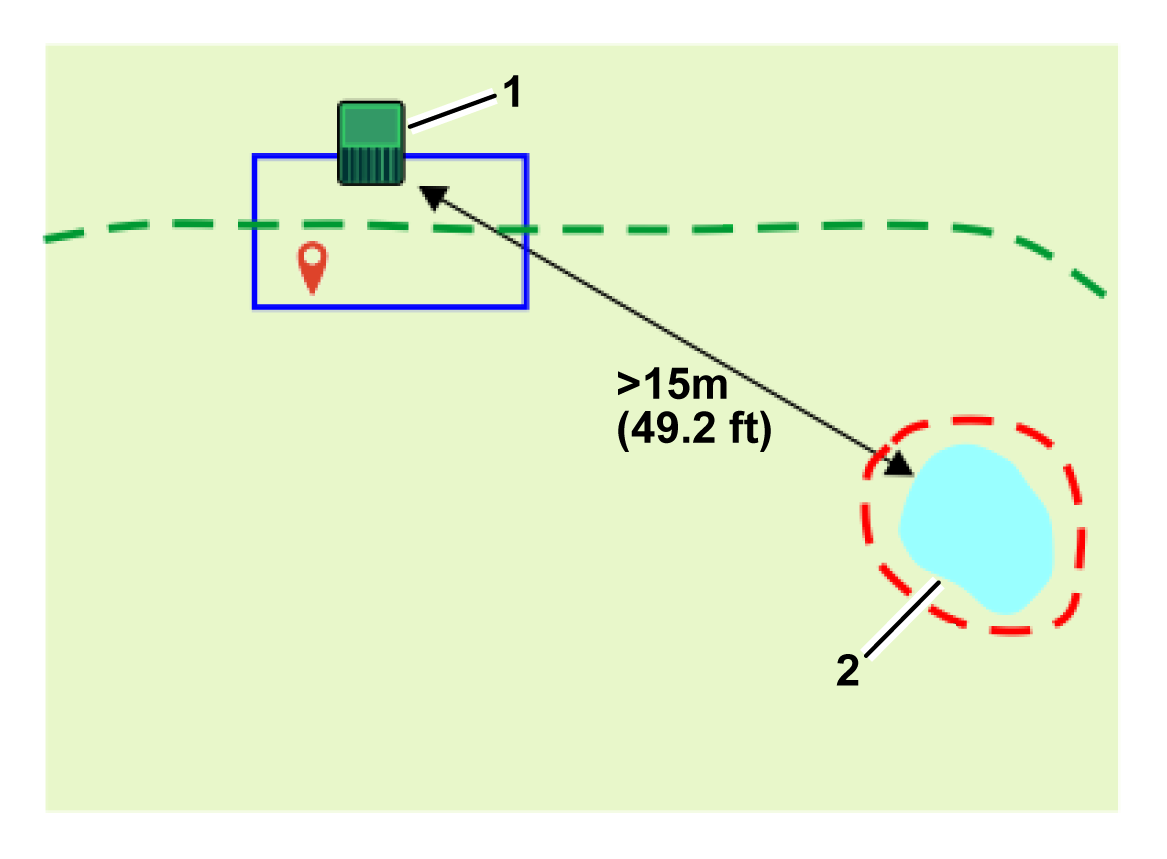
Charging Station
The station must be at least 15 m (49.2 ft) from any obstacle.
Graphic
G578631
  1. Charging station
  2. Obstacle
Water
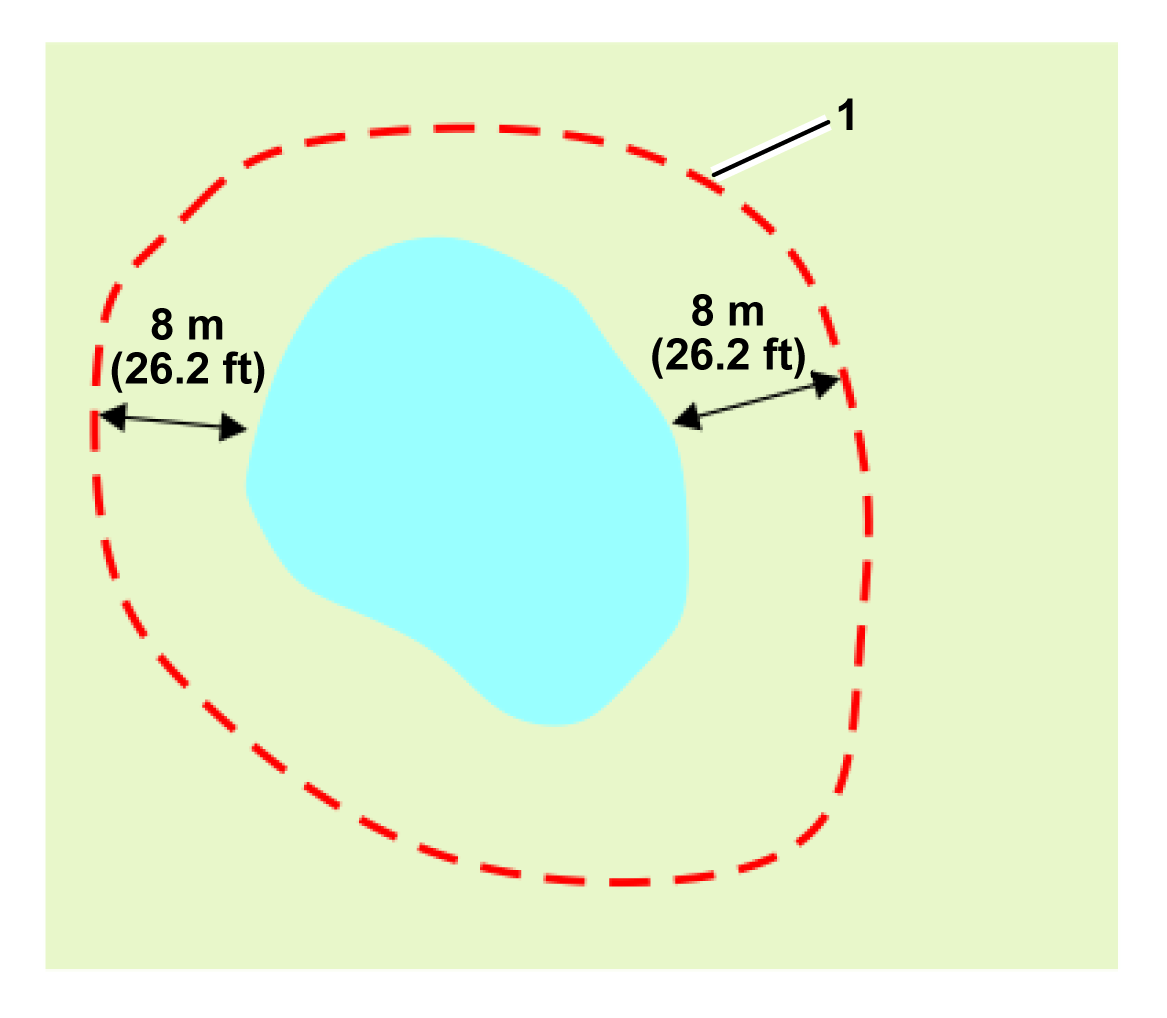
Water is especially hazardous for the robots and must be surrounded by a NoGo zone or a working area.
The boundary of the NoGo zone or working area must be at least 8 m (26.2 ft) from the edge of the water.
Graphic
G578632
  1. NoGo zone
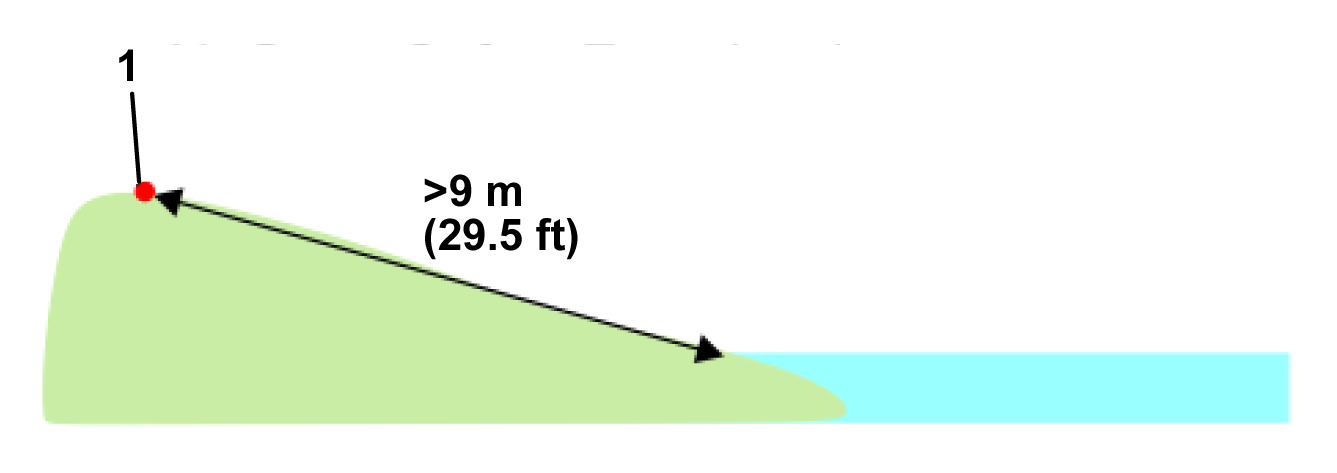
If the ground is sloping down to the water, a distance of at least 9 m (29.5 ft) is required between the boundary of the working area or the NoGo zone and the edge of the water.
Graphic
G578633
  1. Boundary
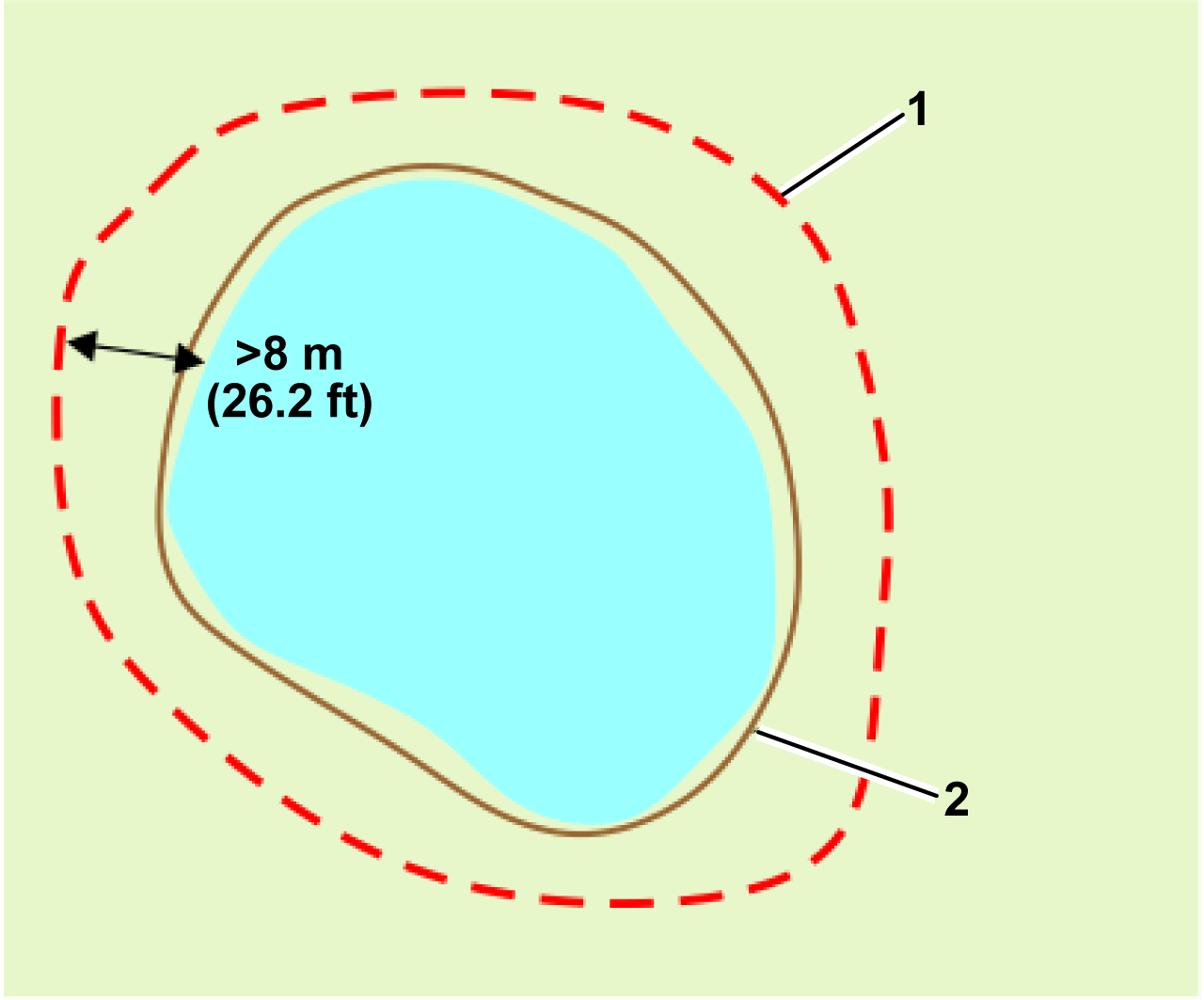
If it is not possible to have at least 8 m (26.2 ft) between the edge of the water and the NoGo zone, a physical barrier of at least 15 cm (6 inches) in height must be installed around the water.
Graphic
G578735
  1. NoGo zone
  2. Physical barrier
Dimensions Relating to Obstacles
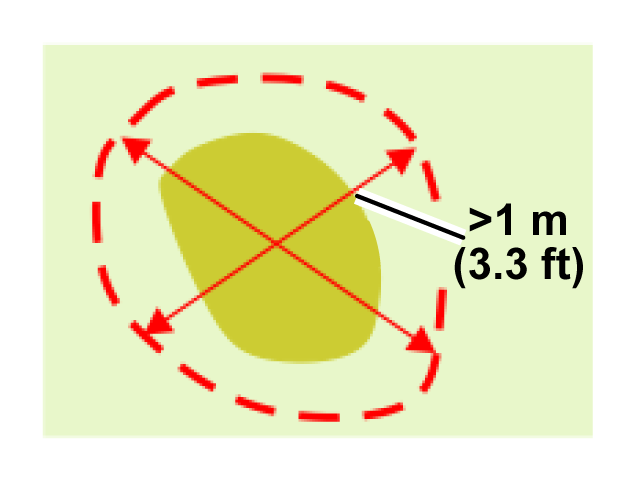
A NoGo zone must be at least 1 m (3.3 ft) in all directions.
Graphic
G578635
The minimum distance between NoGo zones is 5 m (16.4 ft).
Graphic
G578636
  1. NoGo zones
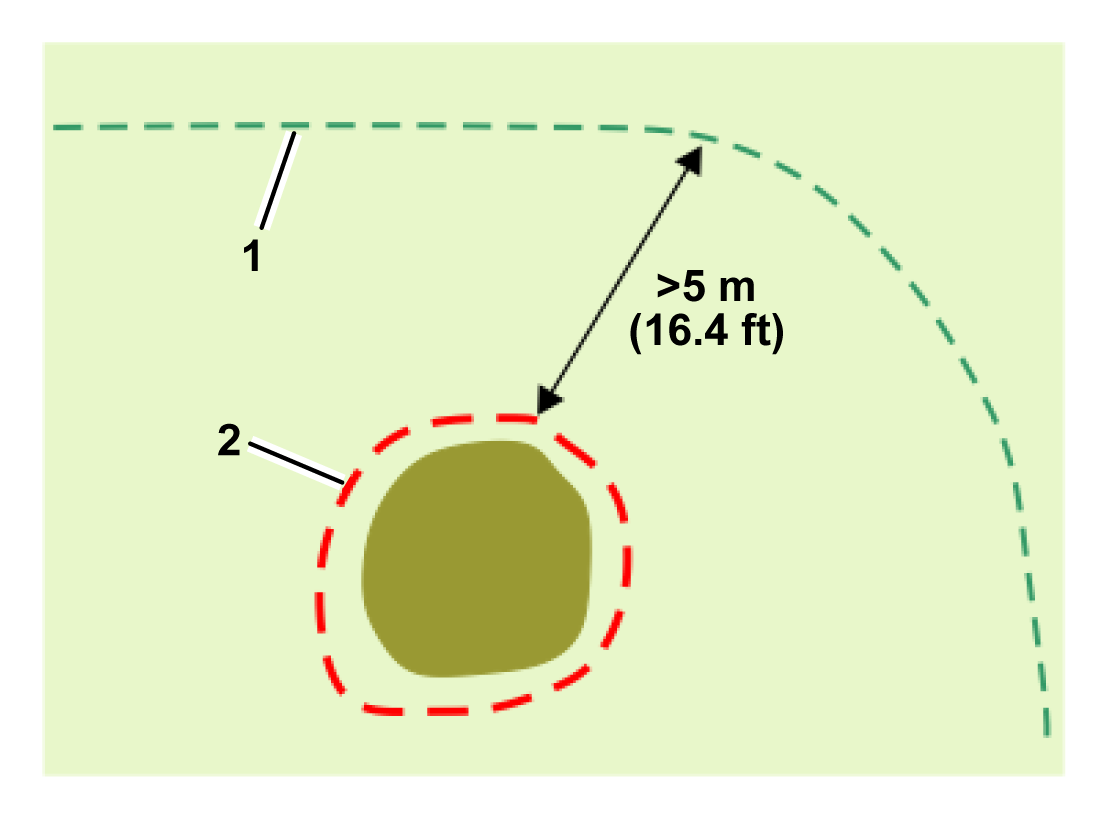
A NoGo zone must be at least 5 m (16.4 ft) away from the boundary of the working area in which the robot works.
Graphic
G578637
  1. Working area boundary
  2. NoGo zone
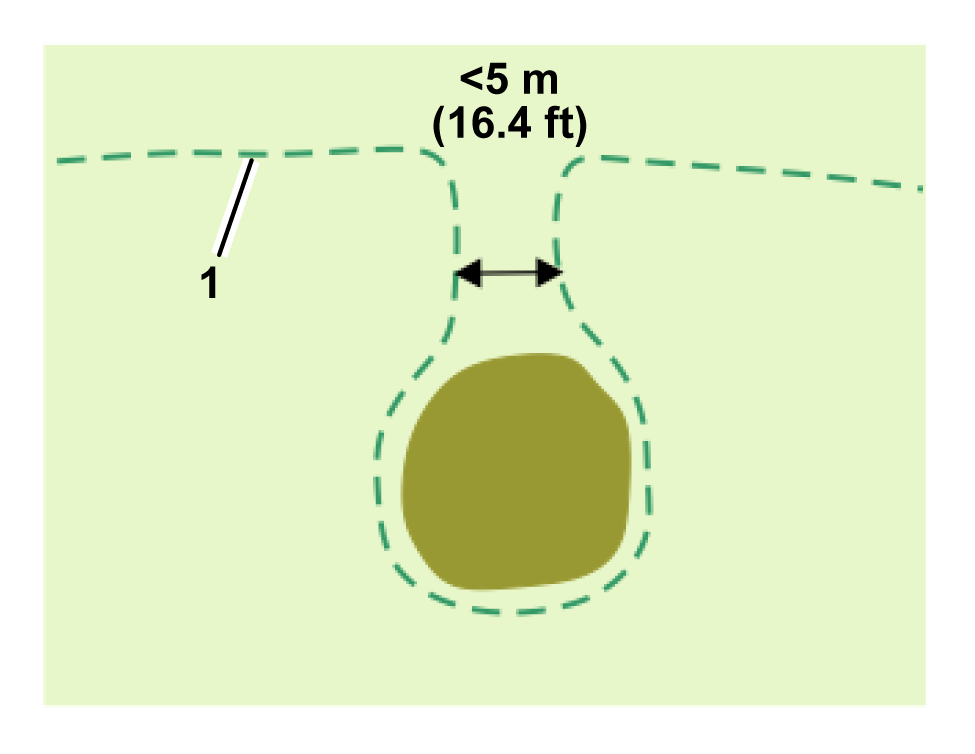
If an obstacle is less than 5 m (16.4 ft) from the border of the working area in which the robot works, the border of the working area should be designed to go around the obstacle. As shown in the following figure, the boundary of the working area loops around the obstacle:
Graphic
G578639
  1. Working area boundary
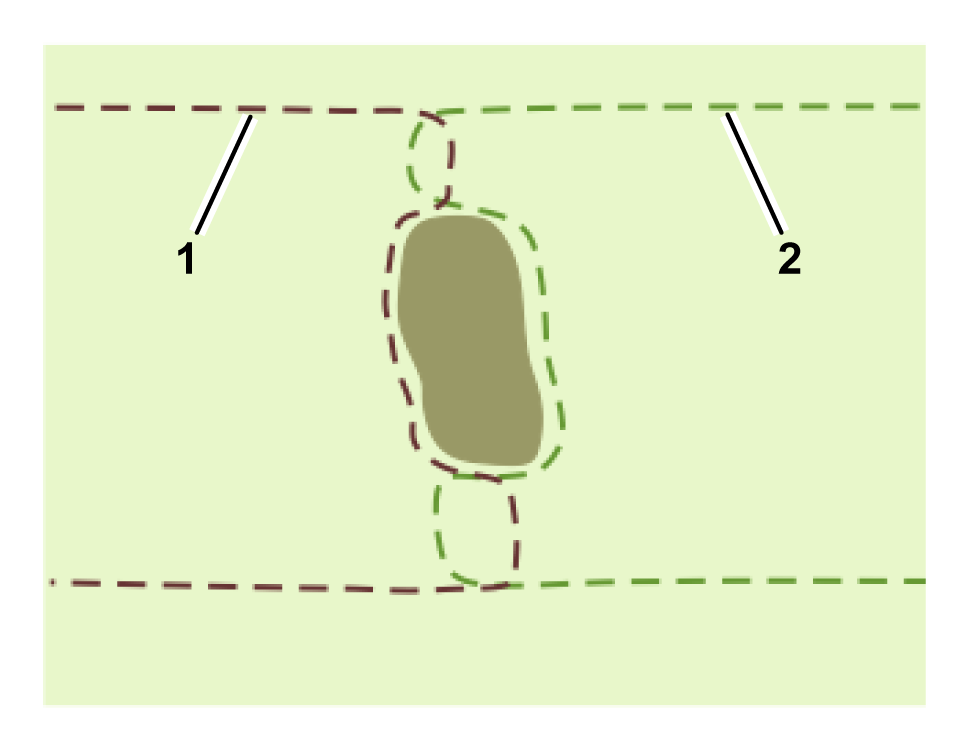
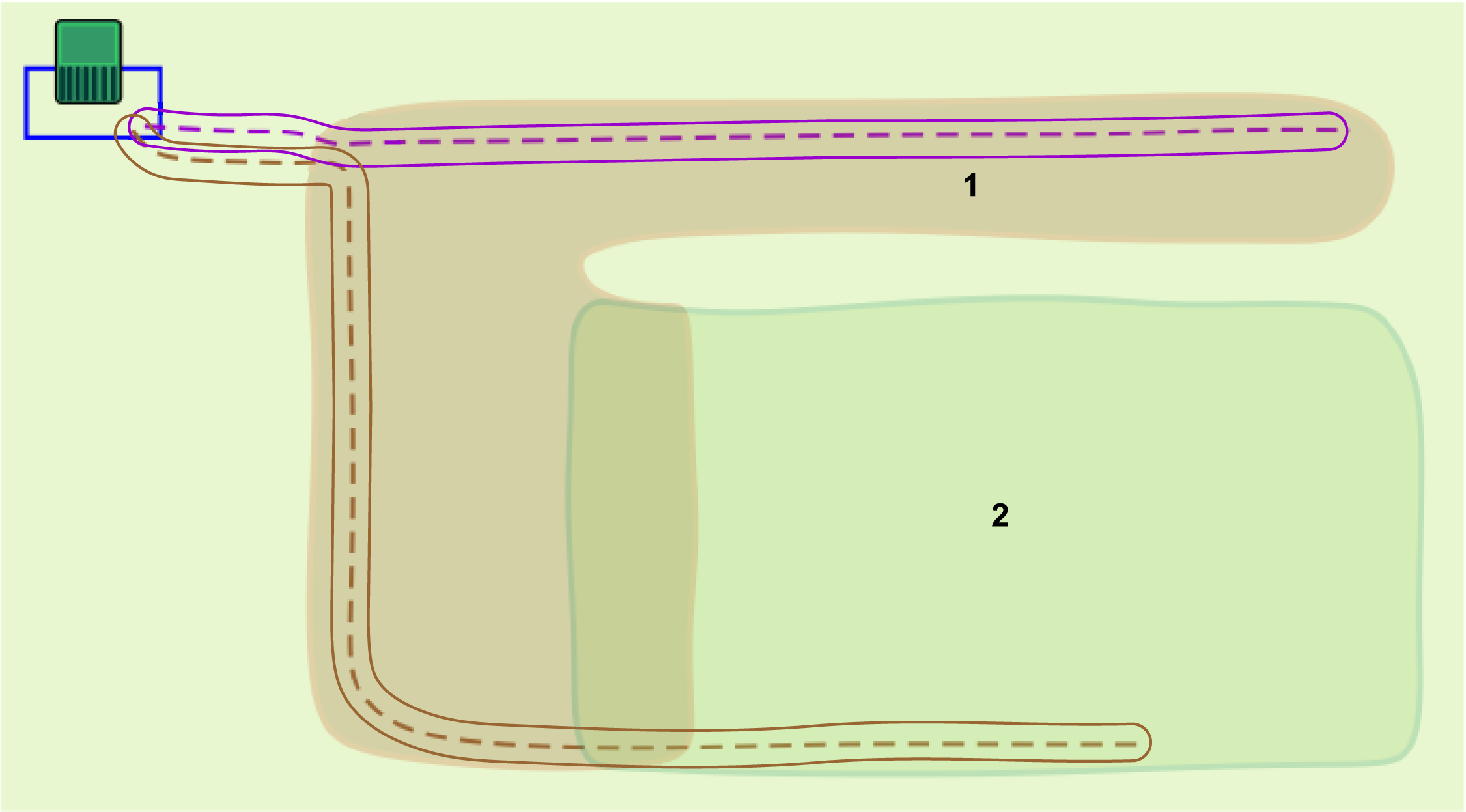
There must be a minimum distance of 5 m (16.4 ft) between the sections of the boundary that approach and leave the obstacle. This means that there will be an area with a width of at least 5 m (16.4 ft) where the robot does not work. To overcome this, you can use two overlapping working areas.
Graphic
G578638
  1. Working area 1 boundary
  2. Working area 2 boundary


Implementing a 4G RTK Installation
 

Installation Components
Graphic
G578640
Charging Station
The charging station for the robot.
Station Loop
A wired loop parcel must be defined for the robot to return to and leave the station. This station loop wire must intersect with a working area or path.
RTK Base
An RTK base must be installed to communicate with the satellites and then to communicate the exact position to the robots. This communication can be made using 4G or Wi-Fi. If using Wi-Fi, it may be necessary to use a Wi-Fi repeater. Details about the base can be found in the relevant base Operators Manual.
Working Area
Working areas are areas that define the robot's working area or are areas surrounding paths that the robot uses for navigation. The boundaries of these areas are discovered by the robot being moved around the site. To ensure that the robot stays within the working areas, a number of key configuration parameters are defined. If any one of these are modified, working areas become invalid and the robot will cease operation.
Entire Site
Wireless navigation requires high GPS signal quality. If the site is surrounded by trees or buildings that impede the base and the robots from viewing satellites, wireless navigation systems may not be feasible.
Internal GPS zones
Any number of internal GPS zones can be defined to create different working areas. These must be located within the overall working area. They do not need to overlap with the station loop. They do not need to be defined by a boundary discovery process.
Robot
The robot must be equipped with a GPS antenna so that it can communicate with satellites and the RTK base.
Permanent Obstacles
These are items such as trees, outbuildings, ponds or playgrounds that the robot must avoid. In most cases, a NoGo zone is required to ensure that these are reliably avoided and the robot creates better path planning.
Wi-Fi Repeater
When Wi-Fi is being used to communicate the corrections to the robot, it may be necessary to use one or two Wi-Fi repeaters to cover the entire site.
NoGo Zone (Exclusion Zone)
These are areas defined by GPS coordinates where the robot will not work in order to avoid obstacles.
Smartphone App
The Turf Pro Connect smartphone app allows you to set up and modify zones, change robot settings, schedule mowing times, and more.
Web portal
The robot must be connected to the turfpro.toro.com web portal.
The robot needs to be configured before the robot can be seen on the portal or the app.
Paths
Paths are strings of GPS points that form a route for the robot to navigate between the station and the working areas. A working area automatically surrounds the path at the requested width after the path is discovered and verified.

Planning the Installation

An installation without a peripheral wire requires a stringent set of criteria to be met. Assess the criteria laid out earlier in this manual before starting the installation.
Assessing the Site
  1. Verify that there is a clear sky view for the robots and the base.
  2. Verify the GPS signal is strong.
Making a Plan
  1. Make a blueprint of the site layout.
  2. Decide on the location of the station and loop(s).
  3. Decide how many working areas are required. This will depend on the complexity of the site.
  4. Decide how the robot will navigate from the loop to the working area(s).
  5. Decide on the location of the base.
  6. Decide whether to use 4G or Wi-Fi.
  7. Decide on the location of Wi-Fi repeaters if required.
  8. Decide on the number, size and shape of the internal GPS zones needed.
  9. Decide on how to deal with obstacles. These can be managed with NoGo zones, or by the shape of the working area and/or physical barriers.
If in doubt, consult your dealer/distributor for help and advice.
Before You Start
  1. Charge the robot using the charging station.
  2. Update the software to the latest version.
  3. Check on the quality of the surface of the site.
    1. Fill in the depressions in the surface where puddles may form.
    1. Ensure that the grass is cut to a maximum height of 10 cm (4 inches).
    Note: A complete 4G RTK installation can only be performed by someone who has the user role of technician.
Installing the RTK Base, Station, and the Loop
  1. Install the base at the chosen position. Refer to the RTK Base Operators Manual.
  2. Install the charging station at the chosen location. Refer to the Charging Station Operators Manual.
  3. Install the station loop, per the instructions earlier in this manual.

Controlling the Robot Remotely from the Smartphone Connect App

The Turf Pro Connect app allows you to remotely control the movements of the robot. This means that you can carry out a boundary discovery without having to manually push the robot.
Note: The app only needs to be set up once to remotely control the robot.

Connecting the Robot to the Base

The method by which the robot is connected to the base depends on the whether Wi-Fi or 4G is being used for the communication between them.

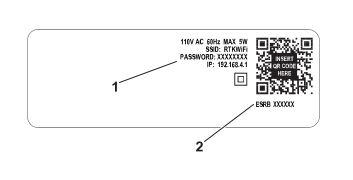
A 4G RTK installation requires password protection for the Wi-Fi connection. Software version 3.0.0 or higher is required for the base. Details on upgrading the software can be found in the relevant RTK Base manual. If the base software has been upgraded, the password will be defined during the upgrade. Otherwise, the default Wi-Fi password can be found on the identification label of the RTK base. You are required to create a new password.
Connecting to the Base for Wi-Fi
Graphic
G539289
  1. The initial/default password for the base Wi-Fi
  2. The serial number of the base
To connect the robot to the base:
  1. On the robot, select Technicians menu (9) > GPS RTK > RTK Wi-Fi Connection.
  2. Enter the default password for the base.
Connecting to the Base for 4G
Note: The RTK 4G functionality on the robot needs to be activated from the smartphone Connect app or the portal. Connecting through the app is the preferred method.
  1. Ensure that the robot is switched to the On position and is online.
  2. Log on to the smartphone Connect app or the portal.
Connecting to the Base for 4G Using the App
  1. Select the Technican menu button > RTK base.
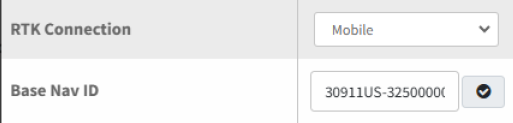
  2. Change the RTK Connection to Mobile using the drop-down menu.
  3. Note: For serial numbers 324000000 through 324999999
    Enter the Base Nav ID. This can be found on the base label and the QR code.
    Note: Do not use any spaces when entering the ID number.
    Graphic
    G539289
    1. The initial/default password for the base Wi-Fi
    2. The serial number of the base
  4. Note: For serial numbers 325000000 and up:
    Enter the Base Nav ID. This can be found on the base label and the QR code.
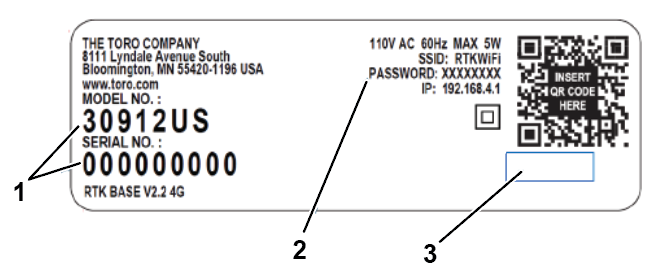
    Note: Do not use any spaces when entering the model and serial number for the base. XXXXX-000000000
    Graphic
    G542400
    1. Base ID serial number Model-Serial
    2. Initial/Default password for the base ID
    3. Area blank
    Graphic
    G542398
  5. Select the back arrow to leave the page (data automatically saves).
  6. Switch the main robot switch to the Off position, then turn back On and push the power button on the keypad.
  7. View the signal quality level and ensure that it is 2.0. Use one of the following methods:
    • In the app, select the Technician menu button > Sensors data > GPS.
    • On the robot, select Technicians menu (9) > GPS RTK.
    The GPS signal quality should be 2.0.
    Note: This may take a few minutes.
Connecting to the Base for 4G Using the Portal
    Graphic
    G527736
  1. Select the robot and click on Parameters.
  2. Select Image to download the latest configuration parameters from the robot.
  3. Select Edit Parameters.
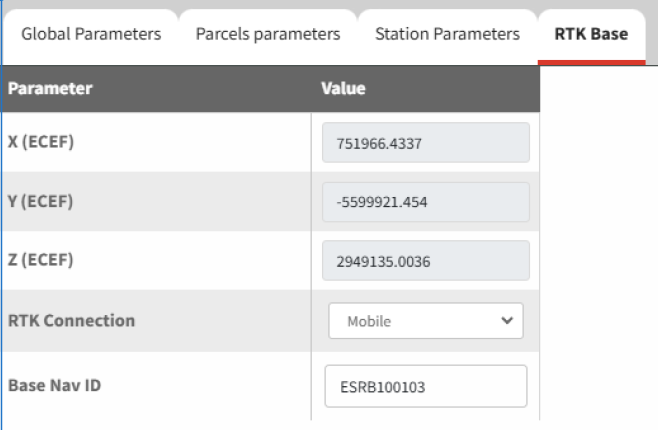
  4. Select the RTK Base tab.
    Graphic
    G540117
  5. Set the RTK connection parameter to Mobile.
    For serial numbers 324000000 through 324999999
  6. Enter the Base Nav ID. This can be found on the base label and the QR code.
    Note: Do not use any spaces when entering the base ID number.
    Graphic
    G539289
    1. The initial/default password for the base Wi-Fi
    2. The serial number of the base
    For serial numbers 325000000 and up:
  7. Enter the Base Nav ID. This can be found on the base label and the QR code.
    Note: Do not use any spaces when entering the model and serial number for the base. XXXXX-000000000
    Graphic
    G542400
    1. Base ID serial number Model-Serial
    2. Initial/Default password for the base ID
    3. Area blank
    Graphic
    G542398
  8. Select Image to upload the new setting to the robot.
  9. Switch the main robot switch to the Off position, then turn back On and push the power button on the keypad.
  10. Signal quality should be 2.0. Signal quality levels can be seen by using Technicians menu (9) > GPS RTK.
    Note: This may take a few minutes.

Connecting Your Smartphone to the Robot via the Turf Pro Connect App

  1. With your phone connected to the Internet, open the Toro Turf Pro Connect App and verify that your robot is in your fleet list.
  2. In your phone settings, disconnect from the Internet and connect to the robot (identified in the Wi-Fi list as the serial number of the robot).
  3. Enter the default password 123456789.
  4. Select Connect, and if prompted, say that you want to stay connected to the network without Internet (this may take a minute to pop up).
  5. Open the Turf Pro Connect App.
  6. Select the menu icon > Wifi Direct.
    The robot dashboard appears.

Remotely Controlling the Robot via 4G

Driving the Robot
  1. Select the Play button > Remote control.
Installing Objects
  1. Select the Technician menu button.
  2. Select the desired object for installation.

Creating a Working Area

The boundary of the working area is of critical importance in a 4G RTK installation. It defines the limit of the area in which the robot can operate. The GPS signal level over the entire working area should be 2. This is particularly important at the boundary.
Note: The creation of the working area can only be done by a user who has the User Role of Technician on the web portal.
Recommended Techniques for Boundary Discovery
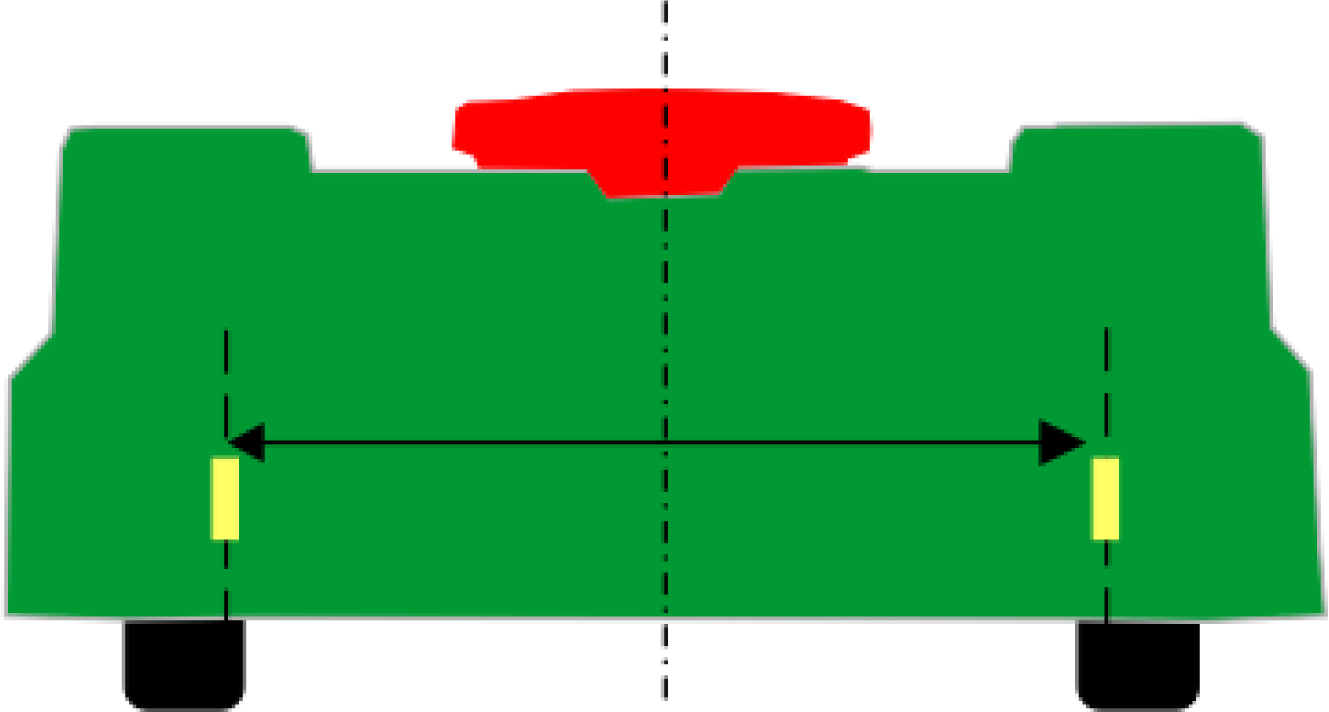
To ensure good results when the robot is mowing the boundary, it is recommended that you mark the cutting width on the back of the robot with tape. This makes it easier to visualize the actual edge of the cut area.
Graphic
G578736
Model
Cutting width
Distance away from center
500/500S
1033 mm (40.6 inches)
516.5 mm (20.3 inches)
300
633 mm (24.9 inches)
316.5 mm (12.5 inches)
The boundary is discovered by controlling the robot using the smartphone app.
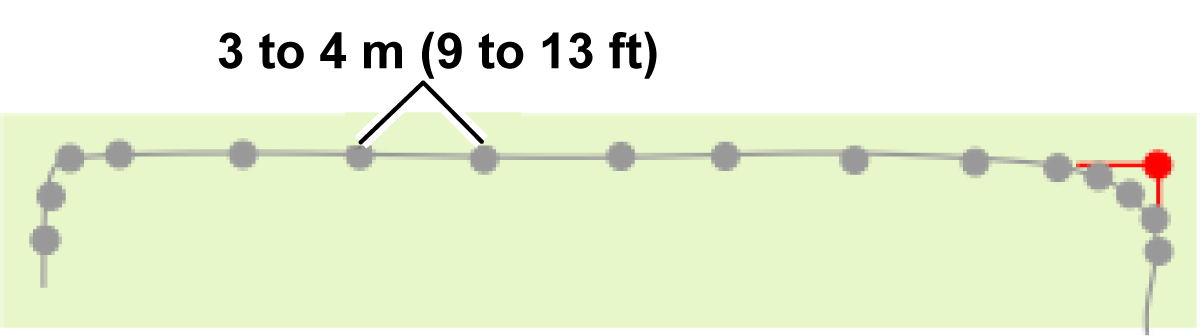
GPS points are added at intervals to define the boundary.
Note: Do not add too many points. On straight stretches, one point every 3 to 4 m (9 to 13 ft) is sufficient. More points should be added on curves
Graphic
G578739
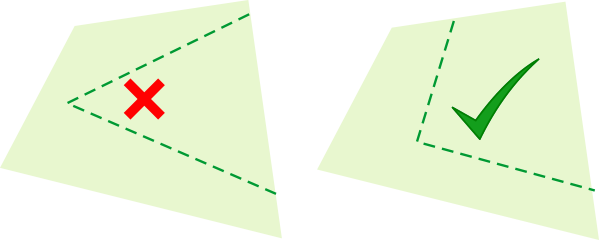
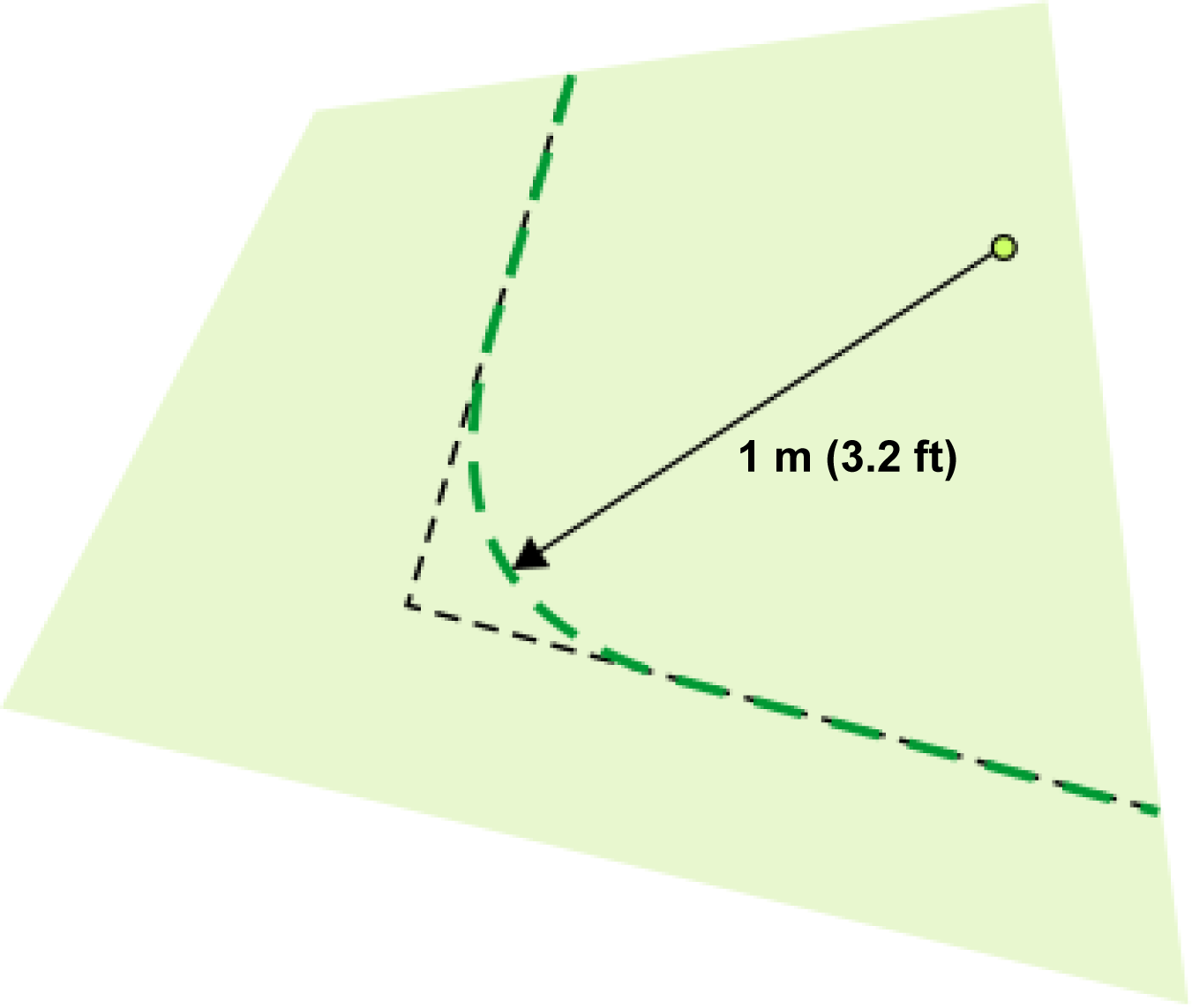
Create curves at the corners, not sharp angles.
Graphic
G527750
Note: Angles must be rounded with a minimum radius of 1 m (3.2 ft).
Graphic
G578738
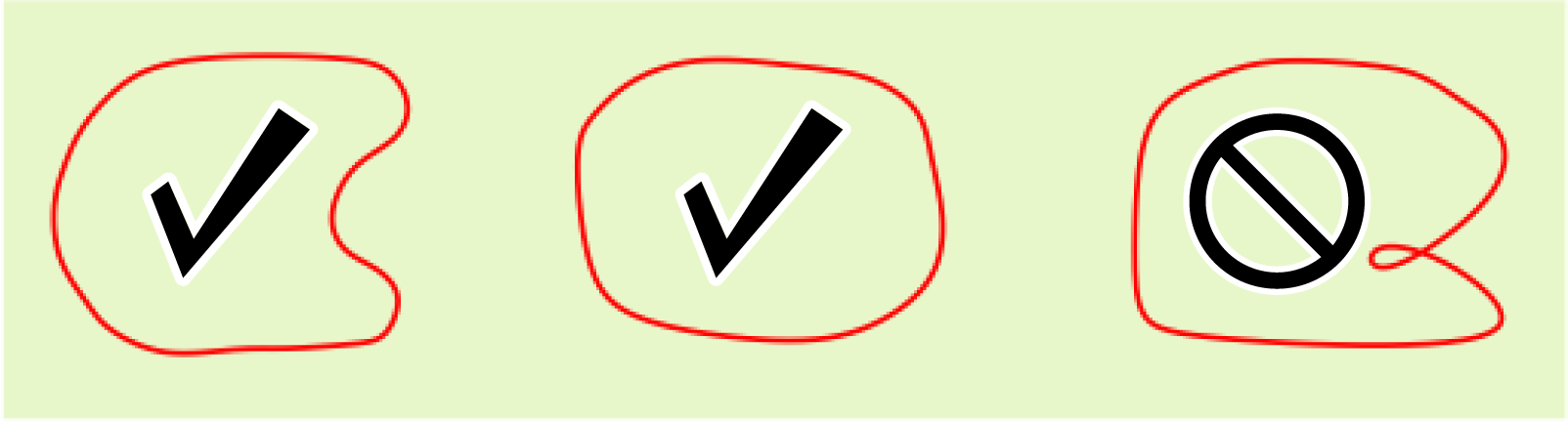
For the curve defining the boundary to be considered valid:
  • The overall shape of boundary may be convex or concave.
  • There must be no crossing over of points.
Graphic
G578740
Note: On the difficult sections of the boundary, mark the border to help in guiding the robot along the required boundary.
The points on the curve may be edited (moved or removed) from the web portal or app. The points can also be removed using the smartphone app during the boundary discovery.
Creating the Working Area
You can create the working area using the following tools:
  • On the smartphone app with the robot (recommended)
  • On the app or the web portal
Using the Robot With the App
  1. Select the Technician menu button > Parcels > Create.
  2. Choose a name for the zone.
  3. If required, select the checkbox for contour cut mode, and copy GPS coordinates from an existing zone.
  4. Select Border discovery.
  5. Add GPS points via the robot remote control as needed.
    Note: If GPS signal quality falls below 2.0, a large Low GPS Quality icon will prevent adding points.
  6. Select Complete to save the working area when close to the first point.
  7. Select the back arrow to return to the main menu.
  8. If the working area is overlapping the station loop, select Loop from the neighboring parcel drop-down menu.
  9. Select Verify border or Skip Border verification.
    If Verify border was selected, the robot will drive and verify the border.
  10. Follow the remaining prompts to complete the setup process.
Using the App or the Portal
  1. Select the Technician menu button > Parcels > Create.
  2. Choose a name for the zone.
  3. If required, select the checkbox for contour cut mode, and copy GPS coordinates from an existing zone.
  4. Select Border Edit.
  5. Add GPS points using your finger (or mouse) as needed to create the area
  6. Complete the area by selecting the first point.
  7. Select Save when near the first point to save the working area.
  8. Select the back arrow to return to the main menu.
  9. If the working area is overlapping the station loop, select Loop from the neighboring parcel drop-down menu.
  10. Select Verify border or Skip Border verification.
    If Verify border was selected, the robot will drive and verify the border.
  11. Follow the remaining prompts to complete the setup process.
Verifying the Boundary on the Robot
  1. On the robot, select Technician's menu (9) > Infrastructure > Parcels > {Name of the working area} > Verify GPS border and press the check mark.
  2. Watch the robot as it follows the boundary that has just been discovered.
  3. When complete, confirm on the robot.

Creating Additional Working Areas

Any number of working areas can be included in the installation. Each one defines a separate area where the robot can work.
The following criteria apply:
  • At least 1 working area or path in the overall configuration must overlap with the station loop wire.
  • Every working area must overlap with other working areas, the loop wire, extra paths, or a wired parcel to enable the robot to navigate over the entire site.
  • This overlap should be at least 4 m x 4 m (13 ft x 13 ft).
  • A working area must be created by a user with the role of technician on the web portal.

Internal GPS Zones

Internal GPS zones can be created within a working area. These can be used to optimize the working of the robot through scheduling.
The following conditions apply:
  • All of these internal zones must lie within a GPS working area.
  • They do not need to be defined by a boundary discovery process. They can be defined and edited on the web portal or the app by any type of user who has access to the robot.
  • The cutting height in the different areas is the same as that set for the encompassing working area.
The creation of an internal GPS zone can be done either through the web portal or the app.
Creating and Discovering Internal GPS Zones on the App
  1. Select the Technician menu button > Parcels > Name of Working zone > Create GPS zone.
  2. Name the zone and select Save.
    Note: If you copied the coordinates of a different working zone, you may skip border discovery and select border edit to edit it on the app or the portal.
  3. Perform border discovery for the GPS zone.
  4. Record GPS points using the remote control of the robot.
    GPS signal quality must remain above 1.6.
    Note: If discovery is interrupted or your phone disconnects, select Border Discovery again to continue recording. GPS points are saved in real-time to the robot.

Creating a NoGo Zone

NoGo zones are a means of avoiding permanent obstacles. In the absence of a peripheral wire, it is important that you are aware of the conditions relating to the avoidance of obstacles before you create them. Permanent obstacles and the means of avoiding them should be set out on the installation plan.
You also need to take into account the dimensions described below before defining the NoGo zone.
Graphic
G578641
  1. Working area boundary
  2. Working area
  3. Area to be excluded from the working area
As can be seen from the preceding figure, when the robot is performing the boundary discovery or working in a direction parallel to the boundary, the location of the registered point on the boundary of the NoGo zone will be away from the actual area being excluded. This distance is half the width of the robot's body, or 639 mm (25.2 inches).
When the pattern direction is perpendicular to the edge of the area, the robot will stop when the center of the axle between the rear wheels reaches the registered position of the boundary of the NoGo zone. In this case, the registered GPS position of the boundary of the NoGo zone will be away from the front bumper of the robot. The distance between the center point of the rear axle and the front of the body is 802 mm (31.5 inches). When the pattern direction is perpendicular to the edge of the area, the nose of the robot will enter further over the boundary of the NoGo zone compared to the side of the robot when the pattern is parallel to the edge of the area.
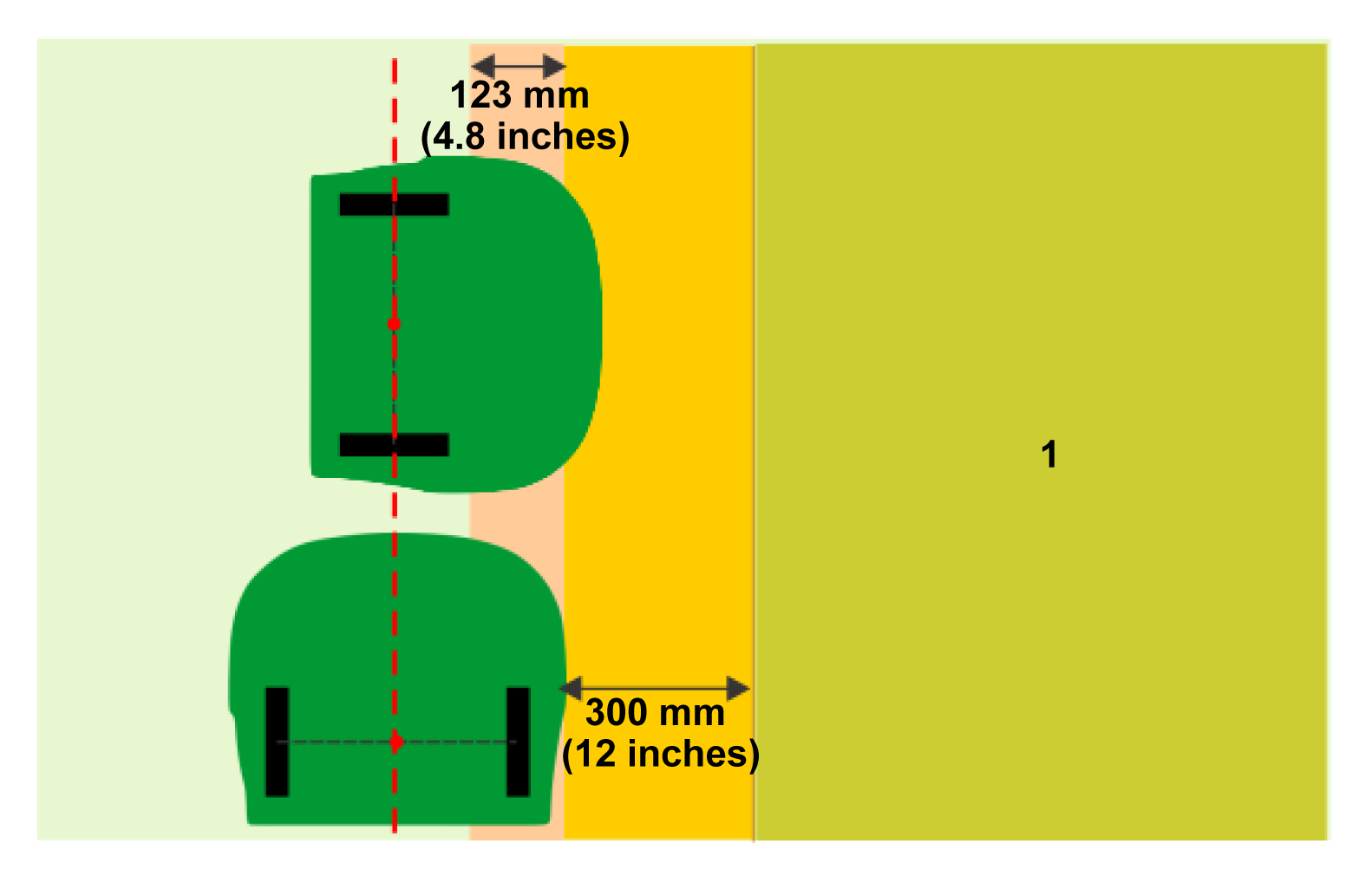
To avoid the robot entering the area to be excluded or colliding with an obstacle, a minimum distance of 300 mm (12 inches) between the excluded area and the side of the robot should to be respected when registering the NoGo zone.
The robot will work up to a distance away from the defined margin (which should be a minimum of 300 mm (12 inches) from the side of the robot) when registering the zone. For the robot, this distance is 123 mm (4.8 inches).
Graphic
G578642
  1. Area to be excluded from the working area
There are 2 methods by which a NoGo zone can be created:
  • On the robot
  • On the app
Creating and Discovering a NoGo Zone on the App
  1. Select the Technician menu button > GPS NoGo zones.
  2. Select Create.
  3. Assign a name to the NoGo zone.
  4. Select Border discovery.
  5. While walking behind the robot, add GPS points with the + button. Points can be removed with the X button.
  6. Select Complete while near the near first point to save the NoGo zone.
  7. Select the left arrow to return to the menu.
  8. Select Verify GPS border or Skip Border verification.
    If Verify GPS border was selected, the robot will drive and verify the border.
  9. Follow the remaining prompts to complete the setup process.
Creating and Discovering a NoGo Zone on the Robot
  1. On the interface of the robot, select Technician's menu (9) > Infrastructure > GPS NoGo zones.
  2. Select Create.
  3. Enter a name for the NoGo zone.
  4. Select Manual NoGo zone discovery.
    Note: The GPS signal quality must be above 2.0.
  5. Select Add a new GPS point. The Number of GPS points will now be 1 in the Manual NoGo zone Discovery screen.
  6. Move the robot to a new position and select Add a new GPS point again. Continue until you have positioned the robot in a set of points that encircle the zone to be excluded. You need to add enough points to define the zone to the accuracy that you require, but if you add too many points, it will slow the robot down in its operation.
    Note: The NoGo zone will need to be verified.
Modifying an Existing NoGo Zone on the App
Points in an existing NoGo zone can be modified to create a new NoGo zone.
  1. Select an existing NoGo zone.
  2. Select Border edit.
  3. Add or modify the NoGo zone points:
    1. Select and drag existing points.
    2. Select areas in between existing points to add intermediate points
    3. Select Undo/Redo or Clear all points to remove points.
    4. After making any changes, select Save.
  4. Select Verify GPS Border or Skip Border verification.
    If Verify GPS border was selected, the robot will drive and verify the border.
Changing NoGo Zone Settings
  • NoGo zones can be enabled or disabled through the Turf Pro Nav settings within the Technician menu.
  • Border mode can be enabled or disabled.
NoGo zones are automatically validated. If the shape is not valid, the color turns red.
Verifying the NoGo Zone on the Robot
Verification of the NoGo zone can be done on the interface of the robot or the app. Verification on the robot is done by using the following steps:
  1. Select Technician's menu (9) > Infrastructure > GPS NoGo zones and select the NoGo zone that you just created.
  2. Select Verify GPS border. Confirm that you want to verify the boundary.
  3. Watch the robot as it moves around the boundary. If you approve of the boundary, select OK. If not, select Cancel and start the process again.

Creating Paths

Paths provide an efficient means for the robot to navigate between working areas and the station. Since they operate in both directions, they can be used for leaving and returning to the station.
A typical example of the use of a path is to provide a route between the station and its loop and the working area. This means that the station can be installed in a convenient position away from busy areas. Paths can also be used to navigate between widely-separated working areas.
Paths can be created on the smartphone app or the portal.
Characteristics of Paths
  • Paths do not need be in a working area. They will create their own working area, which will then need to be verified.
  • Multiple paths can be connected. They must be connected using 1 point on each path. When paths are connected, a blue circle will appear.
  • Connected paths can have different widths.
  • The width of the path determines how fast the robot can travel along that path. Whenever possible, use wide paths for more efficient operation. Narrow paths should be used for areas with narrow passages and many permanent obstacles.
  • One of the paths must start in the station loop.
  • Connected loops must have at least a single path starting in the station loop.
  • When using connected paths, only the path that starts in the station loop has to set the connected peripheral wires to the loop.
Creating a Path on the App
Note: The starting point of the path must be within the station loop.
  1. Select the Technician menu button > GPS paths.
  2. Select Create and give the path a name.
  3. Select Discover path.
  4. Drive the robot and add points using your smartphone.
    The starting point for the path is green; the end point is white. Points will be connected linearly.
  5. When finished, select Complete.
Creating a Branched Path
Branched paths are paths that extend from a main path. They can be used to extend paths into additional working areas or create additional coverage.
  1. Select a white dot on an existing path.
  2. Create the branched path by clicking on the map.
  3. When finished, select Complete.
When complete, the branching point will appear as a blue dot on the map.
Discovering the Path on a Smartphone
This has to be done by remotely controlling the robot from the smartphone app. This requires you to have set up the app.
  1. Position the robot on the first point of the path.
    Note: When a path starts from the station loop, the 1st point of the path needs to be positioned inside the station loop.
  2. Standing behind the robot, move it along the path adding GPS points using the + button.
    Graphic
    G587196
    1. Loop wire
    2. Point
  3. The second point needs to be positioned outside the station loop. The discovery of the path should always go from the station loop towards the other zones.
    Note: Do not add too many points. On straight sections the recommended distance between points is 10 m (33 ft) for paths. The points should be closer together on curved sections.
  4. Extend the path into the zone. This aids the navigation when the robot needs to return to the station.
  5. Tap the check mark button when the path is complete. The app will compute the polynomial that is formed by the GPS points.
  6. Click the Save icon.
    Note: The points defining the path that was discovered can be viewed and modified on the web portal and the app.
  7. Select Verify GPS border or Skip Border verification.
    If Verify GPS border was selected, the robot will drive and verify the border.
Path Settings
  • Paths can enabled or disabled through the Turf Pro Nav settings within the Technician menu.
  • Width for the path working area can be modified.
    Default width: 3 m (9.8 ft). Speed is reduced when the width is less than 3 m (9.8 ft).
  • Cutting heads can be enabled or disabled.
  • Connected peripheral wires (i.e., loop wire) can be enabled or disabled.
Verifying a Path
Since paths are enclosed by a working area with a boundary, paths need to be verified. Changes to the width or the GPS points of the path require the path to be verified again.
  1. Select the Technician menu button > GPS Path > Path being verified > Verify GPS path or Skip GPS path verification.

Setting the Mowing Direction

Setting the Mowing Direction on the App
  1. Select the Gear button.
  2. Select Mowing.
  3. Select the mowing direction.
  4. Select the working area.
  5. Rotate the dot to choose an angle for the working area.
    You may select 1, 2, or 4 angles, or customize up to 8 angles.
  6. Select Save to save your changes.
Setting the Mowing Direction on the Robot
This procedure enables you to ensure that the robot mows in a direction that corresponds to the definition of the sports field or pitch. This procedure assumes that the sports field or pitch has been setup for pattern mowing (i.e. the working area corresponding to the sports field or pitch has been created).
This procedure enables you to set primary and secondary working directions.
Before starting this procedure you should check that the GPS signal quality is at least 1.6; on the robot, select Technician's menu (9) > GPS RTK > GPS signal quality.
    Graphic
    G578753
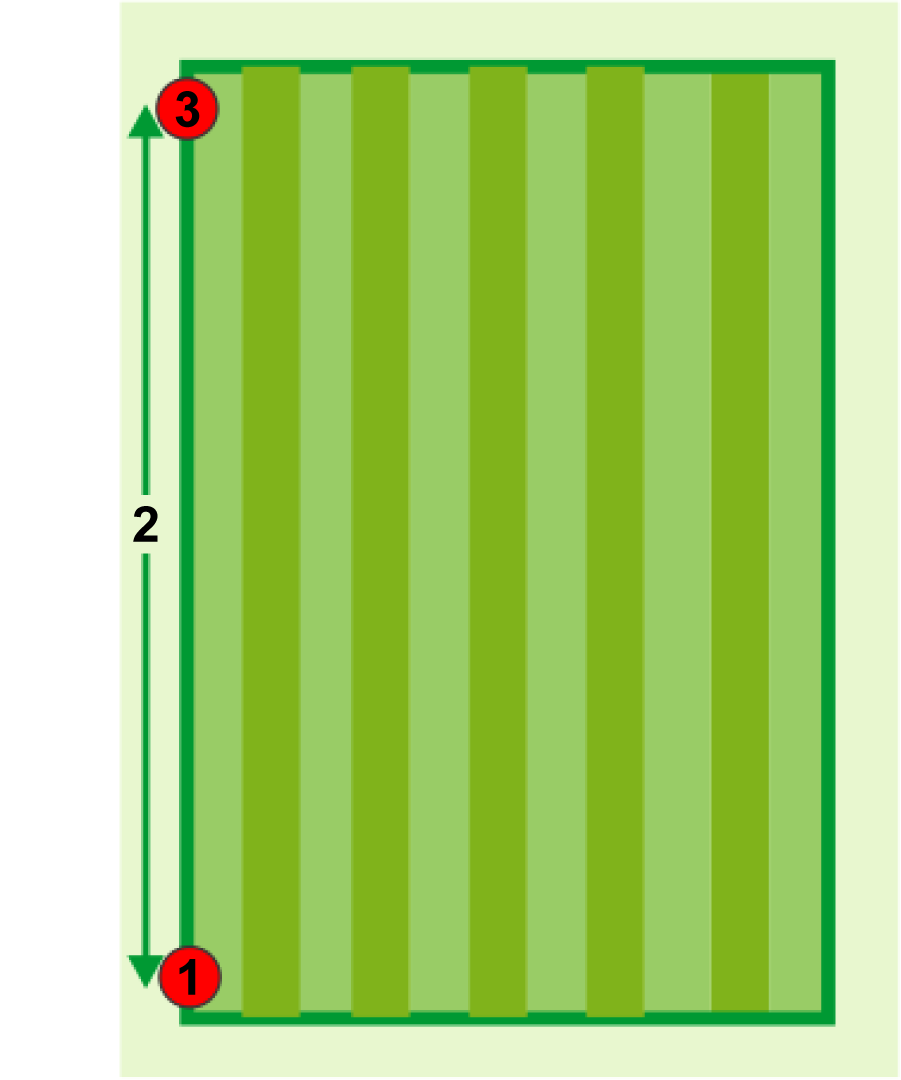
  1. Position the robot at a point that will be used as a reference point to define the direction . It is recommended that this point is near a corner of the pitch.
  2. Select Technician's menu (9) > Infrastructure > Parcels > {RTK GPS zone corresponding to the pitch). Check that the option Pattern mowing is checked on.
  3. Select Main heading.
  4. Select Set ref. point.
  5. Push the robot at least 10 m (32.8 ft) in the exact direction in which the pattern is to be established . It is recommended to move the robot the maximum distance possible, to ensure the most accurate measurement of the direction.
  6. When you have moved the robot more than 10 m (32.8 ft), you can define the second point . Select Set main heading.
  7. Graphic
    G578754
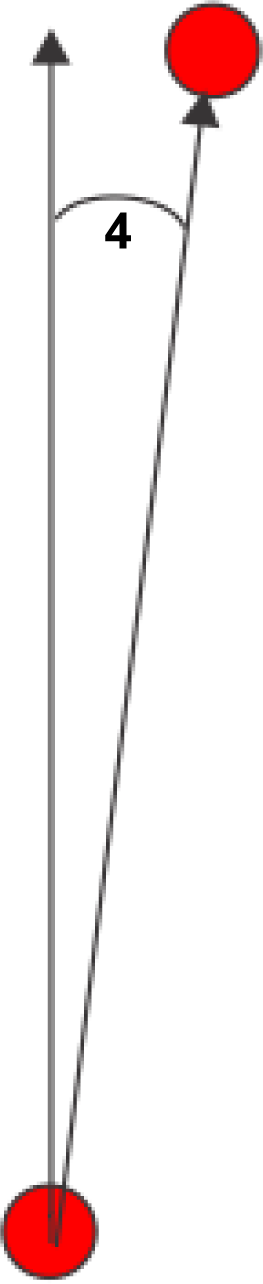
  8. The angle between the robot's orientation and due north is displayed .
    If you are not happy with the angle, select Delete ref. point and start the process again.
    It is also possible to set the other mowing directions relative to the main one. To do this select Other headings, then select the number of directions and the angle between each of these directions.
  9. After the direction is defined, save the settings.

Setting a GPS Return Point

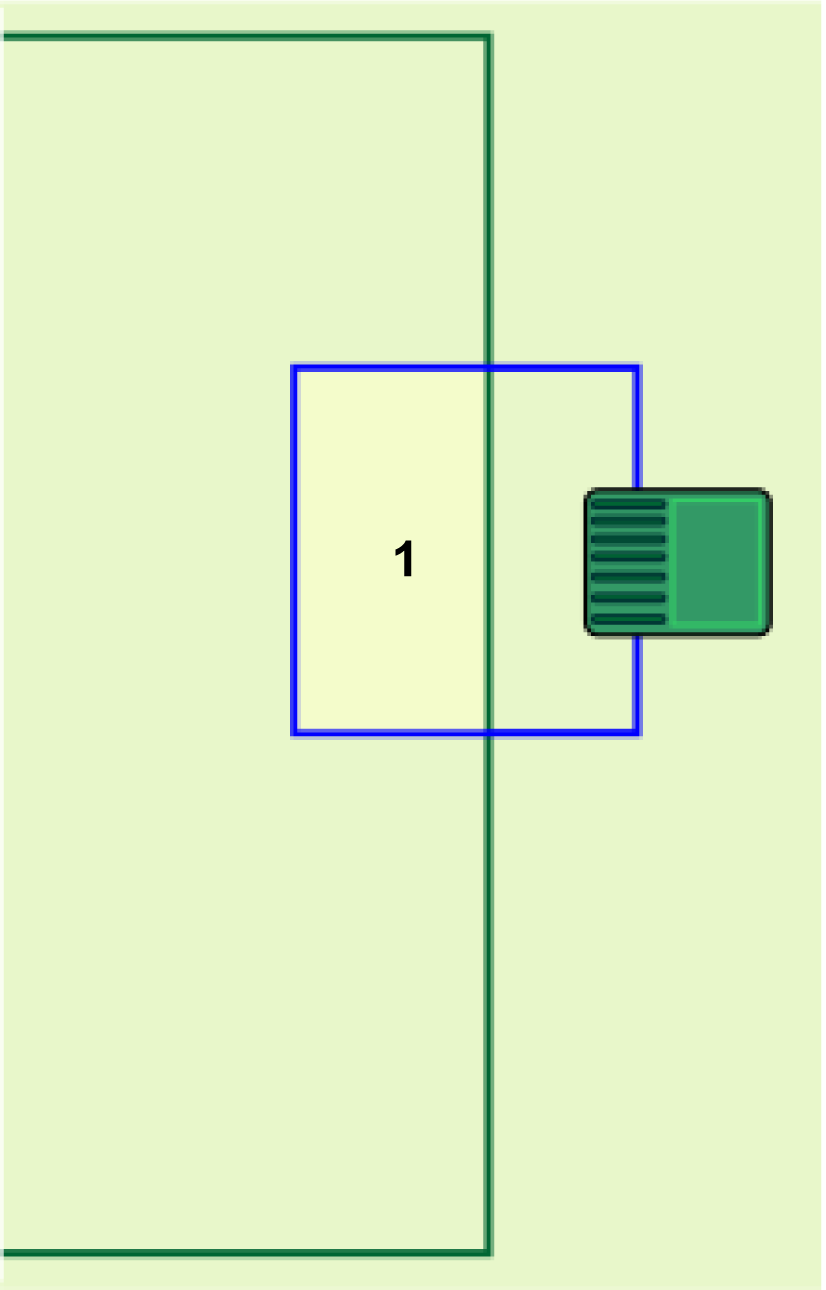
It is recommended to use a path to connect the station loop to a working area, but if a path is not used, a GPS return point must be added to enable the robot to return to the station. This point must be defined inside the loop wire and the working area:
Graphic
G578741
  1. GPS return point
  1. Position the robot at a point that is at least 5 m (16 ft) away from the loop wire, and in a direction that is perpendicular to the loop wire. The following figure shows 3 valid positions for the example shown in the previous figure.
    Graphic
    G578742
  2. Push the robot forward until it is inside the loop and at the point where the GPS return point is required.
  3. On the robot, select Technician's menu (9) > Infrastructure > Parcels > {Name of the working area} > Neighboring parcels.
  4. Check the button next to the loop ON. This will create a point that will guide the robot from the working area into the loop.
  5. Select GPS points > Set.
  6. Confirm the setting.

Configuring the Installation

Choosing the Cutting Disc Type
If your working area is to be mowed at a lower height of cut (less than 20 mm or 0.8 inches), then you can opt to use a "low height" cutting disc. The range of the low height cutting discs is between 15 mm (0.6 inches) and 90 mm (3.5 inches).
Choosing the Cutting Disc Type on the App
  1. Select the gear in the upper-left corner.
  2. Select Hardware info.
  3. Select Low cutting height.
Choosing the Cutting Disc Type on the Robot
  1. Select Technician's menu (9) > Advanced parameters.
  2. Select Cutting disc and select Low height.
Setting the Cutting Height
The cutting height of the blades can be set for each working area that is defined in the installation. It is not possible to set different cutting heights for internal GPS zones; these must be the same cutting height as the parent working area.
Note: Cutting is not enabled by default when the robot is navigating along a path.
Setting the Cutting Height on the App
  1. Select the Cutting height button.
  2. Use the slider to adjust the cutting height.
Setting the Cutting Height on the Robot
  1. On the interface of the robot, select Settings > Cutting height.
  2. Select the working area on which you are changing the cutting height.
  3. Select Set target. Select the parcel to change the cutting height.
  4. Enter the required height and tap the check mark icon.
Defining the Working Schedule
The working schedule for the robot can be defined by setting a time schedule, setting a percentage of time allotted to each working area, or by setting the number of times a working area can be moved in a day.
The working schedule can also be used to set the sequence that the robot mows the working areas.
The schedule can be most easily defined on the app or the web portal.
Border Mowing
It is important in a 4G RTK installation that the boundary of the working area is mowed regularly.
Note: It is strongly recommended that you use sequential scheduling to manage the boundaries.
When sequential scheduling is implemented, the border will always be mowed as soon as the working area has been completely mowed.
Implementing Sequential Scheduling on the App
  1. Select the Scheduling (clock) button.
  2. Ensure that Sequential Scheduling is checked.
Implementing Sequential Scheduling on the Robot
  1. On the interface of the robot, select Service Settings > Operations.
  2. Select Sequential Schedule and check the button ON.
  3. A list of parcels/areas including paths is presented. Check those to be included in the sequence.
  4. If you don't want the border of an area to be included in the sequence, select Settings > Border and define the border settings.
    Note: The boundaries of NoGo zones stay the same.
Configuring the Exit Station Parameters
A GPS signal level of 1.2 is sufficient for the robot to exit the station, but a signal level of 2 is required for the robot to operate in the working area. When it exits the station, the robot needs to travel a distance X along the loop wire before it encounters a suitable signal level of 2. This distance X needs to be set as an exit parameter.
This parameter can be set manually, but it is recommended that you allow the robot to set them automatically.
Automatically Setting the Exit Parameters (Calibrating the Wire)
  1. Position the robot at the charging station.
  2. Select Technicians menu (9) > Infrastructure > Stations > Manual station > Calibrate now.
  3. Confirm that you wish to calibrate the station. The robot will make a circuit of the loop. It will set the Min exit distance to the distance travelled before the GPS signal level of 2 is registered. The Max exit distance will be set to 1.0 m (3.3 ft) more than the minimum value.
  4. Confirm to accept the values.
Setting the Exit Parameters on the App
  1. Select the Technican menu button > Stations.
  2. Select the station that needs to have the parameters adjusted (typically Manual Station 1).
  3. Edit the Exit min distance setting.
  4. Edit the Exit max distance setting.
    Note: The max distance needs to be greater than the min distance.
Manually Setting the Exit Parameters
  1. Select Technicians menu (9) > Infrastructure > Stations > Manual station > Exit parameters.
  2. Select Create new parameter set.
  3. Set the distance X as the Min exit distance. The minimum value that can be entered is 0.8 m (31.5 in).
  4. Enter the required value for the Max exit distance. This can be 1 m (3.3 ft) more than the minimum exit distance.


How the Turf Pro works in a 4G RTK Installation
 

Exit the Station

The robot will leave the station when:
  • The battery has been fully charged
  • The work schedule dictates it
The way that the robot leaves the station and enters the working area/path depends on the configuration of the installation:
  • A station loop overlaps the working area
  • The robot uses one or more paths to navigate to its working area
Station Loop Overlaps the GPS Working Area
Graphic
G578755
  1. Loop wire
  2. GPS working area boundary
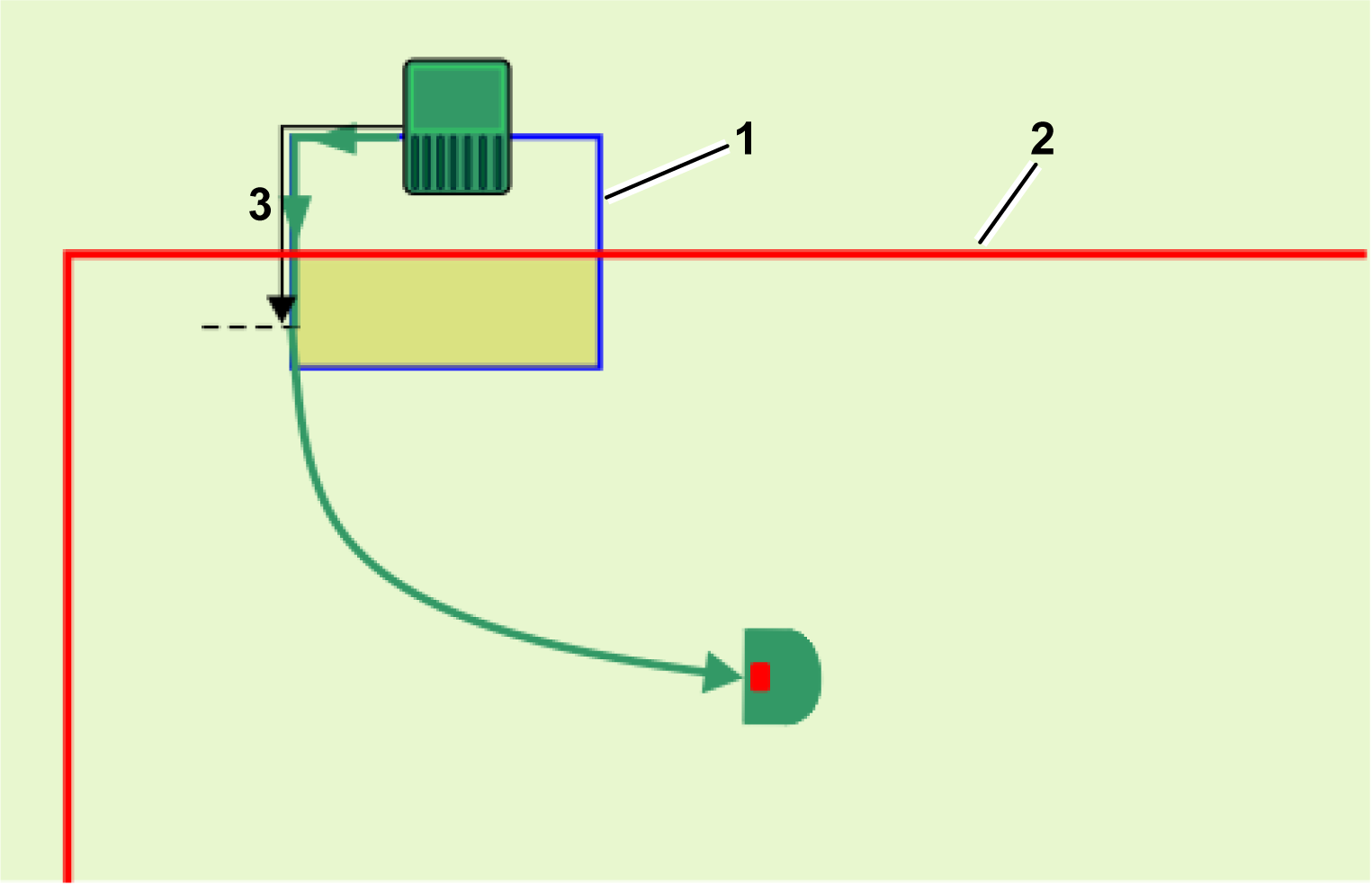
  3. Set distance for the robot to travel to enter the GPS working area and detect a GPS signal level of 2
The robot must detect a GPS signal level of at least 1.2 when it is at the station. When it leaves the station it will follow the loop wire for a distance until it has entered the GPS working area and it detects a GPS signal level of 2 .
Once the robot reaches the working area and detects a GPS signal level of 2, it stops and calculates the route towards the point at which it is scheduled to work. It sets the cutting height to the value set for the GPS working area, and then rotates away from the wire and uses GPS to navigate to where it is set to start working.
The Robot Uses 1 or More Paths to Navigate to a Working Area
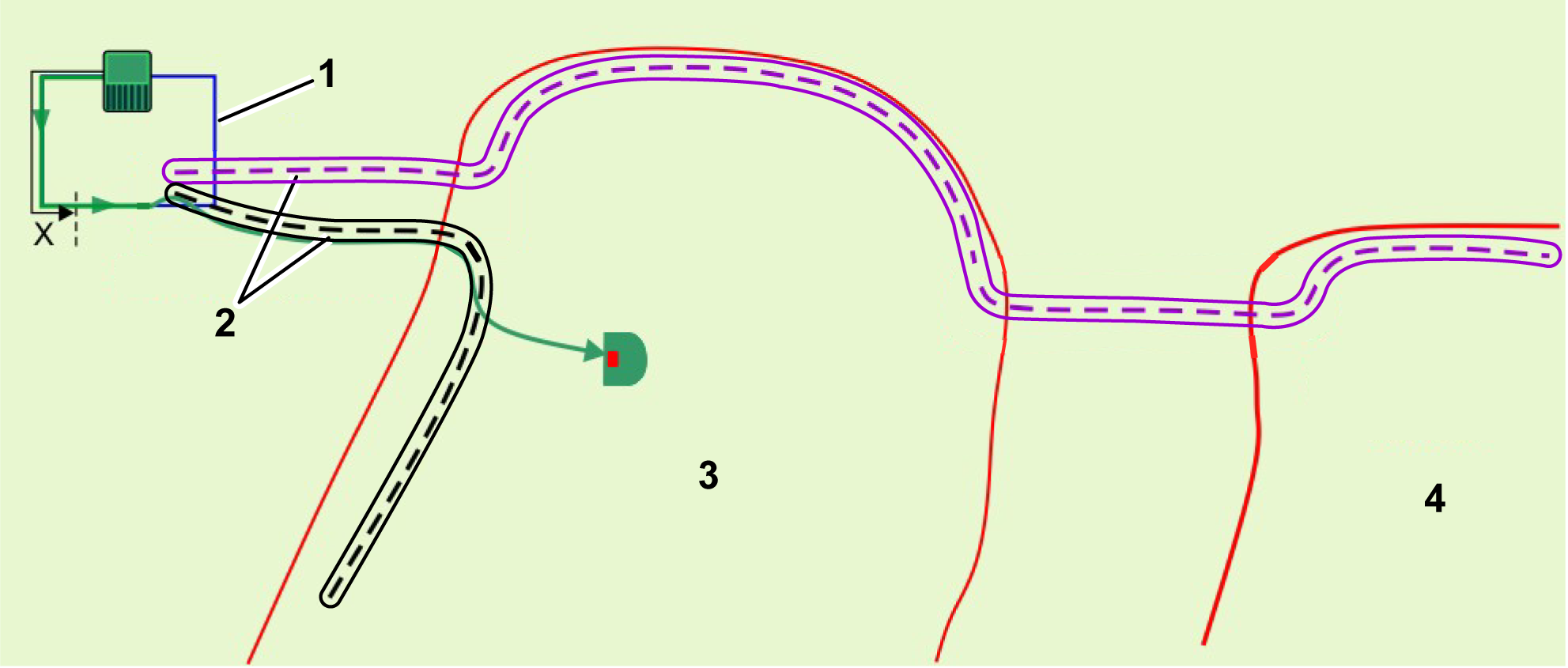
For large and complex installations, paths provide an efficient means of navigation to the working areas. Paths automatically create their own working areas, so at least one path or working area must overlap with the station loop wire.
The robot will leave the station and move along the track wire until it senses that it has entered a working area. The robot will then rotate away from the wire and move to the end of the path, which will then lead to the area where it needs to work. It will move along the path using a random offset from the path to ensure that traces are not left in the grass.
When the robot senses that it has entered the working area where it needs to work, it will move away from the path towards the point where it needs to start working.
Graphic
G587133
  1. Loop wire
  2. Path
  3. Working area 1
  4. Working area 2

Working

Once the robot has left the station, it will navigate to the next working area.
Working in a Simple Area
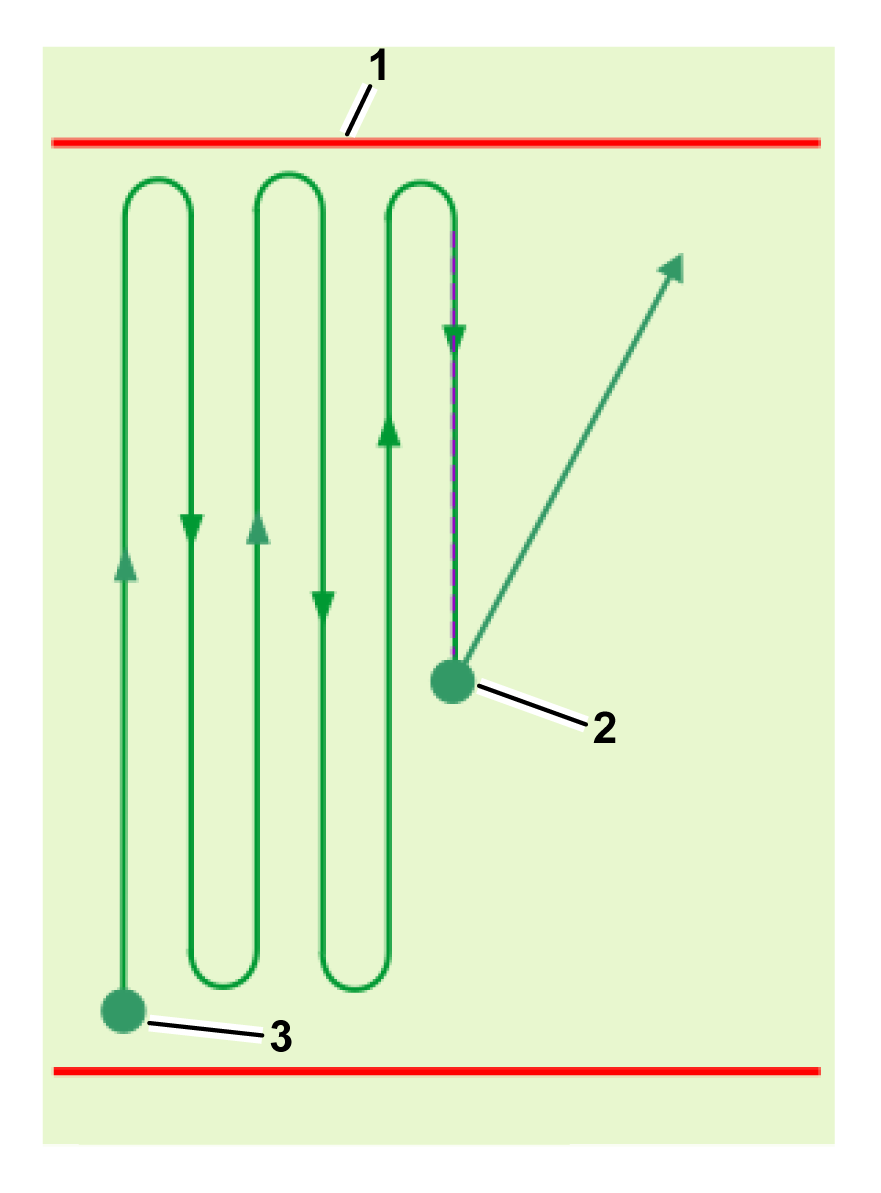
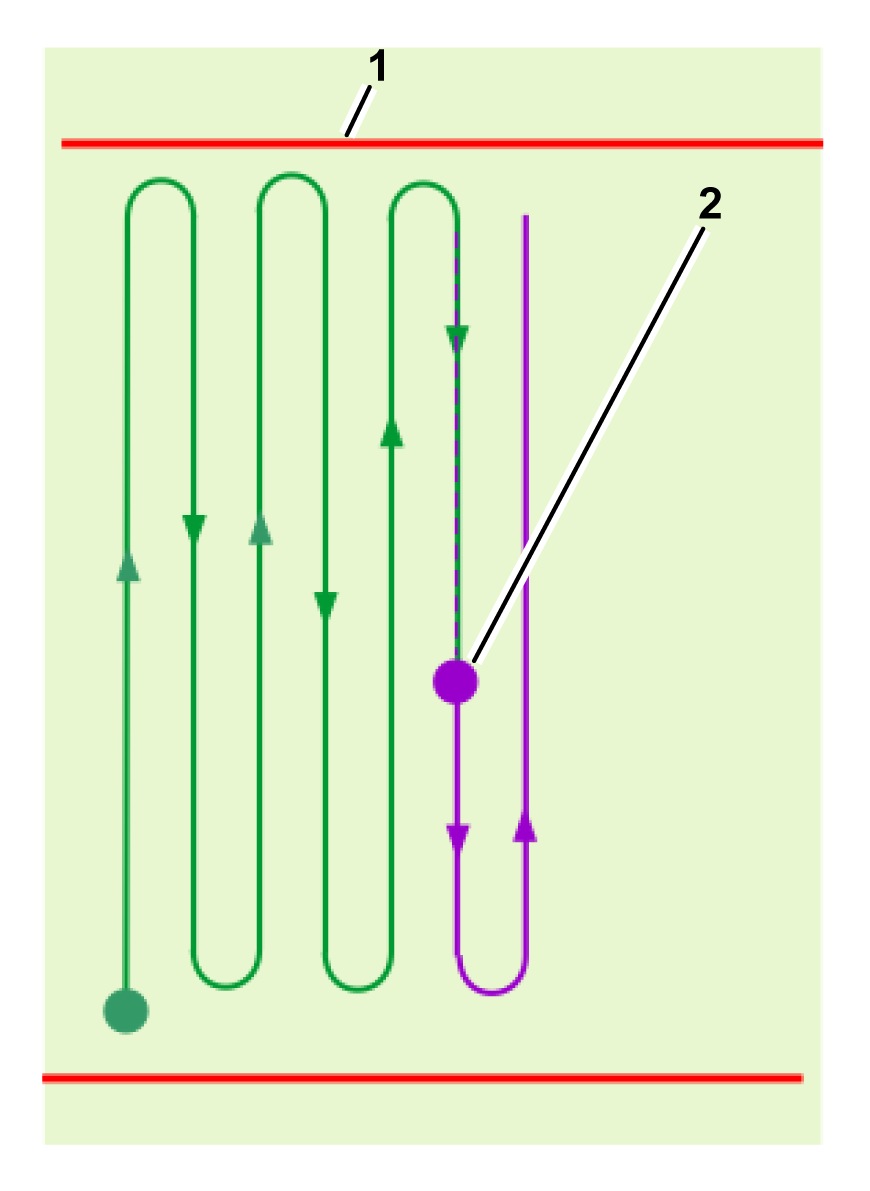
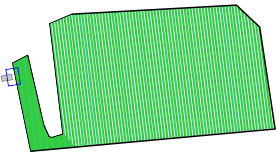
The robot will navigate to the start point of the pattern it has calculated for this area and start working using a default overlap of 10 cm (4 inches) for each line of the pattern. It will continue in this manner until it needs to return to the station.
Graphic
G578665
Graphic
G578666
  1. GPS working area boundary
  2. End/start point for cycle
  3. Start of cycle
The mowing pattern is executed over multiple working cycles. At the start of each new cycle, the robot resumes its pattern, by default, at the exact point where the previous cycle ended. It is also possible to resume mowing at the start of the line that was incomplete at the end of the previous cycle.
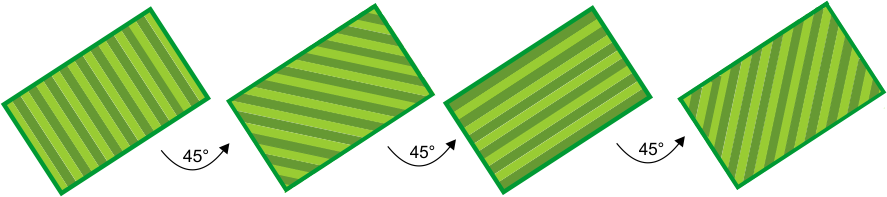
Once the pattern is complete, the robot will recalculate a new mowing pattern and will rotate the mowing direction to ensure optimal cutting quality and full coverage of the field. In the example shown in the following figure, 4 directions are specified with angles of 45° between them. It is possible to have fewer or add more (up to 8) mowing directions if required.
Graphic
G527677
Working in a Complex Area
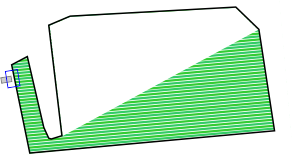
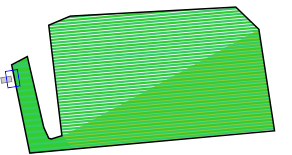
When operating in a more complex working area, the area is subdivided depending on the direction of the working pattern.
Graphic
G527678
The robot will first work in sub-area 1 in a particular direction. Coverage of a subarea can require more than one cycle.
Graphic
G527679
When subarea 1 has been completed, the robot will move directly to start mowing subarea 2 in the same direction. A new cycle is not started.
Graphic
G527680
When the entire area has been completed, the robot will return to the station to charge. It will then compute new subareas that will cover the working area when working in a new direction. A new working cycle will begin.
Graphic
G527681
When subarea 3 has been completed, the robot will move directly to start mowing subarea 4 in the same direction. A new cycle is not started.
During pattern mowing, the robot turns before the edge of the defined mowing area. It is important to make sure that the robot mows the border regularly.

Choosing Where to Work

When there are multiple mowing areas that need to be mowed, it is important that each zone is mowed according to its needs and during the times when it is available.
There are two methods by which the robot determines where to work:
  • Implementing sequential scheduling (recommended)
  • Defining the percentage of time to be spent in each zone
Note: It is recommended that you define a working schedule for the robot.
Sequential Scheduling
The easiest way in which to ensure that each zone and its border is mowed regularly is to implement sequential scheduling. When sequential scheduling is implemented, the robot will work in each zone in turn and mow the border when the mowing is complete. The robot works in conjunction with the defined working schedule.
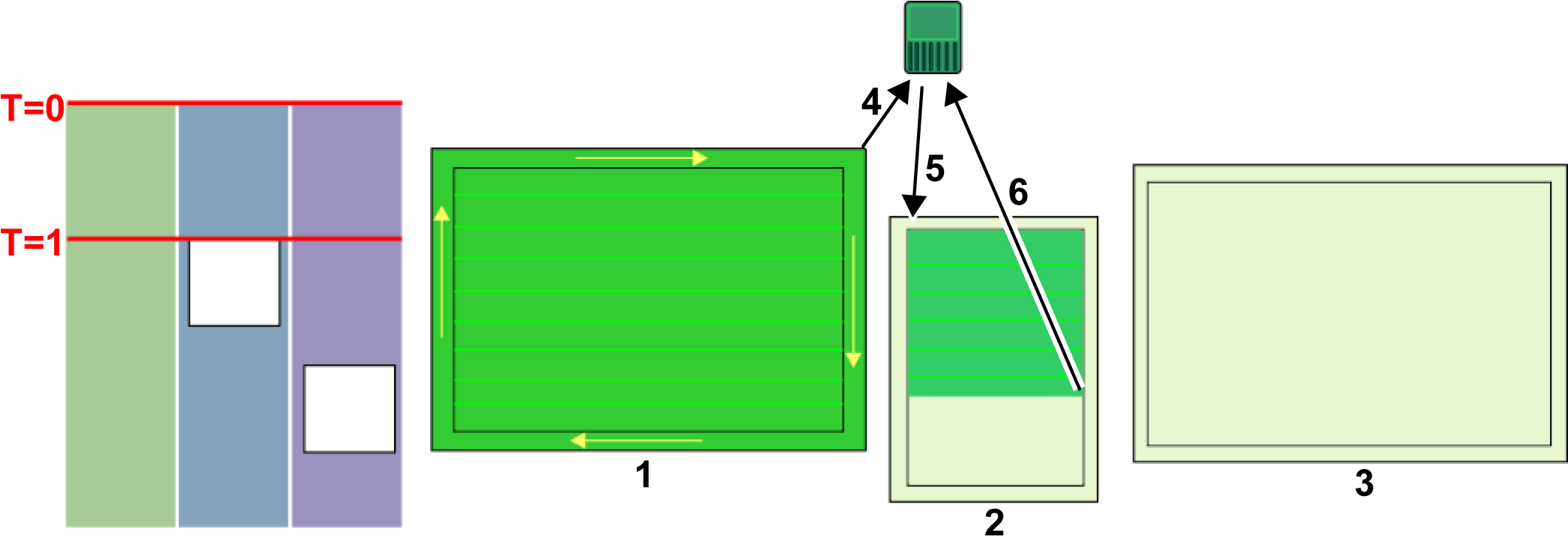
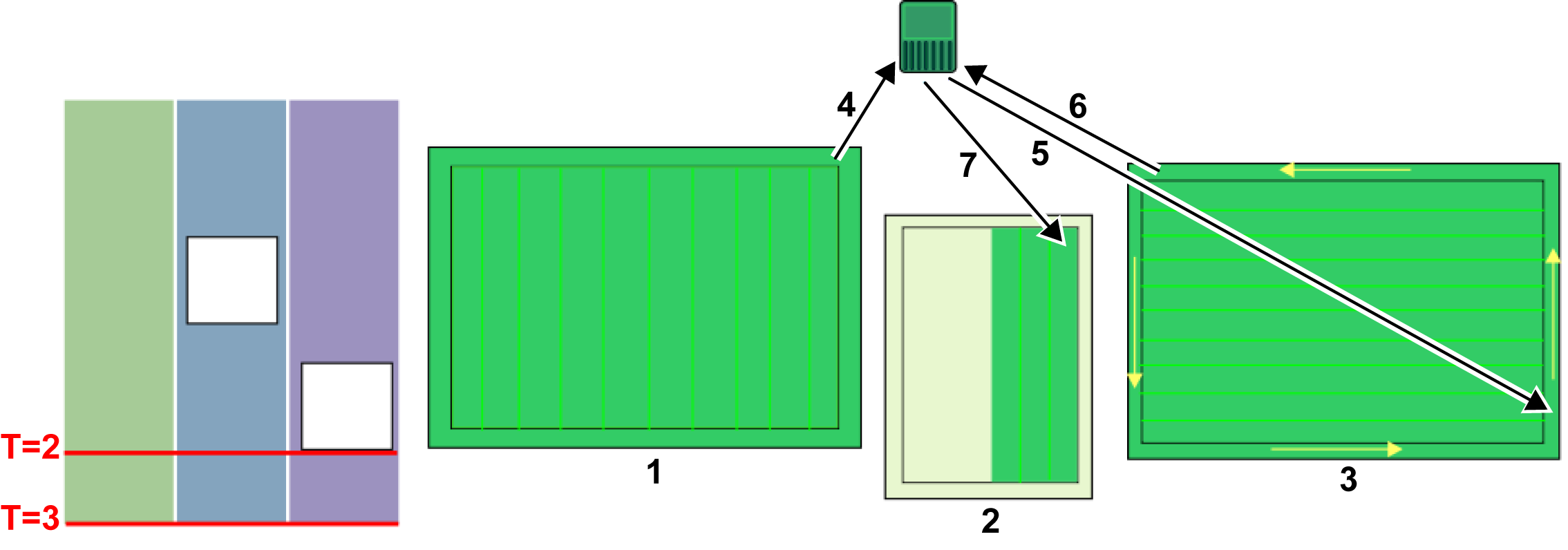
The process of sequential scheduling is shown in the following figure. Consider the installation setup with three separate zones to be mowed. The defined schedule dictates that zones 2 and 3 are unavailable for certain times of the day.
Graphic
G581271
At time T=0, the robot starts mowing zone . When the whole area has been mowed, it mows the border and then returns to the station . It then moves to zone and mows until time T=1. At this point, the defined schedule dictates that zone is unavailable. The robot returns to the station .
Note: When mowing the border, the robot follows the same direction as was used when the border was discovered.
Graphic
G581690
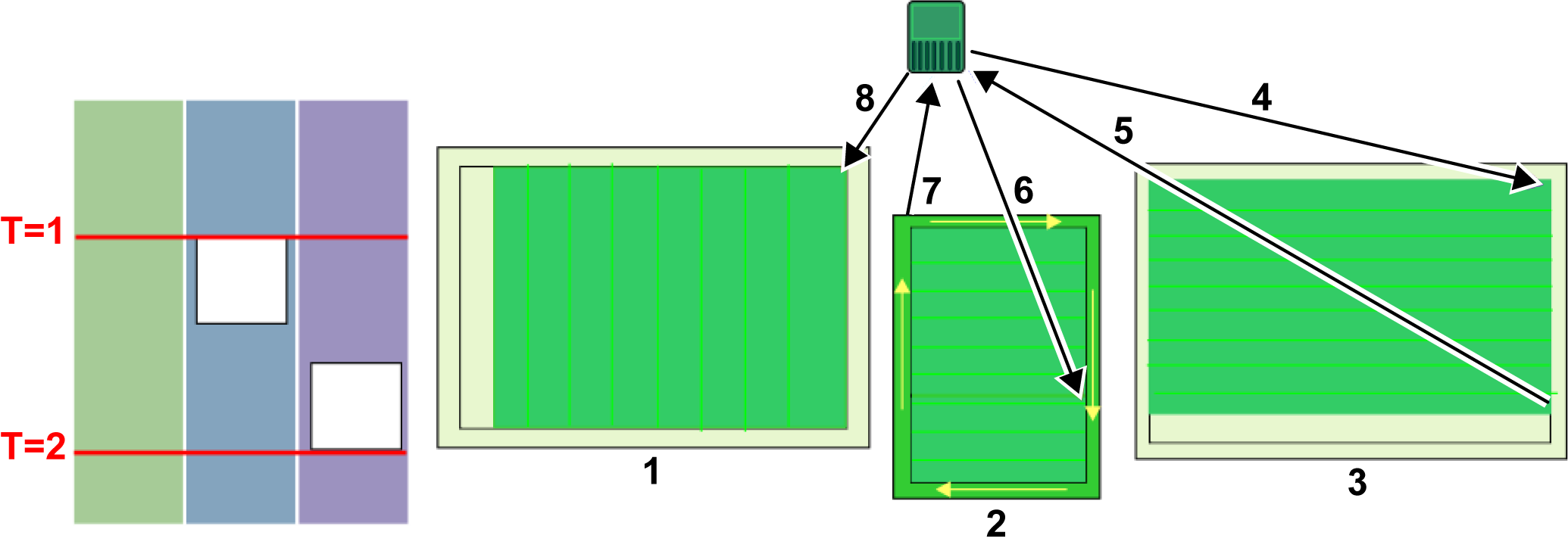
At the time T=1, the robot will move to zone and mow there until the schedule dictates that zone is unavailable. The robot will return to the station and then return to finish mowing zone . When the area has been mowed, it will mow the border before returning to a station . Since zone is still unavailable, it will move to zone and start mowing in a new direction.
At time T=2, zone is not complete when zone becomes available.
Graphic
G581691
At time T=2, the robot will complete mowing zone and then mow the border before returning to the station . It will then return to zone and complete mowing the zone and the border. It will return to the station and then start mowing zone in a new direction.
Note: It is strongly recommended to use sequential scheduling. If it is not used, it is necessary to define the percent of time to be spent working in a particular zone and to specify explicitly the number of times per week that the border is to be mowed.
Pattern Working with Defined Percentage Times
This option is not recommended.
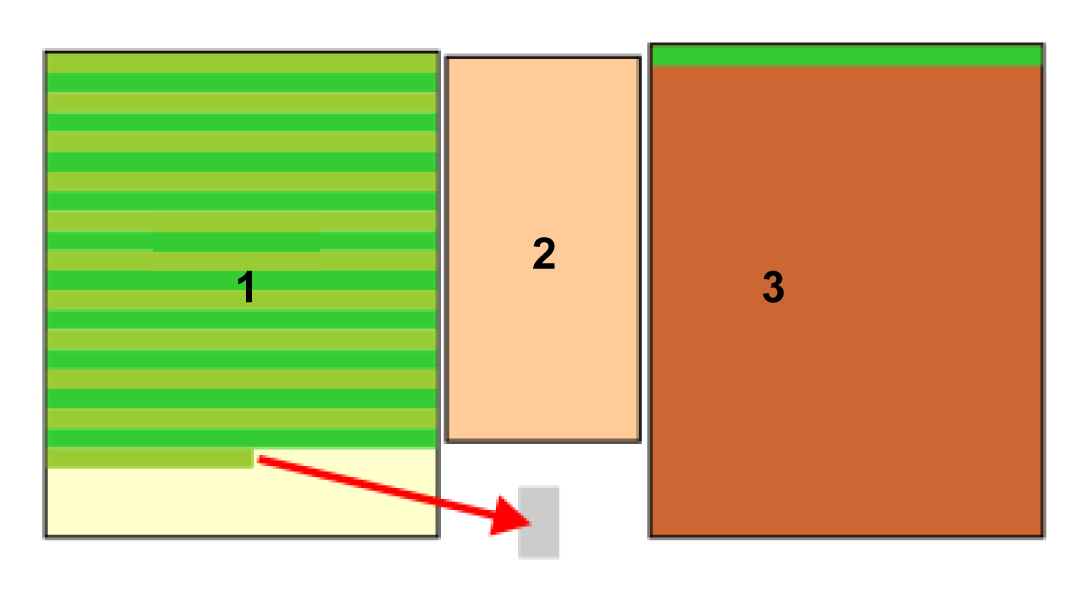
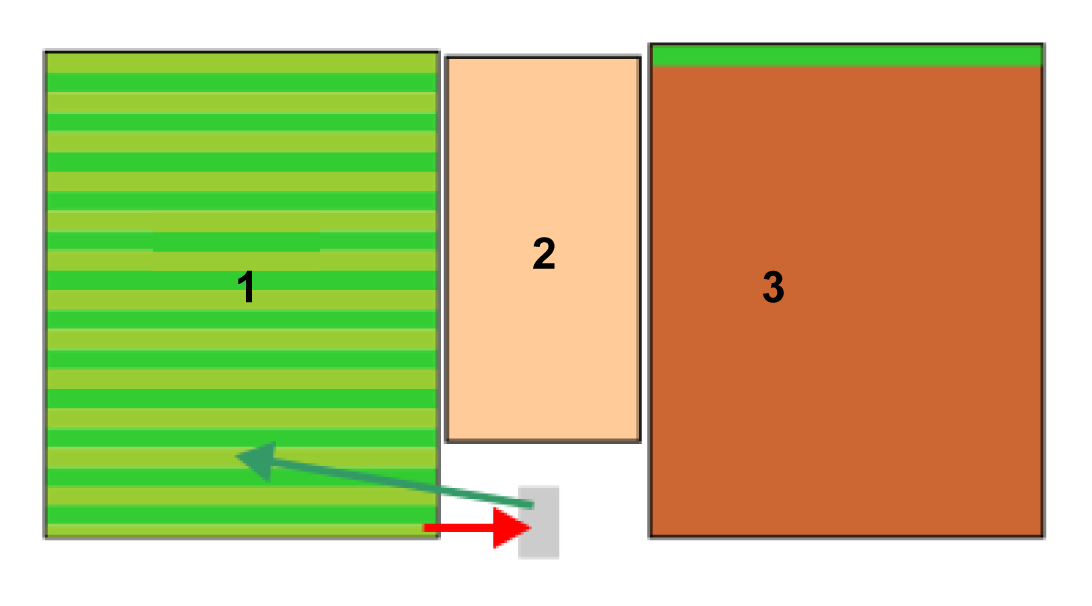
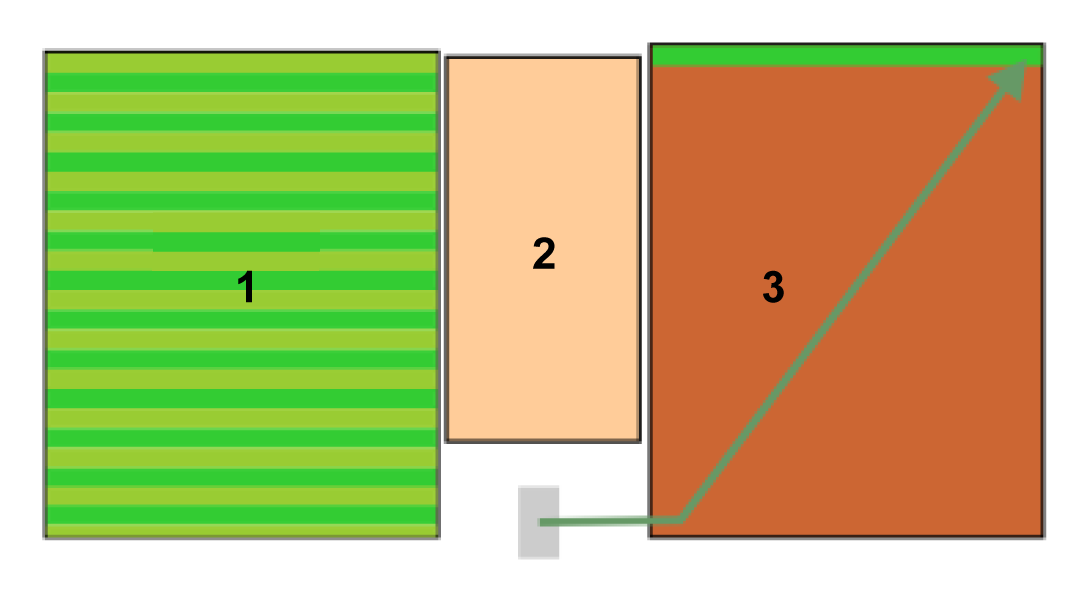
When working in pattern mode, the robot will preferentially complete the work in one zone before moving onto another, overriding the allotted percentage times.
Consider the situation where there are three zones:
  • Zone which has a percentage time of 40%
  • Zone which has a percentage time of 20%
  • Zone which has a percentage time of 40%
Graphic
G578668
The robot works in Zone , until the cycle ends when it needs to return to the station to charge. The work in Zone is not complete.
Graphic
G578669
When the robot resumes working, it will ignore the percentage times allotted and return to Zone to complete the pattern. When this pattern is complete, it will return to the station and a new cycle will begin.
Graphic
G578670
The robot will now start work on a new zone.
It will start working in Zone which has a higher percentage of time allotted. A new cycle is started.

Avoiding Obstacles when Mowing

This section describes how the robot deals with small obstacles within the working area. Larger, permanent, and hazardous obstacles have to be avoided by excluding them in the definition of the working area or through the use of NoGo zones.
When mowing normally, the robot moves at a speed of about 1 m/s, 3.5 km/h (3.3 ft/s, 2.2 mph). In areas where the grass is longer, the robot will automatically adapt its mowing mode by slowing down.
The robot can detect an obstacle (permanent or transitory) through a set of sonar sensors. Detection causes the robot to slow down and gently touch the obstacle with the pressure sensors on the bumper.
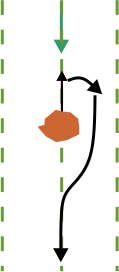
When the robot detects an obstacle when working in pattern mode, it will move backwards and try to navigate around it using small changes in angle. If this is successful, it will continue along the path it was following.
Graphic
G527689
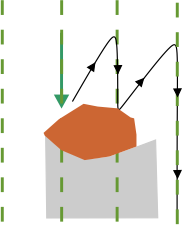
If this is not successful, it will move backwards and then to the next mowing lane, and continuing doing this until it has passed the obstacle.
Graphic
G527690
This means that there is a risk of areas behind the obstacles not being mowed. However, since the direction of mowing changes with each cycle, this may be remedied on subsequent cycles.

Mowing the Border

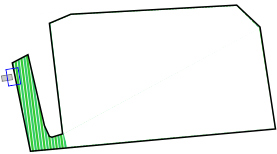
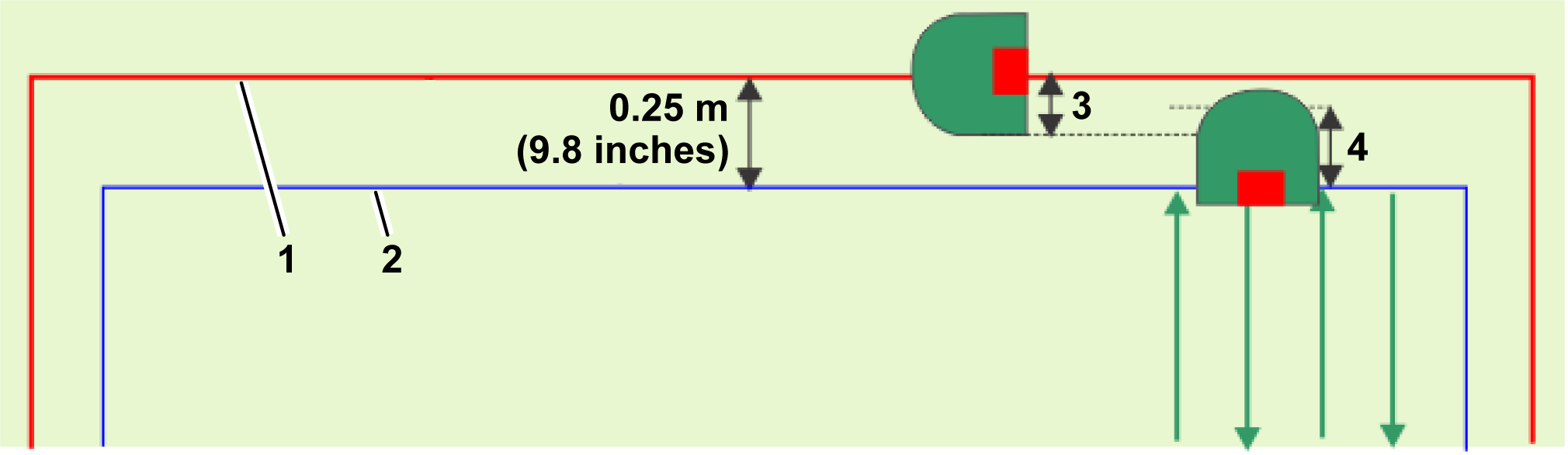
When the robot is mowing, the pattern does not reach to the very edge of the working area. It is therefore important to configure the robot to mow the border.
Graphic
G578671
  1. GPS working area
  2. Border of the working area
  3. 21 cm (8.3 inches)
  4. 36 cm (14.2 inches)
Each row in the pattern extends to the point where the smartbox tracking device for the robot reaches a distance of 0.25 m (9.8 inches) from the GPS working area boundary. The area that is mowed is contained within the GPS working area boundary.
The border can be mowed clockwise or counterclockwise. This can be changed in the app by selecting the gear in the upper-left corner > Border and changing the setting for the border.
The preferred method of mowing the border is to implement sequential scheduling. In this case, the border will be mowed automatically each time the robot completes mowing the working area.
Note: It is strongly recommended that you use sequential scheduling.
If sequential scheduling is not being used, the robot must be configured to mow the border at least 2 times per week.

Returning to the Station

The robot returns to the station:
  • When the battery needs charging
  • When the schedule dictates it
  • When a command has been issued either from the robot's interface, the web portal or the app
The manner in which the robot returns to the station depends on whether the working area is connected directly to the loop or whether paths are used to link working areas.
Returning to the Station Using Paths
Paths are used to enable navigation between different working areas.
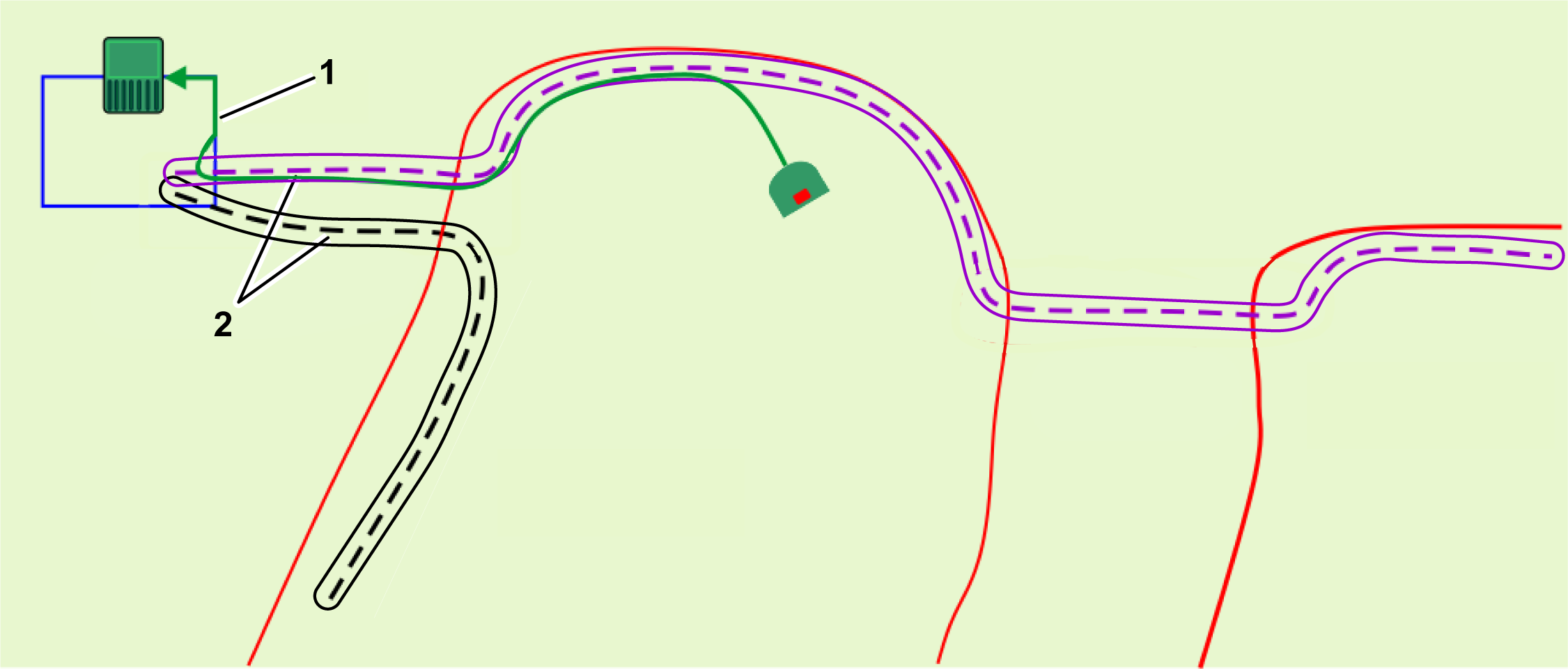
Graphic
G587201
  1. Loop wire
  2. Path
When the robot needs to return to the station, it will stop and calculate a route to the nearest position on a path. It is recommended to make the paths extend well into the working area to facilitate a short route back to a path to return to the station.
It will follow the path using a random offset from the actual path to avoid tracks in the grass. When the robot senses it has entered the station loop wire, it will turn and follow this wire to reach the station. Therefore, a path must overlap with the station loop wire.
Returning to the Station Directly From the Working Area
This situation is most likely to occur in those installations where there is a single working area that overlaps directly with the loop wire.
Graphic
G578672
  1. Loop wire
  2. GPS working area
A GPS return point must be located inside the area where the loop and the GPS working area intersect.
When the robot needs to return to the station, it will stop and calculate a route toward the GPS return point. When it detects that it has crossed the loop wire, it turns and follows the loop track wire until it reaches the station.
Note: It is recommended to use paths rather than GPS return points to guide the robot back to the station. With paths, the robot will move along the path using a random offset to ensure that traces are not left in the grass.


4G RTK Use Cases
 

A station loop is required for the robot to access the station. At least 1 GPS working area or path must be connected to the station loop. It is recommended to use paths rather than a GPS return point for the robot to use when returning back to the station.
Note: For a 4G RTK installation, the GPS signal level of 2 must be available if working areas and NoGo zones are to be accepted.

Single GPS Working Area

Graphic
G587135
  1. RTK base
  2. Loop wire
  3. Path (recommended)
  4. GPS working area
  • The site is open. No trees are restricting the view between the robots, the base, and the satellites.
  • The GPS signal level is 2 over the entire site.
  • The base can be mounted at a height of 4 m (13.1 ft) on a building.
  • The GPS working area or path intersects the station loop wire by at least 4 m x 4 m (13 ft x 13 ft). The loop is set as the neighboring parcel to the working area or the path.

Multiple GPS Working Areas Connected to the Loop

Graphic
G587147
  1. RTK base
  2. Loop wire
  3. Path (recommended)
  4. GPS working area 1
  5. GPS working area 2
  • 2 GPS working areas or paths are defined, each of which intersect with the station loop by 4 m x 4 m (13 ft x 13 ft). In both cases, the loop must be set as the neighboring parcel to the working areas or paths.
  • If Wi-Fi is being used for the corrections, it may be necessary to use a repeater.

Multiple GPS Working Areas Connected by Paths

Graphic
G587149
  1. Loop wire
  2. Path
  3. GPS working area 1
  4. GPS working area 2
  5. RTK base
  • In addition to the 2 GPS working areas, an additional GPS working area is created for the path, which has an overlap with the loop wire.
  • The path zone intersects with both of the working areas.
  • Paths are created to enable the robot to access both of the working areas.
  • The paths extend well into the working areas. This aids the robot when it navigates back to the station.
  • If Wi-Fi is being used for the corrections, it may be necessary to use a repeater.
  • An additional path that would join the 2 paths together could be added so that the robot could operate between the 2 areas.

Single Working Area, 3 Internal GPS Zones, and a Single NoGo Zone

Graphic
G587150
  1. RTK base
  2. Loop wire
  3. GPS working area
  4. NoGo zone
  5. Path (recommended)
  6. Internal GPS zone 1
  7. Internal GPS zone 2
  8. Internal GPS zone 3
  • 1 GPS working area encompasses the entire working area.
  • The GPS working area or path intersect the station loop wire by at least 4 m x 4 m (13 ft x 13 ft).
  • 3 internal GPS zones have been defined within the working area to optimize the working schedule of the robot. These do not need to intersect with the station loop wire.
  • 1 NoGo zone has been defined. This must be at least 5 m (16.4 ft) from the boundary of the primary GPS working area and follows the rules for an installation of an NoGo zone.

Separated Working Areas Connected by Paths

Graphic
G587151
  1. GPS working area 1
  2. Path 1
  3. Path 2
  4. GPS working area 2
  5. GPS working area 3
  • 3 separate working areas can be connected by paths.
  • 1 path passes through several GPS working areas.
  • The paths extend into the working area to facilitate the return to station from wherever the robot finds itself when it needs to return to the station.

Working Area Containing a Narrow Passage

Graphic
G580903
  1. GPS working area
In this example, the working area contains a passage where the distance between neighboring sections of the working area boundary is less than 5 m (16.4 ft). This arrangement can pose problems, and the configuration shown in the following figure should be adopted instead. In this configuration, 2 separate zones have been defined to avoid having neighboring sections that are too close.
Graphic
G580904
  1. GPS working area 1
  2. GPS working area 2

Paths Connecting GPS and Wired Working Areas

Graphic
G587165
  1. GPS working area 1
  2. Paths
  3. GPS working area 2
  4. Wired working parcel
Paths can be used to connect GPS working areas and wired parcels. A peripheral wire may be necessary in those situations where the GPS signal level is less than 2.


Troubleshooting
 

During a 4G RTK installation where there is no peripheral wire, the safety of the robot to operate only within its working area is critical. There are a number of configuration parameters set in the installation that are monitored. If any of these are modified, an error is generated and the robot will stop working.
These critical parameters are:
When a new mission is launched, any changes are detected automatically and the robot will not start the mission. The cause of the problem can be seen on the GeoLink summary screen on the interface of the robot. This should appear automatically, but can be viewed by selecting Technician's menu (9) > Infrastructure > GeoLink summary. Address any issues that lack a checkmark. This information can also be viewed on the app by selecting the Technician menu button and selecting TURF PRO NAV. Address any issues that are present with a yellow triangle or red circle on the screen.
For details on all the messages that appear on this screen, refer to your Technical Manual.

Troubleshooting RTK GPS Installations

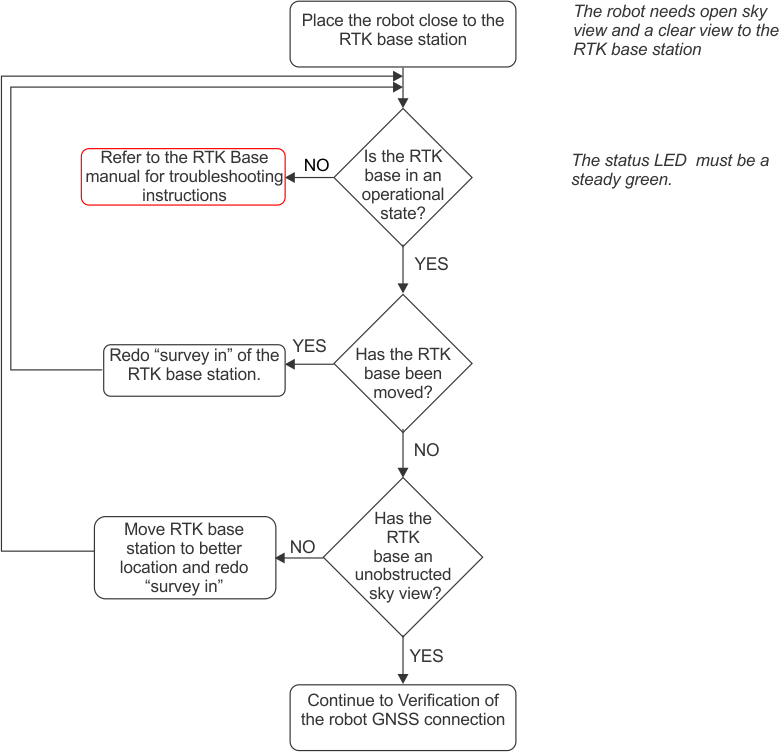
This procedure is used to identify the problem when the GPS signal quality is too low. Signal quality levels can be seen by using Technician's menu (9) > GPS RTK. This procedure consists of a number of stages which should be carried out in order.
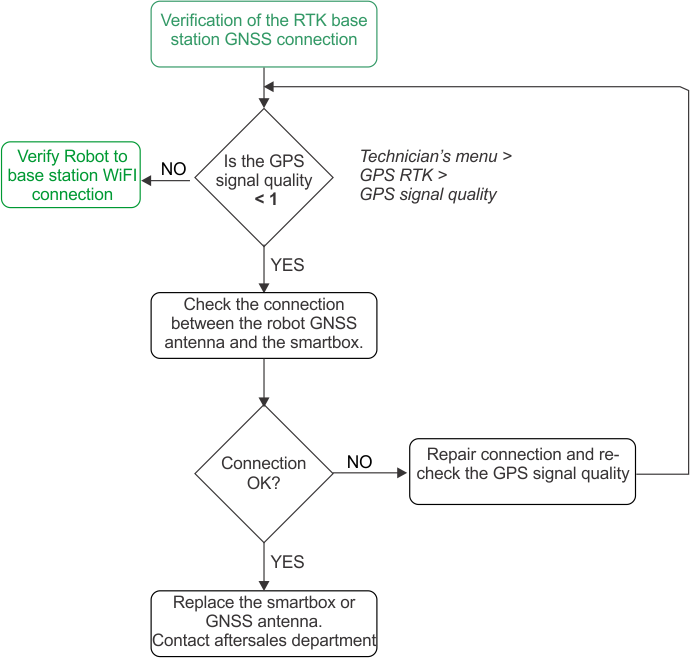
Verifying the RTK Base Station GNSS Connection
Note: After each action, always wait a few minutes to verify if GPS signal quality has increased to RTK quality level > 1.2.
Graphic
G527792
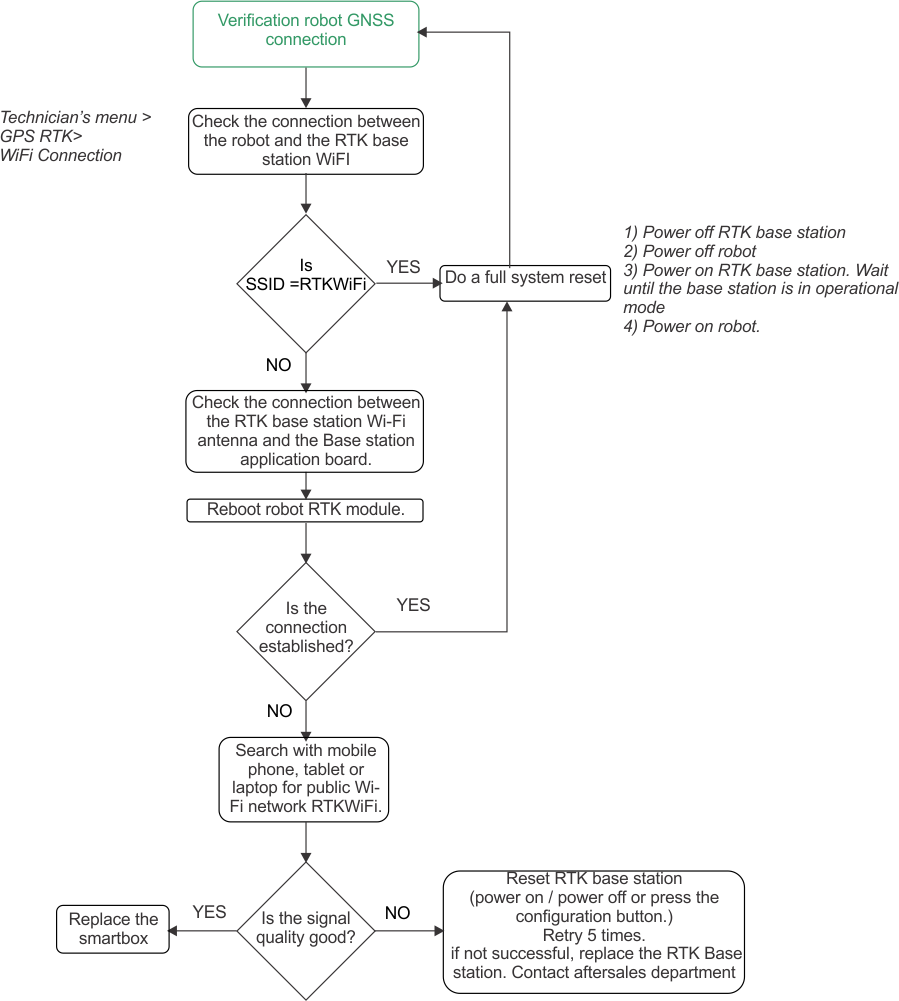
Verifying the Robot GNSS Connection
Note: After each action, always wait a few minutes to verify if GPS signal quality has increased to RTK quality level > 1.2.
Graphic
G527793
Verifying the Robot to RTK Base Station Wi-Fi Connection
Note: After each action, always wait a few minutes to verify if GPS signal quality has increased to RTK quality level > 1.2.
Graphic
G527794

Appendices

Inactive State
A condition may arise which causes the robot to stop its autonomous mowing mission and enter an inactive state. Reasons for this could be:
  • The robot has encountered a problem and has issued an alarm.
  • The mission has been manually stopped.
In both these situations there are mechanisms for managing the power consumption of the robot.
Alarm
Graphic
G527797
When the robot encounters a problem it will register an alarm, which will eventually require manual intervention.
If the alarm has not been cleared after 15 minutes, the robot will enter sleep mode. In this state the robot will reduce its power consumption, by shutting down everything apart from the modem.
Note: Sleep mode will only be enabled if the robot has been switched on for more than one hour.
It will continue in sleep mode for 2 days, or until the battery reaches a very low level, after which it will switch itself OFF.
This will require manual intervention: clear the alarm and resume the autonomous work mode, or push the robot to a charging station to charge the battery.
Mission Stopped
Graphic
G527798
In this case, the robot will enter into an idle state. By default, after 15 minutes of being idle, the robot will enter the sleep mode described above, in which the power consumption is reduced to a minimum. It will continue in sleep mode for 2 days, or until the battery reaches a very low level, after which it will switch itself OFF.
Before resuming working, the robot will perform a self test, to check the integrity of the entire system (including electronics, sensors, mechanics and software).
  • If the result of the self test is successful, the robot will resume the autonomous working state.
  • If the result of the self test is not successful, the robot will register an alarm, which will require and intervention.