









Introduction

This robotic lawn mower is intended to be used by professional, hired operators for autonomous, programmable turf care in commercial applications. It is designed primarily for cutting grass on well-maintained turf on residential or commercial properties that meet Toro requirements detailed in Autonomous Operating Area Criteria . Using this product for purposes other than its intended use could prove dangerous to you and bystanders.

Read this information carefully to learn how to operate and maintain your product properly and to avoid injury and product damage. You are responsible for operating the product properly and safely.

Visit www.Toro.com for more information, including safety tips, training materials, accessory information, help finding a dealer, or to register your product.

Whenever you need service, genuine Toro parts, or additional information, contact an Authorized Service Dealer or Toro Customer Service and have the model and serial numbers of your product ready. Figure 1 identifies the location of the model and serial numbers on the product. Write the numbers in the space provided.

Important: With your mobile device, you can scan the QR code on the serial number decal (if equipped) to access warranty, parts, and other product information.

g518004

Safety-Alert Symbol

The safety-alert symbol (Figure 2) shown in this manual and on the machine identifies important safety messages that you must follow to prevent accidents.

g000502

The safety-alert symbol appears above information that alerts you to unsafe actions or situations and is followed by the word DANGER, WARNING, or CAUTION.

DANGER indicates an imminently hazardous situation which, if not avoided, will result in death or serious injury.

WARNING indicates a potentially hazardous situation which, if not avoided, could result in death or serious injury.

CAUTION indicates a potentially hazardous situation which, if not avoided, may result in minor or moderate injury.

This manual uses two other words to highlight information. Important calls attention to special mechanical information and Note emphasizes general information worthy of special attention.

Modes of Operation

This machine has been designed to perform two modes of operation:

  • Manual Mode: Mode of machine operation in which machine functions are controlled by an operator.

  • Autonomous Mode: A mode of machine operation in which a machine performs functions related to its defined tasks without operator interaction, but instead its operation is monitored by a qualified supervisor.

    Note: Refer to Terminology for Autonomous operation definitions.

Terminology

Advisory—A message that informs the user of an operator error or anything that may cause a job to pause or halt and may require the user to intervene.

App—An abbreviation for software application. A computer program on a mobile device that performs one or more tasks. Also called application or mobile app.

Autonomous—Automated machine functions that operate in autonomous mode during all of the machine’s operating cycles

Autonomous control system (ACS)—A system that controls all robotic functions.

Autonomous mode—A mode of machine operation in which a machine performs functions related to its defined tasks without operator interaction, but instead its operation is monitored by a qualified supervisor.

Base station—In the context of external land surveying, it is a GPS receiver at an accurately known, fixed location used to derive correction information for nearby portable GPS receivers. See also Global Positioning System; GPS receiver.

Boundary—Something that indicates or fixes a limit or extent. For a robot, it is the outside, no-cross line of an operating area, transit path or zone, or exclusion area. Also called perimeter. See also operating area; exclusion area.

Exclusion area—An area recorded by the operator that the robot shall not enter.

Fault—The result of a mechanical, sensor, or software error, which requires service or correction of the machine, sensor, or software code.

Global Navigation Satellite System (GNSS)—A general term describing the global set of constellations used for GPS positioning. See also Global Positioning System.

Global Positioning System (GPS)—A satellite-based navigation system that uses a digital signal from each satellite to send data to a receiver. This receiver can then determine its exact range from the satellite, as well as the geographic position (GP) of the satellite, which is the location on the earth directly below the satellite.

GNSS antenna—a device used for receiving and expanding radio signals sent by distinct frequencies coming from GPS satellites. See also Global Navigation Satellite System (GNSS); Global Positioning System (GPS).

GNSS receiver—A device that can receive information from GNSS satellites and then calculate the geographical position of the device. Also called satellite navigation device. See also Global Navigation Satellite System.

Job—The work being performed by a robot at one time inside an operating area.

Localization—The process of determining where a mobile robot is with respect to its environment. Localization is a most fundamental competency required by robot as the knowledge of its location is necessary for making decisions about future actions.

Manual mode—Mode of machine operation in which machine functions are controlled by an operator.

Mobile app—See App.

Navigation—The ability of a robot to determine its own position in its frame of reference and then to plan a path toward some goal location.

Obstacle—Object or ground condition which can cause harm, or is harmed, if it comes into contact or collision with the machinery.

Obstacle detection—The process of detecting objects or terrain types that impede a robot’s motion.

Operating area—An area in which the robot can run autonomously. The area inside a boundary. Operating may be interchangeable with adjectives that describe the work, such as mowing, clearing, and trenching.

Path—A route that a robot is programmed to travel. As part of a job, a path can connect multiple fields or paths.

Perimeter—See Boundary.

Real-time kinematics (RTK)—A real-time correction of position accuracy (less than 1 inch or 3 cm) using satellite messages to a moving machine, compared to that of a stationary base station. RTK information can be sent to the machine by either a cellular connection or radio waves.

Robot—A machine designed to execute one or more tasks automatically. For example, a robot can sense, compute, and act. It must be able to have sensors that provide it with input and insights about the physical space around them. It must be able to compute to make decisions based on its programming and inputs. To be defined as a robot, it must be able to move in or change the physical world in some manner.

Satellite navigation device—See GPS receiver.

Sensing—The feedback from the environment of the robot, which enables the robot to react to its environment. Sensory inputs may come from a variety of sensor types.

Sensor—A device that responds to physical stimuli (including, but not limited to, heat, light, sound, pressure, magnetism, and motion) and transmits the resulting signal or data providing a measurement, operating a control, or both. For example, a sensor can estimate the condition of a robot and its environment. This information is sent to a controller to enable the appropriate behavior. A robot requires extensive information about its environment to function effectively.

User Definitions

Qualified machine supervisor (Supervisor)

One or more individuals having the responsibility of overseeing the operation of the machine(s). A supervisor will have demonstrated:

  • Adequate machine control

  • A general understanding of the energy, powertrain, and control systems of the machine(s)

  • Been trained and read and understood the machine operator's manuals

Qualified manual operator (Operator)

One or more customer employees having the responsibility of manually driving the machine while it is in manual mode.

On-product emergency stop

An emergency-stop switch (e-stop) that is located on and attached to the machine.

Mobile device

A supervisor’s mobile device (e.g., smart phone or tablet) that connects to the machine for programming, controlling, and monitoring the machine while it operates in autonomous mode. The device serves as the remote stop device that the supervisor must carry for stopping all functions of the machine(s) on command when necessary.

Line of sight supervision: A supervisor’s ability to monitor the operation of the machine and surrounding conditions visually without obstruction.

The supervisor is required to remain in line of sight with the machine during autonomous operations. During autonomous operation, the supervisor must be able to see the machine operate.

Autonomous Site Assessment Criteria

Note: For optimal performance, the operating area should consist of large areas (1000 m² or a quarter of an acre and larger) of turf with few obstacles.

Before enabling the machine to operate in autonomous mode, the operating area needs to meet the requirements in Autonomous Operating Area Criteria .

The first time the machine is brought to a job site, review the information stated in the Initial Autonomous Site Assessment section.

When the machine is brought back to a recurrent autonomous site, the operating area must be inspected every time. It is the Supervisor’s responsibility to verify that no new permanent objects need to be excluded, remove all temporary obstacles, and ensure that all new exclusion areas have been recorded prior to autonomous operation. Refer to Recurrent Autonomous Site Assessment.

It is a violation of California Public Resource Code Section 4442 or 4443 to use or operate the engine on any forest-covered, brush-covered, or grass-covered land unless the engine is equipped with a spark arrester, as defined in Section 4442, maintained in effective working order or the engine is constructed, equipped, and maintained for the prevention of fire.

The enclosed engine owner's manual is supplied for information regarding the US Environmental Protection Agency (EPA) and the California Emission Control Regulation of emission systems, maintenance, and warranty. Replacements may be ordered through the engine manufacturer.

Please refer to the engine manufacturer’s information included with the machine.

Gross or Net Torque: The gross or net horsepower (or torque) of this engine was laboratory rated by the engine manufacturer in accordance with the Society of Automotive Engineers (SAE) J1940 or J2723. As configured to meet safety, emission, and operating requirements, the actual engine horsepower (or torque) on this class of mower will be significantly lower.

This device complies with Part 15 of the FCC Rules. Operation is subject to the following two conditions: (1) this device may not cause harmful interference, and (2) this device must accept any interference received, including any interference that may cause undesired operation.

Electromagnetic Compatibility Certification
CONTAINS FCC ID: OF7-NVG2IC: 3575A-NVG2
CONTAINS FCC ID: 2ANOS-S201AIC: 27966-SBV0
GraphicWARNING
The user that changes or modifications not expressly approved by Toro could void the user’s authority to operate the equipment.

Note: This equipment has been tested and found to comply with the limits for a Class B digital device, pursuant to part 15 of the FCC Rules. These limits are designed to provide reasonable protection against harmful interference in a residential installation. This equipment generates, uses and can radiate radio frequency energy and, if not installed and used in accordance with the instructions, may cause harmful interference to radio communications. However, there is no guarantee that interference will not occur in a particular installation. If this equipment does cause harmful interference to radio or television reception, which can be determined by turning the equipment off and on, the user is encouraged to try to correct the interference by one or more of the following measures:

  • Reorient or relocate the receiving antenna.

  • Increase the separation between the equipment and receiver.

  • Connect the equipment into an outlet on a circuit different from that to which the receiver is connected.

  • Consult the dealer or an experienced radio/TV technician for help.

This device contains licence-exempt transmitter(s)/receiver(s) that comply with Innovation, Science and Economic Development Canada’s licence-exempt RSS(s). Operation is subject to the following two conditions: (1) This device may not cause interference. (2) This device must accept any interference, including interference that may cause undesired operation of the device.

This radio transmitter [IC: 3575A-NVG2] has been approved by Innovation, Science and Economic Development Canada to operate with the antenna types listed below, with the maximum permissible gain indicated. Antenna types not included in this list that have a gain greater than the maximum gain indicated for any type listed are strictly prohibited for use with this device.

ManufacturerThe Toro Company
Antenna161-7450
DescriptionAntenna–Cell/WiFi
TypeOmnidirectional
Peak Gain (dBi)3.2

Warning

CALIFORNIA

Proposition 65 Warning

The engine exhaust from this product contains chemicals known to the State of California to cause cancer, birth defects, or other reproductive harm.

Battery posts, terminals, and related accessories contain lead and lead compounds, chemicals known to the State of California to cause cancer and reproductive harm. Wash hands after handling.

Use of this product may cause exposure to chemicals known to the State of California to cause cancer, birth defects, or other reproductive harm.

Safety

General Safety

This machine is capable of amputating hands and feet and of throwing objects. Always follow all safety instructions to avoid serious personal injury or death.

General Safety Information

  • Read, understand, and follow all instructions and warnings in this guide and on the machine, engine, and attachments.

  • Wear appropriate personal protective equipment, such as safety glasses; long pants; substantial, slip-resistant footwear; and hearing protection. Tie back long hair and avoid loose clothing and loose jewelry, which may get tangled in moving parts.

  • This machine produces sound levels in excess of 85 dBA at the operator’s ear and can cause hearing loss through extended periods of exposure. Wear hearing protection when operating this machine.

  • Do not operate the machine near drop-offs, ditches, embankments, water, or other hazards.

  • Keep bystanders, including coworkers and children, out of the operating area.

  • Do not put your hands or feet near moving parts.

  • Do not modify the machine or software in any way.

  • Do not put anything on the machine.

  • Do not modify or override the machine controls or safety devices.

  • Do not operate the machine without all safety shields, guards, switches, and other devices in place and in proper working condition.

  • Park the machine on level ground, disengage the drives, engage the parking brake, shut off the engine, and remove the key. Wait for all moving parts to stop before leaving the operator’s position. Allow the machine to cool before servicing, adjusting, fueling, cleaning, or storing.

Manual Mode Safety Information

  • This mower was designed for one operator only.

  • Do not carry passengers.

  • Practice operating the machine without the sulky until you are familiar with the controls.

  • Practice operating the machine with the sulky attached on large, open, level terrain with no obstacles present before use. The sulky will affect the machine operation, especially on slopes, when turning, and when stopping.

  • For operators over 113 kg (250 lb), it is recommended to use the pneumatic tire assembly (Part No. 103-3798) for the sulky.

Autonomous Mode Safety Information

Important: This machine uses GNSS and RTK technology to establish the location of the machine. The machine needs to have a clear view of the sky to receive information from positioning satellites. While GNSS with RTK offers improved accuracy, it is sensitive to signal obstructions, particularly in urban areas with tall buildings or dense foliage.

Note: If you experience any unexpected behavior from your machine, please contact an Authorized Service Dealer.

  • Do not stand, sit, or ride on the machine or allow others to do so while the machine is in autonomous mode.

  • The sulky must be in the stowed position or removed from the machine before autonomous operations can begin.

  • Keep bystanders, including coworkers, a minimum of 6 m (20 ft) away from the machine while operating autonomously.

  • Keep the mobile device on the supervisor and easily accessible when the machine is operating autonomously.

  • Ensure the operating area meets the criteria in the Autonomous Operating Area Criteria .

  • Autonomous mode requires that a qualified supervisor remain within the line of sight (see “Line of sight supervision” in User Definitions) of the machine at all times while operating in autonomous mode.

  • For the first mowing of all planned paths, pay extra attention to ensure that the recording and path planning are successfully completed. Make sure the machine can successfully complete the planned job without compromising performance and that the planned path does not lead to unsafe operation during autonomous operation (i.e., the planned path does not allow the machine to exceed the limits as defined by the site assessment).

Before Operation Safety

  • Do not operate the mower when coworkers, people (especially children), or pets are in the area. Shut off the machine and attachment(s) if anyone enters the area.

  • Do not operate the machine without safety devices in place and in proper working condition. Frequently check for worn or deteriorating components and replace them with the manufacturer’s recommended parts when necessary.

  • Check the radar sensors and make sure they are clean of dirt, grass, leaves, and other debris.

  • Know how to stop the machine and prevent any parts from moving.

Fuel Safety

Danger

Gasoline is extremely flammable and vapors are explosive.

A fire or explosion from gasoline can burn you, others, and cause property damage.

  • Fill the fuel tank outdoors on level ground, in an open area, when the engine is cold. If fuel is spilled, Do not attempt to start the engine. Move away from the area of the spill and avoid creating any source of ignition until fuel vapors have dissipated.

  • Do not refill the fuel tank or drain the machine indoors or inside an enclosed trailer.

  • Never smoke when handling gasoline, and stay away from an open flame or where gasoline fumes may be ignited by spark.

  • Add fuel before starting the engine. Never remove the cap of the fuel tank or add fuel when engine is running or when the engine is hot.

  • Store gasoline in an approved container and keep it out of the reach of children.

  • Do not operate without entire exhaust system in place and in proper working condition.

  • In certain conditions during fueling, static electricity can be released and cause a spark, which can ignite gasoline vapors.

    • Do not fill containers inside a vehicle or on a truck or trailer bed with a plastic liner. Always place containers on the ground and away from your vehicle before filling.

    • When practical, remove gas-powered equipment from the truck or trailer and refuel the equipment with its wheels on the ground. If this is not possible, then refuel such equipment on a truck or trailer from a portable container, rather than from a gasoline dispenser nozzle.

    • If a gasoline dispenser nozzle is used, keep the nozzle in contact with the rim of the fuel tank or container opening at all times until fueling is complete. Do not use a nozzle lock-open device.

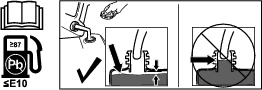
  • Do not overfill the fuel tank. Fill the fuel tank to the bottom of the filler neck. The empty space in the tank allows gasoline to expand. Overfilling may result in fuel leakage or damage to the engine or emission system.

  • Gasoline is harmful or fatal if swallowed. Long-term exposure to vapors may cause serious injury and illness.

    • Avoid prolonged breathing of vapors.

    • Keep your face away from the nozzle and the gas tank/container opening.

    • Keep away from eyes and skin.

  • To help prevent fires:

    • Keep the engine and engine area free from accumulation of grass, leaves, excessive grease or oil, and other debris that can accumulate in these areas.

    • Clean up oil and fuel spills and remove fuel-soaked debris.

    • Allow the machine to cool before storing the machine in any enclosure. Do not refuel or store the machine and fuel container where there is an open flame, spark, or pilot light such as on a water heater or other appliance.

During Operation Safety

The operator and/or supervisor must use their full attention when operating the machine. Do not engage in any activity that causes distractions; otherwise, injury or property damage may occur.

Warning

Operating engine parts, especially the muffler, become extremely hot and can cause severe burns on contact. Debris, such as leaves, grass, and brush, can catch fire.

Clean the machine as stated in the Maintenance section. Keep the engine and engine area free from accumulation of grass, leaves, excessive grease or oil, and other debris that can accumulate in these areas.

  • Check the radar sensors and make sure they are clean of dirt, grass, leaves, and other debris.

  • Operate the engine only in well-ventilated areas. Exhaust gases contain carbon monoxide, which is an odorless deadly poison.

  • Do not operate the machine while ill, tired, or under the influence of alcohol or drugs.

  • Operate the machine only in good visibility and appropriate weather conditions. Do not operate the machine when there is the risk of lightning.

  • Keep away from holes, ruts, bumps, rocks, and other hidden hazards. Use care when approaching blind corners, shrubs, trees, tall grass, or other objects that may hide obstacles or obscure vision. Uneven terrain could overturn the machine or cause the operator to lose their balance or footing.

  • Start the engine with your feet well away from the blades.

  • Do not operate the machine without all safety shields, guards, switches, and other devices in place and in proper working condition.

  • Keep your hands and feet away from moving parts.

  • Never raise the deck with blades running.

  • Stop the blades, slow down, and use caution when crossing surfaces other than grass and when transporting the mower to and from the mowing area.

  • Be alert, slow down, and use caution when making turns. Do not mow in reverse unless it is absolutely necessary. Always look down and behind you before moving the machine in reverse.

  • Park the machine on level ground, shut off the engine, wait for all moving parts to stop, and remove the key for the following instances:

    • Before checking, cleaning, or working on the mower.

    • After striking a foreign object or abnormal vibration occurs (inspect the mower for damage and make repairs before restarting and operating the mower).

    • Before clearing blockages.

    • Whenever you leave the mower. Do not leave a running machine unattended.

  • Shut off the engine and wait for all moving parts to stop before refueling and before making height-of-cut adjustments.

  • Tragic accidents can occur if the operator and/or supervisor is not alert to the presence of children. Children are often attracted to the machine and the mowing activity. Never assume that children will remain where you last saw them.

    • Keep children out of the mowing/operating area and under the watchful care of another responsible adult, not the operator or supervisor.

    • Be alert and shut off the machine if children enter the area.

    • Before and while backing up or changing direction, look behind, down, and side-to-side for small children.

    • Never allow children to operate the machine.

    • Do not carry children, even with the blades shut off. Children could fall off and be seriously injured or interfere with the safe operation of the machine. Children that have been given rides in the past could suddenly appear in the operating area for another ride and be run over or backed over by the machine.

  • If the machine rolls over, stay away from moving parts.

Slope Safety

  • Slopes are a major factor related to loss of control and rollover accidents, which can result in severe injury or death. The operator is responsible for safe slope operation. Operating the machine on any slope requires extra caution. Before using the machine on a slope, the operator must:

    • Review and understand the slope instructions in the guide and on the machine.

    • Evaluate the site conditions of the day to determine if the slope is safe for machine operation. Use common sense and good judgment when performing this evaluation. Changes in the terrain, such as moisture, can quickly affect the operation of the machine on a slope.

  • Operate across slopes; never up and down. Avoid operation on excessively steep or wet slopes. Poor footing could cause a slip-and-fall accident.

  • Identify hazards at the base of the slope. Do not operate the machine near drop-offs, ditches, embankments, water, or other hazards. The machine could suddenly roll over if a wheel goes over the edge or the edge collapses. Keep a safe distance between the machine and any hazard. Use a handheld tool to operate in these areas.

  • Avoid starting, stopping, or turning the machine on slopes. Avoid making sudden changes in speed or direction; turn slowly and gradually.

  • Do not operate a machine under any conditions where traction, steering, or stability is in question. Be aware that operating the machine on wet grass, across slopes, or downhill may cause the machine to lose traction. Loss of traction to the drive wheels may result in sliding and a loss of braking and steering. The machine can slide even if the drive wheels are stopped.

  • Remove or mark obstacles such as ditches, holes, ruts, bumps, rocks, or other hidden hazards. Tall grass can hide obstacles. Uneven terrain could overturn the machine.

  • If you lose control of the machine, step away from the direction of travel of the machine.

  • Always keep the machine in gear when going down slopes. Do not coast downhill.

After Operation Safety

  • Park the machine on level ground, disengage drives, engage the parking brake, shut off the engine, and remove the key. Wait for all moving parts to stop before leaving the operator’s position. Allow the machine to cool before servicing, adjusting, fueling, cleaning, or storing.

  • Clean grass, leaves, excessive grease or oil, and other debris from the mower deck, muffler, drives, and engine area to help prevent fires.

  • Check the radar sensors and make sure they are clean of dirt, grass, leaves, and other debris after every operation.

  • Close the fuel-shutoff valve and turn the battery-disconnect switch to the OFF before storing or transporting the machine.

General Machine Safety Warnings

The term “machine” in all of the warnings listed below refers to your mains-operated (corded) machine or battery-operated (cordless) machine.

  1. Work area safety

    1. Keep work area clean and well lit.Cluttered or dark areas invite accidents.

    2. Do not operate the machine in explosive atmospheres, such as in the presence of flammable liquids, gasses, or dust.The machine creates sparks, which may ignite the dust or fumes.

    3. Keep children and bystanders away while operating the machine.Distractions can cause you to lose control.

  2. Electrical safety

    1. Machine plugs must match the outlet. Never modify the plug in any way. Do not use any adapter plugs with an earthed (grounded) machine.Unmodified plugs and matching outlets will reduce risk of electric shock.

    2. Avoid body contact with earthed or grounded surfaces, such as pipes, radiators, ranges, and refrigerators.There is an increased risk of electric shock if your body is earthed or grounded.

    3. Do not expose the machine to rain or wet conditions.Water entering a machine will increase the risk of electric shock.

    4. Do not abuse the cord. Never use the cord for carrying, pulling or unplugging the machine. Keep cord away from heat, oil, sharp edges, or moving parts.Damaged or entangled cords increase the risk of electric shock.

    5. When operating the machine outdoors, use an extension cord suitable for outdoor use.Use of a cord suitable for outdoor use reduces the risk of electric shock.

    6. If operating the machine in a damp location is unavoidable, use a residual current device (RCD) protected supply.Use of an RCD reduces the risk of electric shock.

  3. Personal safety

    1. Stay alert, watch what you are doing, and use common sense when operating the machine. Do not use the machine while you are tired or under the influence of drugs, alcohol, or medication.A moment of inattention while operating the machine may result in serious personal injury.

    2. Use personal protective equipment. Always wear eye protection.Protective equipment such as a dust mask, non-skid safety shoes, or hearing protection used for appropriate conditions will reduce personal injuries.

    3. Prevent unintentional starting. Ensure the switch is in the off-position before connecting to power source and/or battery pack.Energising a machine that has the switch on invites accidents.

    4. Remove any adjusting key or wrench before turning the machine on.A wrench or a key left attached to a rotating part of the machine may result in personal injury.

    5. Do not overreach. Keep proper footing and balance at all times.This enables better control of the machine in unexpected situations.

    6. Dress properly. Do not wear loose clothing or jewelry. Keep your hair and clothing away from moving parts.Loose clothes, jewelry or long hair can be caught in moving parts.

    7. If devices are provided for the connection of dust extraction and collection facilities, ensure these are connected and properly used.Use of dust collection can reduce dust-related hazards.

    8. Do not let familiarity gained from frequent use of the machine allow you to become complacent and ignore machine safety principles.A careless action can cause severe injury within a fraction of a second.

  4. Machine use and care

    1. Do not force the machine. Use the correct machine for your application.The correct machine will do the job better and safer at the rate for which it was designed.

    2. Do not use the machine if the switch does not turn it on and off.Any machine that cannot be controlled with the switch is dangerous and must be repaired.

    3. Disconnect the plug from the power source and/or remove the battery pack, if detachable, from the machine before making any adjustments, changing accessories, or storing the machine.Such preventive safety measures reduce the risk of starting the machine accidentally.

    4. Store an idle machine out of the reach of children and do not allow persons unfamiliar with the machine or these instructions to operate the machine.A machine is dangerous in the hands of untrained users.

    5. Maintain the machine and accessories. Check for misalignment or binding of moving parts, breakage of parts and any other condition that may affect the operation of the machine. If damaged, have the machine repaired before use.Many accidents are caused by a poorly maintained machine.

    6. Keep cutting tools sharp and clean.Properly maintained cutting tools with sharp cutting edges are less likely to bind and are easier to control.

    7. Use the machine, accessories, and tool bits etc., in accordance with these instructions, taking into account the working conditions and the work to be performed.Use of the machine for operations different from those intended could result in a hazardous situation.

    8. Keep handles and grasping surfaces dry, clean and free from oil and grease.Slippery handles and grasping surfaces do not allow for safe handling and control of the machine in unexpected situations.

  5. Battery machine use and care

    1. Recharge only with the charger specified by a manufacturer.A charger that is suitable for one type of battery pack may create a risk of fire when used with another battery pack.

    2. Use the machine only with specifically designated batteries.Use of any other batteries may create a risk of injury and fire.

    3. When battery pack is not in use, keep it away from other metal objects, like paper clips, coins, keys, nails, screws or other small metal objects, that can make a connection from one terminal to another.Shorting the battery terminals together may cause burns or a fire.

    4. Under abusive conditions, liquid may be ejected from the battery; avoid contact. If contact accidentally occurs, flush with water. If liquid contacts eyes, additionally seek medical help.Liquid ejected from the battery may cause irritation or burns.

    5. Do not use a battery pack or machine that is damaged or modified.Damaged or modified batteries may exhibit unpredictable behavior resulting in fire, explosion or risk or injury.

    6. Do not expose a battery pack or machine to fire or excessive temperature.Exposure to fire temperature above 130°C may cause an explosion.

    7. Follow all charging instructions and do not charge the battery pack or machine outside the temperature range specified in the instructions.Changing improperly or at temperatures outside the specified range may damage the battery and increase the risk of fire.

  6. Service

    1. Have your machine serviced by a qualified repair person using only identical replacement parts.This will ensure that the safety of the machine is maintained.

    2. Never service damaged battery packs.Service of battery packs should be performed only by the manufacturer or authorized service providers.

Lawn Mower Safety Warnings

  1. Do not use the lawnmower in bad weather conditions, especially when there is a risk of lightning.This decreases the risk of being struck by lightning.

  2. Thoroughly inspect the area for wildlife where the lawnmower is to be used.Wildlife may be injured by the lawnmower during operation.

  3. Thoroughly inspect the area where the lawnmower is to be used and remove all stones, sticks, wires, bones, and other foreign objects.Thrown objects can cause personal injury.

  4. Before using the lawnmower, always visually inspect to see that the blade and the blade assembly are not worn or damaged.Worn or damaged parts increase the risk of injury.

  5. Keep guards in place. Guards must be in working order and be properly mounted.A guard that is loose, damaged, or is not functioning correctly may result in personal injury.

  6. Keep all cooling air inlets clear of debris.Blocked air inlets and debris may result in overheating or risk of fire.

  7. While operating the lawnmower, always wear non-slip and protective footwear. Do not operate the lawnmower when barefoot or wearing open sandals.This reduces the chance of injury to the feet from contact with the moving blade.

  8. While operating the lawnmower, always wear long trousers.Exposed skin increases the likelihood of injury from thrown objects.

  9. Do not operate the lawnmower on excessively steep slopes.This reduces the risk of loss of control, slipping and falling which may result in personal injury.

  10. When working on slopes, always be sure of your footing, always work across the face of slopes, never up or down and exercise extreme caution when changing direction.This reduces the risk of loss of control, slipping and falling which may result in personal injury.

  11. Use extreme caution when reversing or pulling the lawnmower towards you.Always be aware of your surroundings.

  12. Do not touch blades and other hazardous moving parts while they are still in motion.This reduces the risk of injury from moving parts.

  13. When clearing jammed material or cleaning the lawnmower, make sure all power switches are off and remove (or activate) the disabling device.Unexpected operation of the lawnmower may result in serious personal injury.

Save all warnings and instructions for future reference.

Safety and Instructional Decals

Graphic

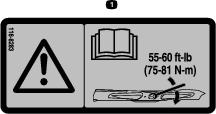
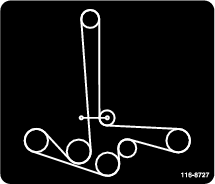
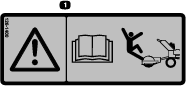
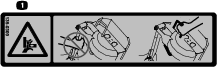
Safety decals and instructions are easily visible to the operator and are located near any area of potential danger. Replace any decal that is damaged or missing.

decaloemmarkt
decalbatterysymbols
decal106-5517
decal112-9028
decal114-1606
decal116-8225
decal116-8283
decal116-8727
decal126-1400
decal133-8061
decal133-8062
decal135-0300
decal137-8127
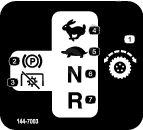
decal144-7003
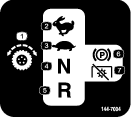
decal144-7004
decal144-7008
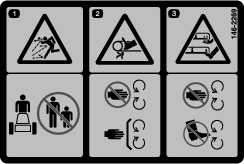
decal146-2269
decal146-3668
decal146-3669
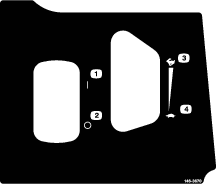
decal146-3670
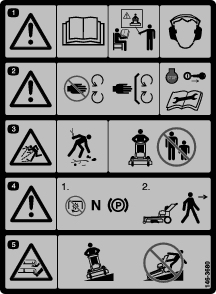
decal146-3680
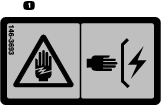
decal146-3693
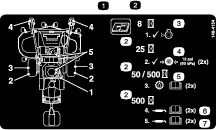
decal146-4154
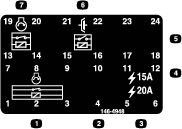
decal146-4948
decal146-4949
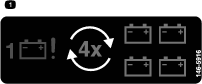
decal146-5916
decal146-6114
decal146-7853
decal147-0290
decalemergencystopbtn
decalptoengage
decal126-1411

Product Overview

g582866

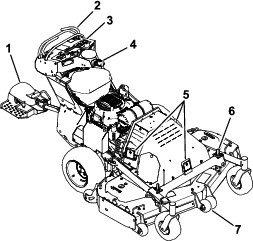
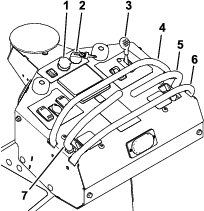
Become familiar with all of the controls before starting the engine and operating the machine.

g582871

Motion-Control Levers

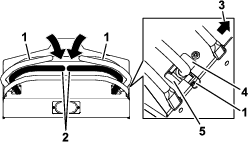
The motion control levers, located on each side of the control tower, allow the forward and reverse motion of the machine.

Moving the levers forward or backward turns the wheel on the same side forward or reverse, respectively. Wheel speed is proportional to the amount the lever is moved.

g584663

Note: When the motion-control levers are in the PARK position, an indicator displays on the message display.

Throttle Control

Located on the right side of the front right control panel.

The throttle is used to control engine speed. Moving the throttle control forward will increase engine speed and moving it to the rear will decrease engine speed. Moving the throttle forward into the detent is high idle position.

Park Position

Moving the motion-control levers outward from the NEUTRAL position into the T-slot engages the electric parking brake on the drive motors.

Moving the motion control levers inward from the T-slot disengages the brake.

When parking on a steep slope, the wheels must be chocked or blocked in addition to the brake being engaged. The machine must be tied down and brake engaged when transporting.

Key Switch

Located on the right side of the top control panel.

The key switch is used to start and shut off the engine. The switch has 3 positions: OFF, ON, and START. Insert the key into the switch and rotate clockwise to the ON position. Rotate clockwise to the next position to engage the starter (key must be held against spring pressure in this position). Allow the key to return to the ON position immediately after the engine starts.

Fuel-Shutoff Valve

Located in the fuel line midway between the tank and engine.

The fuel-shutoff valve is used to shut off the flow of fuel when parking inside of a building, during transportation to and from the job sites, and when the machine will not be used for a few days.

Rotate the valve 1/4-turn clockwise to shut the fuel off. Rotate the valve 1/4-turn counterclockwise to turn the fuel on.

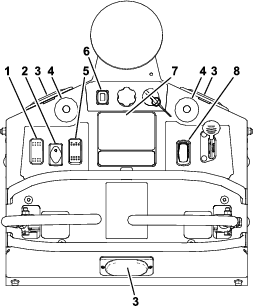
Control Panel

g582904

Blade-Control (PTO) Switch

Located on the front right control panel (see Figure 6).

Pushing down on the front of the switch will put the PTO in the ON (engaged) position. Pushing down on the back of the switch will put the PTO in the OFF (disengaged) position.

g391899

Emergency Stop (E-Stop) Button

Caution

Avoid approaching the machine while in autonomous operation.

Use the mobile device to remotely stop the machine as the best practice. Always approach the machine from the rear.

The emergency stop push button (red button) is located in the center of the top control panel (see Figure 4).

Pushing this button down causes the machine to shut down quickly in the event of an emergency. The status indicator lights will flash red (reference Figure 6).

To restart the machine, disengage the emergency stop by rotating the button either clockwise or counter-clockwise until it resets to the normal operating position. Press the fault clear button to turn off the red indictor lights and clear the message from the display screen.

Manual/Auto-Mode Switch

The switch can be placed in either Manual or Auto (Autonomous Operation) Mode.

  • Rotating the switch to the right places the machine in Manual Mode. This mode has the following features:

    • The operator can operate the machine to mow.

    • Autonomous operations are not permitted.

    • The record-mode switch can be used to program the boundary and exclusion area(s) for the operating area.

  • Rotating the switch to the left places the machine in Auto Mode (Autonomous Operation). This mode has the following features:

    • The machine is capable of autonomous operations.

    • The machine cannot be operated manually.

Record-Mode Switch

Located on the right side of the front left control panel.

The record mode is used to record the boundary and exclusion area(s).

  • Push down on the front of the switch when ready to start a boundary recording.

  • Push down on the back of the switch when ready to start an exclusion area recording.

This switch can only be used when the machine is in Manual Mode.

Auto-Start Switch

Located on the left side of the front left control panel.

When the Manual/Auto-mode switch has been placed in Auto Mode, pressing down on the front of the Auto-Start switch allows the machine to begin autonomous operation.

Fault Clear Button

Located on the left side of the top control panel.

Press this button to clear the Manual or Auto Mode Faults. Once this fault condition has been resolved, pressing this button will cause the red indicator lights to turn off.

Sensors

Obstacle Detection Sensors

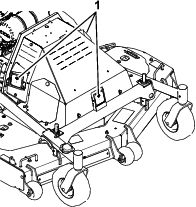
Located near the center, front, and sides of hood on the machine.

The obstacle detection sensors are used to detect objects near the machine during autonomous operations.

g582947

Important: While the radar sensors are intended to detect human bystanders and many obstacles within the operating area that have not been previously recorded as exclusion areas, operators should not rely solely on the obstacle detection sensors to detect foreign objects in the operating area. Before deploying the machine, the supervisor should ensure the site has been inspected and meets the requirements per the Autonomous Operating Area Criteria section.The supervisor will need to create a new recording session if an exclusion area needs to be added after a recording session has been finished.

Sulky Detection Sensor

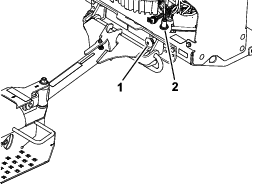
Located behind the rear cover on the right side of the engine deck.

Senses when the plunger on the sulky is in contact with the engine deck for the stowed or operating position.

g582948

Wheel Speed Sensor

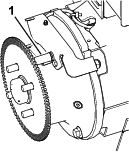
Located behind each drive wheel, mounted in the mounting flange of the drive motors.

g582950

The wheel speed sensor is use to determine if the wheels are turning and how fast.

Blade Sensor

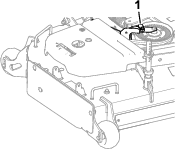
Located on the cutting deck over the stationary idler sheave.

g582951

The blade sensor is used to determine if the blades are engaged.

Alerts and Alarms

Use the charts below for status indicator and warning light explanations

Status Indicator Lights

Located on the control panel.

Light ColorLight StateIndicates
Red SolidA fault or advisory has been triggered.
RedTurns offThe fault or advisory has been cleared.
BlueSolidRecording is in process.
BlueTurns offRecording process has been canceled or completed.
GreenSolidMachine working in autonomous operation.
White (LED on mode select switch)SolidAutonomous mode selected.

Autonomous Operation Warning Lights

Located on the left and right panels above the fuel tank and on the rear of the control tower.

Light ColorLight StateIndicates
AmberBlinking– continuous slowMachine working in autonomous operation.
AmberBlinking– continuous fastObstacle detected
AmberTurns offMachine not working in autonomous operation.

Note: If the amber LEDs are not flashing in sync, configure them by navigating to CONFIGURE AMBER LEDS in the MENU settings of the Message Display.

Audible Alarm

An audible alarm will sound during the following conditions:

  • For 2 seconds before the machine begins forward movement in Autonomous Mode.

  • For 2 seconds before the blades engage in Autonomous Mode.

  • Until the blades quit rotating after being disengaged while in Autonomous Mode.

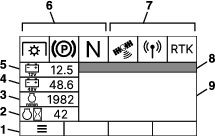
Message Display

The message display is located in the center of the front control panel.

The information screen displays icons and information relative to machine operation and is backlit for viewing in low light situations. The information screen is located above the push buttons.

g432106

Safety Circuit Status Icons

IconONOFF
Parking brakeGraphicGraphic
Operator presenceGraphicGraphic
PTOGraphicGraphic

Signal Status Icons

IconSignalNo Signal (shaded red)
GPS (Global Positioning System)GraphicGraphic
CellularGraphicGraphic
RTK (Real-Time Kinematics)GraphicGraphic

Toro Proline App

A mobile app is available for both iOS and Android. Access to the mobile app is required to begin autonomous operations each time a path is loaded to the machine. The supervisor is enabled to remotely stop the machine using the mobile app. The app can also be used to view the current path that the machine is mowing as well as other information about the machine.

Installing the App

Download the app “Toro Proline” from the iOS App Store or the Google Play Store.

Logging In

Log into the app using the credentials that were provided during the registration process.

Specifications and design are subject to change without notice.

Cutting width152 cm (60 inches)
Tread width (outside to outside of tires, widthwise)117.9 cm (46.4 inches)
Wheel base (center of caster tire to center of drive tire)115.1 cm (45.3 inches)
Height113 cm (44.5 inches)
Length273.1 cm (107.5 inches)
Weight534 kg (1178 lb)

Attachments/Accessories

A selection of Toro approved attachments and accessories is available for use with the machine to enhance and expand its capabilities. Contact your Authorized Service Dealer or authorized Toro distributor or go to www.Toro.com for a list of all approved attachments and accessories.

To ensure optimum performance and continued safety certification of the machine, use only genuine Toro replacement parts and accessories. Replacement parts and accessories made by other manufacturers could be dangerous, and such use could void the product warranty.

Operation

Important: Review the safety messages and safe operating practices in Safety before operating the machine.

Note: Determine the left and right sides of the machine from the normal operating position.

Before Operation

Daily Operation Checklist

Read the information below to ensure the machine is ready to operate reliably. Correct any issues before resuming operation.

  • Read, understand, and follow all instructions and warnings in this guide and on the machine, engine, and attachments.

  • Check that the following items are in place and in proper working condition: the operator presence controls, safety switches, guards, and shields. Do not operate the machine unless they are in proper working condition. Replace worn or deteriorated parts with genuine Toro parts when necessary.

    Danger

    It is essential that operator safety mechanisms be connected and in proper operating condition prior to use. Contacting the blade will result in serious personal injury.

    Shut off the engine, remove the key, and wait for all moving parts to stop before leaving the operating position. When the key is turned to the OFF position, the engine should shut off and the blade should stop. If not, stop using the machine immediately and contact an Authorized Service Dealer.

  • If present, ensure the sulky drawbar assembly is securely connected to the mount plate.

  • Check for dirt/mud buildup between tire and fender on the sulky. Remove buildup before operating.

    Note: You can wash the sulky with mild detergent and water. Do not pressure wash the machine.

  • All the obstacle detection sensors are securely mounted on the machine, functioning properly, clean of debris, and are positioned in the proper direction.

  • The mobile device is charged and functioning properly.

  • All audible and visual warnings on the machine are functioning properly.

  • Confirm that all warnings and operating conditions in the Operator’s Manual have been reviewed and understood.

Supervisor Information

Supervisor for Deployment and Operation of Machine

The supervisor is responsible for inspecting the machine(s) prior to use to ensure that it is ready to operate reliably. Inspections include but are not limited to the following:

  • Verify that the sensors are functioning properly, clean of dust and debris, and pointed in the proper direction prior to daily deployment.

  • Perform normal daily operation checklist(s) as required for the machine(s) prior to daily deployment.

  • Perform any additional maintenance or readiness checks as detailed in the training or instructions provided by the machine(s).

  • Carry the mobile device at all times for remotely stopping the machine.

  • The supervisor is responsible for ensuring that all exclusion areas have been recorded prior to autonomous operation. The operating areas must follow the requirements in Autonomous Operating Area Criteria

  • The supervisor is responsible for initiating autonomous operation of the machine(s) from a staging area within the autonomous operating area. The machine must be transported to that staging area and back to the storage area in manual mode by a qualified operator.

  • Prior to and during machine operation, the supervisor is responsible for inspecting the operating areas (including but not limited to the autonomous operation area); the contiguous mowing area; and the transit paths to identify and remove hazards including but not limited to the following:

    • Items in the operating area such as sticks, rocks, debris, raised sprinklers, tools, lawn furniture, sporting goods, toys, and any other objects not meant to be cut by blades or otherwise mowed

    • Bystanders and children

    • Unmowable areas such as areas under repair, standing water, damaged turf, etc.

  • A qualified manual operator may need to mow with the machine in manual mode if operating that machine autonomously is restricted by, but not limited to, the following:

    • Inadequate wireless signal (i.e., cellular, GNSS connectivity, etc.)

    • Restriction of operating area for the machine(s) based on and identified by the site assessment

    • Area too close to a boundary or immovable obstacles

Autonomous Operating Area Criteria

Autonomous Job Site Assessment

For optimal performance, the operating area should consist of large areas (1000 m² or a quarter of an acre and larger) of turf with few obstacles.

  • Before each use, make sure the operating area is free from all debris that could interfere with the operation of the machine or that the machine could throw:

    • Standing water, tree limbs, non-turf objects, holes, or washouts, etc. have been either repaired or removed.

    • All irrigation heads are completely retracted to the ground.

    • All expected obstacles have been removed from the autonomous operating area. Example of obstacles include temporary obstacles such as tools, lawn furniture, sporting goods, and toys.

  • Regularly inspect the operating area for new hazards and address them before operating the machine.

  • Ensure the operating area does not include slopes greater than 5 degrees.

  • Ensure the operating area does not include sharp drop-offs.

  • Ensure the operating area is not in areas where bystanders, co-workers, or moving vehicles and/or planes are expected. Ensure no public roads or walking/bicycle paths cross through the operating area.

  • The supervisor is responsible for ensuring that all exclusion areas have been recorded prior to autonomous operation. For recording instructions, refer to the Starting a Recording Session.

Initial Autonomous Site Assessment

The first time the machine is brought to a job site, verify the following:

  • The site meets the Autonomous Job Site Assessment.

  • The availability of the cellular, GNSS, and RTK signal.

  • The sensors for the object detection system are functioning properly.

Recurrent Autonomous Site Assessment

Each time the machine is brought to a job site, verify the following:

  • The site meets the Autonomous Job Site Assessment.

  • The availability of the cellular, GNSS, and RTK signals meets the Autonomous Job Site Assessment.

  • The sensors for the object detection system are functioning properly.

  • Removal of new temporary obstacles such as tools, lawn furniture, sporting goods, and toys left in the operating area since the operating area was previously mowed.

  • No new permanent objects need to be excluded (i.e., newly planted trees, new landscaping, new physical structures).

  • The supervisor is responsible for ensuring that all exclusion areas have been recorded prior to autonomous operation. For recording instructions, refer to the Starting a Recording Session.

    Important: The supervisor will need to create a new recording session if an exclusion area needs to be added after a recording session has been finished.

Adding Fuel

Fuel Tank Capacity

18.9 L (5 US gallons)

Recommended Fuel

  • For best results, use only clean, fresh (less than 30 days old), unleaded gasoline with an octane rating of 87 or higher ((R+M)/2 rating method).

  • Ethanol: Gasoline with up to 10% ethanol (gasohol) or 15% MTBE (methyl tertiary butyl ether) by volume is acceptable. Ethanol and MTBE are not the same. Gasoline with 15% ethanol (E15) by volume is not approved for use. Never use gasoline that contains more than 10% ethanol by volume, such as E15 (contains 15% ethanol), E20 (contains 20% ethanol), or E85 (contains up to 85% ethanol). Using unapproved gasoline may cause performance problems and/or engine damage which may not be covered under warranty.

  • Do not use gasoline containing methanol.

  • Do not store fuel either in the fuel tank or fuel containers over the winter unless you use a fuel stabilizer.

  • Do not add oil to gasoline.

Using Stabilizer/Conditioner

Use a fuel stabilizer/conditioner in the machine to provide the following benefits:

  • Keeps fuel fresh longer when used as directed by the fuel-stabilizer manufacturer

  • Cleans the engine while it runs

  • Eliminates gum-like varnish buildup in the fuel system, which causes hard starting

    Important: Do not use fuel additives containing methanol or ethanol.

    Add the correct amount of fuel stabilizer/conditioner to the fuel.

    Note: A fuel stabilizer/conditioner is most effective when mixed with fresh fuel. To minimize the chance of varnish deposits in the fuel system, use fuel stabilizer at all times.

Filling the Fuel Tank

g302021

Performing Daily Maintenance

Before starting the machine each day, perform the Each Use/Daily procedures listed in .

Using the Safety-Interlock System

Warning

If the safety-interlock switches are disconnected or damaged, the machine could operate unexpectedly, causing personal injury.

  • Do not tamper with the interlock switches.

  • Check the operation of the interlock switches daily and replace any damaged switches before operating the machine.

Understanding the Safety-Interlock System

The safety-interlock system is designed to prevent the PTO from engaging unless you do the following:

  • Move either motion-control lever to the center, unlocked position.

  • The E-Stop is disengaged.

  • Pull the PTO switch to the ON position.

    The safety-interlock system is designed to stop the blades/attachment if you move or release both motion-control levers outward.

    The message display screen on the front control panel has symbols to notify the user when each interlock component is in the correct position.

Testing the Safety-Interlock System

Test the safety-interlock system before you use the machine each time.

Note: If the safety system does not operate as described below, have an Authorized Service Dealer repair the safety system immediately.

Checking the Normal Engine Starting Chart

Mode Select Switch PositionEngine StatePTO Switch PositionMotion-Control Lever PositionDo thisOutcome
ManualOffDisengagedBoth levers out (parking brake engaged)Turn the key switch from the OFF to the STARTposition.Starter should crank, engine should start, blades should not rotate.

Checking the Blade-Control Switch (PTO)

Mode Select Switch PositionEngine StatePTO Switch PositionMotion-Control Lever PositionDo thisOutcome
Manual Or AutoOffAnyBoth levers out (parking brake engaged)Turn the key switch from the OFF to the START position.Starter should crank, engine should start, blades should not rotate.
ManualRunningEngaged (blades rotating)One or both levers inDisengage the PTO switch.Blades should stop rotating.

Checking Operator Presence

Mode Select Switch PositionEngine StatePTO Switch PositionMotion-Control Lever PositionDo thisOutcome
ManualRunningEngaged (blades rotating)One or both levers inRelease both of the motion-control levers (both levers out).Blades should stop rotating.

Checking the Emergency Stop (E-Stop)

Mode Select Switch PositionEngine StatePTO Switch PositionMotion-Control Lever PositionDo thisOutcome
Manual Or AutoRunningAnyAnyEngage the E-Stop.Machine should shut down, fault will trigger.
Manual Or AutoOffAnyAnyEngage the E-Stop, then turn the key switch from theOFF to the START position.Starter should not crank, fault will trigger.

Checking Obstacle-Detection Sensors

Mode Select Switch PositionEngine StatePTO Switch PositionMotion-Control Lever PositionDo thisOutcome
Auto RunningAnyAnyObstruct the proximity sensor(s).Machine should shut down, fault will trigger.
Auto OffAnyAnyObstruct the proximity sensor(s), then turn the key switch from the OFF to the START position.Starter should not crank, fault will trigger.

Checking the Sulky Detection System

Mode Select Switch PositionEngine StatePTO Switch PositionMotion-Control Lever PositionDo thisOutcome
Auto AnyAnyAnyChange the sulky from the stowed position to the operating position.Fault will trigger.

During Operation

Operating Instructions

Important: Review the safety messages and safe operating practices in Safety before operating the machine.

Important: It is essential that operator safety mechanisms be connected and in proper operating condition prior to use. Refer to theUsing the Safety-Interlock System.

Opening the Fuel Shut-Off Valve

Rotate the valve 1/4 turn counterclockwise to turn the fuel on.

Starting the Engine

  1. Move the motion control levers outward to the PARK position

  2. Disengage the blade-control switch (PTO).

  3. Place the throttle midway between the SLOW and FAST positions.

  4. Turn the key switch to the START position. Release the switch as soon as the engine starts.

    Important: Do not crank the engine continuously for more than ten seconds at a time. If the engine does not start, allow a 60 second cool-down period between starting attempts. Failure to follow these guidelines can burn out the starter motor.

Engaging the Blade-Control Switch (PTO)

Danger

The rotating blades under the mower deck are dangerous. Blade contact can cause serious injury or death.

Do not put hands or feet under the mower or mower deck when the blades are engaged.

The PTO switch engages the cutting blades. Be sure that all persons are clear of the mower deck before engaging the PTO.

After moving a drive lever inward to the drive position, push down on the front of the PTO switch to engage the blades.

Disengaging the Blade-Control Switch (PTO)

Push down on the back of the PTO switch to disengage the blades.

Stopping the Engine

  1. Disengage the PTO.

  2. Bring the machine to a full stop.

  3. Move the motion control levers outward to the PARK position

  4. Place the throttle midway between the SLOW and FAST positions.

  5. Allow the engine to run for a minimum of 15 seconds, then turn the key switch to the OFF position to shut off the engine.

  6. Remove the key to prevent children or other unauthorized persons from starting engine.

  7. Close the fuel shut-off valve and turn the battery-disconnect switch to the OFF position when the machine will not be in use for a few days, when transporting, or when the machine is parked inside a building.

Driving the Machine

Danger

If the sulky rotates beyond 90°, there is a potential crushing hazard. Rapid rotation beyond 90° can cause the sulky to jackknife into the mower engine deck and cause serious injury.

  • Dismount the sulky and place in transport position before operating in reverse.

  • Reduce speed when making sharp turns and operating on slopes.

Caution

Machine can spin very rapidly by positioning one lever too much ahead of the other. Operator may lose control of the machine, which may cause damage to the machine or injury.

  • Use caution when making turns.

  • Slow the machine down before making sharp turns.

Driving Forward

  1. Step onto the sulky or place it in the stowed (transport) position.

  2. Move the motion-control levers inward (together) to the NEUTRAL position.

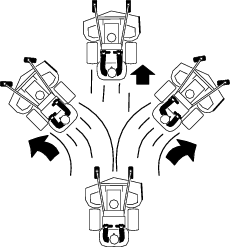
  3. To move forward in a straight line, move both levers forward with equal pressure.

    g520703

    To turn left or right, pull the motion-control lever back toward neutral in the desired turn direction.

    • Use care when turning to ensure that you do not swing yourself and the sulky into obstacles.

    • When turning, lean forward and toward the direction of the turn to help in keeping balance.

    The machine will move faster the farther the motion-control levers are moved from the NEUTRAL position.

  4. To stop, position both motion-control levers in the NEUTRAL position.

Driving in Reverse

  1. Move the motion-control levers to the NEUTRAL position.

  2. If installed, step off the sulky and place it in the stowed (transport) position.

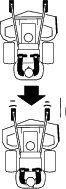
  3. To move rearward in a straight line, slowly move both front levers rearward with equal pressure.

    g520704

    To turn left or right, release pressure on the motion-control lever toward the desired turn direction.

  4. To stop, position both motion-control levers in the NEUTRAL position.

Adjusting the Height of Cut

Warning

When the two front support rod hairpins are removed from the mower deck, the weight of the tractor section may cause the front frame of the machine to rise suddenly. If the machine rises suddenly, injury may occur.

Securely hold down the front of the machine when raising the mower deck for hairpin repositioning.

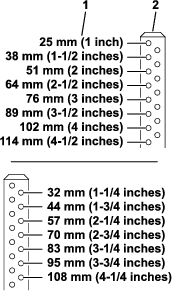
The height of cut of the mower deck is adjusted from 2.54 cm to 11.4 cm (1 to 4-1/2 inches) in 7 mm (1/4-inch) increments.

  1. Park the machine on a level surface, disengage the PTO, and move the motion control levers outward to the PARK position.

  2. Shut off the machine, remove the key, and wait for all moving parts to stop before leaving the operating position.

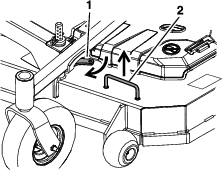
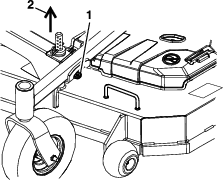
  3. Lift the cutting deck using the handle as shown in Figure 16 (handle position varies with deck size) to the highest position possible. Engage deck height change assist lever by shifting forward until contact with the deck support rod is felt (see Figure 17). While the lever is manually engaged, lower the deck to rest on the lever.

    g539043
    g539044
  4. On lifted deck side, install hairpin clips in the holes for the desired cutting height (see Figure 18).

    Important: To maintain correct cutting height and rake, check the following for proper adjustment.

    1. The front and rear hairpins are in the same holes with the proper spacers under the hair pins (see Figure 18).

      g583668
    2. The tire pressures are set as directed in Checking the Tire Pressure.

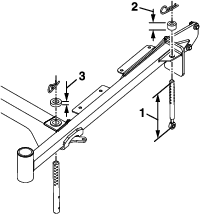
    3. The length of the rear deck support link assemblies average 197 mm (7.76 inches or approximately 7-3/4 inches) from the center of the balljoint to the center of the farthest hole (see Figure 19).

      Note: All four pins must equally support the weight of the deck. Adjustment in the length of the rear deck support assemblies may be necessary. Check lifted side rear support to meet average length as stated in step 3. When lifted opposing rear support is checked, adjust to same length as previous rear support. After lowering deck (de-latching) check that all four support pin rings are loaded. Adjust either rear pin assembly side as needed.

      g518376
  5. Repeat steps 3 and 4 for opposite side.

  6. Lift deck to de-latch and lower until the pin makes contact with the thrust washer.

    Note: Deck height change assist levers are not intended to be used during transport or as cut height positions. During operation, vibration and jerky movements will lift the cutting deck enough to allow spring return disengagement of levers. This will result in sudden drop of the cutting deck, causing possible damage. Levers are also not intended to be used as tie-down locations during transport.

Adjusting the Anti-Scalp Rollers

It is recommended to change the anti-scalp roller position when the height of cut has changed.

  1. Park the machine on a level surface, disengage the PTO, and move the motion-control levers outward to the PARK position.

  2. Shut off the machine, remove the key, and wait for all moving parts to stop before leaving the operating position.

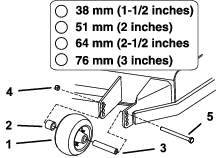
  3. Remove the nut and bolt position the anti-scalp rollers and install the nut and bolt.

  4. Ensure that the spacers and bushings are installed (Figure 20).

    g583685

Operating Area – Autonomous Operation

If there is not a previously recorded operating area one will have to be recorded before autonomous operations can be started.

Important: The locations must meet Autonomous Operating Area Criteria .

Starting a Recording Session

In order to create an operating area an operator must complete a recording session. Recording can only be accomplished when the machine is in Manual Mode. The first step in the recording session is to record the boundary. The operator must choose whether or not the blades are engaged while recording.

  1. With the mode select in the Manual Mode position, determine a start point for the planned boundary and drive the machine to that start point. The machine should be facing the direction the operator plans to begin driving once the boundary recording has been started.

  2. To start a boundary recording press down on the front of the Record Mode switch (record boundary position). The status indicator lights will turn solid blue to indicate the boundary recording is in process, and will turn off once the boundary is confirmed or canceled.

  3. Follow the instructions on the message display to confirm or cancel the boundary. To be prompted to confirm the boundary, the operator must drive the entire boundary path, returning to the point at which they started the boundary recording.

  4. Once a boundary has been successfully recorded, the operator can either continue the recording session by adding exclusion areas or finish the recording session.

  5. If adding exclusion areas to the recording session, first determine a start point on the perimeter of the exclusion area and drive the machine to that start point. The machine should be facing the direction the operator plans to begin driving once the exclusion area recording has been started.

    Important: Ensure all permanent objects in the operating area are recorded as exclusion areas to minimize risk of contact with the machine.

  6. To start the exclusion area recording press down on the back of the Record Mode switch (record exclusion area position). The status indicator lights will turn solid blue to indicate the exclusion area recording is in process, and will turn off once the exclusion area is confirmed or canceled.

  7. Follow the instructions on the message display to confirm or cancel the exclusion area. To be prompted to confirm the exclusion area, the operator must drive the entire exclusion area perimeter, returning to the point at which they started the exclusion area recording

  8. Continue adding exclusion areas to the recording session or finish the recording session by following the instructions on the message display.

  9. The operating area is automatically stored upon finishing the recording session. Once an operating area is uploaded it is available anytime the mower is within the boundary of the operating area.

Starting Autonomous Operation

Important: A machine supervisor must be within the line of sight at all times while the machine is operating in Auto Mode. The supervisor must be capable of remotely interrupting/stopping autonomous operation of the machine.

Before the machine can start the autonomous operation, the following conditions must be met:

  • An operating area must be created.

  • The machine must be parked within the operating area.

  • The sulky must be in transport position or removed from the machine.

  • The blades must be disengaged.

  • The motion-control levers must be placed in the outward T-slots (PARK position).

  • The engine must be running and the throttle set to high idle.

  • No objects detected by sensors.

  • Machine is indicating it has cellular, GNSS, and RTK signals.

  • The supervisor must position the mode select switch to Auto Mode.

    Note: An initial fill path is generated the first time a machine is parked within an operating area and the mode select switch is set to Auto Mode. The fill angle used for the fill path is determined by the direction the machine is facing when Auto Mode is selected.

When all machine conditions are met, the operator is ready to start autonomous operation.

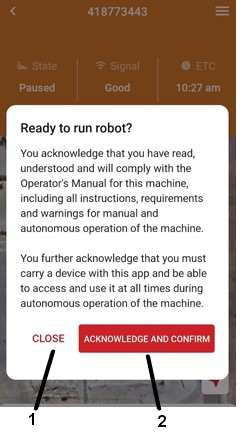
Note: An user acknowledgement must be confirmed in the mobile app each time a path is loaded to the machine.

To confirm the user acknowledgement:

  1. Open the mobile app to the Dashboard screen.

  2. Select the machine waiting for user acknowledgement confirmation (it will be highlighted in orange).

  3. Read the user acknowledgement statement that appears and select “Acknowledge and Confirm” if you are prepared for the machine to begin autonomous operation, otherwise select “Close”.

    g573735j

To start the autonomous operation:

  1. Press the “Auto Start” switch. Green indicator lights and amber blinking warning lights will turn on, indicating the machine is capable of autonomous operation. The green indicator lights and amber blinking lights will remain on while the machine is capable of autonomous operation.

  2. There will be a minimum two second delay before autonomous operation can begin. The audible alarm will sound during this delay. This delay is to allow time for the operator to move away from the machine. Exit the machine towards the rear.

  3. Following the delay, the machine will move to the starting location for the operating area.

    Important: If the machine contacts an object or becomes immobilized, use the remote stop to ensure the machine has stopped autonomous operation before approaching or interacting with the machine.

  4. Once the machine has moved to the starting location, it will pause for two seconds while the audible alarm sounds. After this two second delay, the blades will turn on and the machine will begin mowing the operating area.

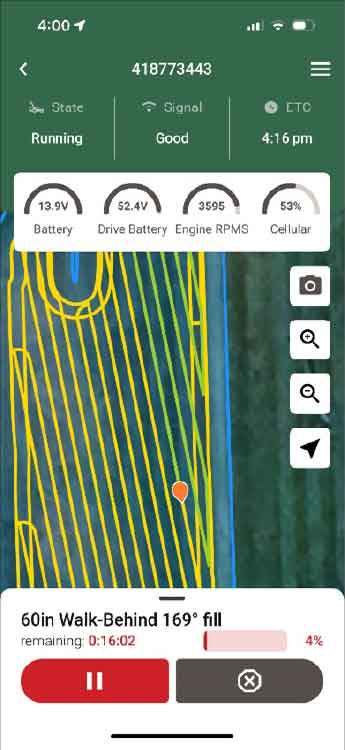
The supervisor can review progress of the autonomous operation by accessing the “XiQ” mobile app.

Upon completion of the entire fill path, the machine will stop and the blades will disengage. The amber blinking lights will turn off and green indicator lights will turn off. A message will appear on the screen to let the operator know the job has been completed.

Interruption of Autonomous Operation

Autonomous operation is interrupted by any of the following:

  • If the machine detects an object

    • Close to the machine: the machine stops, the engine stops, PTO is disengaged, the amber blinking lights turn off, the indicator lights turn from green to red, and an audible alarm sounds until the blades stop rotating. Operator intervention is required to reset the machine.

    • Further from the machine: the machine stops (but engine remains running), PTO is disengaged, the amber lights flash fast, an audible alarm sounds until the blades stop rotating. The machine can return to an autonomous operation if the obstacle clears this zone within 30 seconds. If the obstacle is present after 30 seconds, the engine remains running, the amber blinking lights turn off, and the green indicator lights turn red signaling operator intervention is required.

  • If the machine encounters a fault:

    The machine stops, the PTO is disengaged, an audible alarm sounds until the blades stop rotating, the amber blinking lights turn off, and the green indicator lights turn red. Operator intervention is required to reset the machine.

  • If the mobile device is used to remotely stop the machine:

    The machine stops, the PTO is disengaged, an audible alarm sounds until the blades stop rotating, the amber blinking lights turn off, and the green indicator lights turn red. Operator intervention is required to reset the machine.

To use the mobile app to remotely stop the machine:

  1. Open the mobile app to the Dashboard screen.

  2. Select the desired machine to open the machine details screen.

  3. Select the Graphic in the lower right hand corner of the screen.
    g573756j

Advisories, Faults, and Fault Handling

The machine will detect advisories and faults and communicate them to the operator. When an advisory or fault is detected, the operation of the machine is halted, and a message will appear on the message display screen.

  • Advisories will alert the operator that something on the machine is limited in capability or function. When an advisory is active a message will display on the message display screen that has amber text and the amber LEDs on the message display screen will flash.

  • Faults alert the operator that something is wrong with part of the machine that needs to be addressed. When a fault is active, a message will display on the message display screen that has red text and the red LEDs on the message display screen will flash.

Some advisories and faults will require the operator to interact with the machine. When this happens, the status indicator lights will turn red and the fault clear button will need to be pressed to reset the fault or advisory. If autonomous operations was interrupted, the process outlined in Starting Autonomous Operation will have to be repeated in order to resume operating autonomously.

After Operation

Important: Review the safety messages and safe operating practices Safety after operating the machine.

Transporting

Transporting the Machine

Use the platform side handles to lift and rotate the sulky into transport position when loading a machine on a trailer, unloading a machine from a trailer, or operating in reverse.

Important: Do not use the drawbar to lift the sulky.

Caution

Fingers may be pinched when lifting and rotating the platform.

Always use platform side handles to lift and rotate the sulky.

  • Placing into the Transport Position:

    1. Using one of the platform side handles, slightly lift the sulky.

      g192304
    2. Slowly and carefully rotate the sulky until it contacts the drawbar (see Figure 24).

      If holding the left platform side handle, rotate the sulky counterclockwise; using the right platform side handle, rotate it clockwise.

      g192306
    3. Slowly and carefully lift the sulky until the latch locks into place.

      g192305
  • Lowering the Sulky into the Operating Position:

    1. Firmly hold the platform side handle and lift sightly (reference Figure 25).

    2. Squeeze the latch to release the sulky and slowly and carefully lower it to the ground.

Warning

Loading the mower onto a trailer without strong enough or properly supported ramps could be dangerous. The ramps could collapse causing the unit to fall, which could cause injury.

  • Use proper ramps that are secured to the truck or trailer.

  • Keep feet and legs out from under the unit when loading and unloading.

  • If necessary, use assistance when loading.

Use a heavy-duty trailer or truck to transport the machine. Ensure that the trailer or truck has all necessary lighting and marking as required by law. Thoroughly read all of the safety instructions. Knowing this information could help you, your family, pets, or bystanders avoid injury.

To transport the machine:

  • Use full width ramps when loading the machine.

  • Be sure the fuel shut-off valve is closed.

  • Engage the parking brake, then block the wheels. Do not rely solely on the parking brake to hold the machine on the trailer.

  • Securely fasten the machine to the trailer or truck with straps, chains, cable, or ropes. If possible, both front and rear straps should be directed down and outward from the machine.

  • Secure a trailer to the towing vehicle with safety chains.

Using the Drive-Wheel Motor Releases

The drive-wheel motor releases are located in the center of each drive-wheel motor hub.

  1. Park the machine on a level surface, disengage the PTO, and move the motion control levers outward to the PARK position.

  2. Shut off the machine, remove the key, and wait for all moving parts to stop before leaving the operating position.

  3. To push the machine by hand, do the following:

    1. Remove and retain the outer cap from the motor.

    2. Insert a ratchet with 3/8-inch drive into the square hole in the motor hub.

    3. To release the drive system, rotate the hub counterclockwise until it stops (approximately 4 full rotations).

    4. Torque to 41 to 68 N∙m (30 to 50 ft-lb).

    5. Repeat this on each side of the machine.

    Important: Do not move the machine faster than 8 km/h (5 mph).

  4. To reset the drive system, do the following:

    1. Rotate the hub clockwise until it stops (approximately 4 full rotations) to engage the transmission.

    2. Torque to 41 to 68 N∙m (30 to 50 ft-lb).

    3. Repeat this on each side of the machine.

    4. Replace the outer caps.

Important: Do not tow the machine.

Maintenance

Note: Determine the left and right sides of the machine from the normal operating position.

Maintenance Safety

  • Park the machine on a level surface, disengage the drives, engage the parking brake, shut off the engine, remove the key, and disconnect the spark-plug wire. Wait for all moving parts to stop before leaving the operator’s position. Allow the machine to cool before servicing, adjusting, fueling, cleaning, or storing.

  • If you leave the key in the switch, someone could accidently start the engine and seriously injure you or other bystanders. Remove the key from the switch before you perform any maintenance.

  • Never allow untrained personnel to service machine.

  • Turn the battery-disconnect switch to the OFF position and disconnect the spark-plug wire before making any repairs. Disconnect the negative terminal first and the positive last. Reconnect the positive terminal first and negative last.

  • Keep all guards, shields, switches, and all safety devices in place and in proper working condition. Frequently check for worn or deteriorating components and replace them with genuine Toro parts when necessary.

    Warning

    Removal or modification of original equipment, parts and/or accessories may alter the warranty, controllability, and safety of the machine. Unauthorized modifications to the original equipment or failure to use original Toro parts could lead to serious injury or death. Unauthorized changes to the machine, engine, fuel, or venting system may violate applicable safety standards, such as ANSI, OSHA, and NFPA, and/or government regulations, such as EPA and CARB.

  • Use care when checking blades. Wrap the blade(s) or wear gloves, and use caution when servicing them. Only replace damaged blades. Never straighten or weld them.

  • Do not rely solely on mechanical or hydraulic jacks for support. Use adequate jack stands.

  • Carefully release pressure from components with stored energy.

  • Keep your hands and feet away from moving parts or hot surfaces. If possible, do not make adjustments with the engine running.

  • Keep all parts in good working condition and all hardware tightened, especially the blade-attachment hardware.

Recommended Maintenance Schedule(s)

Maintenance Service IntervalMaintenance Procedure
After the first 5 hours
  • Change the engine oil.
  • After the first 50 hours
  • Change the transmission fluid.
  • After the first 100 hours
  • Check the wheel lug nuts.
  • Before each use or daily
  • Check for loose hardware.
  • Check the engine oil level.
  • Inspect the blades.
  • Inspect the sulky.
  • Check for dirt/mud buildup between tire and fender.
  • Clean the grass and debris build-up from the machine and cutting deck.
  • Clean the engine and exhaust system area.(May be required more often in dry or dirty conditions.)
  • Clean the grass build-up from under the cutting deck.
  • Every 40 hours
  • Check the tire pressure.
  • Check the belts for wear or cracks.
  • Every 50 hours
  • Check the spark arrester.
  • Every 100 hours
  • Change the engine oil.(May need more often under severe conditions.)
  • Every 160 hours
  • Remove the spark plugs and check their condition. Reset gaps or replace them with new spark plugs
  • Every 250 hours
  • Replace the primary air cleaner element — check secondary air cleaner element; replace if dirty.(May need more often under severe conditions. See the engine owner's manual for additional information.)
  • Every 500 hours
  • Replace the secondary air cleaner element.(May need more often under severe conditions. See the engine owner's manual for additional information.)
  • Change the transmission fluid.
  • Adjust the caster-pivot bearing.
  • Yearly
  • Grease the front caster pivots (more often in dirty or dusty conditions).
  • Grease the front caster wheel hubs.
  • Grease the idler pivot (mower deck).
  • Grease the sulky wheel hub.
  • Grease the caster wheel hubs.
  • Inspect the blade bolts and bushings. Replace if damaged.
  • Important: Refer to your engine owner's manual for additional maintenance procedures.

    Caution

    If you leave the key in the switch, someone could accidently start the engine and seriously injure you or other bystanders.

    Shut off the engine and remove the key from the switch before you perform any maintenance.

    Pre-Maintenance Procedures

    Using the Battery-Disconnect Switch

    Located on the right side of the machine under the hood access panel.
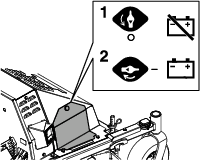
    g518535
    1. Park the machine on a level surface, disengage the PTO, and move the motion-control levers outward to the PARK position.

    2. Shut off the machine, remove the key, and wait for all moving parts to stop before leaving the operating position.

    3. Turn the battery-disconnect switch to the ON or OFF position.

    Check for Loose Hardware

    Maintenance Service IntervalMaintenance Procedure
    Before each use or daily
  • Check for loose hardware.
    1. Park the machine on a level surface, disengage the PTO, and move the motion control levers outward to the PARK position.

    2. Shut off the machine, remove the key, and wait for all moving parts to stop before leaving the operating position.

    3. Visually inspect machine for any loose hardware or any other possible problem. Tighten hardware or correct the problem before operating.

    Lubrication

    Greasing the Front Caster Pivots

    Maintenance Service IntervalMaintenance Procedure
    Yearly
  • Grease the front caster pivots (more often in dirty or dusty conditions).
  • Grease type: Lithium or molybdenum grease

    1. Remove the dust cap and adjust the caster pivots; refer to Adjusting the Caster-Pivot Bearings.

      Note: Keep the dust cap off until you have finished greasing the caster pivots.

    2. Remove the hex plug.

    3. Thread a grease fitting into the hole.

    4. Pump grease into the fitting until it oozes out around the top bearing.

    5. Remove the grease fitting from the hole.

    6. Install the hex plug and dust cap.

    Greasing the Machine

    Maintenance Service IntervalMaintenance Procedure
    Yearly
  • Grease the front caster wheel hubs.
  • Grease the idler pivot (mower deck).
  • Grease the sulky wheel hub.
  • Note: See the chart for the service intervals.

    1. Park the machine on a level surface, disengage the PTO, and move the motion control levers outward to the PARK position.

    2. Shut off the machine, remove the key, and wait for all moving parts to stop before leaving the operating position.

    3. Lubricate fittings with one to two pumps of NLGI grade #2 multi-purpose gun grease.

      Refer to the following chart for fitting locations and lubrication schedule.

      Lubrication Chart
      Fitting LocationsInitial Pumps Number of Places Service Interval
      1. Front Caster Wheel Hubs*02*Yearly
      2. Front Caster Pivots*02*Yearly
      3. Idler Pivots (Mower Deck) and Generator11Yearly
      4. Sulky Wheel Hub01Yearly

      * See step 4 for special lubrication instructions on the front caster pivots and the Greasing the Caster Wheel Hubs section for special lubrication instructions on the front casters wheel hubs.
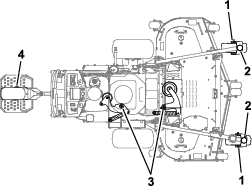
      Graphic
    4. Lubricate the front caster pivots once a year. Remove the hex plug and cap. Thread the grease zerk into the hole and pump with grease until it oozes out around the top bearing. Remove the grease zerk and thread the plug back in. Place the cap back on.

    Greasing the Caster Wheel Hubs

    Maintenance Service IntervalMaintenance Procedure
    Yearly
  • Grease the caster wheel hubs.
    1. Park the machine on a level surface, disengage the PTO, and move the motion control levers outward to the PARK position.

    2. Shut off the machine, remove the key, and wait for all moving parts to stop before leaving the operating position.
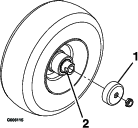
      g006115
    3. Remove caster wheel from caster forks.

    4. Remove seal guards from the wheel hub.

    5. Remove one of the spacer nuts from the axle assembly in the caster wheel. Note that thread locking adhesive has been applied to lock the spacer nuts to the axle. Remove the axle (with the other spacer nut still assembled to it) from the wheel assembly.

    6. Pry out seals, and inspect bearings for wear or damage and replace if necessary.

    7. Pack the bearings with a NLGI grade #1 multi-purpose grease.

    8. Insert 1 bearing and 1 new seal into the wheel.

      Note: Seals (Toro Part No. 103-0063) must be replaced.

    9. If the axle assembly has had both spacer nuts removed (or broken loose), apply a thread locking adhesive to one spacer nut and thread onto the axle with the wrench flats facing outward. Do not thread the spacer nut all of the way onto the end of the axle. Leave approximately 3 mm (1/8 inch) from the outer surface of the spacer nut to the end of the axle inside the nut.

    10. Insert the assembled nut and axle into the wheel on the side of the wheel with the new seal and bearing.

    11. With the open end of the wheel facing up, fill the area inside the wheel around the axle full of NLGI grade #1 multi-purpose grease.

    12. Insert the second bearing and new seal into the wheel.

    13. Apply a thread locking adhesive to the 2nd spacer nut and thread onto the axle with the wrench flats facing outward.

    14. Torque the nut to 8 to 9 N∙m (75 to 80 in-lb), loosen, then torque again to 2 to 3 N∙m (20 to 25 in-lb). Make sure the axle does not extend beyond either nut.

    15. Install the seal guards over the wheel hub and insert wheel into caster fork. Install the caster bolt and tighten nut fully.

    Important: To prevent seal and bearing damage, check the bearing adjustment often. Spin the caster tire. The tire should not spin freely (more than 1 or 2 revolutions) or have any side play. If the wheel spins freely, adjust torque on spacer nut until there is a slight amount of drag. Reapply thread-locking adhesive.

    Engine Maintenance

    Important: Refer to your engine owner’s manual for additional maintenance procedures.

    Engine Safety

    Warning

    The engine can become very hot, especially the muffler and exhaust components. Touching a hot engine can cause severe burns.

    Allow the engine to cool completely before service or making repairs around the engine area.

    Do not change the engine governor setting or overspeed the engine.

    Servicing the Air Cleaner

    Maintenance Service IntervalMaintenance Procedure
    Every 250 hours
  • Replace the primary air cleaner element — check secondary air cleaner element; replace if dirty.(May need more often under severe conditions. See the engine owner's manual for additional information.)
  • Every 500 hours
  • Replace the secondary air cleaner element.(May need more often under severe conditions. See the engine owner's manual for additional information.)
    1. Park the machine on a level surface, disengage the PTO, and move the motion control levers outward to the PARK position.

    2. Shut off the machine, remove the key, and wait for all moving parts to stop before leaving the operating position.

    3. See the engine owner's manual for maintenance instructions.

    Checking the Engine-Oil Level

    Maintenance Service IntervalMaintenance Procedure
    Before each use or daily
  • Check the engine oil level.
    1. Park the machine on a level surface, shut off the machine, and wait for all moving parts to stop.

    2. Check with the engine cold.

    3. Clean the area around dipstick. Remove the dipstick and wipe oil off. Reinsert the dipstick according to the engine manufacturer's recommendations. Remove the dipstick and read the oil level.

    4. If the oil level is low, wipe off the area around the oil fill cap, remove the cap and fill to the FULL mark on the dipstick. Toro 4-Cycle Engine Oil is recommended; refer to the Engine Owner's manual for an appropriate API rating and viscosity. Do not overfill.

    Important: Do not operate the engine with the oil level below the LOW (or ADD) mark on the dipstick, or over the FULL mark.

    Changing the Engine Oil

    Maintenance Service IntervalMaintenance Procedure
    After the first 5 hours
  • Change the engine oil.
  • Every 100 hours
  • Change the engine oil.(May need more often under severe conditions.)
    1. Park the machine on a level surface, disengage the PTO, and move the motion control levers outward to the PARK position.

    2. Shut off the machine, remove the key, and wait for all moving parts to stop before leaving the operating position.

    3. Drain oil while the engine is warm from operation.

    4. The oil drain hose is located on the left-hand side of engine. Place pan under the machine to catch oil. Remove the plug from end of drain hose. Allow the oil to drain and replace the oil drain plug. Torque the plug to 27 to 32 N∙m (20 to 24 ft-lb).

    5. Replace the oil filter every other oil change. Clean around oil filter and unscrew filter to remove. Before reinstalling new filter, apply a thin coating of Toro 4-Cycle Engine Oil on the surface of the rubber seal. Turn filter clockwise until rubber seal contacts the filter adapter then tighten filter an additional 1/2 to 3/4 turn.

    6. Clean around the oil fill cap and remove the cap. Fill to the specified capacity and replace the cap.

    7. Use oil recommended in Checking the Engine-Oil Level. Do not overfill. Start the engine and check for leaks. Shut off the engine and check the oil level again.

    Checking the Spark Plugs

    Maintenance Service IntervalMaintenance Procedure
    Every 160 hours
  • Remove the spark plugs and check their condition. Reset gaps or replace them with new spark plugs
  • Remove the spark plugs, check condition and reset gaps, or replace with new spark plugs. See the engine owner's manual.

    Checking the Spark Arrester

    Maintenance Service IntervalMaintenance Procedure
    Every 50 hours
  • Check the spark arrester.
  • Warning

    Hot exhaust-system components may ignite fuel vapors even after you shut off the engine. Hot particles exhausted during engine operation may ignite flammable materials, resulting in personal injury or property damage.

    Do not refuel or run the engine unless the spark arrester is installed.

    1. Park the machine on a level surface, disengage the PTO, and move the motion control levers outward to the PARK position.

    2. Shut off the machine, remove the key, and wait for all moving parts to stop before leaving the operating position.

    3. Wait for the muffler to cool.

    4. If you see any breaks in the screen or welds, replace the arrester.

    5. If the screen is plugged, remove the arrester, shake loose particles out of the arrester, and clean the screen with a wire brush (soak the screen in solvent if necessary).

    6. Install the arrester on the exhaust outlet.

    Fuel System Maintenance

    Danger

    In certain conditions, fuel is extremely flammable and highly explosive. A fire or explosion from fuel can burn you and others and can damage property.

    Refer to Fuel Safety for a complete list of fuel related precautions.

    Changing the Fuel Filter

    Service Interval: As required

    A fuel filter is installed between the fuel tank and the engine. Replace when necessary.

    Note: Reinstall the fuel line hoses and secure them with plastic ties as originally routed to keep the lines away from components that could cause damage.

    Electrical System Maintenance

    Checking the Battery Charge–

    Service Interval: As required

    Allowing batteries to stand for an extended period of time without recharging them will result in reduced performance and service life. To preserve optimum battery performance and life, recharge batteries in storage when the open circuit voltage drops to 12.1 V.

    Note: To prevent damage due to freezing, batteries should be fully charged before putting away for winter storage.

    Charge batteries in an open, well-ventilated area away from spark and flames. Unplug the charger before connecting or disconnecting from the battery. Wear protective clothing and use insulated tools.

    Danger

    Charging or jump-starting the battery may produce explosive gases. Battery gases can explode, causing serious injury.

    • Keep sparks, flames, or cigarettes away from the battery.

    • Ventilate when charging or using the battery in an enclosed space.

    • Make sure that the battery venting path is always open once the battery is filled with acid.

    • Always shield your eyes and face from battery.

    Danger

    Battery electrolyte contains sulfuric acid, which is poisonous and can cause severe burns. Swallowing electrolyte can be fatal or can cause severe burns if it touches skin.

    • Wear safety glasses to shield eyes, and wear rubber gloves to protect your skin and clothing when handling electrolyte.

    • Do not swallow electrolyte.

    • In the event of an accident, flush with water and call a doctor immediately.

    Caution

    If the ignition is in the ON position, there is potential for sparks and engagement of components. Sparks could cause an explosion, or moving parts could accidentally engage and cause personal injury.

    Ensure that the ignition switch is in the OFF position before charging the battery.
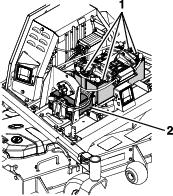
    g539045
    • 12 V System

      The battery voltage will be displayed on the message display if the ignition key is turned to the ON position for a few seconds. You can also use a digital voltmeter with the key in the ON position and the engine turned off. Charge the battery to bring it up to a charge of 12.1 V or greater.

    • 48 V System

      With the engine turned off and the key in the ON position, check each battery individually with a digital voltmeter. Charge each battery individually to bring it up to a charge of 12.1 V or greater. All four batteries need to be charged to a minimum of 12.1 V, and need to be within 0.3 V of each other. If any of the batteries in the pack cannot meet these requirements, all 4 batteries must be replaced at the same time.

    Important: When replacing the 48 Volt battery pack, use 4 identical Toro batteries (P/N 142-7345). Charge each battery individually to a minimum of 12.1 V and ensure each battery is within 0.3 V of each other before installing. Failure to do so will reduce the life of the battery pack.

    Important: In order to prevent damage to the battery, use an automatic 12 volt smart charger approved for use with AGM type batteries with an output of 3.5 A or less. Make sure the negative battery cable is disconnected before charging and that the charger is set to the correct mode for 12 volt AGM batteries.

    Important: For EFI machines: Unplug the harness from the ECU before performing any welding on the equipment.

    Recommended Jump Starting Procedure–

    Caution

    Corrosion or loose connections can cause unwanted electrical voltage spikes at anytime during the jump starting procedure.

    Do not attempt to jump start with loose or corroded battery terminals or damage to the engine or EFI may occur.

    Danger

    Jump starting a weak battery that is cracked, frozen, has low electrolyte level, or an open/shorted battery cell, can cause an explosion resulting in serious personal injury.

    Do not jump start a weak battery if these conditions exist.

    Caution

    Connecting the jumper cables incorrectly (wrong polarity) can immediately damage the electrical and/or EFI system.

    Be certain of battery terminal polarity and jumper cable polarity when hooking up batteries.

    Warning

    Batteries contain acid and produce explosive gases.

    • Shield the eyes and face from the batteries at all times.

    • Do not lean over the batteries.

    1. Check the weak battery for terminal corrosion (white, green, or blue “snow”), it must be cleaned off prior to jump starting. Clean and tighten connections as necessary.

    2. Make sure the booster is a good and fully charged lead acid battery at 12.6 V or greater. Use properly sized jumper cables (4 to 6 AWG) with short lengths to reduce voltage drop between systems. Make sure the cables are color coded or labeled for the correct polarity.

      Note: The following instructions are adapted from the SAE J1494 Rev. Dec. 2001 – Battery Booster Cables – Surface Vehicle Recommended Practice (SAE – Society of Automotive Engineers).

      Note: Be sure the vent caps are tight and level. Place a damp cloth, if available, over any vent caps on both batteries. Be sure the vehicles do not touch and that both electrical systems are off and at the same rated system voltage. These instructions are for negative ground systems only.

    3. Connect the positive (+) cable to the positive (+) terminal of the discharged battery that is wired to the starter or solenoid as shown in Figure 29.
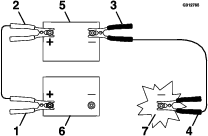
      g012785
    4. Connect the other end of the positive cable to the positive terminal of the booster battery.

    5. Connect the black negative (–) cable to the other terminal (negative) of the booster battery.

    6. Make the final connection on the engine block of the stalled vehicle (not to the negative post) away from the battery. Stand back.

    7. Start the vehicle and remove the cables in the reverse order of connection (the engine block (black) connection is the first to disconnect).

    Note: A malfunctioning machine battery may cause the charging voltage to exceed 18.5 V. The engine will turn off if there is a charge above 18.5 V. Turn the ignition switch off, then on again to reset the engine before restarting the machine.

    Drive System Maintenance

    Checking the Tire Pressure

    Maintenance Service IntervalMaintenance Procedure
    Every 40 hours
  • Check the tire pressure.
  • g300243

    Checking the Wheel-Lug Nuts

    Maintenance Service IntervalMaintenance Procedure
    After the first 100 hours
  • Check the wheel lug nuts.
  • Check and torque the wheel lug nuts to 108 to 122 N∙m (80 to 90 ft-lb).

    Changing the Transmission Fluid

    Maintenance Service IntervalMaintenance Procedure
    After the first 50 hours
  • Change the transmission fluid.
  • Every 500 hours
  • Change the transmission fluid.
  • Fluid type: Toro Synthetic HV Electric Motor Drive Oil

    Capacity: 150 ml (5 fl oz)

    1. Park the machine on a level surface, disengage the PTO, and move the motion control levers outward to the PARK position.

    2. Shut off the machine, remove the key, and wait for all moving parts to stop before leaving the operating position.

    3. Remove the tire.

      g380066
    4. Place a drain pan under the transmission.

    5. Remove the top plug and bottom plug. Allow the fluid to drain.
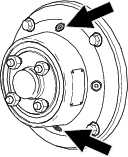
      g380054
    6. Install the bottom plug and torque it to 7 to 8 N∙m (62 to 70 in-lb).

    7. Remove a side plug.

    8. Add fluid, as specified at the beginning of this procedure, through the top hole until the level reaches the side plug opening.
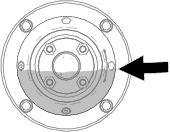
      g380053
    9. Install the top plug and side plug. Torque them to 7 to 8 N∙m (62 to 70 in-lb).

    10. Install the tire and torque the lug nuts to 108 to 122 N∙m (80 to 90 ft-lb).

    11. Repeat for the other transmission.

    Servicing the Caster Wheels and Bearings

    The caster wheels rotate on a roller bearing supported by a spanner bushing. If the bearing is kept well lubricated, wear will be minimal. Failure to keep the bearing well lubricated causes rapid wear. A wobbly caster wheel usually indicates a worn bearing.

    1. Remove the locknut and wheel bolt holding the caster wheel to the caster fork (Figure 34).
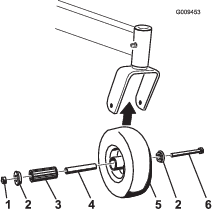
      g009453
    2. Remove 1 bushing, then pull the spanner bushing and roller bearing out of the wheel hub (Figure 34).

    3. Remove the other bushing from the wheel hub and clean any grease and dirt from the wheel hub (Figure 34).

    4. Inspect the roller bearing, bushings, spanner bushing and the inside of the wheel hub for wear.

      Note: Replace any damaged or worn parts (Figure 34).

    5. Place 1 bushing into the wheel hub (Figure 34).

    6. Grease the roller bearing and spanner bushing, and slide them into the wheel hub (Figure 34).

    7. Place the second bushing into the wheel hub (Figure 34).

    8. Install the caster wheel into the caster fork and secure it with the wheel bolt and locknut (Figure 34).

    9. Tighten the locknut until the spanner bushing bottoms against the inside of the caster forks (Figure 34).

    10. Grease the fitting on the caster wheel.

    Belt Maintenance

    Inspecting the Belts

    Maintenance Service IntervalMaintenance Procedure
    Every 40 hours
  • Check the belts for wear or cracks.
    1. Park the machine on a level surface, disengage the PTO, and move the motion control levers outward to the PARK position.

    2. Shut off the machine, remove the key, and wait for all moving parts to stop before leaving the operating position.

    3. Remove the 2 mower-deck belt shields to check the primary and secondary belt condition.

    4. Look under the engine deck to check the generator-drive belt condition.

    5. Check all idler arms to be sure that they pivot freely.

    Replace the belts if they are worn. The signs of a worn belt include squealing while the belt is rotating; the blades slipping while cutting grass; and frayed edges, burn marks, and cracks on the belt.

    Controls System Maintenance

    Adjusting the Motion-Control Levers

    If the motion-control levers do not align, adjust the motion-control levers.

    1. Park the machine on a level surface, disengage the PTO, and move the motion-control levers outward to the PARK position.

    2. Shut off the machine, remove the key, and wait for all moving parts to stop before leaving the operating position.

    3. Turn the battery-disconnect switch to the OFF position.

    4. Push the motion control levers down out of the PARK position.

    5. Rotate the CAM to the point that holds the lever at the highest location while still being able to move the full forward position.

    6. Verify that the lever does not rub on the edge of the T-box as this could cause it to bind.

    7. Tighten the adjustment CAM.

    8. When released from full forward position, the lever should return to the neutral location freely.

    Mower Deck Maintenance

    Blade Safety

    A worn or damaged blade can break and a piece could be thrown toward you or bystanders, resulting in serious personal injury or death.

    • Inspect the blades periodically for excessive wear or damage.

    • Use care when checking the blades. Wear gloves and use caution when servicing them. Only replace the blades; never straighten or weld them.

    • On multi-bladed machines, take care as rotating 1 blade can cause other blades to rotate.

    Servicing the Cutting Blades

    Before Inspecting or Servicing the Blades

    1. Park the machine on a level surface, disengage the PTO, and move the motion control levers outward to the PARK position.

    2. Shut off the machine, remove the key, wait for all moving parts to stop before leaving the operating position, and disconnect the spark-plug wires from the spark plugs..

    Inspecting the Blades

    Maintenance Service IntervalMaintenance Procedure
    Before each use or daily
  • Inspect the blades.
    1. Inspect the cutting edges (Figure 35).

    2. If the edges are not sharp or have nicks, remove and sharpen the blade; refer to Sharpening the Blades.

    3. Inspect the blades, especially in the curved area.

    4. If you notice any cracks, wear, or a slot forming in this area, immediately install a new blade (Figure 35).
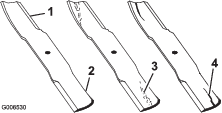
      g006530

    Checking for Bent Blades

    1. Rotate the blades until the ends face forward and backward.

    2. Measure from a level surface to the cutting edge, position A, of the blades (Figure 36).
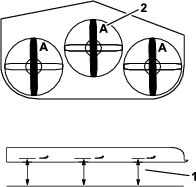
      g584963
    3. Rotate the opposite ends of the blades forward.

    4. Measure from a level surface to the cutting edge of the blades at the same position as in step 2 above.

      Note: The difference between the dimensions obtained in steps 2 and 3 must not exceed 3 mm (1/8 inch).

      Note: If this dimension exceeds 3 mm (1/8 inch), replace the blade.

      Warning

      A blade that is bent or damaged could break apart and could critically injure you or bystanders.

      • Always replace a bent or damaged blade with a new blade.

      • Do not file or create sharp notches in the edges or surfaces of the blade.

    Removing and Installing the Blades

    Maintenance Service IntervalMaintenance Procedure
    Yearly
  • Inspect the blade bolts and bushings. Replace if damaged.
    1. Park the machine on a level surface, disengage the PTO, and move the motion control levers outward to the PARK position.

    2. Shut off the machine, remove the key, and wait for all moving parts to stop before leaving the operating position.

    3. Lift the deck and secure in the raised position; refer to Adjusting the Height of Cut.

    4. Inspect the blades and sharpen or replace as required.

    5. Reinstall the blades (if they were removed) in the following order:

      1. Install the bushing through blade with bushing flange on bottom (grass) side of blade.
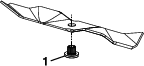
        g518684
      2. Install the bushing/blade combo into spindle.
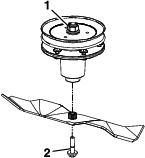
        g518685
      3. Apply lubricant to threads of blade bolt as needed to prevent seizing. Copper-based anti-seize preferable. Grease acceptable substitute. Install blade bolt finger tight. Place wrench on the top spindle nut then torque the blade bolts to 75 to 81 N∙m (55 to 60 ft-lb).

      Warning

      Incorrect installation of the blade or components used to retain the blade can be dangerous. Failure to use all original components and assembled as shown could allow a blade or blade component to be thrown out from under the deck resulting in serious personal injury or death.

      Always install the original Toro blades, blade bushings, and blade bolts as shown.

    Sharpening the Blades

    1. Use a file to sharpen the cutting edge at both ends of the blade (Figure 39).

      Note: Maintain the original angle.

      Note: The blade retains its balance if the same amount of material is removed from both cutting edges.

      g000552
    2. Check the balance of the blade by putting it on a blade balancer (Figure 40).

      Note: If the blade stays in a horizontal position, the blade is balanced and can be used.

      Note: If the blade is not balanced, file some metal off the end of the sail area only (Figure 39).
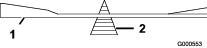
      g000553
    3. Repeat this procedure until the blade is balanced.

    Sulky Maintenance

    Inspecting the Sulky

    Maintenance Service IntervalMaintenance Procedure
    Before each use or daily
  • Inspect the sulky.
    1. Park the machine on a level surface, disengage the PTO, and move the motion control levers outward to the PARK position.

    2. Shut off the machine, remove the key, and wait for all moving parts to stop before leaving the operating position.

    3. Inspect for loose hardware. Tighten any loose hardware.

    4. Inspect for wear or damage daily. Replace or repair worn parts as needed before operating.

    Checking the Sulky for Buildup

    Maintenance Service IntervalMaintenance Procedure
    Before each use or daily
  • Check for dirt/mud buildup between tire and fender.
  • Check for dirt/mud buildup between tire and fender. Remove buildup before operating.

    Note: You can wash the sulky with mild detergent and water. Do not pressure wash the machine.

    Adjusting the Tire

    To obtain additional ground clearance, the platform wheel can be repositioned (see Figure 41).
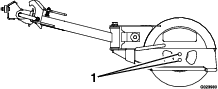
    g023980

    Note: To achieve more ground clearance for higher cutting heights, raise the platform by using the lower wheel adjustment hole.

    Adjustments

    Important: Park the machine on a level surface, disengage the PTO, move the motion control levers outward to the PARK position, shut off the machine, remove the key, and wait for all moving parts to stop before servicing, cleaning, or making any adjustments to the unit.

    Generator Drive-Belt Tension

    The generator drive belt is self-tensioning, so there is no necessary adjustment.

    Deck Belt Tension

    The deck belt is self-tensioning, so there is no necessary adjustment.

    Electric Clutch Adjustment

    There is no necessary adjustment for the electric clutch.

    Adjusting the Caster-Pivot Bearings

    Maintenance Service IntervalMaintenance Procedure
    Every 500 hours
  • Adjust the caster-pivot bearing.
    1. Park the machine on a level surface, disengage the PTO, and move the motion control levers outward to the PARK position.

    2. Shut off the machine, remove the key, and wait for all moving parts to stop before leaving the operating position.

    3. Remove the dust cap from the caster and tighten the locknut (Figure 42).

    4. Tighten the locknut until the spring washers are flat, and then back off a 1/4 turn to properly set the preload on the bearings (Figure 42).

      Important: Make sure that the spring washers are installed correctly as shown in Figure 42.

    5. Install the dust cap (Figure 42).

      g001297

    Cleaning

    Cleaning and Storage Safety

    • Park the machine on a level surface, disengage the drives, engage the parking brake, shut off the engine, remove the key, and disconnect the spark-plug wire. Wait for all moving parts to stop before leaving the operator’s position. Allow the machine to cool before servicing, adjusting, fueling, cleaning, or storing.

    • Clean grass and debris from the cutting unit, muffler, drives, grass catcher, and engine compartment to prevent fires.

    • Allow the machine to cool before storing the machine in any enclosure. Do not store the machine or fuel container, or refuel, near an open flame, spark, or pilot light, such as those on a water heater or other appliance.

    Cleaning Debris From the Machine

    Maintenance Service IntervalMaintenance Procedure
    Before each use or daily
  • Clean the grass and debris build-up from the machine and cutting deck.
    1. Park the machine on a level surface, disengage the PTO, and move the motion control levers outward to the PARK position.

    2. Shut off the machine, remove the key, and wait for all moving parts to stop before leaving the operating position.

    3. Clean off any oil, debris, or grass build-up on the machine and cutting deck, especially under deck belt shields, around the fuel tank, around engine and exhaust area.

      Important: You can wash the machine with mild detergent and water. Do not pressure wash the machine. Avoid excessive use of water, especially near the control panel, around the engine, generator, ACS tower, and motors.

    Cleaning the Engine and Exhaust System Area

    Maintenance Service IntervalMaintenance Procedure
    Before each use or daily
  • Clean the engine and exhaust system area.(May be required more often in dry or dirty conditions.)
  • Caution

    Excessive debris around the engine cooling air intake and exhaust system area can cause the engine, exhaust area, and hydraulic system to overheat, which can create a fire hazard.

    Clean all debris from the engine and exhaust system area.

    1. Park the machine on a level surface, disengage the PTO, and move the motion control levers outward to the PARK position.

    2. Shut off the machine, remove the key, and wait for all moving parts to stop before leaving the operating position.

    3. Clean all debris from rotating engine air intake screen, around engine shrouding, and exhaust system area.

    4. Wipe up any excessive grease or oil around the engine and exhaust system area

    Cleaning Grass Build-Up Under the Deck

    Maintenance Service IntervalMaintenance Procedure
    Before each use or daily
  • Clean the grass build-up from under the cutting deck.
    1. Park the machine on a level surface, disengage the PTO, and move the motion control levers outward to the PARK position.

    2. Shut off the machine, remove the key, and wait for all moving parts to stop before leaving the operating position.

    3. Raise deck to the transport (maximum cutting height) position. Lift the front of unit and support the machine using jack stands or equivalent support.

    4. Clean out any grass build-up from underside of deck and in discharge deflector.

    Disposing of Waste

    Oil and Fluid Disposal

    Engine oil and hydraulic fluid are both pollutants to the environment. Dispose of these at a certified recycling center according to your state and local regulations.

    Battery Disposal

    Danger

    Battery electrolyte contains sulfuric acid, which is poisonous and can cause severe burns. Swallowing electrolyte can be fatal or can cause severe burns if it touches skin.

    • Wear safety glasses to shield eyes, and wear rubber gloves to protect your skin and clothing when handling electrolyte.

    • Do not swallow electrolyte.

    • In the event of an accident, flush with water and call a doctor immediately.

    Federal law states that batteries should not be placed in the garbage. Management and disposal practices must be within relevant federal, state, or local laws.

    If a battery is being replaced or if the unit containing the battery is no longer operating and is being scrapped, take the battery to a local certified recycling center. If no local recycling is available return the battery to any certified battery reseller.

    Troubleshooting

    ProblemPossible CauseCorrective Action
    The starter does not crank.
    1. E-Stop is pressed.
    2. The motion-control levers are not in the Neutral/Park position.
    3. The battery is dead.
    4. The electrical connections are corroded or loose.
    5. A fuse is blown.
    6. A relay or switch is damaged.
    1. Disengage the E-Stop.
    2. Ensure that the motion-control levers are in the Neutral/Park position.
    3. Charge the battery.
    4. Check the electrical connections for good contact.
    5. Replace the fuse.
    6. Contact an Authorized Service Dealer.
    The engine does not start, starts hard, or fails to keep running.
    1. The fuel tank is empty.
    2. Fuel-shutoff valve is closed
    3. The throttle is not in the correct position.
    4. The air cleaner is dirty.
    5. The electrical connections are corroded or loose.
    6. The spark-plug wire(s) is loose or disconnected.
    7. The spark plug(s) is pitted, fouled, or the gap is incorrect.
    8. There is dirt in fuel filter.
    9. Dirt, water, or stale fuel is in fuel system.
    10. There is incorrect fuel in the fuel tank.
    11. The oil level in the crankcase is low.
    1. Fill the fuel tank.
    2. Open the fuel-shutoff valve.
    3. Ensure that the throttle control is midway between the Slow and Fast positions.
    4. Clean or replace the air-cleaner element.
    5. Check the electrical connections for good contact.
    6. Install the wire(s) on the spark plug.
    7. Install a new, correctly gapped spark plug(s).
    8. Replace the fuel filter.
    9. Contact an Authorized Service Dealer.
    10. Drain the tank and replace the fuel with the proper type.
    11. Add oil to the crankcase.
    The engine loses power.
    1. The engine load is excessive.
    2. The air cleaner is dirty.
    3. The oil level in the crankcase is low.
    4. The cooling fins and air passages under the engine blower housing are plugged.
    5. The spark plug(s) is pitted, fouled, or the gap is incorrect.
    6. The fuel-tank vent is blocked.
    7. There is dirt in the fuel filter.
    8. Dirt, water, or stale fuel is in the fuel system.
    9. There is incorrect fuel in the fuel tank.
    1. Reduce the ground speed.
    2. Clean the air-cleaner element.
    3. Add oil to the crankcase.
    4. Remove the obstruction from the cooling fins and air passages.
    5. Install a new, correctly gapped spark plug(s).
    6. Contact an Authorized Service Dealer.
    7. Replace the fuel filter.
    8. Contact an Authorized Service Dealer.
    9. Drain the tank and replace the fuel with the proper type.
    The engine overheats.
    1. The engine load is excessive.
    2. The oil level in the crankcase is low.
    3. The cooling fins and air passages under the engine-blower housing are plugged.
    4. The air cleaner is dirty.
    5. Dirt, water, or stale fuel is in the fuel system.
    1. Reduce the ground speed.
    2. Add oil to the crankcase.
    3. Remove the obstruction from the cooling fins and air passages.
    4. Clean or replace the air-cleaner element.
    5. Contact an Authorized Service Dealer
    The cutting height is uneven.
    1. Blade(s) are not sharp.
    2. Cutting blade(s) is/are bent.
    3. The mower deck is not level.
    4. The mower deck pitch is wrong.
    5. The underside of mower deck is dirty.
    6. The tire pressure is not correct.
    7. A blade spindle is bent.
    1. Sharpen the blade(s).
    2. Install new cutting blade(s).
    3. Level the mower deck side-to-side position.
    4. Adjust the front-to-rear pitch.
    5. Clean the underside of the mower deck.
    6. Adjust the tire pressure.
    7. Contact an Authorized Service Dealer.
    There is an abnormal vibration.
    1. Cutting blade(s) is/are bent or unbalanced.
    2. A blade-mounting bolt is loose.
    3. The engine-mounting bolts are loose.
    4. An engine pulley, idler pulley, or blade pulley is loose.
    5. An engine pulley is damaged.
    6. A blade spindle is bent.
    7. A belt is damaged.
    1. Install new cutting blade(s).
    2. Tighten the blade-mounting bolt.
    3. Tighten the engine-mounting bolts.
    4. Tighten the appropriate pulley.
    5. Contact an Authorized Service Dealer.
    6. Contact an Authorized Service Dealer.
    7. Install a new belt.
    The blades do not rotate.
    1. A mower-deck belt is worn, loose or broken.
    2. A mower-deck belt is off the pulley.
    3. An idler spring is broken or missing.
    4. The clutch connector or wire is damaged.
    5. The electric clutch is damaged.
    6. The safety-interlock system prevents blade rotation.
    7. The PTO switch is faulty.
    1. Install the new deck belt.
    2. Install the deck pulley and check the idler pulley, idler arm and spring for the correct position and function.
    3. Replace the spring.
    4. Contact an Authorized Service Dealer.
    5. Contact an Authorized Service Dealer.
    6. Contact an Authorized Service Dealer.
    7. Contact an Authorized Service Dealer.
    The fuel tank is showing signs of collapsing or the machine is frequently showing signs of running out of fuel.
    1. The air-cleaner paper element clogged.
    1. Clean the paper element.
    The machine runs into an obstacle and/or becomes immobilized.
    1. Object not in the exclusion area.
    2. The machine encountered a fault.
    3. The sensors are dirty or not working properly.
    4. The machine contacted an object.
    1. Record the operating area again.
    2. Resolve the fault.
    3. Clean and inspect the sensors.
    4. Contact an Authorized Service Dealer.
    The machine does not operate in autonomous mode.
    1. Machine is not parked within a recorded operating area.
    2. User acknowledgement has not been confirmed in the mobile app.
    3. The sulky is installed, but not in the stowed position.
    4. The engine is not running or throttle is not set to high idle.
    5. The motion-control levers are in the engaged position.
    6. The mode select switch is not set to the “Auto Mode” position.
    7. An obstacle is being detected by an obstacle detection sensor.
    8. The machine has not acquired all of the required signals (GNSS, RTK, Cellular).
    1. Ensure that a valid operating area has been recorded and that the machine is parked within that operating area.
    2. Open the mobile app and confirm the user acknowledgement.
    3. Remove the sulky or place it in the stowed position.
    4. Turn the engine on and set throttle to the high idle position.
    5. Release the motion-control levers and allow them to return to the disengaged position.
    6. Turn the mode select switch to the “Auto Mode” position.
    7. Move any obstacles that are near the machine, or change to “Manual Mode” and move the machine away from the obstacle.
    8. Move the machine to have a clearer view of the sky and away from tall objects. Allow more time to acquire signals. Ensure that the machine is in the RTK coverage area. After moving the machine and allowing more time, power cycle the machine and try again. If problem persists, contact an Authorized Service Dealer.