Important: To install of this kit, you must purchase and install the separate
ultra sonic boom finishing kit.
MultiPro 5800—Finishing Kit 164-1050
MultiPro 1750—Finishing Kit 164-1051
MultiPro Workman—Finishing Kit 164-1052
Important: For Multi Pro Machines Model Year 2023 and before, you must
purchase and install the boom cradle kit 161-4170.
Note: Determine the left and right sides of the machine from the normal
operating position.
Preparing the Machine
-
Clean the exterior of the machine and sprayer; refer
to the Operator’s Manual for your machine.
-
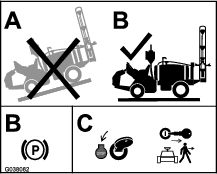
Move the machine to a level surface, shut off the
engine, set the parking brake, and remove the key.
Caution
If you leave the key in the ignition switch, someone could accidently
start the engine and seriously injure you or other bystanders.
Remove the key from the ignition switch before you install the
kit.
-
Disconnect the negative-battery cable from the battery;
refer to the Operator’s Manual for your
machine.
Adjusting the Boom-Hinge Springs
Important: Operating the spray system with the boom-hinge springs under
the incorrect compression could damage the boom assembly. Measure
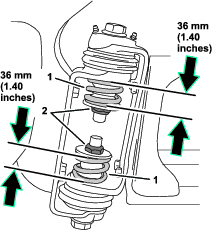
the springs and use the jam nut to compress the springs to 36 mm (1.40
inches), if necessary.
Use another person or lifting equipment to support the boom
while adjusting the spring height of the boom hinge.
-
Extend the outer booms to the spray position (horizontal).
-
Support the booms while you are adjusting the spring
height.
-
At the pivot bracket and hinge
for the outer boom, adjust the jam nut for the upper spring until
the compressed spring height measures 36 mm (1.40 inches).
-
Adjust the jam nut for the lower
spring until the compressed spring height measures 36 mm (1.40 inches).
-
Repeat steps 3 and 4 for the upper and lower springs
at the other outer boom.
-
At the boom hinge, measure the compression of the
upper and lower springs while the booms are in the extended position
(Figure 2).
-
Compress all springs until they measure 36 mm (1.40
inches).
-
Use the jam nut to compress any spring that measures
greater than 36 mm (1.40 inches).
Adjusting the Booms
Note: You will need 2 wooden blocks about 10 cm (4 inches) in height
for this procedure.
The booms are set at the factory to travel downward no farther
than the horizontal position. To enable the ultrasonic boom kit to
maintain a consistent distance between the nozzles and the ground
when the ground slopes downward from the machine, you must adjust
the boom support system to allow the booms to travel below the horizontal
position to maintain a constant nozzle-to-ground distance.
-
Raise the booms and have them rest in the transport
cradle.
-
At the pivot brackets of the outer-boom
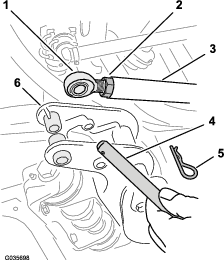
sections, remove the hairpin and clevis pin that secures the rod end
for the lift cylinder to the pivot bracket (Figure 3).
Note: There should be no more than 16 mm (5/8 inch) of exposed thread
on the eyelet to prevent the engaged threads from stripping and the
rod from pulling away.
-
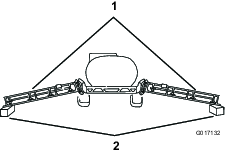
Carefully lower the outer-boom sections onto wooden
blocks about 10 cm (4 inches) high as shown in Figure 4.
-
Start the machine and fully extend the lift cylinders.
-
Loosen the jam nuts at the rod ends for each lift
cylinder (Figure 3).
-
Adjust the rod end for the lift cylinders end until
the hole in the rod ends align with the holes in the pivot brackets
for the boom sections (Figure 3).
-
At each pivot bracket, secure the rod end to the bracket
with the clevis pin that you removed in step 2.
-
Secure the cotter pins to the pivot brackets with
the hairpin cotters (Figure 3) that you removed in step 2.
-
Tighten the jam nut at each rod until the nuts are
snug (Figure 3).
Replacing the Lift-Cylinder Manifold
Parts needed for this procedure:
| Hydraulic manifold block | 1 |
| Straight-hydraulic fitting | 4 |
Assembling the Cylinder-Lift Manifold
-
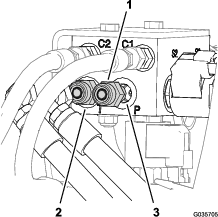
At the back of the sprayer, label the hoses at port-P
and port-T of the lift-cylinder manifold (Figure 5).
-
Remove the hoses from the straight-hydraulic fittings
at port-P and port-T of the lift-cylinder manifold (Figure 5).
-
Remove the straight-hydraulic fittings
from port-P and port-T of the old lift-cylinder manifold (Figure 5).
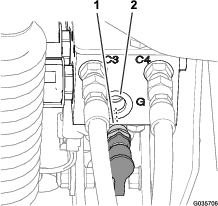
-
Remove the diagnostic fitting and
cap from port-G of the old lift-cylinder manifold (Figure 6)
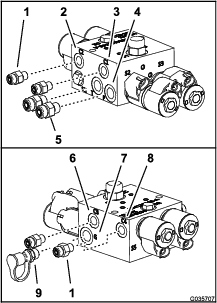
-
At the new lift-cylinder manifold, assemble the straight-hydraulic
fittings (Figure 7) that you removed in step 3 into port-P and port-T.
-
Assemble the 4 straight-hydraulic fitting from the
ultra sonic boom leveling kit into ports C1, C2, C3, and C4 of the
new lift-cylinder manifold (Figure 7).
-
Assemble the diagnostic fitting and cap that you removed
in step 4 into port-G of the new lift-cylinder manifold (Figure 7).
Replacing the Cylinder-Lift Manifold
-
If installed, remove the hydraulic block cover plate
from the lift-cylinder manifold.
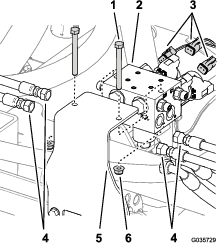
-
Label all the hoses connected to the lift-cylinder
manifold (ports C1, C2, C3, and C4), and disconnect them from the
cylinder manifold (Figure 8).
-
Disconnect the rear-wire harness connectors from the
solenoids of the lift-cylinder manifold (Figure 8).
-
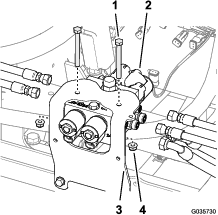
Remove the lift-cylinder manifold
from the mounting bracket by removing 2 bolts and 2 locknuts (Figure 8).
Note: Save the 2 bolts and 2 locknuts.
-
Replace the mounting bracket for the lift-cylinder
manifold; refer to the installation instructions for the ultra sonic
boom finishing kit.
-
Install the new lift-cylinder manifold onto the mounting
bracket with the 2 bolts and 2 locknuts that you in step 4.
-
Install all the hoses onto the fittings of the lift-cylinder
manifold as follows:
-
The tank hose (3/8 inch) from the return filter connects
to the “T” port
-
The pressure hose (3/8 inch) connects to the “P”
port.
-
The hoses (1/4 inch) from the extend ports of the
boom-lift cylinders connect to C1 and C3 ports of the lift-cylinder
manifold.
-
The hoses (1/4 inch) from the retract ports of the
boom-lift cylinders connect to C2 and C4 ports of the lift-cylinder
manifold.
Important: Ensure that you install the hoses correctly.
-
Purge the hydraulic system. Refer to the Operator’s Manual.
Note: You will connect the wire harness from the ultra sonic boom
kit to the solenoids of the lift-cylinder manifold in Connecting the Wire Harness at the Boom-Lift Manifold.
Installing the Sonic-Boom Sensors
Parts needed for this procedure:
| Sonic-boom sensor | 2 |
| Bracket | 2 |
| Bolt (#10 x 3/4 inch) | 8 |
| Bolt (1/4 x 5/8 inch) | 4 |
| Locknut (#10) | 4 |
| Locknut (1/4 inch) | 4 |
| Cable tie | 10 |
Installing the Sensor and Bracket
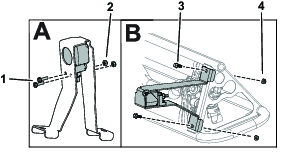
-
Secure the sensors to the brackets using 2 bolts (M10)
and 2 locknuts (M10).
-
Secure the assembly to the booms using 2 bolts (1/4
x 5/8 inch) and 2 locknuts (1/4 inch).
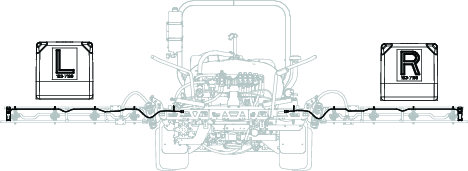
Important: Ensure that you install the correct sensor on the correct side.
Routing the Wire Harness
-
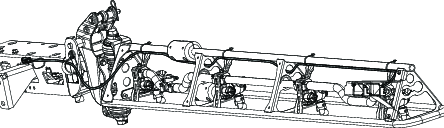
Route the wire harness on each
boom and secure with cable ties.
Important: Allow enough slack in the wire around the sensor so that the
sensor can freely pivot on the hinge without pulling on the wire.
-
Connect the 4-pin connectors for the left and right
sensor-wire harnesses to the 4-socket connector of the wire harness
for the ultra sonic boom finishing kit labeled LEFT SONIC
SENSOR and RIGHT SONIC SENSOR.
Connecting the Wire Harness at the Boom-Lift Manifold
-
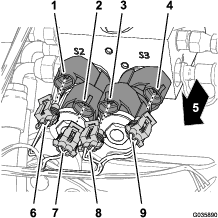
At the front of the lift-cylinder manifold, connect
the 4 electrical connectors of the wire harness for the sonic boom
to the solenoids for controlling boom lift as shown in Figure 13.
-
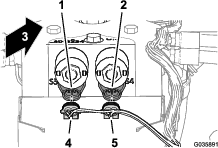
At the back of the lift-cylinder manifold, connect
the 2 electrical connectors of the wire harness for the sonic boom
to the solenoids for controlling sonic enable as shown in Figure 14.
Mounting the Electronic Control
Parts needed for this procedure:
| Electronic controller | 1 |
| Bolt (1/4 x 1-1/8 inch) | 4 |
| Locknut (1/4 inch) | 4 |
Connecting the Wire Harness to the Electronic Controller
Multi Pro 1750 and Multi Pro WM Machines
-
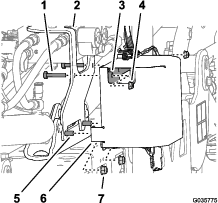
Route the wire harness for the sonic boom to the hydraulic
manifold.
-
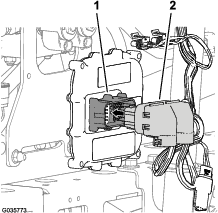
Connect the 50-socket connector of the wire harness
for the sonic boom to the 50-pin connector of the electronic controller,
and secure the connectors with the socket-head screw (Figure 15).
Note: The controller electrical connection is keyed and can be connected
only 1 way.
-
Torque the socket-head screw to 2.7 to 3.2 N-m (24
to 28 in-lb).
Installing the Controller to the Machine
Multi Pro 1750 and Multi Pro WM Machines
-
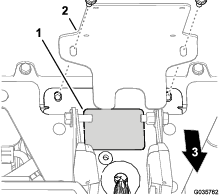
Align the electronic controller to the interior of
the controller cover with the lower outboard mounting holes of the
controller aligned with the holes in the lower rear flange of the
cover (Figure 16)
-
Assemble the controller to the cover with 2 bolts
(1/4 x 1-1/8 inches) and 2 flange locknuts (1/4 inch) as shown in Figure 16.
-
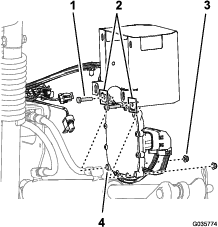
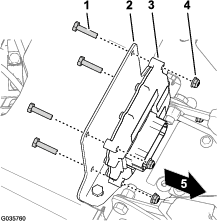
Remove the 2 flange locknuts (5/16
inch) that secure the mounting bracket of the ultra sonic boom finishing
kit from the cylinder mount (Figure 17).
Note: Leave the mounting bracket assembled to the cylinder mount.
-
Assemble the controller cover (Figure 17) onto the flange-head bolt
(5/16 x 1 inch) at the lower forward holes in the cover, and loosely
secure the cover, bracket and mount with the 2 flange locknuts (5/16
inch) that you removed in 3.
-
Assemble the 2 bolts (1/4 x 1-3/8 inches) through
the upper holes in the mounting bracket (ultra sonic boom finishing
kit), rear flange (controller cover), and controller (Figure 17) with the
2 flange locknuts (1/4 inch).
-
Torque the 5/16 flange-head bolt and flange nuts to
1978 to 1243 N∙cm (175 to 225 in-lb).
-
Torque the 1/4 flange-head bolt and flange nuts to
1017 to 2542 N∙cm (90 to 110 in-lb).
Installing the Controller to the Machine
Multi Pro 5800 Machines
-
Rotate the operator and passenger seats forward and
secure the seats with the prop rods.
-
For 2015 and before machines—locate the knockout plug between the inboard operator and
passenger seat-belt halves, and remove the knockout plug from the
console base (Figure 19).
-
Assemble the electronic controller to the mounting
bracket (Figure 19) with the 4 bolts (1/4 x 1-1/8 inch) and 4 locknuts (1/4 inch).
-
Torque the nuts and bolts to 1017 to 1243 N∙cm (90
to 110 in-lb)
Connecting the Wire Harness to the Electronic Controller
Multi Pro 5800 Machines
-
Route the 50-socket connector of the wire harness
for the sonic boom as follows:
-
For 2015 and before machines—the
branch of the wiring harness with the 50-socket connector is routed
through the opening in the console base that you made in step 2; refer to
the installation instructions for the ultra sonic boom finishing kit.
-
For 2015 and after machines—the
branch of the wiring harness with the 50-socket connector is routed
through the large grommet in the console base; refer to the installation
instructions for the ultra sonic boom finishing kit.
-
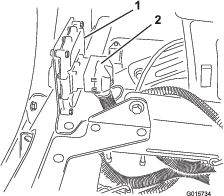
Connect the 50-socket connector of the wire harness
for the sonic boom to the 50-pin connector of the electronic controller,
and secure the connectors with the socket-head screw (Figure 20).
Note: The electrical connection for the controller is keyed and can
be connected only 1 way.
-
Torque the socket-head screw to 2.7 to 3.2 N-m (24
to 28 in-lb).
Connecting the Wiring Harness and Switches
Parts needed for this procedure:
| Rocker switch (illuminated) | 1 |
| Cable tie | 12 |
Installing the Ultra Sonic-Mode Switch
Multi Pro 1750 Machines
-
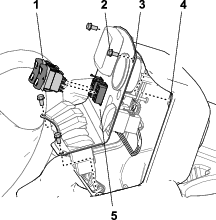
If installed, remove the 4 flange-head
bolts (1/4 x 1/2 inch) that secure the panel cover to the top of the
console as shown in Figure 21.
-
Remove the switch plug from the panel cover of the
console (Figure 21).
-
Align the Connect the 8-socket connector of the wiring
harness of the ultra sonic boom finishing kit through the opening
in panel cover (Figure 21).
-
Connect the 8-socket connector of the wiring harness
of the ultra sonic boom finishing kit labeled SONIC MODE
MANUAL VS. AUTO to the rocker switch (Figure 21).
-
Insert the rocker switch in the dash panel opening
until the switch snaps securely (Figure 21).
-
Align the holes in the panel cover to the holes in
the top of the console (Figure 21).
-
Secure the panel to the console with the bolts (Figure 21) that you
removed in step 1.
Installing the Ultra Sonic-Mode Switch
Multi Pro 5800 Machines
-
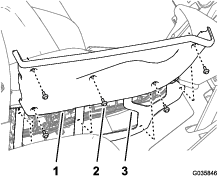
Remove the switch plug in the dash panel at the location
shown in Figure 22.
-
Connect the 8-socket connector of the wiring harness
of the ultra sonic boom finishing kit labeled SONIC MODE
MANUAL VS. AUTO to the rocker switch (Figure 22).
-
Insert the rocker switch in the dash panel opening
until the switch snaps securely (Figure 22).
Note: Align the tail of the switch down.
Installing the Ultra Sonic-Mode Switch
Multi Pro WM Machines
-
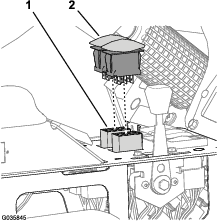
If installed, remove the 4 flange-head
bolts (1/4 x 1/2 inch) that secure the control panel to the console
as shown in Figure 23.
-
Remove the switch plug from the control panel of the
console (Figure 23).
-
Align the Connect the 8-socket connector of the wiring
harness of the ultra sonic boom finishing kit through the opening
in control panel (Figure 23).
-
Connect the 8-socket connector of the wiring harness
of the ultra sonic boom finishing kit labeled SONIC MODE
MANUAL VS. AUTO to the rocker switch (Figure 23).
-
Insert the rocker switch in the control panel opening
until the switch snaps securely (Figure 23).
Note: Align the tail of the switch down.
-
Align the holes in the control panel to the holes
in the top of the console (Figure 23).
-
Secure the panel to the console with the bolts (Figure 23) that you
removed in step 1.
Connecting the Boom-Lift Switches to the Sonic-Boom Harness
Connecting the Switches to the Harness
Multi Pro 1750 or Multi Pro WM Machines
-
Remove the 4 flange-head bolts
(1/4 x 1/2 inch) that secure the switch panel to the center console,
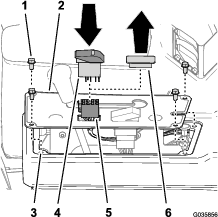
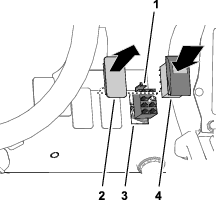
and lift the panel (Figure 24 or Figure 15).
-
Disconnect the 8-socket connectors of the machine-wire
harness from the boom-lift switches (Figure 24 or Figure 25).
Note: If additional clearance is needed, remove the boom-lift switches
from the switch panel.
-
Connect the rocker switches into the 8-socket connectors
of the wiring harness for the ultra sonic boom finishing kit (Figure 24 or Figure 25).
Note: Ensure that the sonic-boom harness connector labeled LEFT ACTUATOR SWITCH is aligned with the left switch
opening in the switch panel.
-
If you removed the switch(es) from the switch panel,
insert the boom-lift switch(es) into the openings in the center-console
panel until the switch(es) snaps securely.
-
Align the holes in the switch panel with the frame
of the console (Figure 24 or Figure 25).
-
Secure the side cover on the center console with the
4 flange-head bolts (1/4 x 1/2 inch) (Figure 24 or Figure 25) that you removed in step 1.
Connecting the Switches to the Harness
Multi Pro 5800 Machines
-
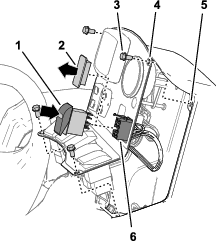
Remove the 5 flange-head bolts
(1/4 x 3/4 inch) that secure the right-side cover to the center console
(Figure 26).
-
Remove the rocker switches for the left and right
boom-lift controls from the center-console panel (Figure 26).
-
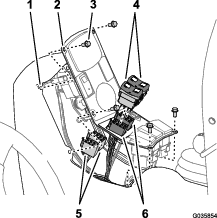
Disconnect the 8-socket connectors of the wiring harness
for the machine from the boom-lift switches for the left and right
boom-lift control circuits (Figure 27).
Note: Tuck the connectors for the wire harness for the machine alongside
the harness.
-
Connect the rocker switches into the 8-socket connectors
of the wiring harness for the ultra sonic boom finishing kit (Figure 27).
Note: Ensure that the sonic-boom harness connector labeled LEFT ACTUATOR SWITCH is aligned with the left switch
opening in the center-console panel.
-
Insert the boom-lift switches in the openings in the
center-console panel until the switches snap securely (Figure 27).
-
Align the holes in the right-side cover with the frame
of the center console (Figure 26).
-
Secure the side cover on the center console (Figure 26) with the
5 flange-head bolts (1/4 x 3/4 inch) that you removed in step 1.
Finishing Installation of the Ultra Sonic Boom Leveling Kit
-
Connect the negative-battery cable to the battery;
refer to the Operator’s Manual for your
machine.
-
For Multi Pro 1750 and Multi Pro 5800 machines, rotate
down the seats.
Calibrating the Sonic Booms
Once you initiate the controller processor for calibration,
you will have 20-seconds to calibrate the sensors on the booms. The
distance you set between the sensor on each boom and the ground after
the 20-second calibration period is the boom height setting in automatic
mode until the next time you calibrate the sensor.
Note: For uncovered booms: The default height
setting is 51 cm (20 inches) from the nozzle to the ground. If, after
setting a boom to a height different from that of the factory default
setting, you wish to restore the calibration to the factory-default
setting, calibrate the boom with the boom in the cradle. For covered booms: The default height setting of 51 cm
(20 inches) is for uncovered booms only. You must calibrate the sensors
on covered booms.
-
Ensure that the turf sprayer is parked and away from
any trees, buildings, vehicles, debris, and underground utilities
and plumbing.
Note: For best results, park the turf sprayer on dry grass.
-
Lower the booms to the horizontal position.
-
Turn off the ignition key.
-
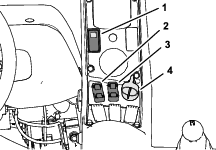
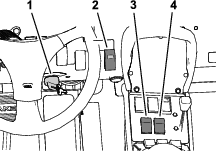
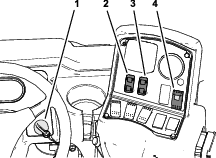
Press the sonic-boom switch to the ON position (Figure 28, Figure 29, or Figure 30).
-
While pressing and holding both the left boom-lift
control switch to the LOWER position and
the right boom-lift control switch to the RAISE position, turn the ignition key and start the machine.
-
Release the boom switches.
Note: The indicator light on the sonic-boom switch will flash rapidly,
indicating that the sonic boom system is in calibration mode. You
now have 20 seconds to use the Raise and Lower boom switches to set
the desired distance between the booms to the ground. After the 20
seconds, the indicator light flashes slowly.
-
Raise and lower the outer-boom sections using the
boom-lift control switches to adjust the height of each boom until
you achieve the desired distance between the tip of the boom and the
ground.