Maintenance
Maintenance and servicing are not required under normal conditions.
When you clean the surface of the equipment, wipe it only with a dry cloth.
Do not disassemble the equipment; if it is damaged, contact your Authorized Service Dealer.
This inverter is intended to be used by residential homeowners. It is designed to use Flex-Force™ 60V lithium-ion battery packs. These battery packs are designed to be charged only by Flex-Force 60V lithium-ion battery chargers. Using these products for purposes other than their intended use could prove dangerous to you and bystanders.
Model 51860T does not include a battery or a charger.
Read this information carefully to learn how to operate and maintain your product properly and to avoid injury and product damage. You are responsible for operating the product properly and safely.
Visit www.Toro.com for more information, including safety tips, training materials, accessory information, help finding a dealer, or to register your product.
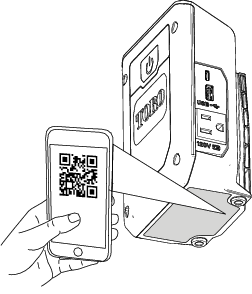
Whenever you need service, genuine the manufacturer parts, or additional information, contact an Authorized Service Dealer or the manufacturer Customer Service and have the model and serial numbers of your product ready. Figure 1 identifies the location of the model and serial numbers on the product. Write the numbers in the space provided.
Important: With your mobile device, you can scan the QR code (if equipped) on the serial number plate to access warranty, parts, and other product information.
The safety-alert symbol (Figure 2) shown in this manual and on the machine identifies important safety messages that you must follow to prevent accidents.

The safety-alert symbol appears above information that alerts you to unsafe actions or situations and is followed by the word DANGER, WARNING, or CAUTION.
DANGER indicates an imminently hazardous situation which, if not avoided, will result in death or serious injury.
WARNING indicates a potentially hazardous situation which, if not avoided, could result in death or serious injury.
CAUTION indicates a potentially hazardous situation which, if not avoided, may result in minor or moderate injury.
This manual uses two other words to highlight information. Important calls attention to special mechanical information and Note emphasizes general information worthy of special attention.
CALIFORNIA
Proposition 65 Warning
Use of this product may cause exposure to chemicals known to the State of California to cause cancer, birth defects, or other reproductive harm.
IMPORTANT SAFETY
INSTRUCTIONS
SAVE THESE INSTRUCTIONS—This manual contains important safety and operating instructions for power inverter Model 51860T.
Before using the inverter, read all the instructions and cautionary markings on the inverter, battery pack, and product using the battery pack.
CAUTION—To reduce risk of injury, use only Toro 60V lithium-ion battery packs with the power inverter. Other brands and types of battery packs may burst, causing personal injury and damage.
WARNING—Do not connect the inverter to a wall outlet or any AC distribution wiring, this can cause can cause a fire or electric shock.
These devices comply with Part 15 of the FCC rules. Operation is subject to the following 2 conditions: (1) These devices may not cause harmful interference; and (2) these devices must accept any interference received, including interference that may cause undesired operation.
I. Training
Keep bystanders and children out of the operating area. Do not allow children to operate the machine. Allow only people who are responsible, trained, familiar with the instructions, and physically capable to operate the machine.
Do not allow children to use or play with the battery pack or battery inverter; local regulations may restrict the age of the operator.
II. Preparation
Use the inverter only with specifically designated battery packs. Using other types of battery packs may create a risk of injury and/or fire.
Do not use a damaged or modified battery pack or battery inverter. It may exhibit unpredictable behavior, resulting in fire, explosion, or risk of injury.
If the inverter is damaged, contact an Authorized Service Dealer to replace it.
III. Operation
Charge the battery pack with only the battery charger specified by Toro. A charger suitable for 1 type of battery pack may create a risk of fire when used with another battery pack.
Use the inverter in a dry, well-ventilated area only. Do not operate the inverter if it is wet or near flammable materials.
Do not ground the neutral of the inverter.
Do not perform maintenance or service appliances that are connected to the inverter. Disconnect any appliances from the inverter when they are done charging.
Follow all operation instructions and do not use the battery pack or inverter outside of the temperature range specified in the instructions. Otherwise, you may damage the battery pack or inverter and increase the risk of fire.
Under abusive conditions, the battery pack may eject liquid; avoid contact. If you accidently come into contact with the liquid, flush with water. If the liquid contacts your eyes, seek medical help. Liquid ejected from the battery pack may cause irritation or burns.
Do not expose a battery pack or tool to fire or excessive temperature. Exposure to fire or temperature above 130°C (265°F) may cause explosion.
CAUTION—A mistreated battery pack may present a risk of fire, explosion, or chemical burn.
Do not disassemble the battery pack.
Replace the battery pack with a genuine Toro battery pack only; using another type of battery pack may cause a fire or risk of injury.
Keep battery packs out of the reach of children and in the original packaging until you are ready to use them.
IV. Maintenance and Storage
Do not allow children to clean or maintain the battery inverter.
When the battery pack is not in use, keep it away from metal objects such as paper clips, coins, keys, nails, and screws that can make a connection from 1 terminal to another. Shorting the battery terminals may cause burns or a fire.
Do not attempt to repair the battery pack or power inverter. Have an Authorized Service Dealer perform service on the battery pack or power inverter using identical replacement parts to ensure that the product is safely maintained.
Check with local codes for possible special battery disposal instructions.
SAVE THESE
INSTRUCTIONS
| Model | 51860T | |
| Type | 60V MAX Lithium-Ion Battery Inverter | |
| Watts | 330W continuous, 450W momentary surge | |
| Input | 60V DC  8A 8A |
|
| Output Wave Form | Modified sine wave | |
| AC Receptacle Output | 120V AC ~2.5A, 60Hz | |
| USB Port Output* | USB-C | 5V 2.4A, 9V 3A, 12V 2.5A, 20V 1.5A, |
| USB-A | 5V 3.4A, 9V 2A, 12V 1.5A | |
*The USB ports share internal circuitry; if the USB-A port is in use; the USB-C port supplies 5V output only.
| Charge/store the battery pack at | 5°C (41°F) to 40°C (104°F)* |
| Use battery pack at | -30°C (-22°F) to 49°C (120°F) |
| Use the tool at | 0°C (32°F) to 49°C (120°F)* |
*Charging time will increase if you do not charge the battery within this range.
Store the tool, battery pack, and battery charger in an enclosed clean, dry area.
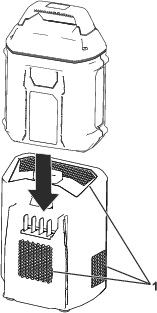
Ensure that the vents on the battery and inverter are clear of any dust and debris (Figure 4).
Disconnect any devices attached to the inverter.
Line up the cavity in the battery pack with the tongue on the inverter (Figure 4).
Slide the battery pack into the inverter until it is fully seated.
To remove the battery pack, turn the power off, then press down the latch button and slide the battery up and away from the inverter.
Important: Use the inverter only in temperatures that are within the appropriate range; refer to Specifications.
Important: Ensure that the combined load requirement of your equipment does not exceed the inverter’s output rating.
Important: Do not connect the inverter to a household wall outlet or any AC distribution wiring, and do not connect the neutral inverter connector to ground.
Install the battery; refer to Installing the Battery
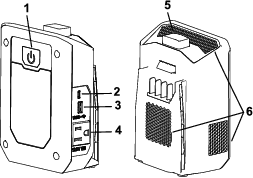
Press the power button on the back of the inverter to turn the inverter on, the LED lights up to solid green (Figure 3).
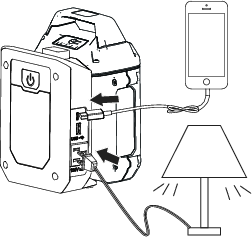
Connect your device to a USB port or the AC receptacle (Figure 5).
The power button has an LED that signals the condition of the inverter; refer to the following table to interpret the LED indicator light on the inverter.
| Indicator light | Condition |
| Off | No battery pack inserted |
| Solid Green | Normal operation |
| Flashing Green | Low battery voltage |
| Solid Red | High-voltage protection or battery error |
| Flashing Red, intervals of 4 | Short-circuit protection or overload protection |
| Flashing Red, intervals of 5 | Low-voltage protection |
| Flashing Red, intervals of 6 | Battery pack and/or battery inverter is over or under the appropriate temperature range. |
*Refer to for more information.
Important: Whenever the inverter is not in use, turn the inverter off and remove the battery from the inverter.
Maintenance and servicing are not required under normal conditions.
When you clean the surface of the equipment, wipe it only with a dry cloth.
Do not disassemble the equipment; if it is damaged, contact your Authorized Service Dealer.
Important: Store the inverter, battery pack, and charger only in temperatures that are within the appropriate range; refer to Specifications.
Important: If you are storing the inverter for the off-season, remove the battery pack from the tool and charge the battery pack until 1 or 2 LED indicators turn green on the battery. Do not store a fully charged or fully depleted battery. When you are ready to use the inverter again, charge the battery pack until the left indicator light turns green on the charger or all 4 LED indicators turn green on the battery.
Disconnect the inverter from the power supply (i.e., remove the battery pack) and check for damage after use.
Clean all foreign material from the inverter.
Do not store the inverter with the battery pack installed.
When not in use, store the inverter, battery pack, and battery charger out of the reach of children.
Keep the inverter, battery pack, and battery charger away from corrosive agents, such as garden chemicals and de-icing salts.
To reduce the risk of serious personal injury, do not store the battery pack outside or in vehicles.
Store the inverter, battery pack, and battery charger in an enclosed clean, dry area.
Important: Upon removal, cover the terminals of the battery pack with heavy-duty adhesive tape. Do not attempt to destroy or disassemble the battery pack or remove any of its components.

 Contact your local municipality
or your authorized Authorized Service Dealer or distributor for more
information on how to responsibly recycle the battery.
Contact your local municipality
or your authorized Authorized Service Dealer or distributor for more
information on how to responsibly recycle the battery.
 |
Lithium-ion battery packs labeled with the Call2Recycle seal can be recycled at any participating retailer or battery recycling facility in the Call2Recycle program (US and Canada only). To locate a participating retailer or facility closest to you, please call 1-800-822-8837 or visit www.call2recycle.org. |
 |
Lithium-ion battery packs labeled with the High Energy Battery (HEB) seal shown here, and any 60V Flex-Force batteries 6.0 Ah or greater, can be recycled at any participating dealer or retailer in the Call2Recycle HEB program. To locate a participating dealer or retailer closest to you, please visit www.hebattery.org. |
If you cannot locate a participating retailer or facility nearby, or have questions about which recycling program your battery pack may qualify for, please visit the customer support site listed in the Operator’s Manual for your tool/equipment for more information on how to responsibly recycle the battery pack.
If you are located outside of the US and Canada, please contact your Authorized Service Dealer or distributor for more information on how to responsibly recycle the battery pack.
Perform only the steps described in these instructions. All further inspection, maintenance, and repair work must be performed by an authorized service center or a similarly qualified specialist if you cannot solve the problem yourself.
| Problem | Possible Cause | Corrective Action |
|---|---|---|
| The inverter does not charge, shuts down, or the LED indicator light is red. |
|
|
| The battery pack loses charge quickly. |
|
|
| The tool does not run or does not run continuously. |
|
|
| Some AC appliances do not start. |
|
|
| There is a buzzing sound in some plugged-in audio systems. |
|
|
| There is a interference in the signal of some plugged-in television devices. |
|
|